
The best home automation hub for most homes is the Aqara Smart Hub M3, thanks to its broad mix of Matter, Zigbee, Thread, and infrared control. For a simpler lighting-focused setup, the Lutron Caseta Smart Hub is a strong alternative, while Home Assistant Green suits buyers who want extensive customization and local control. The main tradeoff is between easy setup and flexibility: specialist hubs can be straightforward but support narrower device ranges, while advanced hubs often ask more of their owners. I compare compatibility, control options, setup demands, and the kind of home each hub suits below. Read on for the full breakdown and help matching a hub to your devices and routines.

Get home appliances delivered free — and shop member deals
- Fast, free delivery on millions of items
- Access to Prime Big Deal Days deals on October 6–7
- Prime Video, Amazon Music and more included
Complete the kit


Key Takeaways
- Aqara M3 leads for protocol range: its Matter, Zigbee, Thread, and infrared support gives it a wider mix of device types to coordinate than the more focused hubs.
- Lutron Caseta is the clearest lighting specialist: its dedicated hub and dimmer starter kit suit buyers prioritizing dependable lighting control over broad device experimentation.
- Home Assistant Green and Hubitat C-8 Pro favor hands-on owners: they offer a more configurable approach, but require more willingness to manage setup and integrations.
- YoLink and Tapo H100 are better treated as ecosystem-specific choices: their appeal is strongest when their compatible sensors and accessories match the devices a buyer already plans to use.
- A touchscreen is not the same as a more capable hub: SONOFF NSPanel Pro adds an at-a-glance control surface, while dedicated hubs such as Aeotec and SmartThings focus more on coordinating devices.
| Aqara Smart Hub M100 for Home Automation, Matter Controller, Wi‑Fi |  | Best Compact Matter Bridge | Supported Aqara Zigbee devices: Up to 20; third-party Zigbee devices are not supported | Supported Thread/Matter devices: Up to 20 | Wi‑Fi: 2.4 GHz Wi‑Fi 6 with WPA3 | VIEW LATEST PRICE | See Our Full Breakdown |
| YoLink Smart Home Hub YS1603 |  | Best for Long-Range YoLink Devices | Model: YS1603 | Wireless protocol: YoLink LoRa | Maximum stated range: Up to 2,034 feet | VIEW LATEST PRICE | See Our Full Breakdown |
| Aqara Smart Home Hub M3 with Matter, Zigbee, Thread, and IR Control |  | Best Premium Multi-Protocol Hub | Model: HM-G01E | Device capacity: Up to 127 Aqara Zigbee devices and 127 Thread devices | Protocols: Zigbee, Thread, Bluetooth, and Matter bridging | VIEW LATEST PRICE | See Our Full Breakdown |
| Lutron Caseta Smart Hub Compatible with Alexa, Apple, Google Home, & More | 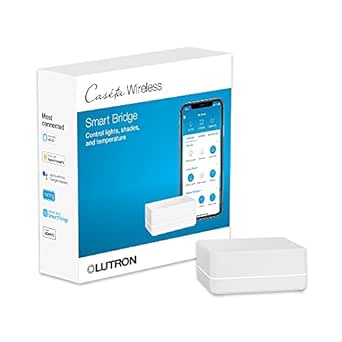 | Best for Lutron Lighting and Shades | Device capacity: Up to 75 Caséta devices | Compatible platforms: Alexa, Apple HomeKit, Google Assistant, Ring, Serena shades, and Sonos | Wireless technology: Clear Connect | VIEW LATEST PRICE | See Our Full Breakdown |
| Tapo H100 Smart Hub with Built-In Chime | 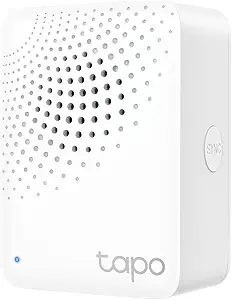 | Best for Tapo Sensors and Alerts | Model: H100 | Compatible device capacity: Up to 64 Tapo devices | Wireless protocol: Low-power protocol for compatible Tapo devices | VIEW LATEST PRICE | See Our Full Breakdown |
| Lutron Caseta Deluxe Smart Dimmer Starter Kit (2 Dimmer Switches, Smart Hub, Pico Remotes) |  | Best for Reliable Lighting Control | Included components: Smart Hub, 2 dimmer switches, 2 Pico 3-button remotes, wall plates | Maximum LED load: 150 W dimmable LEDs per switch | Neutral wire required: No | VIEW LATEST PRICE | See Our Full Breakdown |
| SONOFF NSPanel Pro 120 Smart Home Control Panel – 4.7-inch Touchscreen with Zigbee Hub, Energy Monitoring, Camera Viewer, Thermostat & Web Browser (White) |  | Best Wall-Mounted Control Center | Display: 4.7-inch touchscreen | Hub connectivity: Built-in Zigbee gateway | Power source: AC | VIEW LATEST PRICE | See Our Full Breakdown |
| SmartThings Hub (3rd Generation) – White |  | Best for Mixed Zigbee and Z-Wave Homes | Model number: GP-U999SJVLGDA | Supported protocols: Zigbee, Z-Wave, and cloud-to-cloud | Voice assistants: Alexa and Google Home | VIEW LATEST PRICE | See Our Full Breakdown |
| Home Assistant Green Smart Home Hub |  | Best for Local-First Custom Automation | Processor: Quad-core | Memory: 4 GB RAM | Storage: 32 GB | VIEW LATEST PRICE | See Our Full Breakdown |
| Aeotec Smart Home Hub V3 |  | Best SmartThings Hub with Flexible Networking | Model: V3 – Smart Home Hub (2020) | Connectivity: Ethernet, Wi-Fi, Z-Wave, Zigbee, Matter | Compatible assistants: Amazon Alexa and Google Assistant | VIEW LATEST PRICE | See Our Full Breakdown |
| Hubitat Elevation C-8 Pro Smart Home Hub |  | Best for Local-First Automation | Supported protocols: Matter 1.5, Z-Wave 800 Series, Zigbee 3.0, Bluetooth | Voice and platform compatibility: Amazon Alexa, Google Home, Apple HomeKit, Ring | Antennas: Two dedicated external antennas for Z-Wave and Zigbee | VIEW LATEST PRICE | See Our Full Breakdown |
More Details on Our Top Picks
Aqara Smart Hub M100 for Home Automation, Matter Controller, Wi‑Fi
The Aqara M100 is a space-saving way to bring supported Aqara Zigbee devices and Thread/Matter accessories into compatible smart-home ecosystems. Its local automation can keep supported routines responsive without relying on cloud processing, while Wi‑Fi 6 with WPA3 provides a modern wireless connection. Compared with the larger Aqara Hub M3, the M100 gives up broad device capacity, Ethernet, and the M3’s infrared control in favor of a compact USB-A-powered design. Its 210-degree adjustable shaft can help with placement, but the power adapter is not included. The main limitation is the Zigbee boundary: it supports Aqara Zigbee devices, not third-party Zigbee products. I’d choose it for a focused Aqara setup, not as a universal hub for a mixed-brand Zigbee collection.
Pros:- Bridges supported Aqara Zigbee devices to Matter ecosystems
- Local automation supports responsive routines without cloud execution
- Wi‑Fi 6 and WPA3 provide current wireless connectivity and security
- Compact USB-A power design and adjustable shaft allow flexible placement
Cons:- Zigbee support is limited to Aqara devices
- Capacity is limited to 20 Aqara Zigbee and 20 Thread/Matter devices
- The required power adapter is not included
Best for: People building a compact setup around Aqara Zigbee devices and Matter or Thread accessories who want local automations.
Not ideal for: Households with third-party Zigbee devices or plans for a large installation; its Aqara-only Zigbee support and 20-device limits may be restrictive.
- Supported Aqara Zigbee devices:Up to 20; third-party Zigbee devices are not supported
- Supported Thread/Matter devices:Up to 20
- Wi‑Fi:2.4 GHz Wi‑Fi 6 with WPA3
- Automation:Local execution for Zigbee and Matter devices
- Power:5 V, 0.5 A adapter required; adapter not included
- Power connector:USB-A
- Adjustable shaft:210° range
Our verdict“Choose the M100 for a compact, local-control bridge centered on Aqara devices, but pick the Aqara Hub M3 for higher capacity and Ethernet or infrared control.”
YoLink Smart Home Hub YS1603
The YoLink YS1603 is a hub for buyers whose priority is connecting compatible YoLink devices across a large area, rather than consolidating every smart-home brand under one roof. Its LoRa protocol has a stated range of up to 2,034 feet, a different proposition from the shorter-range, ecosystem-focused Tapo H100. Wi‑Fi or Ethernet gives the hub a choice of network connection, and Alexa, IFTTT, and Home Assistant support offer ways to link YoLink devices with broader routines. Those integrations do not make it a general Zigbee, Thread, or Matter controller, however: its reach applies to compatible YoLink devices. There is also no battery backup, so a power interruption takes the hub offline. I’d shortlist it for distributed YoLink sensors, not for a mixed-protocol starter setup.
Pros:- YoLink LoRa has a stated range of up to 2,034 feet
- Can connect over Wi‑Fi or Ethernet
- Supports Alexa, IFTTT, and Home Assistant integrations
- Centralizes compatible YoLink devices in the app
Cons:- Works with YoLink-compatible devices rather than serving as a general multi-protocol hub
- No battery backup is provided
- The long stated range does not remove the need for hub power and network connectivity
Best for: Owners of compatible YoLink sensors or other YoLink devices who need connectivity across a large property and want Alexa, IFTTT, or Home Assistant integrations.
Not ideal for: Buyers seeking a multi-brand Zigbee, Thread, or Matter hub, or anyone who needs the hub to stay powered during an outage.
- Model:YS1603
- Wireless protocol:YoLink LoRa
- Maximum stated range:Up to 2,034 feet
- Network connection:Wi‑Fi or Ethernet
- Compatible services:Alexa, IFTTT, and Home Assistant
- Power:5 volts, plug-in; no battery backup
- Dimensions:4.33 x 4.33 x 1.06 inches
Our verdict“Pick the YS1603 when long-range connectivity for compatible YoLink devices matters more than Matter or broad device-brand support.”
Aqara Smart Home Hub M3 with Matter, Zigbee, Thread, and IR Control
The Aqara Hub M3 is the most capable Aqara-focused hub in this group for buyers who want room to grow across Zigbee, Thread, and Matter. It supports up to 127 Aqara Zigbee and 127 Thread devices, far more than the M100’s 20-device limits, and adds Ethernet with PoE as well as dual-band Wi‑Fi. Local automations and 8GB of encrypted storage suit a setup that should keep more processing and data in the home. Its 360-degree infrared blaster can also bring traditional remote-controlled equipment into routines, a feature none of the other listed hubs offers. The tradeoff is complexity and ecosystem focus: Aqara Zigbee support is not a promise of universal third-party Zigbee compatibility, and some cloud notifications still need internet. The adapter is sold separately, and Matter exposure for air conditioners is limited to one.
Pros:- Supports up to 127 Aqara Zigbee devices and 127 Thread devices
- Local automations and 8GB of encrypted local storage
- 360-degree IR blaster includes status feedback and learning
- Offers Ethernet with PoE, dual-band Wi‑Fi, and USB-C power
Cons:- Some cloud notifications require an internet connection
- USB power adapter is not included
- Only one air conditioner can be exposed to Matter
Best for: Aqara households planning a larger Zigbee and Thread installation that want local automation, Ethernet or PoE, and infrared control for traditional appliances.
Not ideal for: Buyers who want a small, simple hub or a brand-neutral Zigbee controller; the M100 is more compact, while the M3’s strengths center on Aqara devices.
- Model:HM-G01E
- Device capacity:Up to 127 Aqara Zigbee devices and 127 Thread devices
- Protocols:Zigbee, Thread, Bluetooth, and Matter bridging
- Network connectivity:Dual-band 2.4/5 GHz Wi‑Fi or Ethernet with PoE
- Infrared control:360° IR blaster with status feedback and learning
- Local storage:8GB encrypted storage
- Power:USB-C; 2A USB power adapter not included
- Compatibility:Matter, Apple HomeKit, Alexa, SmartThings, and Home Assistant
Our verdict“Choose the M3 for a larger Aqara-centered system that benefits from local processing, PoE, and IR, rather than the M100’s simpler compact design.”
Lutron Caseta Smart Hub Compatible with Alexa, Apple, Google Home, & More
The Lutron Caséta Smart Hub is a strong fit when the job is dependable control of Caséta lights, shades, and related devices—not acting as a universal hub for every smart-home protocol. It supports up to 75 Caséta devices and connects with Alexa, Apple HomeKit, Google Assistant, Ring, Serena shades, and Sonos. Lutron’s Clear Connect technology is designed not to interfere with Wi‑Fi, which helps keep its lighting network separate from household wireless traffic. Setup is plug-in and app-guided, but the hub requires separate Caséta dimmers, switches, or shades to control anything. Compared with the Aqara Hub M3, Caséta is narrower in protocol scope: it does not offer the M3’s Zigbee, Thread, Matter bridging, or IR control. I’d favor it for a dedicated Lutron installation and skip it as the sole hub for mixed-brand sensors and devices.
Pros:- Supports up to 75 Caséta devices
- Works with Alexa, Apple HomeKit, Google Assistant, Ring, Serena shades, and Sonos
- Clear Connect technology is designed not to interfere with Wi‑Fi
- Plug-in installation with app-guided setup
Cons:- Limited to the Lutron Caséta ecosystem and listed compatible devices
- Requires separate purchase of Caséta dimmers, switches, or shades
- Does not provide the multi-protocol Zigbee, Thread, and Matter coverage of the Aqara Hub M3
Best for: Homeowners building around Lutron Caséta lighting or Serena shades who want voice-assistant and smart-platform integrations.
Not ideal for: Buyers looking for a hub for mixed-brand Zigbee, Thread, or Matter devices, or those who do not plan to purchase Caséta-compatible equipment.
- Device capacity:Up to 75 Caséta devices
- Compatible platforms:Alexa, Apple HomeKit, Google Assistant, Ring, Serena shades, and Sonos
- Wireless technology:Clear Connect
- Operation mode:ON-OFF
- Operating voltage:120 volts
- Connector type:Plug-in
- Dimensions:1.44 x 2.94 x 4.69 inches
Our verdict“Choose the Caséta hub for a Lutron-centered lighting and shade system, but look to the Aqara Hub M3 for broader protocol support.”
Tapo H100 Smart Hub with Built-In Chime
The Tapo H100 is best understood as a focused hub for compatible Tapo sensors, switches, and buttons, rather than a controller for a whole home’s lighting and plugs. It can connect up to 64 Tapo devices, trigger smart actions, and sound a built-in chime or siren rated up to 90 dB. That makes it a practical choice for sensor-led routines and audible alerts, while its low-power wireless connection can help compatible devices conserve battery. The tradeoff is a firm ecosystem boundary: the H100 does not connect directly to Tapo smart plugs or lights, so those products cannot simply join through this hub. It also needs 2.4 GHz Wi‑Fi and has a stated range of up to 30 meters. Compared with the YoLink YS1603, it offers a built-in siren and chime, but far less stated reach.
Pros:- Supports up to 64 compatible Tapo devices
- Built-in chime and siren rated up to 90 dB
- Low-power wireless connection can help compatible devices conserve battery
- Can trigger smart actions from compatible connected devices
Cons:- Requires 2.4 GHz Wi‑Fi
- Does not directly connect to Tapo smart plugs or lights
- Stated range is up to 30 meters, much shorter than the YoLink YS1603’s stated range
Best for: Tapo users who want to connect compatible sensors, switches, or buttons and use them for automated actions and audible alerts.
Not ideal for: Buyers who want one hub for Tapo lighting and plugs, or need connectivity across a larger property than its stated 30-meter range.
- Model:H100
- Compatible device capacity:Up to 64 Tapo devices
- Wireless protocol:Low-power protocol for compatible Tapo devices
- Wi‑Fi requirement:2.4 GHz
- Maximum stated range:Up to 30 m
- Siren volume:Up to 90 dB
- Built-in chime:Yes
Our verdict“Pick the H100 for Tapo sensor routines and local audible alerts, but skip it if your main goal is bringing Tapo plugs and lights into a hub.”
Lutron Caseta Deluxe Smart Dimmer Starter Kit (2 Dimmer Switches, Smart Hub, Pico Remotes)
This kit is my pick for buyers whose main automation goal is dependable lighting, not a general-purpose device hub. Its Caseta Smart Hub works without Wi-Fi, so lighting control does not rely on a wireless network connection, while the two dimmers and Pico remotes offer physical control alongside app and voice options. Compared with the SmartThings Hub (3rd Generation), Caseta is much more focused: it is a strong fit for lighting, but not the choice for building automations across a broad range of Zigbee and Z-Wave sensors. Installation also suits older homes because no neutral wire is required. The tradeoffs are a 150 W LED load limit per switch and separately purchased accessories for expanded multi-location setups. I’d choose it over a general hub when lighting reliability matters more than protocol breadth.
Pros:- Hub operates without Wi-Fi for responsive lighting control
- No neutral wire is required for dimmer installation
- Works with Alexa, Google Home, Apple HomeKit, Ring, and other listed platforms
- Pico remotes include CR2032 batteries rated for up to 10 years
Cons:- Each switch supports a maximum 150 W dimmable LED load
- Multi-location expansion accessories are sold separately
Best for: Homeowners who want dependable, wall-switch-based dimming and remote control without requiring neutral wires
Not ideal for: Buyers building a broad sensor-and-device automation system, or anyone whose lighting load exceeds 150 W of dimmable LEDs per switch
- Included components:Smart Hub, 2 dimmer switches, 2 Pico 3-button remotes, wall plates
- Maximum LED load:150 W dimmable LEDs per switch
- Neutral wire required:No
- Pico remote battery:CR2032; up to 10-year life
- Compatibility:Alexa, Google Home, Apple HomeKit, Ring, Honeywell, Sonos, Serena shades, and others
- Installation time:Approximately 15 minutes per switch
Our verdict“Choose this kit if reliable dimming and simple physical controls matter more than broad smart-device coverage.”
SONOFF NSPanel Pro 120 Smart Home Control Panel – 4.7-inch Touchscreen with Zigbee Hub, Energy Monitoring, Camera Viewer, Thermostat & Web Browser (White)
The NSPanel Pro is the most screen-centered option here: it combines a 4.7-inch touchscreen with a built-in Zigbee gateway, energy monitoring, thermostat controls, a camera viewer, and a web browser. That makes it a better fit for a visible household control point than the compact Aeotec Smart Home Hub V3, which is designed around SmartThings automation rather than an integrated display. The panel can bring several day-to-day controls into one place, but its Zigbee gateway and screen do not make it a universal hub; camera support is limited to certain types, and the small display can be hard to read across a room. It also runs on AC power with no battery backup, so a power outage takes the panel offline. I’d pick it for a wall interface, not as the most flexible automation foundation.
Pros:- Combines a 4.7-inch touchscreen with a built-in Zigbee gateway
- Provides energy monitoring for compatible devices
- Includes thermostat controls, a camera viewer, and a web browser
- Puts common smart-home controls on a dedicated wall-mounted panel
Cons:- Camera viewing is limited to a small number of supported camera types
- Small screen size can make text difficult to read from a distance
- AC-powered panel has no battery backup and stops operating during power outages
Best for: Households that want a fixed touchscreen for compatible Zigbee devices, energy information, thermostat adjustments, and supported camera feeds
Not ideal for: Buyers who need broad camera compatibility, a screen readable from across a large room, or operation during power outages
- Display:4.7-inch touchscreen
- Hub connectivity:Built-in Zigbee gateway
- Power source:AC
- Voltage:120 V
- Dimensions:4.8 x 3 x 1.7 inches
- Weight:7.8 ounces
- Color and material:White; PC
Our verdict“Pick the NSPanel Pro if a dedicated touchscreen matters more than broad device and camera compatibility.”
SmartThings Hub (3rd Generation) – White
The SmartThings Hub 3rd Generation earns its place by supporting Zigbee, Z-Wave, and cloud-connected devices in one compact system. That mix suits households combining sensors, locks, and lights from different ecosystems, while Alexa and Google Home support add voice control. Compared with the Lutron Caseta Deluxe Smart Dimmer Starter Kit, it is the more versatile automation starting point; Caseta, in turn, is more purpose-built for reliable lighting and includes switches and remotes in the box. SmartThings’ listed setup centers on its app and cloud protocols, so buyers seeking a strictly local, highly customizable system may prefer Home Assistant Green. The product data also describes the hub as battery powered, yet lists a power adapter in the box and does not specify battery details. I’d verify the intended power setup before choosing it for a location without convenient power.
Pros:- Supports Zigbee, Z-Wave, and cloud-to-cloud protocols
- Works with Alexa, Google Home, and the SmartThings app
- Compact body can be wall-mounted
- Includes a motion sensor
Cons:- Product data describes battery power but does not specify battery details, while also listing a power adapter
- Cloud-connected device control may not suit buyers seeking a strictly local system
Best for: Smart-home owners who want one hub for a mix of Zigbee, Z-Wave, cloud-connected devices, and Alexa or Google Home control
Not ideal for: Buyers who require clearly specified backup-power behavior or want a local-first system with extensive customization
- Model number:GP-U999SJVLGDA
- Supported protocols:Zigbee, Z-Wave, and cloud-to-cloud
- Voice assistants:Alexa and Google Home
- Dimensions:5 x 5 x 1.2 inches
- Weight:8 ounces
- Power information:Listed as battery powered; package includes a power adapter
- Included components:Hub, power adapter, quick start guide, LAN cable
- Warranty:1-year limited
Our verdict“Choose SmartThings if you want broad Zigbee and Z-Wave device coverage in an app-led system and can confirm its power setup.”
Home Assistant Green Smart Home Hub
Home Assistant Green is the strongest choice here for buyers who want their automations and home data centered locally rather than managed through a cloud-led hub. Home Assistant comes preinstalled, and the fanless, low-power design makes it a quiet always-on base for a more tailored setup. Unlike the SmartThings Hub (3rd Generation), Green does not list built-in Zigbee or Z-Wave radios: those protocols, along with Thread, require separate USB devices. It also needs an Ethernet connection, so it is less convenient if the intended location has no wired network access. The quad-core processor, 4 GB of RAM, and 32 GB of storage provide the stated hardware foundation, but buyers should expect more hands-on setup than with the Aeotec Smart Home Hub V3 and its SmartThings app approach. I’d pick Green for flexibility and local control, not plug-and-play radio coverage.
Pros:- Home Assistant is preinstalled for a simpler start with the platform
- Keeps home data stored locally on the device
- Compact, fanless design runs silently
- USB expansion can add Z-Wave, Zigbee, and Thread connectivity
Cons:- Requires an Ethernet connection
- Z-Wave, Zigbee, and Thread connectivity require separately purchased USB devices
Best for: Technically confident homeowners who want local data storage, custom Home Assistant automations, and a quiet always-on hub
Not ideal for: Buyers who need built-in Zigbee, Z-Wave, or Thread radios, or cannot connect the hub by Ethernet
- Processor:Quad-core
- Memory:4 GB RAM
- Storage:32 GB
- Design:Compact, fanless, and silent
- Power consumption:A couple of watts
- Network connection:Ethernet
- Connectivity expansion:USB devices for Z-Wave, Zigbee, and Thread
- Setup:Connect the included power supply and Ethernet cable
Our verdict“Choose Home Assistant Green if local control and customization are your priorities and you are comfortable adding radios as needed.”
Aeotec Smart Home Hub V3
The Aeotec Smart Home Hub V3 is a practical hub for buyers who want the SmartThings app paired with Z-Wave, Zigbee, and Matter support. Its option of Wi-Fi or Ethernet gives more placement flexibility than Home Assistant Green, which requires Ethernet, while local automation execution can help compatible routines respond without relying on a cloud round trip. The tradeoff is that management is built around SmartThings, so this is not the pick for someone seeking Home Assistant’s local-first customization. It also has a North America focus, which limits its fit for international buyers. Compared with the SmartThings Hub (3rd Generation), the Aeotec listing adds Matter support and explicitly describes local processing; the older SmartThings model remains a reasonable alternative for buyers focused on its listed Zigbee, Z-Wave, and cloud protocols. I’d choose Aeotec for a SmartThings setup that needs Matter and flexible networking.
Pros:- Supports Z-Wave, Zigbee, and Matter
- Local processing supports faster execution of compatible automations
- Connects through either Wi-Fi or Ethernet
- Works with Amazon Alexa and Google Assistant
Cons:- Designed for North America, limiting international suitability
- Uses the SmartThings app for primary management
Best for: North American SmartThings users who want Zigbee, Z-Wave, Matter, local automation execution, and a choice of Wi-Fi or Ethernet
Not ideal for: International buyers or homeowners who want to manage automations outside the SmartThings app
- Model:V3 – Smart Home Hub (2020)
- Connectivity:Ethernet, Wi-Fi, Z-Wave, Zigbee, Matter
- Compatible assistants:Amazon Alexa and Google Assistant
- Frequency:908.42 MHz
- Weight:1.1 pounds
- Color:White
- Warranty:1-year manufacturer warranty
Our verdict“Pick Aeotec if you want a Matter-capable SmartThings hub with local automation and flexible network connection.”
Hubitat Elevation C-8 Pro Smart Home Hub
The Hubitat Elevation C-8 Pro is my pick for households that want automations to run locally rather than depend on an internet connection. Its support for Matter, Z-Wave 800 Series, Zigbee 3.0, and Bluetooth gives it broader protocol coverage than a hub focused on a narrower device category, while two dedicated antennas support its Z-Wave and Zigbee radios. The AI-assisted routine builder can make setup more approachable, but the hub’s Rule Machine is the bigger draw for people who want detailed, custom logic.
Compared with the Aqara Smart Home Hub M3, the C-8 Pro emphasizes local automation and advanced rules rather than features such as IR control. That flexibility comes with a learning curve: beginners may find the configuration less straightforward, and fully using Rule Machine calls for technical confidence. There is no subscription required, but this is a DIY-oriented hub, not a set-and-forget choice for every home.
Pros:- Local processing lets automations continue when internet access is unavailable
- Supports Matter, Z-Wave 800 Series, Zigbee 3.0, and Bluetooth
- No subscription is required for platform functionality
- AI-assisted routine building sits alongside advanced Rule Machine controls
Cons:- Advanced Rule Machine automations can demand technical knowledge
- Setup and device configuration may feel less approachable than simpler hubs
- Its focus on automation logic may suit some homes less than feature-specific options such as the Aqara M3 with IR control
Best for: DIY smart-home owners who want locally processed automations, broad protocol support, and the freedom to build complex rules without a subscription.
Not ideal for: Beginners who want a guided, low-configuration setup, or buyers who prefer a hub centered on a built-in touchscreen or simple device-specific controls.
- Supported protocols:Matter 1.5, Z-Wave 800 Series, Zigbee 3.0, Bluetooth
- Voice and platform compatibility:Amazon Alexa, Google Home, Apple HomeKit, Ring
- Antennas:Two dedicated external antennas for Z-Wave and Zigbee
- Dimensions:3.23 x 2.95 x 0.67 inches
- Weight:0.16 lbs
- Subscription:No subscription required
Our verdict“Choose the C-8 Pro if you value broad device support and local, customizable automation more than a beginner-friendly setup.”

How We Picked
I ranked these hubs by how well they solve common home automation problems: connecting devices across protocols, creating useful routines, providing accessible controls, and fitting different levels of technical comfort. I gave more weight to versatility and clear everyday value than to a long feature list alone; a hub that fits a focused lighting system can still rank well for the right buyer, but it cannot replace a broad coordinator for mixed devices.
I also considered ecosystem reach, setup and maintenance demands, and whether a product’s distinctive feature changes how a household can use it. That puts the Aqara M3 first for its unusually broad protocol mix, with Lutron Caseta close behind for buyers whose priority is lighting. More specialized or more hands-on options rank lower for general use, not because they lack purpose, but because they suit a narrower set of households. Compatibility can vary by device and software support, so buyers should confirm that their specific products work together before choosing.
Factors to Consider When Choosing Best Home Automation Hubs
Choosing a hub is less about collecting the most protocols and more about avoiding a system that leaves your devices, routines, or household members stranded. I would start with the devices you already own, then decide how much setup and ongoing management you are willing to take on.
Match the Hub to Your Existing Devices
Make a list of the lights, sensors, locks, plugs, and speakers you plan to connect before choosing a hub. A product may advertise a protocol yet still lack support for a particular device or feature, so check compatibility at the model level. Matter can simplify connections across brands, but it does not mean every device feature works in every app. Avoid buying based only on a promise of broad compatibility; confirm the routines and controls you actually need. If most of your devices belong to one ecosystem, a focused hub may be simpler than a more general system.
Decide How Much Local Control You Need
Some buyers want automations to keep running when the internet or a cloud service is unavailable; others care more about easy remote access and setup. Local control can reduce dependence on outside services, but it does not automatically make a system effortless or compatible with every accessory. Check which functions run locally, which rely on an account or cloud connection, and whether remote control needs extra configuration. A common mistake is treating a hub as a guarantee that every connected device will work offline. If outages are a concern, prioritize the specific routines that must continue without internet access.
Choose a Setup That Fits Your Technical Comfort
Hubs vary widely in how much configuration they expect from their owners. A straightforward, ecosystem-focused option can help a household get basic routines running quickly, while highly configurable systems can reward time spent learning integrations and automation logic. Think about who will maintain the system after setup, not just who will install it. Advanced customization is less useful if nobody in the household wants to troubleshoot device pairing or revise rules. Paying for simplicity makes sense when convenience matters more than fine control.
Plan for the Whole Household’s Controls
Automation is easier to live with when people can operate devices without opening an app or remembering a complex routine. Physical switches, remotes, voice control, and a wall-mounted touchscreen each serve different situations, such as guests, children, or a quick light adjustment. A control panel can make the system more visible, but it should not be mistaken for broader device compatibility. Check whether household members can use the controls they prefer and whether essential functions still work when a phone is elsewhere. The best interface is the one people will actually use.
Think Beyond the First Room
A hub that works well for a few lights may become limiting when you add sensors, climate controls, or devices from other brands. Before buying, sketch out a likely expansion plan and check whether the hub’s supported protocols and ecosystem can grow with it. You do not need to pay for capabilities you will never use, but replacing a hub later can mean rebuilding routines and reconnecting devices. Also check how software support and compatible accessories are maintained over time. A focused system is a sensible choice when the use case is stable; a broader platform may make more sense if your plans are still changing.
Separate Hub Features From Accessory Requirements
A hub’s headline capabilities do not always include everything needed to build a complete system. Some setups depend on compatible switches, sensors, remotes, or a separate device that provides a specific radio or function. Check what is included in a starter kit and what must be purchased or configured separately. A bundled kit can simplify a first project, while a standalone hub may be the better fit when you already own compatible accessories. Compare the complete setup you need, rather than judging the hub by its feature list alone.
Frequently Asked Questions
Will one home automation hub work with all of my smart-home devices?
No single hub guarantees support for every device, even when it lists widely used protocols. Compatibility can depend on the exact model, firmware, app, and the features you want to control. Before buying, check the hub maker’s supported-device information and confirm that key functions—not just basic connection—are available. If you are mixing brands, favor a hub with the protocols your devices actually use rather than relying on a general compatibility claim. Keep a record of your devices and their connection method so future additions fit the system.
Do I need a hub if my smart devices already connect to Wi-Fi?
Not always: a small setup of Wi-Fi devices may work fine through their individual apps or a voice assistant. A hub becomes more useful when you want devices from different ecosystems to coordinate, shared routines, or a single control point. It can also help when devices use protocols such as Zigbee or Thread rather than connecting directly to Wi-Fi. Before adding one, identify the problem you want it to solve; a hub that duplicates existing app controls may add little value. Check whether your current devices can already run the routines you want.
Can smart-home automations keep working during an internet outage?
Some can, but offline behavior varies by hub, device, and automation. A routine that runs locally between a sensor and a light may keep working, while remote access, voice services, or cloud-based functions may stop. Product labels alone may not spell out which tasks rely on an internet connection. Check the documentation for the exact routines you depend on, then test them before relying on them for household needs. If outage resilience matters, keep essential controls available through a physical switch or another direct method.
Should I choose a broad hub or one built for a specific job?
Choose a broad hub if you expect to combine different device types or brands and want room to expand. A specialist option can be the better fit when one job, such as lighting or a particular sensor ecosystem, defines your setup. Broad platforms may bring more setup and maintenance, while specialist hubs can leave gaps if your plans change. Decide which devices and routines are non-negotiable now, then list what you may add later. If that future list is uncertain, flexibility has more value; if it is settled, focused support can keep the system simpler.
Is a touchscreen control panel worth choosing over a standard hub?
A touchscreen can make common controls easy to find for people who do not want to rely on a phone app or voice commands. It is most useful when the panel has a practical place in the home and the household will use it for frequent tasks. A display does not necessarily improve protocol support or automation flexibility, so compare those capabilities separately. Also ask whether the panel remains useful if its browser, camera view, or other secondary features are not part of your routine. For a home that mainly needs device coordination, a dedicated hub may be a better fit.
Conclusion
For most mixed-device households, I recommend the Aqara Smart Hub M3 as the best overall pick because its broad protocol support offers room to connect different kinds of devices. For best value in a focused lighting setup, choose Lutron Caseta; buyers who want dimmers and handheld controls can consider the Deluxe Starter Kit. Home Assistant Green is my best premium-style choice for customization, while Tapo H100 is the simpler beginner pick for a household building around compatible Tapo accessories. For specific needs, I would shortlist YoLink for its own sensor-focused ecosystem, SONOFF NSPanel Pro for an integrated control screen, and Hubitat Elevation C-8 Pro for hands-on automation control. Match the hub to your device list and comfort with setup, then verify support for the exact products you plan to connect.
Fall yard work Picks
leaf blowers
As an affiliate, we earn on qualifying purchases.