
The best home tech deals in this roundup cover practical upgrades, from smart plugs and lighting to Alexa displays and projectors. My best overall pick is the Amazon Echo Show 11, which balances a roomy Full HD screen with smart-home controls; the Amazon Basics Smart Plug 4-Pack is a straightforward choice for adding app-controlled outlets, while the Amazon Echo Dot (5th Gen) suits compact voice control. The main tradeoffs are ecosystem compatibility, screen or speaker size, and whether you need a single-purpose accessory or a more capable hub. A low-cost plug can be enough for lamps, while Matter support or a larger display may fit homes with broader plans. Continue reading for the full breakdown and help matching each option to your setup.

Get home appliances delivered free with Prime
- Fast, free delivery on millions of items
- Prime Video, Amazon Music and more included
- Member-only deals all year
Complete the kit


Key Takeaways
- The Echo Show 11 leads as the most balanced display in this lineup, while the Echo Show 5 takes up less space and the Echo Show 15 offers a much larger screen with Fire TV.
- Smart plugs differ most in compatibility and electrical capacity: Matter models offer a broader route across supported ecosystems, while the Tapo 15A/1800W model clearly states its load rating.
- Four-pack smart plugs make the easiest multi-room starter upgrade, but choosing among Amazon Basics, GHome, Linkind, and Govee should depend on ecosystem fit and setup needs, not pack size alone.
- The Echo Dot (5th Gen) and Echo Dot Max serve different speaker priorities: the smaller Dot favors compact voice access, while the Max is the larger-speaker option in the Echo lineup here.
- Projector choice is a portability-versus-certainty tradeoff: HAPPRUN lists native 1080p and licensed Google TV, while Philoent emphasizes Wi-Fi 6, Bluetooth 5.4, and built-in apps.
| Amazon Echo Spot Smart Alarm Clock, Glacier White | 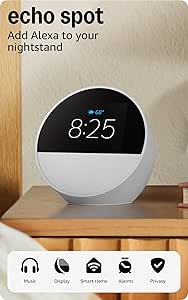 | Best Compact Smart Alarm Clock | Display: 2.83-inch touchscreen, 240 × 320 pixels | Dimensions: 4.5 × 4.1 × 4.4 inches | Weight: 14.3 oz | VIEW LATEST PRICE | See Our Full Breakdown |
| Addtam Surge Protector Outlet Extender with 5 Outlets, 4 USB Ports, and Night Light |  | Best Outlet Hub for Busy Wall Plugs | Outlets: 5, three-sided and wide-spaced | USB ports: 4: one USB-C and three USB-A | USB-C output: Up to 3 A | VIEW LATEST PRICE | See Our Full Breakdown |
| Amazon Basics Smart Plug, Alexa-Compatible, 4-Pack | 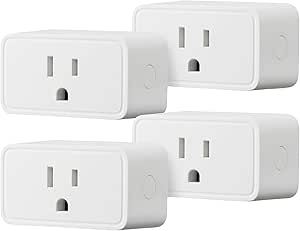 | Best Value for Alexa Smart-Home Expansion | Quantity: 4 plugs | Compatibility: Amazon Alexa only | Connectivity: 2.4 GHz Wi-Fi | VIEW LATEST PRICE | See Our Full Breakdown |
| Amazon Echo Show 5 Smart Display with Alexa, Charcoal |  | Best Small Smart Display | Display: 5.5-inch touchscreen | Camera: 2 MP with built-in shutter | Dimensions: 5.8 × 3.6 × 3.2 inches | VIEW LATEST PRICE | See Our Full Breakdown |
| HAPPRUN Native 1080p Bluetooth Projector with Licensed Google TV |  | Best All-in-One Streaming Projector | Display type: LCD | Native resolution: 1920 × 1080 | 4K support: 4K decoding | VIEW LATEST PRICE | See Our Full Breakdown |
| GHome Smart Plug with Wi-Fi and App Control, 4-Pack | 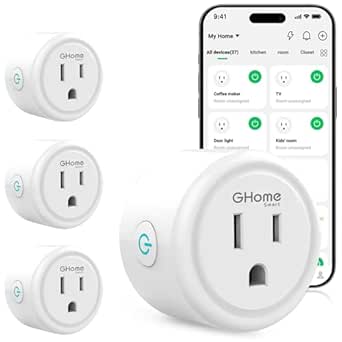 | Best Value Smart Plug Pack | Model: WP3 | Pack size: 4 plugs | Connectivity: 2.4 GHz Wi-Fi | VIEW LATEST PRICE | See Our Full Breakdown |
| Linkind Matter Smart Plug, 4-Pack | 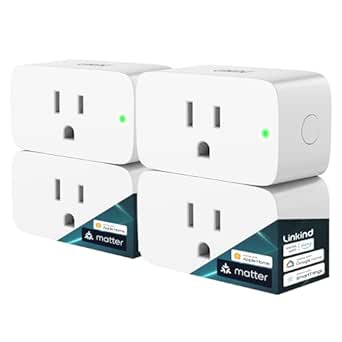 | Best for Matter Compatibility | Model: LC09003256 | Pack size: 4 plugs | Connectivity: Matter, 2.4 GHz Wi-Fi | VIEW LATEST PRICE | See Our Full Breakdown |
| Amazon Echo Show 11 Smart Display with Full HD Touchscreen and Spatial Audio |  | Best Premium Smart Home Hub Display | Display: 10.95-inch Full HD touchscreen, 1920 × 1200 | Dimensions: 10 × 5 × 7.2 in | Weight: 45.92 oz | VIEW LATEST PRICE | See Our Full Breakdown |
| TP-Link Tapo Matter Smart Plug Mini, 15A/1800W, 3-Pack |  | Best Compact Matter Plug | Model: Tapo P125M | Pack size: 3 plugs | Connectivity: 2.4 GHz Wi-Fi, Matter, Bluetooth | VIEW LATEST PRICE | See Our Full Breakdown |
| Amazon Echo Dot (5th Gen) Smart Speaker, Deep Sea Blue |  | Best Compact Alexa Speaker | Generation: 5th Gen | Dimensions: 3.9 × 3.9 × 3.5 in | Weight: 10.7 oz | VIEW LATEST PRICE | See Our Full Breakdown |
| Linkind Smart Color-Changing LED Bulbs, Works with Alexa and Google Home | 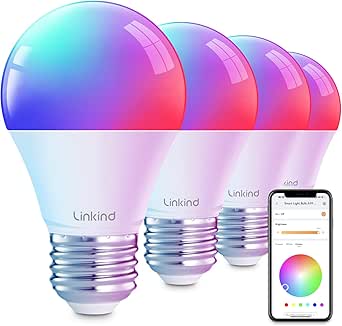 | Best Color Lighting Value | Bulb shape and base: A19, E26 | Power: 9 watts; 120 V | Light output: Up to 800 lumens; 60-watt incandescent equivalent | VIEW LATEST PRICE | See Our Full Breakdown |
| Govee Smart Plug, 4-Pack |  | Best Value for Multiple Appliances | Quantity: 4 plugs | Connectivity: Bluetooth and 2.4 GHz Wi-Fi | Voice assistants: Amazon Alexa and Google Assistant | VIEW LATEST PRICE | See Our Full Breakdown |
| Amazon Echo Dot Max Smart Speaker with Alexa, Graphite |  | Best Smart Speaker and Hub Upgrade | Drivers: 1 × 0.8-inch tweeter and 1 × 2.5-inch woofer | Playback: Two-way mono | Audio bandwidth: 53 Hz–16 kHz at volume 6 | VIEW LATEST PRICE | See Our Full Breakdown |
| Philoent Mini Projector with Wi-Fi 6, Bluetooth 5.4, and Built-In Apps |  | Best Compact Projector for Small Spaces | Native resolution: 1280 × 720 | Maximum supported display resolution: 1920 × 1080 | Brightness: 200 ANSI lumens | VIEW LATEST PRICE | See Our Full Breakdown |
| Amazon Echo Show 15 (2nd Gen) 15.6-inch Full HD Smart Display with Fire TV and Alexa |  | Best Family Command Center | Display: 15.6-inch Full HD, 1920 × 1080 | Dimensions: 16.1 × 10.1 × 1.4 inches | Weight: 4.96 lb | VIEW LATEST PRICE | See Our Full Breakdown |
| home tech deal | Dimensions | Connectivity |
|---|---|---|
| Amazon Echo Spot Smart Alarm C | 4.5 × 4.1 × 4.4 inches | — |
| Addtam Surge Protector Outlet | 5.4 × 3.4 inches | — |
| Amazon Basics Smart Plug | 2.7 × 2.1 × 1.5 inches | 2.4 GHz Wi-Fi |
| Amazon Echo Show 5 Smart Displ | 5.8 × 3.6 × 3.2 inches | — |
| HAPPRUN Native 1080p Bluetooth | — | Wi-Fi 6, Bluetooth 5.2, HDMI, USB, and 3.5 mm audio jack |
| GHome Smart Plug with Wi-Fi an | 2.1 × 2.1 × 1.1 in | 2.4 GHz Wi-Fi |
| Linkind Matter Smart Plug | — | Matter, 2.4 GHz Wi-Fi |
| Amazon Echo Show 11 Smart Disp | 10 × 5 × 7.2 in | — |
| TP-Link Tapo Matter Smart Plug | — | 2.4 GHz Wi-Fi, Matter, Bluetooth |
| Amazon Echo Dot | 3.9 × 3.9 × 3.5 in | — |
| Linkind Smart Color-Changing L | — | 2.4 GHz Wi-Fi and Bluetooth |
| Govee Smart Plug | — | Bluetooth and 2.4 GHz Wi-Fi |
| Amazon Echo Dot Max Smart Spea | — | — |
| Philoent Mini Projector with W | — | Wi-Fi 6, Bluetooth 5.4, HDMI, and USB |
| Amazon Echo Show 15 | 16.1 × 10.1 × 1.4 inches | — |
More Details on Our Top Picks
Amazon Echo Spot Smart Alarm Clock, Glacier White
The Echo Spot is the most bedroom-focused pick here: its small touchscreen puts the time, weather, reminders, and song details within view, while Alexa routines can pair a gradual wake-up with compatible lighting. Compared with the Echo Show 5, it takes up less space and skips the camera, which may suit a bedside table where privacy and a simple clock display matter more than video calls. The tradeoff is a 2.83-inch, 240 × 320 display, far less useful for watching video or browsing visual content than the Show 5’s larger screen. Its speaker handles everyday listening, but buyers seeking fuller sound should look at a dedicated speaker. The built-in eero extension is a bonus only for households with a compatible eero network; it is not a general Wi-Fi extender.
Pros:- Compact touchscreen shows clock faces, weather, reminders, and song information
- Alexa routines can coordinate alarms with compatible smart-home devices
- Built-in speaker plays music, podcasts, and audiobooks
- Camera-free design includes a microphone-off button and app privacy controls
Cons:- Small, low-resolution display is less suited to video and detailed visual content than the Echo Show 5
- eero network extension requires a compatible eero setup and linked account
- Some Bluetooth device and operating-system features are unsupported
Best for: Alexa households seeking a compact bedside clock with routines, basic audio, and no camera
Not ideal for: Buyers who want video calling, a roomy screen for viewing content, or an extender that works with non-eero routers
- Display:2.83-inch touchscreen, 240 × 320 pixels
- Dimensions:4.5 × 4.1 × 4.4 inches
- Weight:14.3 oz
- Camera:None
- Wi-Fi:Dual-band 802.11a/b/g/n/ac, 2.4 and 5 GHz
- Bluetooth:A2DP audio streaming and AVRCP voice control
- Speaker:1.73-inch full-range built-in speaker
- eero Built-in:Up to 1,000 sq. ft. additional coverage with a compatible eero network
Our verdict“Choose the Echo Spot for a space-saving Alexa bedside clock, but pick the Echo Show 5 if a larger screen and video calls matter more.”
Addtam Surge Protector Outlet Extender with 5 Outlets, 4 USB Ports, and Night Light
The Addtam outlet extender makes sense when one wall receptacle has to serve chargers, appliances, and a dim hallway or bedroom. Its three-sided layout gives larger plugs more room than a basic smart plug such as the Amazon Basics Smart Plug, while four USB ports—including USB-C—reduce the need for separate charging bricks. The dusk-to-dawn night light with touch control adds a practical extra, and the unit lists 1,050 joules of surge protection. This is a utility upgrade, not a smart-home controller: it does not offer app scheduling or Alexa routines like the four-pack smart plugs. Fit also needs attention. The stabilizing prong must be cut off for use with USB receptacles and GFCI outlets, and USB charging current varies by device. Check the outlet and surrounding space before choosing it.
Pros:- Five outlets and four USB ports consolidate charging at one wall receptacle
- Three-sided, wide-spaced layout accommodates larger plugs
- Dusk-to-dawn night light includes a touch switch
- Lists 1,050-joule surge protection and additional electrical protections
Cons:- Stabilizing prong must be cut off for use with USB receptacles and GFCI outlets
- USB charging current varies with the connected device
- Does not provide the remote control or scheduling available from Alexa smart plugs
Best for: Households with several chargers and bulky plugs sharing one wall outlet, especially near a hallway or bedside
Not ideal for: Buyers who need app-controlled outlets, or anyone whose USB or GFCI receptacle requires the stabilizing prong to be removed
- Outlets:5, three-sided and wide-spaced
- USB ports:4: one USB-C and three USB-A
- USB-C output:Up to 3 A
- USB-A output:Up to 2.4 A
- Surge protection:1,050 joules
- Night light:Dusk-to-dawn sensor with touch switch
- Dimensions:5.4 × 3.4 inches
Our verdict“Pick the Addtam when you need more physical outlets, USB charging, and a night light in one spot; choose a smart plug for app control.”
Amazon Basics Smart Plug, Alexa-Compatible, 4-Pack
This four-pack of Amazon Basics Smart Plugs is a straightforward way to schedule lamps and other compatible appliances across several rooms without adding a hub. The Alexa app supports remote control, voice commands, and schedules tied to sunrise or sunset, so lights can follow a routine even when no one is home. Unlike the Linkind Matter Smart Plug in this roundup, this model is Alexa-only; that narrower compatibility keeps setup focused but rules it out for buyers building around other platforms. Its compact shape is designed to leave the adjacent outlet available, a useful advantage over bulkier outlet extenders such as the Addtam. The main limitation is network support: it requires 2.4 GHz Wi-Fi, and it controls power rather than adding USB charging or surge-protected outlets.
Pros:- Four plugs let buyers automate devices in several locations
- Alexa app offers remote control and timed scheduling
- Sunrise and sunset schedules support hands-off lighting routines
- Compact design leaves the adjacent outlet available
Cons:- Works with Amazon Alexa only, unlike the Linkind Matter Smart Plug
- Requires a 2.4 GHz Wi-Fi network
- Adds no USB ports or surge protection
Best for: Alexa users who want to automate lamps or small compatible appliances in multiple rooms without a hub
Not ideal for: Smart-home buyers who need Matter or Google Home compatibility, or households relying only on 5 GHz Wi-Fi
- Quantity:4 plugs
- Compatibility:Amazon Alexa only
- Connectivity:2.4 GHz Wi-Fi
- Hub required:No
- Amperage:15 A
- Dimensions:2.7 × 2.1 × 1.5 inches
- Plug type:Type B
- Warranty:1-year limited
Our verdict“Choose this pack to add simple, hub-free schedules to an Alexa home, but opt for a Matter plug if you want broader platform flexibility.”
Amazon Echo Show 5 Smart Display with Alexa, Charcoal
The Echo Show 5 is the more versatile bedside or kitchen screen in this group: its 5.5-inch display supports visual updates and streaming, and the 2 MP camera enables video calls and viewing compatible cameras. Compared with the camera-free Echo Spot, it offers more screen area and video features, though it takes up more room and may feel like more device than someone seeking only an alarm clock needs. The built-in shutter and microphone/camera-off button give privacy-conscious owners physical controls. Its speaker covers everyday listening, but the compact enclosure is not a substitute for a larger audio system. Wi-Fi and Bluetooth support are useful, with some limits: it does not support ad-hoc or peer-to-peer Wi-Fi, and Bluetooth speakers that require PIN codes are unsupported.
Pros:- 5.5-inch touchscreen displays visual updates and streaming content
- Built-in 2 MP camera supports video calls and checks of compatible cameras
- Camera shutter and microphone/camera-off button provide direct privacy controls
- Uses recycled polyester yarn and recycled aluminum, with recyclable packaging
Cons:- Larger than the Echo Spot and less suited to buyers who only need a compact clock
- Does not support ad-hoc or peer-to-peer Wi-Fi networks
- Bluetooth speakers requiring PIN codes are unsupported
Best for: Alexa users who want a compact screen for video calls, compatible camera checks, and everyday visual updates
Not ideal for: Buyers who want a camera-free bedside clock, a larger viewing experience, or support for ad-hoc Wi-Fi networks
- Display:5.5-inch touchscreen
- Camera:2 MP with built-in shutter
- Dimensions:5.8 × 3.6 × 3.2 inches
- Weight:16.1 oz
- Speaker:1.75-inch full-range built-in speaker
- Wi-Fi:Dual-band 802.11a/b/g/n/ac
- Processor:MediaTek MT 8169
- Bluetooth:A2DP and AVRCP support
Our verdict“Choose the Echo Show 5 for a small Alexa display with video calling; choose the Echo Spot if a camera-free, smaller bedside clock is the priority.”
HAPPRUN Native 1080p Bluetooth Projector with Licensed Google TV
The HAPPRUN projector stands out for combining licensed Google TV, voice assistance, and native 1080p resolution in a portable home-cinema setup. Built-in streaming apps mean fewer boxes and cables than a projector that needs a separate player, while HDMI, USB, Wi-Fi 6, and Bluetooth 5.2 give it room to connect consoles and other devices. Its image can scale from 50 to 300 inches, but screen size alone does not guarantee a bright, clear picture: the listed brightness is 350 ANSI lumens, with another 400-lumen figure also supplied. That makes room lighting and viewing size relevant tradeoffs. The 5W speaker is convenient for casual viewing, though a separate audio system may suit film nights better. Unlike a small smart display such as the Echo Show 5, this is built for shared-screen viewing, not quick bedside interactions.
Pros:- Licensed Google TV provides streaming apps without a separate player
- Native 1080p resolution supports full HD image output
- Offers HDMI, USB, Wi-Fi 6, Bluetooth 5.2, and a 3.5 mm audio jack
- Supports tabletop, ceiling, tripod, and wall mounting
Cons:- 4K is supported as input or decoding, not as native display resolution
- Listed brightness figures differ: 400 lumens and 350 ANSI lumens
- Built-in 5W speaker may not suit buyers seeking fuller home-theater sound
Best for: Movie and streaming viewers who want built-in Google TV, native 1080p, and flexible placement for a large image
Not ideal for: Buyers who need a bright picture in a well-lit room, native 4K resolution, or room-filling built-in audio
- Display type:LCD
- Native resolution:1920 × 1080
- 4K support:4K decoding
- Brightness:350 ANSI lumens; also listed as 400 lumens
- Image size:50 to 300 inches
- Throw distance:5.48 to 22 feet
- Audio:Built-in 5W speaker with Dolby sound effects
- Connectivity:Wi-Fi 6, Bluetooth 5.2, HDMI, USB, and 3.5 mm audio jack
Our verdict“Choose the HAPPRUN for a flexible Google TV projector with native 1080p, but plan around its brightness and modest built-in speaker.”
GHome Smart Plug with Wi-Fi and App Control, 4-Pack
The GHome 4-pack makes sense for buyers who want to add basic voice and app control to several lamps or small appliances without building around a specific smart-home standard. It works with Alexa and Google Assistant, and schedules, timers, and grouped control give it more everyday flexibility than a simple remote-controlled outlet. Compared with the Linkind Matter Smart Plug and TP-Link Tapo Matter Smart Plug Mini, though, GHome relies on its listed app integrations rather than Matter, so it is less appealing if you want to move plugs between smart-home platforms. Setup also starts in the GHome app before linking to Alexa or Google Home, adding a step. Its 1200 W rating is lower than the 1800 W ratings of those Matter alternatives, so I’d reserve it for lower-draw devices.
Pros:- Four plugs provide app and voice control across multiple devices.
- Works with Alexa and Google Assistant.
- Schedules, timers, grouping, and sharing support everyday automation.
- Supports GHome, Smart Life, and Tuya apps.
Cons:- The 1200 W rating is lower than the 1800 W capacity of the Linkind and Tapo Matter plugs.
- Requires a 2.4 GHz Wi-Fi network.
- Initial setup must be completed in the GHome app before connecting to Alexa or Google Home.
Best for: Alexa or Google Assistant households that want app scheduling and control for several lamps or other modest-power devices.
Not ideal for: Buyers building a Matter-based home or looking to control devices rated above 1200 W; it requires 2.4 GHz Wi-Fi and initial setup in the GHome app.
- Model:WP3
- Pack size:4 plugs
- Connectivity:2.4 GHz Wi-Fi
- Voice assistants:Alexa, Google Assistant
- Compatible apps:GHome, Smart Life, Tuya
- Operating voltage:120 V
- Maximum wattage:1200 W
- Dimensions:2.1 × 2.1 × 1.1 in
- Certifications:ETL, FCC
Our verdict“Choose this four-pack for straightforward Alexa or Google control of several lower-power devices, but pick a Matter plug for broader platform flexibility or higher capacity.”
Linkind Matter Smart Plug, 4-Pack
The Linkind Matter 4-pack is the strongest fit here for buyers who want four plugs that can join a range of Matter-compatible ecosystems. It lists support for Apple Home, Alexa, Google Home, and SmartThings, and local LAN control can keep compatible controls available when internet access drops. Its 15 A, 1800 W rating also gives it more capacity than the GHome Smart Plug, whose listed limit is 1200 W. That extra platform reach comes with setup requirements: the listed major platforms need a Matter-certified hub or controller, and the network must support 2.4 GHz Wi-Fi and IPv6. Buyers who want the simplest route may prefer the TP-Link Tapo Matter Smart Plug Mini, which also offers Matter and local control but comes as a three-pack. Linkind’s protection features are a useful addition, though platform compatibility alone does not remove the need to check device load.
Pros:- Matter compatibility spans Apple Home, Alexa, Google Home, and SmartThings.
- Local LAN control can work during internet outages.
- 15 A and 1800 W capacity exceeds the GHome plug’s listed rating.
- Short-circuit and overload protection and fire-resistant materials are specified.
Cons:- A Matter-certified hub or controller is needed for several listed platforms.
- Requires both 2.4 GHz Wi-Fi and IPv6.
- Platform setup may be more involved than using the GHome plug through its app integrations.
Best for: Households with a Matter-compatible hub that want four plugs for Apple Home, Alexa, Google Home, or SmartThings, plus local network control.
Not ideal for: People without a Matter-certified controller for their chosen platform, or those whose Wi-Fi setup lacks IPv6 support.
- Model:LC09003256
- Pack size:4 plugs
- Connectivity:Matter, 2.4 GHz Wi-Fi
- Network requirement:IPv6
- Compatible platforms:Apple Home, Alexa, Google Home, SmartThings, AiDot
- Maximum current:15 A
- Maximum power:1800 W
- Safety features:Short-circuit and overload protection; fire-resistant materials
- Certifications:FCC, ETL
Our verdict“Pick Linkind when broad Matter support and a four-plug pack matter more than avoiding hub and network requirements.”
Amazon Echo Show 11 Smart Display with Full HD Touchscreen and Spatial Audio
The Echo Show 11 is the most capable control center in this group, pairing a large Full HD touchscreen with a built-in hub for Zigbee, Matter, and Thread. That makes it a better fit for someone adding a screen-led hub to a compatible smart home than either the Echo Dot (5th Gen) or the plug-only options, which do not provide this same combination of display and hub features. The 13 MP camera with auto framing supports video calls, while presence and temperature sensing can feed Alexa routines. Privacy controls include physical microphone and camera disable buttons. The tradeoff is its larger footprint and focus on Alexa; buyers who only need voice control and a compact speaker may find the Echo Dot a simpler match. Bluetooth speakers that require PIN codes are not supported.
Pros:- 10.95-inch Full HD touchscreen provides more room for controls and video than an Echo Dot.
- Built-in Zigbee, Matter, and Thread Border Router support can reduce the need for separate smart-home hardware.
- 13 MP camera includes auto framing and 3.3× zoom for video calls.
- Physical microphone and camera disable controls provide direct privacy controls.
Cons:- Its screen and hub features make it a larger, more involved choice than the Echo Dot (5th Gen) for basic voice assistance.
- Bluetooth speakers that require PIN codes are not supported.
- Hands-free voice control for connected mobile devices is not supported on Mac OS X.
Best for: Alexa households that want a large touchscreen for calls and smart-home control, with built-in support for Zigbee, Matter, and Thread devices.
Not ideal for: Buyers who want a small, voice-first device or who need support for Bluetooth speakers that require PIN codes.
- Display:10.95-inch Full HD touchscreen, 1920 × 1200
- Dimensions:10 × 5 × 7.2 in
- Weight:45.92 oz
- Camera:13 MP with auto framing and 3.3× zoom
- Audio:1 × 2.8-inch woofer, 2 full-range drivers, spatial audio
- Wi-Fi:Wi-Fi 6E
- Bluetooth:Version 5.4
- Smart home hub:Zigbee, Matter, Thread Border Router
- Sensors:Ambient temperature, ambient light, presence detection, camera
Our verdict“Choose the Echo Show 11 if a substantial screen and built-in multi-standard smart-home hub justify its larger presence over a compact speaker.”
TP-Link Tapo Matter Smart Plug Mini, 15A/1800W, 3-Pack
The Tapo Matter Smart Plug Mini is a practical choice when outlet space matters as much as smart-home compatibility. Its compact design helps preserve access to nearby outlets, while Matter support and local network control make it a flexible pick for Apple Home, Alexa, Google Home, and SmartThings users. Like the four-pack from Linkind, it supports up to 15 A and 1800 W and can keep local control available without internet access. Linkind supplies one more plug, but Tapo adds Bluetooth setup, a UL-certified flame-retardant design, and a stated two-year limited warranty. It still requires 2.4 GHz Wi-Fi, and Matter platform setup may depend on a compatible controller. For buyers who only need three outlets automated, its space-saving design is a more useful distinction than adding a fourth plug.
Pros:- Compact design helps keep adjacent outlets accessible.
- Matter support covers Apple Home, Alexa, Google Home, and SmartThings.
- Local network control can remain available when internet access is down.
- Includes Bluetooth setup, UL certification, and a two-year limited warranty.
Cons:- The three-pack includes one fewer plug than Linkind’s four-pack.
- Requires a 2.4 GHz Wi-Fi network.
- The 15 A and 1800 W limits may not suit devices above its rated capacity.
Best for: People with crowded outlets who need three compact Matter plugs for Apple Home, Alexa, Google Home, or SmartThings.
Not ideal for: Buyers who need four plugs in one pack or want to avoid Matter controller and 2.4 GHz Wi-Fi requirements.
- Model:Tapo P125M
- Pack size:3 plugs
- Connectivity:2.4 GHz Wi-Fi, Matter, Bluetooth
- Compatible platforms:Apple Home, Amazon Alexa, Google Home, Samsung SmartThings
- Maximum current:15 A
- Maximum power:1800 W
- Operating voltage:120 V AC
- Certification:UL certified
- Warranty:2-year limited warranty
Our verdict“Choose Tapo for three compact, Matter-ready plugs and a stated warranty; choose Linkind if you need four outlets automated in one pack.”
Amazon Echo Dot (5th Gen) Smart Speaker, Deep Sea Blue
The Echo Dot (5th Gen) is the simplest pick in this batch for adding Alexa, alarms, and music to a room without giving up space to a screen. Its motion and temperature sensors also support smart-home routines, giving it a practical edge over a basic speaker, while Wi-Fi and Bluetooth playback cover podcasts, audiobooks, and music. Compared with the Echo Show 11, the Dot is smaller and more focused on voice control, but it lacks a touchscreen and the Show’s built-in Zigbee, Matter, and Thread hub. It can also pair with compatible Echo devices or Fire TV and extend a compatible eero network. That network feature has several setup dependencies, so I wouldn’t choose the Dot solely as an extender. Its mono, single-driver audio is also a more modest fit than a dedicated multi-driver display.
Pros:- Compact speaker supports Alexa, alarms, and timers.
- Plays music, audiobooks, and podcasts over Wi-Fi or Bluetooth.
- Motion and temperature sensors can trigger smart-home routines.
- Can pair with compatible Echo devices or Fire TV and extend compatible eero coverage.
Cons:- Mono playback from a single 1.6-inch driver is less suited to buyers wanting a screen or more expansive speaker setup.
- eero Built-in requires compatible eero equipment, linked accounts, and setup in the eero app.
- Does not support ad-hoc Wi-Fi networks or Bluetooth speakers requiring PIN codes.
Best for: Alexa users who want a compact bedroom or office speaker for voice assistance, alarms, audio, and sensor-based routines.
Not ideal for: Buyers seeking a touchscreen hub, multi-driver audio, or an eero extender without compatible eero equipment and account setup.
- Generation:5th Gen
- Dimensions:3.9 × 3.9 × 3.5 in
- Weight:10.7 oz
- Driver:1.6-inch full-range
- Playback channels:Mono
- Wi-Fi:Dual-band 802.11a/b/g/n/ac, 2.4 and 5 GHz
- Smart home compatibility:Wi-Fi, Bluetooth Low Energy Mesh, Matter
- eero Built-in coverage:Up to 1,000 sq. ft. with compatible eero equipment
- Warranty:90-day limited warranty
Our verdict“Pick the Echo Dot for compact Alexa control and everyday audio, but choose the Echo Show 11 if you want a screen and built-in multi-standard hub.”
Linkind Smart Color-Changing LED Bulbs, Works with Alexa and Google Home
For a low-commitment way to add color and voice control to a room, I’d shortlist the Linkind Smart Color-Changing LED Bulbs. They provide adjustable white light as well as 16 million colors, so one bulb can shift from everyday illumination to a scene or music-synced effect. No hub is required, and app, voice, schedule, and group controls make them more flexible than a basic smart plug, such as the Govee Smart Plug 4-Pack, which controls appliances rather than lighting itself.
The tradeoff is setup and fit: these bulbs need a 2.4 GHz Wi-Fi network, and they are not compatible with traditional dimmer switches. Their 800-lumen output suits many lamps, but buyers seeking brighter room-wide lighting may want a different bulb. I’d choose them for smart color accents, not as a fix for every fixture.
Pros:- Combines 16 million RGB colors with tunable white light from 1800K to 6500K
- Works with app, voice, scheduling, and group controls without a hub
- Bluetooth and Wi-Fi provide both local and remote control options
- Music sync and preset scenes add lighting effects beyond basic dimming
Cons:- Initial setup requires 2.4 GHz Wi-Fi and does not support 5 GHz
- Not compatible with traditional dimmer switches
- Indoor use only, with an 800-lumen maximum output
Best for: Alexa or Google Home users who want affordable color and tunable-white lighting in indoor lamps without adding a hub.
Not ideal for: Households with 5 GHz-only Wi-Fi, traditional dimmer switches, or a need for higher-output lighting across a large room.
- Bulb shape and base:A19, E26
- Power:9 watts; 120 V
- Light output:Up to 800 lumens; 60-watt incandescent equivalent
- Color and temperature:16 million RGB colors; 1800K–6500K
- Color rendering index:90
- Connectivity:2.4 GHz Wi-Fi and Bluetooth
- Voice compatibility:Amazon Alexa and Google Home
Our verdict“Choose these Linkind bulbs for flexible, hub-free color lighting, but skip them if your fixtures use dimmer switches or need brighter illumination.”
Govee Smart Plug, 4-Pack
The Govee Smart Plug 4-Pack is the practical pick when the goal is automating several everyday appliances rather than building a more advanced smart-home setup. Each plug supports app control, schedules, and Alexa or Google Assistant, while Bluetooth and 2.4 GHz Wi-Fi offer ways to connect without a separate hub. Compared with the Linkind Matter Smart Plug 4-Pack in this roundup, the Govee’s appeal is straightforward app-based control; buyers specifically seeking Matter compatibility should look at the Linkind option instead.
Its main limitation is network compatibility: 5 GHz Wi-Fi is not supported, so confirm your router can provide a 2.4 GHz connection. The product data also gives an 11 A rating, which buyers should match against their appliances rather than assume it suits every high-load device. This is a useful multi-room automation starter, but less compelling for a home built around cross-platform Matter control.
Pros:- Four plugs let buyers automate several devices from one pack
- Supports Alexa and Google Assistant voice control
- App scheduling and group control help automate daily routines
- Bluetooth and 2.4 GHz Wi-Fi connectivity work without a hub
Cons:- Does not support 5 GHz Wi-Fi
- The stated 11 A rating may rule it out for some higher-load appliances
Best for: Renters and households who want to schedule several compatible lamps or small appliances using Alexa or Google Assistant, without a hub.
Not ideal for: Buyers who need 5 GHz-only connectivity, Matter support, or plugs rated for appliances beyond the stated 11 A capacity.
- Quantity:4 plugs
- Connectivity:Bluetooth and 2.4 GHz Wi-Fi
- Voice assistants:Amazon Alexa and Google Assistant
- Hub requirement:No hub required
- Plug type:Type B
- Certifications:ETL and FCC
Our verdict“Pick the Govee pack for straightforward scheduling across several compatible devices, not for Matter-based control or 5 GHz-only networks.”
Amazon Echo Dot Max Smart Speaker with Alexa, Graphite
The Echo Dot Max makes the most sense for buyers who want a speaker and a smart-home control point in one device. Its room-adapting audio and larger woofer give it a stronger low-end focus than the Amazon Echo Dot (5th Gen) elsewhere in this roundup, while the built-in hub supports Zigbee, Matter, and Thread. That mix can reduce the need for separate control hardware when adding compatible devices.
It is still a compact, two-way mono speaker, not a substitute for a stereo system. The eero expansion feature is conditional: eero Built-in requires a compatible eero network, account linking, and setup in the eero app, with performance that can vary. Buyers who only need a small Alexa speaker may find the simpler Echo Dot a better fit; the Max earns its place when hub support and fuller sound both matter.
Pros:- Room-adapting audio and a 2.5-inch woofer provide more bass than the Echo Dot (2022 release)
- Built-in hub supports Zigbee, Matter, and Thread
- Wi-Fi 6E and Bluetooth support modern wireless connections
- Microphone-disable button provides a direct privacy control
Cons:- Two-way mono playback is less suited to buyers seeking stereo sound
- eero Built-in depends on a compatible router, account linking, and app setup
- The eero feature’s performance and compatibility can vary
Best for: Alexa households adding Zigbee, Matter, or Thread devices who also want fuller sound than a basic compact smart speaker.
Not ideal for: Buyers who want stereo or room-filling audio, or who expect eero network expansion without a compatible eero router.
- Drivers:1 × 0.8-inch tweeter and 1 × 2.5-inch woofer
- Playback:Two-way mono
- Audio bandwidth:53 Hz–16 kHz at volume 6
- Wi-Fi:Wi-Fi 6E (IEEE 802.11ax)
- Smart home hub:Zigbee, Matter, and Thread Border Router
- Bluetooth:Bluetooth Low Energy 5.3; A2DP and AVRCP support
- Dimensions and weight:4.27 × 4.27 × 3.9 inches; 17.82 oz
- eero Built-in coverage:Up to 1,000 sq. ft. with a compatible eero network
Our verdict“Choose the Echo Dot Max if you want an Alexa speaker that also acts as a capable smart-home hub, and skip it if stereo sound is your priority.”
Philoent Mini Projector with Wi-Fi 6, Bluetooth 5.4, and Built-In Apps
For a portable screen that can move between a bedroom, a temporary setup, and a trip, the Philoent Mini Projector emphasizes convenience over cinema-grade picture quality. Its 0.85-pound body, short-throw ratio, autofocus, and automatic vertical keystone correction can make setup easier when there is little room to position a projector. Built-in apps and HDMI, USB, Wi-Fi 6, and Bluetooth 5.4 give it more ways to play content than a display that depends on one connection.
The key tradeoff is image quality: its native resolution is 1280 × 720, even though it accepts content up to 1080p, and 200 ANSI lumens limits use in bright rooms. Compared with the HAPPRUN Native 1080p Bluetooth Projector with Licensed Google TV, this model favors portability and rotation rather than native Full HD. I’d treat it as a casual, dim-room option, not a main living-room projector.
Pros:- Lightweight 0.85-pound design is easier to move and pack
- Short-throw optics and autofocus simplify placement in compact rooms
- Automatic vertical keystone correction and 180-degree rotation support flexible viewing angles
- Built-in apps plus Wi-Fi 6, Bluetooth, HDMI, and USB offer varied playback options
Cons:- Native 1280 × 720 resolution is below the HAPPRUN projector’s native 1080p specification
- 200 ANSI lumens can make the image difficult to see in bright rooms
- Maximum listed image size is 86 inches
Best for: Travelers, students, and small-room viewers who value light weight, flexible placement, and built-in apps over native Full HD.
Not ideal for: Viewers who want sharp native 1080p detail, a large image in daylight, or a projector for a bright living room.
- Native resolution:1280 × 720
- Maximum supported display resolution:1920 × 1080
- Brightness:200 ANSI lumens
- Throw ratio and distance:0.8:1; 0.6–3.5 meters
- Maximum image size:86 inches
- Connectivity:Wi-Fi 6, Bluetooth 5.4, HDMI, and USB
- Rotation:Up to 180 degrees
- Weight and warranty:0.85 lb; 2 years
Our verdict“Choose the Philoent for portable viewing in dim, compact spaces, but pick a native 1080p model if picture detail matters more than easy placement.”
Amazon Echo Show 15 (2nd Gen) 15.6-inch Full HD Smart Display with Fire TV and Alexa
The Echo Show 15 (2nd Gen) is the most screen-focused option in this group: its 15.6-inch Full HD display can put calendars, lists, weather, entertainment, and smart-home controls in one shared place. Customizable widgets make it better suited to household organization than the Echo Show 5, whose smaller screen is more practical for a bedside table. Built-in Fire TV also gives the large panel a second job as an entertainment display.
This is a substantial device, not a casual countertop speaker: it measures 16.1 × 10.1 × 1.4 inches and weighs 4.96 pounds, so buyers should plan where it will live. Its camera includes auto-framing and a privacy shutter, while Zigbee, Matter, and Thread support extend its smart-home role. Some services may involve extra fees, and it does not support ad-hoc Wi-Fi networks, so it suits a connected household with a fixed home setup better than a highly portable one.
Pros:- Large 15.6-inch Full HD screen gives widgets and shared information room to breathe
- Built-in Fire TV combines household organization with entertainment
- 13 MP camera includes auto-framing, zoom, noise reduction, and a privacy shutter
- Zigbee, Matter, and Thread support helps control compatible smart-home devices
Cons:- Large dimensions and 4.96-pound weight need a planned mounting or counter location
- Some skills and services may require subscriptions or other fees
- Does not support ad-hoc Wi-Fi networks or Bluetooth speakers that require PIN codes
Best for: Families who want a shared wall or counter display for schedules, lists, video calls, Fire TV, and compatible smart-home devices.
Not ideal for: Buyers with little mounting or counter space, those seeking a portable display, or households relying on ad-hoc Wi-Fi networks.
- Display:15.6-inch Full HD, 1920 × 1080
- Dimensions:16.1 × 10.1 × 1.4 inches
- Weight:4.96 lb
- Camera:13 MP with shutter, auto-framing, 3.3× zoom, and noise reduction
- Audio:Two 2-inch woofers and two 0.6-inch tweeters
- Wi-Fi:Wi-Fi 6E; tri-band, dual-antenna MIMO
- Smart home connectivity:Zigbee, Matter, and Thread Border Router
- Included accessories:Alexa Voice Remote (2024), batteries, 30 W power adapter, and 5 ft cord
Our verdict“Pick the Echo Show 15 for a fixed family hub that combines organization and entertainment, and choose a smaller Echo Show if space or portability matters more.”

How We Picked
I compared these 15 products as home-tech upgrades, not as a single interchangeable category. The ranking gives more weight to everyday usefulness, setup clarity, and range of use than to feature counts alone. Smart displays and speakers were judged by how well their form and stated capabilities fit common home roles; plugs and bulbs by compatibility, control options, and how easily they can expand an existing setup; projectors by the viewing features and connectivity described in their listings.
Compatibility and practical tradeoffs shaped the order. A product with Matter support can appeal to homes mixing supported platforms, while a clearly Alexa-oriented device may be simpler for an Alexa household. I also considered whether a model serves a distinct need—such as a compact display, large-screen viewing, or a multi-outlet setup—rather than repeating another pick’s role. The rankings reflect the information available for these products; buyers should verify current platform support, device limits, and electrical ratings before connecting equipment.
Factors to Consider When Choosing Best Home Tech Deals
Home tech can make daily routines simpler, but a feature only helps if it fits your home and the devices you already own. I’d start with the job you want to solve, then check compatibility and installation needs before comparing extra features.
Choose Your Smart-Home Ecosystem Before Adding Devices
Start by listing the phone assistants and smart-home platforms you already use, including any hub or router requirements. A device that works with Alexa may be a smooth fit in an Alexa-first home but less convenient if your household relies on another platform. Matter support can improve cross-platform flexibility, but it does not mean every feature works in every app or that no compatible controller is needed. A common mistake is buying several accessories before checking how they pair and where their controls live. For a small setup, sticking to one ecosystem may be easier than mixing brands for marginal feature differences. If you expect your setup to grow, verify supported platforms and device requirements before choosing the first plug or bulb.
Match the Device to the Job, Not the Feature List
Decide whether you need voice control, a screen for household information, lighting automation, or a larger viewing setup. A smart speaker and a smart display can both provide voice assistance, but a display adds a visual interface and takes more surface or wall space. Buy for the routine you want to improve, such as controlling a lamp from bed or following on-screen content in a shared room. Overbuying is easy when a device includes entertainment features you may rarely use. On the other hand, a basic accessory may feel limiting if you need timers, schedules, or controls several family members can see. Write down the main use first; then treat additional features as useful only when they support it.
Check Plug Ratings and Outlet Layout
Smart plugs and outlet extenders can make ordinary devices easier to schedule, but they are not a substitute for checking electrical limits. Compare the device’s rated capacity with the appliance you plan to connect, and follow the manufacturer’s guidance for high-load equipment. Outlet shape and spacing matter too: bulky adapters can block neighboring sockets, while an extender may solve that problem but occupy more wall space. Avoid assuming that a smart plug is suitable for every heater, appliance, or motor; confirm permitted uses in its instructions. If you need several connections in one location, count both standard outlets and USB ports before choosing an extender. For equipment that must remain on or requires a direct connection, a smart plug may be the wrong control method.
Think About Screen Size, Placement, and Household Use
Smart displays range from compact bedside units to larger screens that suit shared rooms or wall mounting. Bigger screens can make video and glanceable information easier to see, but they need more space and may be less discreet. Measure the intended location before choosing, including viewing distance, nearby power access, and whether a wall mount is practical. A smaller display can work better for alarms or quick checks, while a larger model makes more sense when several people will use it for media or household information. Consider privacy settings and camera or microphone controls if the device will sit in a bedroom or shared area. The right size depends on where it will live, not just the size of its display.
Treat Projector Specs as a Starting Point
Projector labels can highlight resolution, wireless standards, and built-in apps, but those details do not answer every viewing question. Check supported input sources, app availability, audio options, focus and keystone controls, and the recommended room conditions. Ambient light and projection distance can shape the result as much as a headline resolution claim. A portable projector may suit occasional movie nights, while a fixed viewing room may call for a different setup and screen. Do not assume built-in apps replace every streaming device or that Bluetooth audio will suit every speaker. Review the manufacturer’s setup guidance and confirm the connections you need before choosing between models.
Plan for Expansion and Ongoing Setup
A single plug is easy to manage; a home full of devices can create a patchwork of apps, accounts, and setup steps. Before buying a multi-pack, decide which rooms you want to automate and whether every item will be controlled through the same platform. Consistency can be more useful than a longer feature list, especially when multiple people need to use the controls. Keep track of which outlet powers each accessory and whether a schedule or automation depends on a particular hub or network. A common mistake is adding devices faster than the household can maintain them, leaving old routines or duplicate apps behind. Expand in small groups, then confirm that the new devices work as expected before adding more.
Frequently Asked Questions
Should I choose a Matter smart plug or one made for a single ecosystem?
Choose Matter when you want the option to manage a device through multiple supported smart-home platforms, or you expect your household’s setup to change. It can reduce dependence on a single brand, but platform support and controller requirements still matter. A plug designed around one ecosystem may be simpler if your home already uses that assistant and you do not plan to switch. Check which features each app supports, since compatibility does not always mean identical controls. For a first purchase, prioritize the platform you use daily over a label alone.
Is a smart display a better first purchase than a smart speaker?
A smart display is a better fit if you want visual information, on-screen controls, or video alongside voice assistance. A speaker is usually the simpler choice when music, timers, and voice commands are the main goals, and it can take up less space. Think about where the device will sit and whether people in the household will use its screen. A display may add little value if it will be tucked out of sight or if you rarely use visual features. Decide based on your daily routine rather than assuming a screen is automatically an upgrade.
Can I use a smart plug with any appliance?
No. Check the plug’s electrical rating and the appliance’s requirements before connecting them, and follow both manufacturers’ instructions. Some devices may not be suitable for smart-plug control, particularly if they draw substantial power, use motors, or require a specific switching procedure. Also consider whether cutting and restoring power could affect the appliance’s settings or safe operation. A plug’s app control does not make an otherwise incompatible load safe. When the instructions are unclear, use a direct outlet or ask the appliance manufacturer.
What should I verify before buying a projector with built-in apps?
Confirm that the apps you rely on are available and supported on that projector, and check whether updates or a separate streaming device may be needed. Review input options for game consoles, laptops, and other sources, plus audio output if you plan to use external speakers. Room brightness, projection distance, and available wall or screen space can affect whether the setup suits your home. Wireless connectivity features are useful, but they do not replace checking app compatibility and network requirements. Reading the setup instructions can reveal limitations that headline features do not show.
How should I decide between a compact Echo Show and a larger model?
Match screen size to where the display will be placed and how far away people will view it. A compact model can fit a bedside table or small counter, while a larger display is more suited to shared viewing and visible household information. Larger units need more room and may call for wall mounting or a dedicated surface. Consider whether you want the screen mainly for quick checks or for media that benefits from a bigger image. If you are unsure, measure the space and viewing distance before choosing.
Conclusion
For the broadest mix of screen space and everyday smart-home use, I’d choose the Amazon Echo Show 11 as best overall. The Amazon Basics Smart Plug 4-Pack is my best value-style pick for adding basic outlet control across several spots, while the Echo Show 15 is the best premium choice for buyers who want a large display with Fire TV. Beginners can start with the Echo Dot (5th Gen) for compact voice access or a multi-pack of plugs if their main goal is automating lamps. For specific needs, choose the Tapo Matter Smart Plug Mini when its stated 15A/1800W rating and Matter support fit your setup, the HAPPRUN projector for its listed native 1080p and licensed Google TV, or the Echo Show 5 for a smaller display. My final filter would be compatibility and placement: buy the device that solves a real household task without adding setup or space you do not need.