
Whether you’re a content creator, gamer, or professional streamer, choosing the right webcam is essential for high-quality broadcasts. The EMEET PIXY Dual-Camera AI-Powered PTZ 4K Webcam stands out as the best overall due to its versatile dual-camera setup and AI features, offering a professional look with flexible framing. The Logitech Brio Ultra 4K is a solid choice for those who prioritize ultra-high-definition video and reliable performance, while the Insta360 Link 2 excels with AI tracking and gesture control for dynamic presentations. Buyers face tough tradeoffs between resolution, autofocus, field of view, and price—this guide breaks down the best options to help you find the perfect fit. Keep reading for a detailed comparison that will help you choose the ideal webcam for your streaming needs.

Get home appliances delivered free with Prime
- Fast, free delivery on millions of items
- Prime Video, Amazon Music and more included
- Member-only deals all year
Complete the kit


Key Takeaways
- The highest resolution webcams (4K) generally deliver sharper images but often come at a higher price and may require more powerful PCs.
- AI-powered features like auto-framing, tracking, and gesture control significantly enhance stream quality but can add complexity and cost.
- Field of view varies widely; wider lenses are better for capturing full scenes but may introduce distortion or reduce detail on smaller frames.
- Built-in microphones differ in quality—select models with noise-canceling mics if audio clarity is critical for your streams.
- Price range is broad, but investing in a mid- to high-tier model often results in better image quality, autofocus, and durability for streaming use.
| EMEET PIXY Dual-Camera AI-Powered PTZ 4K Webcam |  | Best for Intelligent Dual-Camera Streaming and Business Use | Resolution: 4K | Camera Type: Dual-camera PTZ | Sensor: 1/2.55″ sensor | VIEW ON AMAZON | See Our Full Breakdown |
| OBSBOT Meet 2 4K Webcam for PC with AI Framing and Autofocus |  | Best for Compact, AI-Enhanced Streaming and Portability | Resolution: 4K UHD | Sensor: 1/2″ CMOS | Connectivity: USB-C | VIEW ON AMAZON | See Our Full Breakdown |
| Logitech Brio Ultra 4K HD Webcam for Streaming and Meetings – Black |  | Best for Versatile, High-Quality Professional Streaming | Resolution: 4K at 30 fps | Field of View: 65°, 78°, 90° | Microphones: Dual omnidirectional noise-canceling | VIEW ON AMAZON | See Our Full Breakdown |
| TRASI 1080P FHD Webcam with Noise-Canceling Mic, Auto Light Correction, Privacy Cover, Wide Angle Lens, Plug & Play USB for Laptop/Desktop/Mac | 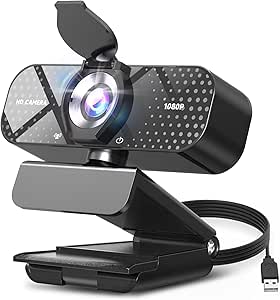 | Best for Budget-Friendly, All-Around Streaming and Video Calls | Resolution: 1080p | Video Capture Format: AVI | Lens Type: Wide Angle | VIEW ON AMAZON | See Our Full Breakdown |
| Logitech MX Brio Ultra HD 4K Webcam – Graphite |  | Best for Premium, Highly Customizable Streaming and Conference Use | Resolution: 4K at 30 fps, 1080p at 60 fps | Sensor Size: 70% larger pixels | Microphones: Dual beamforming noise-reducing | VIEW ON AMAZON | See Our Full Breakdown |
| EMEET C60E Dual-Camera 4K Webcam for Streaming, Wide-Angle & Telephoto |  | Best Versatile Dual-Camera Streaming Solution | Sensor Type: CMOS | Connectivity Technology: USB | Color: Black | VIEW ON AMAZON | See Our Full Breakdown |
| Insta360 Link 2 – 4K Webcam with AI Tracking, HDR, and Gesture Control for PC/Mac |  | Best AI-Enhanced Streaming with Smart Tracking | Sensor Type: CMOS | Connectivity Technology: USB | Color: Graphite Black | VIEW ON AMAZON | See Our Full Breakdown |
| 4K Webcam with Ring Light & Built-in Microphone for PC Streaming |  | Best Lighting and High-Resolution Video Combo | Resolution: 4K@30FPS | Ring Light: Three color temperature settings | Autofocus: TOF autofocus | VIEW ON AMAZON | See Our Full Breakdown |
| EMEET NOVA 4K Webcam for PC, Ultra HD, PDAF Autofocus, Dual Omni Mics |  | Best Business-Grade 4K for Streaming and Meetings | Resolution: 4K UHD | Frame Rate: 30FPS | Sensor: CMOS | VIEW ON AMAZON | See Our Full Breakdown |
| 1080P HD Webcam with Microphone, Noise Cancellation, Privacy Cover, Wide-Angle Lens, Auto Light Correction, Plug & Play USB Webcam |  | Best Budget-Friendly Wide-Angle Streaming Webcam | Resolution: 1080P | Frame Rate: 30 fps | Lens: Wide-angle | VIEW ON AMAZON | See Our Full Breakdown |
| Logitech Brio 101 Full HD 1080p Webcam for Streaming and Meetings – Black |  | Best Overall for Versatile Streaming and Video Calls | Resolution: Full HD 1080p | Connectivity: USB A | Built-in Microphone: Yes | VIEW ON AMAZON | See Our Full Breakdown |
| EMEET S600 4K Webcam for Streaming, Sony 1/2.55” Sensor, PDAF Autofocus |  | Best for High-Resolution Content Creators and Serious Streamers | Sensor: Sony 1/2.55” | Video Resolution: 4K at 30FPS, 1080P at 60FPS | Field of View: 73° at 4K, 40°-73° at 1080P | VIEW ON AMAZON | See Our Full Breakdown |
| AOC 4K Webcam for PC, Streaming Computer Camera with Noise-Canceling Mic |  | Best for Broad Compatibility and Easy 4K Setup | Resolution: 4K Ultra HD | Field of View: 80° | Connectivity: USB-C & USB-A | VIEW ON AMAZON | See Our Full Breakdown |
| NexiGo N60 1080P Webcam with Microphone, Privacy Cover, and Plug and Play Compatibility |  | Best for Budget-Friendly, Reliable HD Streaming | Resolution: 1920 x 1080 at 30fps | Microphone: Built-in noise-canceling | Compatibility: USB 2.0/3.0, Windows, Mac, Linux, Android | VIEW ON AMAZON | See Our Full Breakdown |
| Insta360 Link 2C 4K Webcam for PC/Mac with Auto Framing and AI Noise-Canceling Mic | 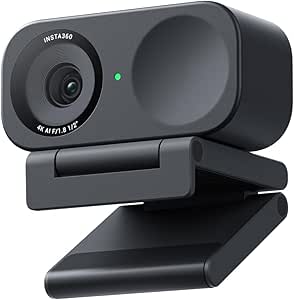 | Best for Creative Streamers and Advanced Content Production | Sensor Type: CMOS | Resolution: UHD 4K | Features: Auto Framing, Gesture Control | VIEW ON AMAZON | See Our Full Breakdown |
| webcams for streaming | Resolution |
|---|---|
| EMEET PIXY Dual-Camera AI-Powe | 4K |
| OBSBOT Meet 2 4K Webcam for PC | 4K UHD |
| Logitech Brio Ultra 4K HD Webc | 4K at 30 fps |
| TRASI 1080P FHD Webcam with No | 1080p |
| Logitech MX Brio Ultra HD 4K W | 4K at 30 fps, 1080p at 60 fps |
| EMEET C60E Dual-Camera 4K Webc | — |
| Insta360 Link 2 | — |
| 4K Webcam with Ring Light & Bu | 4K@30FPS |
| EMEET NOVA 4K Webcam for PC | 4K UHD |
| 1080P HD Webcam with Microphon | 1080P |
| Logitech Brio 101 Full HD 1080 | Full HD 1080p |
| EMEET S600 4K Webcam for Strea | — |
| AOC 4K Webcam for PC | 4K Ultra HD |
| NexiGo N60 1080P Webcam with M | 1920 x 1080 at 30fps |
| Insta360 Link 2C 4K Webcam for | UHD 4K |
More Details on Our Top Picks
EMEET PIXY Dual-Camera AI-Powered PTZ 4K Webcam
The EMEET PIXY stands out for its dual-camera setup and AI-powered tracking, making it ideal for dynamic streaming or online teaching where flexible framing is essential. Unlike the Logitech Brio, which offers high-quality 4K but lacks automatic tracking, PIXY’s dual lenses and AI features provide smooth, automated framing that enhances engagement. However, this added complexity requires additional setup and a tripod, and some features depend on software configuration, which might be a hurdle for less tech-savvy users. Its 4K resolution ensures sharp images, while the noise-canceling microphones improve audio clarity during busy sessions. Price details are not specified, but the feature set positions it as a premium choice for those needing intelligent control and multiple perspectives.
Pros:- AI-powered dual-camera system with smooth tracking
- High-quality 4K resolution for sharp images
- Multiple noise-canceling audio modes for clear sound
- Easy control with preset positions and privacy options
Cons:- Requires additional tripod for mounting
- Some features depend on software setup
Best for: Streamers, online teachers, and business professionals who want automated framing and versatile camera angles.
Not ideal for: Casual users or those on a tight budget, as the setup complexity and potential extra costs may outweigh benefits.
- Resolution:4K
- Camera Type:Dual-camera PTZ
- Sensor:1/2.55″ sensor
- Focus:PDAF and AI Autofocus
- Pan/Tilt:310°/180°
- Frame Rate:30FPS in 4K, 60FPS in 1080P
- Microphone Array:3-mic
- Compatibility:Windows 10+, macOS 10.14+
- Control Software:EMEET STUDIO
Our verdict“This webcam is best suited for professionals who need intelligent tracking and multi-angle streams, despite the extra setup effort.”
OBSBOT Meet 2 4K Webcam for PC with AI Framing and Autofocus
The OBSBOT Meet 2 offers a compact yet capable 4K webcam with AI framing, autofocus, and gesture control, making it suitable for on-the-go content creators and streamers who value portability. Compared to the EMEET PIXY, it is much smaller and lighter, which enhances mobility, but it may lack the advanced pan/tilt capabilities and multi-camera setup. Its high-resolution imaging and AI framing provide a professional look, while the gesture control adds a touch of innovation. The limited details on software customization and the potential overheating during extended use are tradeoffs that could impact long sessions or advanced users. Its USB-C connection makes setup straightforward, but the smaller size may limit some user adjustments or field of view options.
Pros:- High-quality 4K resolution with excellent clarity
- AI framing and autofocus for professional-looking videos
- Lightweight and portable design
- Plug-and-play USB-C connectivity
Cons:- May overheat during prolonged use
- Limited information on software customization
- No adjustable field of view
Best for: Content creators and streamers who need a portable, high-resolution camera with AI features for quick setup and mobility.
Not ideal for: Users requiring extensive manual control, customizable field of view, or long streaming sessions without overheating concerns.
- Resolution:4K UHD
- Sensor:1/2″ CMOS
- Connectivity:USB-C
- Microphone:Dual omni-directional noise-canceling mics
- Features:AI framing, autofocus, gesture control
- Weight:40.5 grams
Our verdict“This webcam makes sense for mobile streamers and content creators seeking AI-powered features in a compact form, with some caution about thermal performance.”
Logitech Brio Ultra 4K HD Webcam for Streaming and Meetings – Black
The Logitech Brio brings excellent 4K video quality with vibrant color and detailed images, making it a staple for professional streamers and business calls. Its adjustable field of view (65°, 78°, 90°) offers flexible framing, surpassing many basic webcams like the TRASI, which has a fixed focus. The built-in noise-canceling microphones provide cleaner audio, but the larger, bulkier design and premium price mean it might not suit minimalistic setups or budget-conscious users. Windows Hello compatibility adds a layer of security, but the need for compatible software for full customization can be a hurdle for some. Overall, it delivers exceptional video quality with versatile features, albeit at a higher cost.
Pros:- Excellent 4K video with vibrant color and detail
- Adjustable field of view for flexible framing
- Noise-canceling dual microphones for clear audio
- Supports Windows Hello for secure login
Cons:- Higher price point compared to basic webcams
- Bulkier design may not fit small setups
- Requires compatible software for full features
Best for: Professional streamers and remote workers who need high-resolution, adjustable framing, and integrated security features.
Not ideal for: Casual users or those seeking a budget-friendly, ultra-compact webcam with minimal features.
- Resolution:4K at 30 fps
- Field of View:65°, 78°, 90°
- Microphones:Dual omnidirectional noise-canceling
- Compatibility:Windows, Mac, ChromeOS
- Privacy Shutter:Yes
- Warranty:1 year
Our verdict“This webcam is ideal for professionals needing high-quality video and flexible framing, with a premium design that fits serious streaming needs.”
TRASI 1080P FHD Webcam with Noise-Canceling Mic, Auto Light Correction, Privacy Cover, Wide Angle Lens, Plug & Play USB for Laptop/Desktop/Mac
The TRASI 1080P FHD Webcam offers reliable 1080p video quality with automatic light correction and a wide-angle lens, making it a practical choice for those new to streaming or needing a straightforward, affordable solution. Compared with the OBSBOT Meet 2, which provides 4K resolution and AI framing, TRASI’s fixed focus and 1080p limit its versatility but keeps costs lower and setup simple. Its privacy cover and noise-canceling microphone add security and clarity, though the fixed focus may not suit all environments or users who need zoomed-in shots. Compatible with most devices via USB, it’s a balanced option for casual streaming, video conferencing, and content creation without the bells and whistles.
Pros:- Reliable 1080p Full HD video quality
- Wide-angle lens for broader framing
- Automatic light correction for varied environments
- Privacy cover for security
Cons:- Fixed focus limits flexibility
- Limited to 1080p resolution
- No advanced AI tracking or framing
Best for: Beginners and casual streamers seeking a dependable, budget-friendly webcam for everyday use.
Not ideal for: Advanced streamers or content creators requiring high-definition video or AI features for professional production.
- Resolution:1080p
- Video Capture Format:AVI
- Lens Type:Wide Angle
- Focus Type:Fixed Focus
- Special Features:Auto Light Correction, Privacy Cover
- Connectivity:USB
Our verdict“This webcam fits entry-level streaming needs well, especially for those prioritizing affordability and ease of use over advanced features.”
Logitech MX Brio Ultra HD 4K Webcam – Graphite
The Logitech MX Brio delivers outstanding 4K video quality with AI-based enhancements like auto white balance, exposure, and noise reduction, making it a favorite for high-end professional streaming. Its adjustable lighting controls and Show Mode, which allows sharing notes or whiteboards, add unique versatility not found in standard webcams like the EMEET PIXY or OBSBOT Meet 2. However, its higher price and reliance on USB-C for optimal performance make it less accessible for casual users or those with older hardware. Its larger physical size may also be a drawback in tight setups. For users who need the best image quality and extensive customization, this webcam offers unmatched flexibility, but it may be overkill for more casual streams.
Pros:- Exceptional 4K video with AI enhancements
- Customizable lighting and white balance controls
- Dual noise-reducing microphones for clear audio
- Supports Show Mode for sharing notes
Cons:- Premium price point
- Requires USB-C port for best performance
- Larger size may not fit all setups
Best for: Professional streamers, educators, and remote workers demanding top-tier image quality and advanced control features.
Not ideal for: Users with limited budgets or minimal desk space who prefer simple plug-and-play options.
- Resolution:4K at 30 fps, 1080p at 60 fps
- Sensor Size:70% larger pixels
- Microphones:Dual beamforming noise-reducing
- Compatibility:Windows, macOS, Chrome OS, Linux
- Features:Auto white balance, auto exposure, noise reduction, adjustable lighting, Show Mode
Our verdict“This webcam is the best choice for those needing professional-grade quality and extensive control, despite its higher cost and size.”
EMEET C60E Dual-Camera 4K Webcam for Streaming, Wide-Angle & Telephoto
The EMEET C60E stands out for its dual-camera setup, offering both wide-angle and telephoto views in one device. Compared with single-lens webcams like the 4K Webcam with Ring Light & Built-in Microphone, it provides greater flexibility for dynamic streaming and presentations. The 11X hybrid zoom and smart controls make it ideal for content creators who need to switch perspectives smoothly, though zoom support is limited in 4K mode, which can be a drawback for high-resolution streams. Its compact design and RGB lighting add aesthetic value, but its water resistance and durability details are lacking. This model is best suited to streamers or educators who want multiple angles without multiple devices, but it may be overkill for simple video calls.
Pros:- Dual-camera setup provides versatile wide-angle and telephoto views
- Supports up to 11X hybrid zoom with smooth autofocus
- Smart control options via remote and software enhance usability
- Vibrant RGB lighting adds aesthetic appeal
Cons:- Zoom not supported in 4K, 60FPS, or YUY2 modes
- Incompatible with Chrome OS and Windows Hello functions
- Limited information on water resistance or durability
Best for: Content creators, educators, or remote presenters needing multiple perspectives in a single device
Not ideal for: Casual users or those seeking a simple webcam for occasional meetings, as its feature set and complexity are higher than needed
- Sensor Type:CMOS
- Connectivity Technology:USB
- Color:Black
- Special Features:2 Mics, RGB Lighting, Remote Control, Dual-Camera
- Photo Sensor Size:1/2.8-inch
- Viewing Angle:73 degrees
- Display Resolution:Maximum UHD
- Audio Supported:AAC, PCM
Our verdict“This webcam is perfect for streamers or professionals who need multi-angle footage but may be excessive for basic video calls.”
Insta360 Link 2 – 4K Webcam with AI Tracking, HDR, and Gesture Control for PC/Mac
The Insta360 Link 2 excels with its AI tracking and advanced video modes, making it ideal for streamers who want dynamic, professional-looking content. Its 4K HDR video and excellent low-light performance surpass many competitors, such as the EMEET NOVA 4K, especially in complex lighting environments. The AI tracking and gesture control provide effortless framing and interaction, though it’s less compatible with ARM-based Windows systems and may require a slightly complex setup. Its compact size is convenient, but the software complexity may challenge beginners. This pick makes the most sense for streamers, gamers, or educators seeking smart features that elevate their live video quality, though casual users might find it over-featured.
Pros:- High-quality 4K video with HDR and low-light capability
- AI tracking and auto focus for professional framing
- Gesture controls and remote smartphone control for convenience
- Versatile modes including DeskView and Whiteboard
Cons:- Not compatible with ARM Windows systems or Windows Hello
- Requires USB connection, limiting portability without a computer
- Setup software can be complex for newcomers
Best for: Streamers, gamers, or online educators looking for AI-driven auto-framing and high-quality visuals
Not ideal for: Users with limited technical experience or those on ARM-based Windows devices, due to compatibility issues
- Sensor Type:CMOS
- Connectivity Technology:USB
- Color:Graphite Black
- Special Features:DeskView, Whiteboard, 4K Portrait Mode
- Sensor Size:1/2-inch
- Maximum Focal Length:108 centimeters
- Maximum Aperture:2.22 millimeters
- Audio Supported:Multiple formats
Our verdict“Ideal for tech-savvy streamers and content creators wanting intelligent framing and premium video quality.”
4K Webcam with Ring Light & Built-in Microphone for PC Streaming
This 4K Webcam with Ring Light offers excellent resolution and customizable lighting, making it a strong choice for streamers who prioritize image quality. The adjustable ring light with three color settings helps achieve professional lighting conditions, a feature that sets it apart from basic webcams like the 1080P HD Webcam with Microphone. The dual noise-canceling microphones improve audio clarity, though the absence of an adjustable field of view might limit framing flexibility. Its plug-and-play nature makes setup simple, but the higher price tag reflects its premium features. This webcam is best for streamers or content creators who want high-res video with integrated lighting, especially in variable lighting conditions, but may be overkill for casual users or those on a tight budget.
Pros:- High-resolution 4K video at 30FPS
- Adjustable ring light for perfect lighting
- Dual noise-canceling microphones for clear audio
- Easy plug-and-play setup
Cons:- No mention of adjustable field of view
- Limited wireless options or remote control
- Higher price compared to standard webcams
Best for: Streamers or online presenters who need superior lighting and 4K video quality
Not ideal for: Users seeking a budget-friendly option or those who prefer adjustable field of view for flexible framing
- Resolution:4K@30FPS
- Ring Light:Three color temperature settings
- Autofocus:TOF autofocus
- Microphones:Dual noise-canceling
- Compatibility:Windows, Mac OS, Linux
- Connection:USB
Our verdict“An excellent choice for streamers who need quality video and integrated lighting in a single device.”
EMEET NOVA 4K Webcam for PC, Ultra HD, PDAF Autofocus, Dual Omni Mics
The EMEET NOVA 4K offers sharp 4K visuals with a focus on professional use, making it suitable for business meetings and educational streaming. Its PDAF autofocus ensures consistently sharp images, outperforming many basic webcams like the 1080P HD Webcam with Microphone. Although it defaults to 1080P in many applications, the real strength lies in its ability to deliver true 4K quality when properly configured, which may require extra software. The dual omni-directional microphones provide clear stereo sound, but the lack of wireless connectivity and manual focus only can limit flexibility. Its robust mounting options and privacy features make it reliable for frequent use. This model is best for professionals seeking high-resolution visuals without complex setup, though casual users might find its extra features unnecessary.
Pros:- High-quality 4K video at 30FPS for sharp visuals
- Accurate PDAF autofocus for consistent clarity
- Dual omni-directional microphones for clear stereo sound
- Flexible mounting with 360° rotation and adjustable stand
Cons:- Video defaults to 1080P in some applications
- Requires software to enable full 4K capabilities
- No wireless connectivity options
Best for: Business professionals, educators, or streamers needing high-quality 4K visuals with dependable autofocus
Not ideal for: Casual users or those seeking wireless or mobile webcam solutions, due to its wired setup and manual focus
- Resolution:4K UHD
- Frame Rate:30FPS
- Sensor:CMOS
- Autofocus:PDAF
- Microphones:Dual omni-directional
- Stand Adjustment:360° horizontal, 15° vertical
- Privacy Cover:Yes
Our verdict“A solid choice for professionals needing reliable, high-resolution streaming with excellent autofocus and audio clarity.”
1080P HD Webcam with Microphone, Noise Cancellation, Privacy Cover, Wide-Angle Lens, Auto Light Correction, Plug & Play USB Webcam
The 1080P HD Webcam with Microphone offers reliable video quality with a wide-angle lens, making it suitable for everyday streaming and video calls. Unlike higher-priced models such as the Insta360 Link 2, it provides a straightforward, plug-and-play experience without complex setup or advanced features. The noise-canceling microphone and automatic light correction improve audio and video clarity in most lighting conditions, but its fixed wide-angle lens limits framing flexibility, and it lacks autofocus, which can reduce image sharpness in some scenarios. Its affordability and simple design make it ideal for casual streamers or remote workers on a budget. This webcam fits best with users who need decent quality without extra bells and whistles, but it may not satisfy those seeking premium features or adjustable framing.
Pros:- High-quality 1080P video with wide-angle coverage
- Built-in noise-canceling microphone
- Automatic light correction for various lighting conditions
- Easy plug-and-play setup
Cons:- No adjustable mount or tripod support
- Limited to fixed wide-angle view
- No advanced autofocus or zoom features
Best for: Casual streamers, remote workers, or students needing reliable, affordable webcam coverage
Not ideal for: Professional streamers or content creators who require auto-focus or adjustable field of view for more dynamic production
- Resolution:1080P
- Frame Rate:30 fps
- Lens:Wide-angle
- Microphone:Noise-canceling
- Light Correction:Auto
- Connection:USB
Our verdict“A practical, budget-friendly webcam ideal for everyday streaming and communication needs.”
Logitech Brio 101 Full HD 1080p Webcam for Streaming and Meetings – Black
The Logitech Brio 101 stands out for delivering crisp 1080p video quality, making it suitable for both professional streaming and clear video calls. Compared to the Insta360 Link 2C, it lacks advanced AI features and auto framing, but its simplicity and reliability make it ideal for everyday use. Its privacy shutter adds security, and compatibility with major platforms ensures seamless operation. The main tradeoff is its limited connectivity — only USB-A — which might require adapters for newer devices. It doesn’t include additional features like built-in lighting or advanced adjustments, but its environmental angle with recycled plastic makes it a thoughtful choice for eco-conscious users. Overall, this webcam offers a solid balance of quality and security for users who want dependable performance without extra bells and whistles.
Pros:- Clear 1080p video for professional-looking streams and meetings
- Built-in privacy shutter for added security
- Compatible with major video conferencing platforms
- Made with environmentally friendly recycled plastic
Cons:- Limited to USB A connection, no USB-C port
- Basic feature set without advanced image adjustments
- No built-in lighting or enhanced auto-focus features
Best for: General users who need reliable 1080p quality for streaming, meetings, and casual content creation
Not ideal for: Streamers seeking 4K resolution or advanced auto framing features, as it stays limited to 1080p and basic controls
- Resolution:Full HD 1080p
- Connectivity:USB A
- Built-in Microphone:Yes
- Privacy Shutter:Yes
- Compatibility:Windows, Mac
- Material:77% post-consumer recycled plastic
Our verdict“This webcam is ideal for users wanting dependable HD quality with simple setup and security features.”
EMEET S600 4K Webcam for Streaming, Sony 1/2.55” Sensor, PDAF Autofocus
The EMEET S600 offers impressive 4K clarity with a Sony sensor, making it an excellent choice for content creators demanding sharp, detailed video. Unlike the Insta360 Link 2C, which excels in auto framing and AI features, the S600 prioritizes raw image quality and crisp autofocus with PDAF technology. Its auto light adjustment enhances performance in various lighting conditions, but the fixed FOV at 4K can be limiting for dynamic framing. It requires software for full customization and may have software-dependent resolution settings, which could be a hassle for some users. This makes it a compelling option for those who want high-quality video with minimal fuss, provided they’re comfortable with some setup complexity and software reliance.
Pros:- Exceptional 4K resolution with high clarity
- Advanced PDAF autofocus for sharp images
- Auto light adjustment for varied lighting environments
- Integrated privacy cover for security
Cons:- Video resolution may depend on software settings
- Fixed FOV at 4K could limit framing options
- Requires software for advanced adjustments
Best for: Professional streamers, YouTubers, and content creators who prioritize ultra HD clarity and autofocus precision
Not ideal for: Casual users or gamers who don’t need 4K resolution or are concerned about setup complexity, as it’s more suited to content production
- Sensor:Sony 1/2.55”
- Video Resolution:4K at 30FPS, 1080P at 60FPS
- Field of View:73° at 4K, 40°-73° at 1080P
- Autofocus:PDAF
- Light Adjustment:Auto
- Privacy Cover:Yes
Our verdict“Ideal for creators seeking professional-grade 4K quality with reliable autofocus, despite some setup needs.”
AOC 4K Webcam for PC, Streaming Computer Camera with Noise-Canceling Mic
The AOC 4K Webcam delivers sharp ultra HD video with an 80° wide angle, making it suitable for professional-looking streams and conference calls. Compared to the NexiGo N60, which offers 1080p and simpler setup, the AOC provides higher resolution and a broader view, ideal for multi-person or wide-shot scenarios. Its plug-and-play design supports both USB-C and USB-A, providing flexibility across devices, but may require adapters for some setups. The automatic light correction and privacy sliding cover enhance usability, yet for basic users, the 4K resolution might be unnecessary and overkill, requiring more bandwidth and processing power. This webcam is best suited for users who want a straightforward, high-quality, wide-angle camera that fits into a professional or semi-professional streaming environment.
Pros:- Ultra HD 4K resolution for crisp, detailed video
- Wide 80° field of view for multi-person or wide shots
- Supports USB-C and USB-A for broad compatibility
- Easy plug-and-play setup
Cons:- Requires compatible USB-C or USB-A ports, may need adapters
- Overkill for basic streaming needs
- Higher bandwidth and processing demands
Best for: Content creators and professionals needing a 4K camera with broad device compatibility and wide field of view
Not ideal for: Casual users or gamers who don’t require 4K resolution or wide angle, as the higher specs aren’t always necessary
- Resolution:4K Ultra HD
- Field of View:80°
- Connectivity:USB-C & USB-A
- Focus Type:Auto Focus
- Microphone:Built-in noise-reducing
- Privacy Feature:Sliding lens cover
Our verdict“A great choice for professionals who want high-resolution wide shots with flexible connectivity options.”
NexiGo N60 1080P Webcam with Microphone, Privacy Cover, and Plug and Play Compatibility
The NexiGo N60 offers dependable 1080p video quality with an integrated noise-canceling microphone, making it a practical option for everyday conferencing and streaming. Unlike the Logitech Brio 101, which provides higher resolution, the N60 keeps things simple and affordable, suitable for users who don’t need 4K or advanced features. Its broad compatibility and plug-and-play setup make it accessible across many devices, and the privacy cover adds security. The main tradeoff is its fixed focus lens, which might not be ideal for varying distances, and it doesn’t support gaming consoles or high-end customization. For those seeking a straightforward, reliable webcam for professional or personal use without breaking the bank, this model fits well.
Pros:- Reliable 1080p video with clear audio
- Plug-and-play with broad device compatibility
- Includes privacy cover for security
- Affordable price point
Cons:- Fixed focus lens limits flexibility
- No 4K resolution or advanced features
- Not compatible with gaming consoles
Best for: Students, remote workers, and casual streamers seeking reliable HD quality with easy setup
Not ideal for: High-end streamers or gamers who need 4K resolution or advanced auto-focus, as it’s more basic and fixed focus
- Resolution:1920 x 1080 at 30fps
- Microphone:Built-in noise-canceling
- Compatibility:USB 2.0/3.0, Windows, Mac, Linux, Android
- Privacy Cover:Yes
- Focus Type:Fixed
- Optimal Distance:19.6 inches to 13 feet
Our verdict“A dependable, budget-friendly webcam suited for everyday video meetings and casual streaming.”
Insta360 Link 2C 4K Webcam for PC/Mac with Auto Framing and AI Noise-Canceling Mic
The Insta360 Link 2C elevates streaming with its 4K HDR video, AI-powered auto framing, and gesture controls, making it perfect for dynamic content creators. Unlike the EMEET S600, which emphasizes raw resolution and autofocus, the Link 2C offers versatile modes like Whiteboard and DeskView, adding creative options for engaging streams. Its auto framing and gesture controls are highly useful for solo streamers who want to appear professional without manual adjustments, but the setup can be complex for less tech-savvy users. Compatibility is broad, but it’s not supported on ARM-based Windows systems, which could limit some users. This webcam is ideal for streamers and educators who want an all-in-one device combining high-quality video with intelligent framing and interactive features.
Pros:- UHD 4K HDR video with excellent low-light performance
- Auto framing and gesture controls streamline content creation
- Versatile modes like Whiteboard and DeskView
- Smartphone app for remote control
Cons:- Not compatible with ARM-based Windows systems
- Setup can be complex for some users
- Lacks Windows Hello face recognition support
Best for: Creative professionals and streamers who want versatile modes, AI auto framing, and high-quality HDR video
Not ideal for: Casual users or those with less technical setup preferences, due to its more complex configuration and compatibility limitations
- Sensor Type:CMOS
- Resolution:UHD 4K
- Features:Auto Framing, Gesture Control
- Microphone:AI Noise Cancelling
- Display Size:2 inches
- Connectivity:USB
Our verdict“Perfect for creative professionals seeking high-quality, feature-rich streaming with smart auto framing and interactive modes.”

How We Picked
Our evaluation focused on performance factors critical for streaming, including resolution, autofocus accuracy, low-light performance, and AI features like auto-framing. Usability aspects such as ease of setup, compatibility, and microphone quality were also key. We compared build quality, user interface, and additional features like privacy covers and lighting. Price-to-value ratio was considered to recommend options that balance cost with performance. Only models with proven reliability and positive user feedback made the list, ensuring each product offers genuine streaming value.Factors to Consider When Choosing Webcams For Streaming
Choosing the right webcam for streaming involves balancing several key factors. Understanding your specific needs—whether for professional broadcasting, casual gaming, or virtual meetings—will influence what features matter most. Beyond the specs, consider how easy the webcam is to set up and use, its compatibility with your devices, and how much you’re willing to invest. This guide highlights the main considerations to help you avoid common pitfalls and select a webcam that truly enhances your streaming quality.Resolution and Image Quality
Higher resolution webcams, such as 4K models, provide sharper images that make your streams look more professional. However, 4K webcams require a powerful PC and fast internet to handle the larger data streams smoothly. Conversely, 1080p models are more affordable, easier to run, and still deliver excellent quality for most viewers. Consider your target audience and streaming platform—if viewers will see your stream on large screens, investing in higher resolution can be worthwhile. Keep in mind that image quality also depends heavily on sensor size and lens quality, not just resolution alone.
Autofocus and Low-Light Performance
Reliable autofocus ensures your image stays sharp even if you move around or change positions. For streaming, cameras with fast, accurate autofocus reduce distractions and improve viewer engagement. Low-light performance is equally important—if you stream in less-than-ideal lighting conditions, look for webcams with good HDR or automatic light correction. Poor low-light handling can result in grainy, washed-out images, diminishing your professional appearance. Investing in a model with these features can make a noticeable difference in overall stream quality.
Field of View and Framing Features
The field of view (FOV) determines how much of your surroundings is captured—wider FOVs are great for showing full backgrounds or multiple people, while narrower angles focus more on your face. Some webcams include AI features like auto-framing and tracking, which automatically keep you centered or follow your movements. These features are ideal for dynamic presentations or solo streamers who want to appear more engaging without manual adjustments. However, they can add complexity and cost, so assess whether such features align with your streaming style.
Microphone Quality and Additional Features
Built-in microphones vary greatly—some models incorporate noise-canceling tech that reduces background noise, producing clearer audio. Since audio quality directly impacts viewer experience, prioritize webcams with high-quality mics if you don’t plan on using separate audio equipment. Additional features like privacy shutters, built-in lighting, or customizable mounts can also enhance your setup, but weigh their importance against your budget and space constraints. Consider whether these extras provide genuine convenience or just add unnecessary complexity.
Price and Overall Value
Webcams span a broad price range, from budget models to premium options. While higher-priced webcams often offer superior resolution, better autofocus, and advanced AI features, they may not be necessary for casual or beginner streamers. Conversely, investing in a mid-range model can deliver a noticeable upgrade in quality without overspending. Think about your streaming goals—if you’re building a professional setup, paying more for reliability and top-tier features makes sense, but for casual use, a more affordable model may suffice. Always weigh the long-term benefits against your immediate budget.
Frequently Asked Questions
Is 4K resolution really necessary for streaming?
Not necessarily. While 4K offers sharper images, it also demands more from your PC and internet connection. For many streamers, 1080p at 60fps provides excellent quality that’s easier to manage and still looks professional. If you plan to upload high-quality content or want to future-proof your setup, 4K can be worthwhile, but it’s not a must for most viewers. Consider your hardware capabilities and streaming platform requirements before investing heavily in 4K models.
Should I prioritize AI tracking or auto-framing features?
AI tracking and auto-framing can significantly improve your on-camera presence by keeping you centered without manual adjustments. These features are especially useful for solo streamers or presenters who move around frequently. However, they can increase the cost and complexity of setup. If you prefer a straightforward, plug-and-play experience, a static camera with good autofocus and framing might be better. Weigh how much dynamic movement you anticipate against your budget and comfort with advanced tech.
How important is microphone quality in choosing a webcam?
Microphone quality is often overlooked but plays a vital role in stream quality. Clear, noise-canceling mics reduce the need for external audio equipment, simplifying your setup. If you’re doing professional broadcasts, consider models with high-quality integrated microphones, but for serious quality, investing in a dedicated microphone might still be necessary. For casual streaming or conferencing, a built-in mic with noise suppression is usually sufficient, but always check reviews to confirm clarity and background noise handling.
Can I use a regular webcam for professional streaming?
Yes, many regular webcams can work well for streaming, especially models with at least 1080p resolution and good autofocus. However, dedicated streaming webcams often include enhanced features like better low-light performance, wider FOVs, and AI tools that make your streams look more polished. If you’re aiming for a professional-grade broadcast, investing in a specialized streaming webcam can provide a noticeable upgrade. For casual or infrequent streams, a high-quality regular webcam may be enough.
Is it worth spending more on premium webcams?
Spending more typically yields better image quality, more reliable autofocus, enhanced low-light performance, and advanced features like AI tracking. If your streaming is professional, or if you want the best possible image for your audience, investing in a premium model makes sense. However, for casual users or beginners, a mid-range webcam can offer excellent value without the high cost. Consider your streaming goals, equipment compatibility, and budget to determine if the extra investment aligns with your needs.