This checklist is for homeowners planning how to keep essential appliances and home systems supported during a power outage. The picks cover portable backup power, standby equipment, sump pump backup, refrigerator monitoring, and battery charging, so you can focus on the parts of your home that matter most to you. Start with your essential needs before choosing equipment.

Get home appliances delivered free with Prime
- Fast, free delivery on millions of items
- Prime Video, Amazon Music and more included
- Member-only deals all year
The sections are organized by product role, from power sources to supporting devices. Each one explains why that slot matters, what to check before buying, and who the pick may suit. Product names are listed as provided; confirm the model details and included components with the seller before purchase. Check the exact configuration for each item.
Use this checklist to compare requirements against your home setup. Note which appliances you want to support, how they connect, and whether installation or compatible batteries and accessories are needed. For fixed electrical equipment, review the product documentation and installation requirements before making a selection. Verify compatibility first, then decide which backup needs to address.
Portable power station
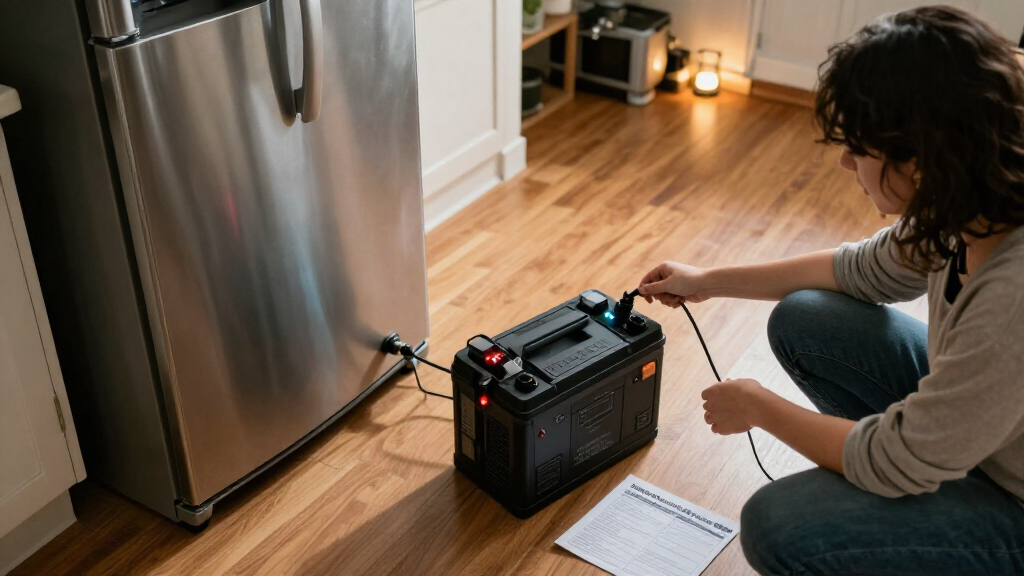
A portable power station can be a flexible option for powering selected appliances and devices during an outage. The listed pick is the Jackery HomePower 3600 Plus Portable Power Station, 3584Wh, 3600W. Before choosing it, identify which equipment you intend to connect and check each device’s power requirements against the station’s documented output and capacity. Match the load to the specifications rather than assuming every appliance will be suitable.
A common buying mistake is choosing by the headline capacity alone. Appliance startup demands, total simultaneous load, connection type, and expected run time all affect whether a particular setup will work for your needs. Make a short list of essential loads and check their labels and manuals. Confirm the available outlets, charging options, and any operating limits in the product documentation. Check both continuous and startup needs for the appliances you plan to use.
Also consider where you will store and operate the unit, how you will recharge it, and whether its size and handling suit your space. Do not assume it connects to household wiring or supports a whole home; verify the intended use and any accessories separately. Plan the actual connection path before relying on a portable station.
What to look for:
- Confirm appliance running and startup requirements against documented output.
- Check capacity against the loads and duration you need.
- Verify outlet types and whether your devices connect directly.
- Review supported charging methods and any required accessories.
- Confirm intended placement, handling, and operating requirements.
Jackery HomePower 3600 Plus Portable Power Station, 3584Wh, 3600W

This portable power station provides 3584Wh of capacity and 3600W output, with expandable capacity and support for 120V and 240V operation in parallel. It offers AC, solar, gas generator, and hybrid charging, plus a wheeled design with a telescopic handle for easier transport.
Pros:
- High 3584Wh capacity with options to expand
- Supports AC, solar, gas generator, and hybrid charging
- Wheels and telescopic handle make it easier to move
- Designed for up to 6,000 battery cycles
Cons:
- Weighs 77.2 pounds
- 240V operation requires parallel configuration
Best for: Homeowners looking to power selected compatible devices.
Not ideal for: Anyone expecting an unverified whole-home connection.
Bottom line: Compare your essential loads and connection needs with the product documentation before choosing this station.
Dual-fuel generator
The listed product name is Jackery HomePower 3600 Plus Portable Power Station with Two 200W Solar. Although this checklist assigns it to the dual-fuel generator slot, the provided name describes a portable power station with two solar panels. Do not assume that it is a fuel-powered generator or supports dual-fuel operation. Verify the product category and configuration before treating it as a generator pick.
Buying by a section label instead of the exact product details can lead to a mismatch in fuel source, output, or intended use. Check the manufacturer’s documentation for the precise model, power inputs and outputs, included solar components, and any operating requirements. Confirm whether the listed panels are included in the offered configuration and what else is needed to use them. Confirm what is actually included with the seller.
For backup planning, compare the documented capabilities with the appliances you want to support and the way you expect to use the equipment. If your requirement is specifically a dual-fuel generator, verify that the chosen product documentation identifies that function and the compatible fuels. Consider placement, connections, and the instructions for safe operation. Use the model documentation as the deciding reference before purchase.
What to look for:
- Verify whether the exact model is a generator or a portable power station.
- Confirm documented fuel sources if dual-fuel operation is required.
- Check output and compatibility for intended appliances.
- Confirm whether two 200W solar panels are included.
- Review connections, placement, and operating instructions.
Jackery HomePower 3600 Plus Portable Power Station with Two 200W Solar Panels

This portable power station has a 3,584Wh capacity, 3,600W output, and can expand to 21kWh per unit. It supports AC, solar, gas generator, and hybrid charging, and includes a wheeled design with a telescopic handle.
Pros:
- High 3,600W output and expandable battery capacity
- Supports four charging methods
- Wheels and telescopic handle make it easier to move
- Rated for 6,000 battery cycles
Cons:
- Heavy at 77.2 pounds
- Solar panels may arrive in separate packages
Best for: Shoppers checking a portable station and solar configuration.
Not ideal for: Anyone requiring confirmed dual-fuel generator operation.
Bottom line: The supplied product name does not establish dual-fuel capability, so verify the exact model before buying.
Automatic transfer switch
The listed pick is the Generac 14 kW Whole-Home Standby Generator with 200-Amp Transfer Switc. Its name identifies a standby generator and a 200-amp transfer switch, making this slot relevant to shoppers considering fixed backup equipment. Before buying, check the full product listing and documentation, including the complete model name and the exact transfer equipment included. Confirm the complete package details before planning an installation.
A common mistake is assuming that a named switch automatically makes a generator compatible with a home’s electrical service or intended loads. Have the home’s service details and backup priorities ready, and check them against the manufacturer’s specifications and installation requirements. Clarify whether the desired circuits or whole-home arrangement are supported by the selected configuration. Confirm service and load compatibility before proceeding.
Also account for the installation requirements described for the exact model. Fixed generator and transfer equipment need a suitable installation plan; do not treat the product name alone as confirmation that it fits your property. Review required connections, siting guidance, and any other components identified in the documentation. Check installation requirements early so the equipment can be evaluated against your home.
What to look for:
- Confirm the full product name and exact included transfer switch.
- Check the documented output and supported household loads.
- Verify compatibility with the home’s electrical service.
- Review installation, connection, and siting requirements.
- Confirm whether additional components are specified.
Generac 14 kW Whole-Home Standby Generator with 200-Amp Transfer Switch and Cell

This 14 kW standby generator automatically detects a power outage and supplies backup power to a home, running on an existing natural gas or liquid propane fuel supply. Built-in cellular connectivity supports remote monitoring and control through the Mobile Link app, while oil-level sensors and cold-start improvements help support reliable operation.
Pros:
- Automatically detects outages and starts to provide home backup power.
- Supports natural gas and liquid propane fuel supplies.
- Built-in cellular connectivity enables remote monitoring, control, and maintenance alerts.
- Oil-level sensors and cold-start improvements support generator readiness.
Cons:
- Mobile Link premium subscription is required for the app’s remote features.
- At 391 pounds, the generator is heavy and requires substantial installation planning.
Best for: Homeowners evaluating a fixed standby setup.
Not ideal for: Anyone seeking a portable, plug-in backup option.
Bottom line: Verify the model, included transfer equipment, and home compatibility before planning installation.
Battery backup sump pump
A battery backup sump pump is intended for a specific household concern: keeping a sump system supported when normal power is unavailable. The listed pick is the Zoeller Aquanot Fit 12-Volt DC Battery Backup Sump Pump System with Wi. The product name is truncated, so check the full listing and documentation to establish the exact system configuration and what the final “with Wi” refers to. Resolve the incomplete product name before comparing options.
A frequent mistake is assuming a backup system will fit any sump pit or work with any existing pump. Check the pit dimensions, plumbing arrangement, pump setup, and the documented compatibility requirements for your installation. Confirm what battery is required or included, how the system indicates its operating status, and how it is maintained. Compare the system with your existing setup rather than relying on the category name.
Think through how the backup will be installed and accessed for routine checks. Review the manufacturer’s guidance for battery care, testing, and any alerts or connectivity features identified in the complete product description. Do not infer wireless functions from the truncated name. Confirm features and upkeep requirements directly from the product materials before purchase.
What to look for:
- Find the complete product name and system configuration.
- Check pit, plumbing, and existing-pump compatibility.
- Confirm battery requirements and whether a battery is included.
- Review status indicators, alerts, and any connectivity features.
- Check installation, access, testing, and battery maintenance guidance.
Zoeller Aquanot Fit 12-Volt DC Battery Backup Sump Pump System with Wi-Fi

This battery-powered backup sump pump works alongside a primary pump, providing up to six hours of pumping when power is interrupted or additional capacity is needed. Its controller includes automatic charging, battery protection, alarms, self-testing, diagnostics, and Wi-Fi connectivity for remote access; a 12-volt battery and primary pump are not included.
Pros:
- Provides backup pumping during a power interruption or when additional capacity is needed
- Controller includes automatic charging, battery protection, and a low-battery alarm
- Self-testing, diagnostics, and high-water switch provide monitoring features
- Built-in Wi-Fi enables remote access and notifications through Z Control
Cons:
- 12-volt battery is not included
- Primary sump pump is not included
Best for: Homeowners checking backup options for a sump setup.
Not ideal for: Anyone unable to confirm fit or battery requirements.
Bottom line: Verify the complete model details and compatibility with your sump installation.
Refrigerator temperature alarm
A refrigerator temperature alarm can help you monitor conditions inside an appliance during a power interruption. The listed pick is Refrigerator Door Alarm with 60-Second Delay, Multiple Reminders, and; its name is incomplete and does not establish whether it measures temperature, monitors a door, or does both. Confirm the alarm’s actual function before treating it as a temperature monitor.
A common buying mistake is assuming a door alarm and temperature alarm provide the same information. Check the full product description for the type of sensor, what triggers an alert, how alerts are delivered, and whether the unit is intended for refrigerator use. The “60-Second Delay” and “Multiple Reminders” wording does not by itself clarify what event they apply to. Match the alert behavior to your need by reviewing the complete specifications.
Check how the device is powered, how it is placed or attached, and whether its alert can reach you in the location where you need it. Review the stated operating range and setup instructions if provided. Do not assume it reports temperatures or sends remote notifications unless the documentation says so. Verify sensing and alert details before relying on it for outage monitoring.
What to look for:
- Confirm whether it senses temperature, door status, or both.
- Review what triggers the 60-second delay and reminders.
- Check alert types and how they are delivered.
- Verify power source, placement, and setup requirements.
- Confirm suitability for the refrigerator and monitoring range.
Refrigerator Door Alarm with 60-Second Delay, Multiple Reminders, and Adjustable

This compact refrigerator door alarm features multiple alert modes and delays to ensure your fridge or freezer door is properly closed. It emits progressive and continuous alarms, including a loud siren option, to help prevent energy loss and maintain appliance security.
Pros:
- Compact size fits various fridge models discreetly
- Multiple alarm modes and adjustable volume levels
- Progressive alerts help prevent door being left open
Cons:
- Requires manual setup and sensor placement
- Alarm sounds may be disruptive in quiet environments
Best for: Shoppers comparing refrigerator monitoring alarms.
Not ideal for: Anyone needing confirmed temperature readings without verification.
Bottom line: The supplied name is incomplete, so confirm the sensing function and alerts before buying.
Smart battery charger
A battery charger can support a backup plan when the selected system uses a compatible rechargeable battery. The listed pick is TowerTop 25A Max Pro Battery Charger: 12V Fully Automatic Smart Trickl. The product name is truncated, so verify the full model and its supported battery types before deciding whether it suits your equipment. Start with the battery’s specifications and compare them with the charger documentation.
A common mistake is matching a charger only by voltage. Check the battery chemistry, capacity, charging profile, connection type, and any restrictions identified by both manufacturers. The “25A Max” and “12V” wording in the supplied name is not enough to establish suitability for every 12-volt battery. Verify chemistry and charging compatibility to avoid selecting a mismatched charger.
Consider where the charger will be used and how its cables and controls fit your setup. Read the complete instructions for connection, operation, and any automatic charging or maintenance functions. Confirm what accessories are included and whether they match the battery terminals. Check the full product listing and manual before incorporating the charger into an outage readiness plan.
What to look for:
- Confirm the full model name and supported battery types.
- Match charger voltage and charging profile to the battery.
- Check battery capacity and the documented current limits.
- Verify connector type and included cables or accessories.
- Review automatic operation and use instructions.
TowerTop 25A Max Pro Battery Charger: 12V Fully Automatic Smart Trickle Charger

The TowerTop 25A Max Pro Battery Charger is a versatile 12V fully automatic smart charger suitable for various battery types, including lead acid and lithium. It features multiple charging modes, engine start assistance, DC power supply, and winter mode, with a user-friendly LCD display and comprehensive safety protections.
Pros:
- Fast and efficient charging with adjustable current settings
- Supports multiple battery types and professional charging modes
- Engine start aid and DC power supply functions for versatile use
- Comprehensive safety protections and user-friendly LCD display
Cons:
- Cannot repair completely dead batteries
- Complex features may be overwhelming for beginners
- Relatively high power consumption during fast charging
Best for: Owners checking charging options for compatible 12-volt batteries.
Not ideal for: Anyone without confirmed battery and charger compatibility.
Bottom line: Match the full charger specifications to your battery before using it in a backup setup.
Build your checklist around the essentials you need to support first: identify the appliances or systems, verify their requirements, and then compare suitable backup equipment. Check model details, compatibility, connections, and installation needs before adding supporting items such as a sump backup, alarm, or charger. Prioritize by household need and confirm each selection against its documentation.
You do not have to solve every backup need at once. Start with a clear list, verify the products that fit your setup, and expand the plan as needed. Careful checking of the exact model and configuration makes it easier to choose equipment that serves the role you expect. A little preparation makes the checklist useful when you are ready to choose.