Complete the kit


Get home appliances delivered free with Prime
- Fast, free delivery on millions of items
- Prime Video, Amazon Music and more included
- Member-only deals all year
Key Takeaways
- Amazon dominates the high-end segment with larger screens and integrated Fire TV, whereas Google focuses on mid-sized, audio-centric experiences.
- The Echo Show 21 is the only model in this lineup that effectively replaces a traditional tablet or secondary TV due to its size and app ecosystem.
- Spatial audio capabilities in the Echo Show 11 provide a measurable improvement in music playback quality compared to the standard stereo setups of the Echo Show 5 and 8.
- Google Assistant devices generally offer a smoother transition for users already invested in Android phones and Chromecast, while Alexa devices excel in third-party smart home compatibility.
- Budget options like the Echo Show 5 sacrifice screen clarity and audio depth for compactness, making them better suited for bedside alarms than for media consumption.
| Echo Show 8 (3rd Gen) with Smart Color Bulb |  | Best Smart Display Bundle for Smart Lighting | Generation: Echo Show 8 (3rd Gen), 2023 release | Display: 8.0-inch HD touchscreen | Camera: 13 MP centered camera with built-in shutter | VIEW LATEST PRICE | See Our Full Breakdown |
| Amazon Echo Show 21 Full HD Smart Display with Fire TV and Alexa |  | Best Smart Display for a Kitchen Command Center | Display: 21-inch Full HD, 1920 × 1080 | Dimensions: 21.4 × 13.2 × 1.5 inches | Weight: 10.7 lb | VIEW LATEST PRICE | See Our Full Breakdown |
| Amazon Echo Show 11 Smart Display with Full HD Screen and Spatial Audio, Graphite |  | Best Mid-Size Smart Display for Calls and Daily Use | Display: 10.95-inch Full HD touchscreen, 1920 × 1200 | Dimensions: 10 × 5 × 7.2 inches | Weight: 45.92 oz | VIEW LATEST PRICE | See Our Full Breakdown |
| Amazon Echo Show 5 Smart Display with Alexa, Charcoal |  | Best Compact Smart Display | Display: 5.5-inch touchscreen | Camera: 2 MP with built-in shutter | Dimensions: 5.8 × 3.6 × 3.2 inches | VIEW LATEST PRICE | See Our Full Breakdown |
| Google Nest Hub Max 10″ Smart Display with Google Assistant – Chalk |  | Best Google Assistant Smart Display for Room-Filling Audio | Display: 10 inches, 1280 × 800 pixels | Aspect ratio: 16:10 | Refresh rate: 60 Hz | VIEW LATEST PRICE | See Our Full Breakdown |
| Amazon Echo Show 5 (3rd Gen) Smart Display, Charcoal, Like-New | | Best Compact Alexa Display | Model: Echo Show 5 (3rd Gen) | Display: 5.5-inch touchscreen | Dimensions: 5.8 × 3.6 × 3.2 inches | VIEW LATEST PRICE | See Our Full Breakdown |
| Google Nest Hub 7-Inch Smart Display with Google Assistant, 1st Gen, Chalk |  | Best for Google Assistant Beginners | Manufacturer: Google | Model: H1A | Generation: 1st Gen | VIEW LATEST PRICE | See Our Full Breakdown |
| eufy Smart Display E10 – 8″ Control Panel & Smart Home Hub |  | Best for eufy Camera Monitoring | Manufacturer: eufy | Model: T87A0 | Display: 8-inch touchscreen | VIEW LATEST PRICE | See Our Full Breakdown |
| smart display | Display | Camera | Dimensions | Weight |
|---|---|---|---|---|
| Echo Show 8 | 8.0-inch HD touchscreen | 13 MP centered camera with built-in shutter | 7.9 × 5.5 × 4.2 inches | — |
| Amazon Echo Show 21 Full HD Sm | 21-inch Full HD, 1920 × 1080 | 13 MP with built-in shutter | 21.4 × 13.2 × 1.5 inches | 10.7 lb |
| Amazon Echo Show 11 Smart Disp | 10.95-inch Full HD touchscreen, 1920 × 1200 | 13 MP with auto framing and 3.3× zoom | 10 × 5 × 7.2 inches | 45.92 oz |
| Amazon Echo Show 5 Smart Displ | 5.5-inch touchscreen | 2 MP with built-in shutter | 5.8 × 3.6 × 3.2 inches | 16.1 oz |
| Google Nest Hub Max 10" Smart | 10 inches, 1280 × 800 pixels | 6.5 MP, FHD 1080p video | — | — |
| Amazon Echo Show 5 | 5.5-inch touchscreen | 2 MP with built-in shutter | 5.8 × 3.6 × 3.2 inches | 16.1 oz (456 g) |
| Google Nest Hub 7-Inch Smart D | 7 inches | — | 7 × 2.65 × 4.65 inches | 1.8 pounds |
| eufy Smart Display E10 | 8-inch touchscreen | — | — | 2.44 pounds |
More Details on Our Top Picks
Echo Show 8 (3rd Gen) with Smart Color Bulb
I’d choose this bundle when a smart display needs to do more than show information: the included color bulb adds a practical lighting project right away, with voice and touchscreen controls, schedules, routines, and remote access through the Alexa app. The 8-inch HD screen is a useful middle ground between the compact Echo Show 5 and the much larger Echo Show 21, while its 13 MP camera and shutter cover calls without giving up privacy controls. Its Zigbee, Matter, and Thread hub also gives it broader smart-home reach than a screen that relies on separate accessories. The tradeoff is scale: compared with the Echo Show 11, it offers less screen and audio presence, and the bundle’s single bulb won’t equip a whole room. Skip it if you want a large shared-screen TV experience.
Pros:- Includes a color bulb with voice, touchscreen, schedule, routine, and app-based remote controls.
- Built-in Zigbee, Matter, and Thread support can connect compatible smart-home devices.
- 13 MP camera has a physical shutter, with additional camera and microphone disable controls.
- 8-inch HD screen is more practical for viewing than the Echo Show 5 without the Echo Show 21’s footprint.
Cons:- The bundle includes one bulb, so broader lighting setups require additional purchases.
- The screen and audio are less suited to room-wide viewing and entertainment than the Echo Show 11 or Echo Show 21.
- Some Alexa services and skills may require subscriptions or additional fees.
Best for: Alexa households setting up smart lighting who want a useful mid-size display and one bulb to start with.
Not ideal for: Buyers who want a large screen for shared viewing or need several bulbs included to outfit multiple rooms.
- Generation:Echo Show 8 (3rd Gen), 2023 release
- Display:8.0-inch HD touchscreen
- Camera:13 MP centered camera with built-in shutter
- Smart home hub:Zigbee, Matter, and Thread Border Router
- Audio:Two 2-inch full-range neodymium drivers with passive bass radiator
- Dimensions:7.9 × 5.5 × 4.2 inches
- Wi-Fi:Dual-band 802.11a/b/g/n/ac
- Bulb setup:No separate hub required
Our verdict“Choose this bundle if you want an 8-inch Alexa display that can control a new smart bulb immediately, but look to the Echo Show 11 for a larger screen.”
Amazon Echo Show 21 Full HD Smart Display with Fire TV and Alexa
The Echo Show 21 is the clearest choice when a smart display needs to serve a whole household: its 21-inch Full HD screen can keep calendars, widgets, smart-home controls, and video visible at a glance, while Fire TV adds streaming without another screen. Unlike the smaller Echo Show 11, it can function as a shared viewing and organization hub, and it supports either landscape or portrait orientation. Its 13 MP camera includes auto-framing, zoom, noise reduction, and a shutter, while the built-in Zigbee, Matter, and Thread hub reduces reliance on separate smart-home bridges. That scale comes with a real placement cost: at 10.7 pounds and over 21 inches wide, it needs substantial wall or counter space. I’d skip it for a bedside table or compact kitchen.
Pros:- 21-inch Full HD screen makes widgets, household schedules, and video easier to view across a room.
- Fire TV provides streaming app access on the same display.
- Landscape and portrait orientations allow more flexible placement.
- Zigbee, Matter, and Thread hub supports compatible smart-home devices without a separate hub.
Cons:- Its large dimensions and 10.7-pound weight demand substantial space and secure placement.
- Streaming services and some features may require subscriptions or additional fees.
- Does not connect to ad-hoc Wi-Fi networks.
Best for: Families or shared households that want a prominent kitchen or common-room screen for schedules, streaming, calls, and device control.
Not ideal for: People with limited counter or wall space, or anyone looking for a compact display for a bedroom or desk.
- Display:21-inch Full HD, 1920 × 1080
- Dimensions:21.4 × 13.2 × 1.5 inches
- Weight:10.7 lb
- Camera:13 MP with built-in shutter
- Audio:Two 2-inch woofers and two 0.6-inch tweeters
- Wi-Fi:Wi-Fi 6E, tri-band, dual-antenna MIMO
- Smart home connectivity:Zigbee, Matter, and Thread Border Router
- Orientation:Landscape or portrait
- Included remote:Alexa Voice Remote with batteries
Our verdict“Pick the Echo Show 21 when your priority is a shared, large-format Alexa screen for organization and entertainment; choose the Echo Show 11 if space is tighter.”
Amazon Echo Show 11 Smart Display with Full HD Screen and Spatial Audio, Graphite
The Echo Show 11 occupies the useful middle ground in this lineup: its 10.95-inch Full HD touchscreen offers more room for recipes, photo slideshows, and video than the Echo Show 8, but it avoids the wall-hogging footprint of the Echo Show 21. The auto-framing 13 MP camera and noise reduction make calls more accommodating when people move around, while spatial audio gives streaming and music more presence than a small bedside display can manage. Its Zigbee, Matter, and Thread hub adds direct smart-home control, and ambient-light, temperature, and presence sensing can support more context-aware routines. The tradeoff is that it’s still a powered, fixed display rather than a portable screen, and the Echo Show 21 is a better fit when several people need to see content from across a room.
Pros:- 10.95-inch Full HD touchscreen balances viewing space with a smaller footprint than the Echo Show 21.
- 13 MP camera offers auto-framing and 3.3× zoom for video calls.
- Spatial audio, a woofer, and two full-range drivers give media more presence than a compact display.
- Built-in Zigbee, Matter, and Thread hub plus ambient and presence sensors support connected-home routines.
Cons:- Smaller than the Echo Show 21 for shared viewing and large household dashboards.
- Bluetooth speakers that require PIN codes are not supported.
- Hands-free voice control for connected mobile devices is not supported on Mac OS X.
Best for: Alexa users who want a substantial kitchen or living-room display for video calls, recipes, streaming, and compatible smart-home routines.
Not ideal for: Buyers who need a very large shared screen, a compact bedside device, or hands-free voice control for connected Mac devices.
- Display:10.95-inch Full HD touchscreen, 1920 × 1200
- Dimensions:10 × 5 × 7.2 inches
- Weight:45.92 oz
- Camera:13 MP with auto framing and 3.3× zoom
- Audio:One 2.8-inch woofer and two full-range drivers with spatial audio
- Wi-Fi:Wi-Fi 6E
- Smart home hub:Zigbee, Matter, and Thread Border Router
- Sensors:Ambient temperature, ambient light, presence detection, and camera-based Omnisense
- Processor:AZ3 Pro with AI Accelerator
Our verdict“Choose the Echo Show 11 for a capable, mid-size Alexa display with strong calling and smart-home features, rather than the Echo Show 21’s larger shared-screen format.”
Amazon Echo Show 5 Smart Display with Alexa, Charcoal
For a nightstand, desk, or small kitchen corner, the Echo Show 5 is the most space-conscious pick here. Its 5.5-inch touchscreen handles at-a-glance updates, basic smart-home controls, streaming, and video calls without asking for the counter space of the Echo Show 11 or Echo Show 21. A built-in camera with a physical shutter and a microphone/camera-off button gives privacy-conscious buyers clear controls, and the recycled-material construction is a thoughtful detail. The compromise is the screen’s limited viewing area and a single 1.75-inch speaker: it’s better for quick checks than shared viewing or immersive entertainment. Compared with the Echo Show 8, this model is easier to place but less comfortable for recipes, dashboards, and longer video sessions.
Pros:- Compact 5.5-inch display fits easily on a nightstand or crowded desk.
- Camera supports video calls and viewing compatible cameras or video doorbells.
- Camera shutter and microphone/camera-off button provide direct privacy controls.
- Uses post-consumer recycled polyester yarn and recycled aluminum.
Cons:- Small screen is less suitable for shared viewing, detailed dashboards, and recipes than the Echo Show 8.
- Single 1.75-inch speaker offers less audio presence than the larger Echo Show models.
- Does not support ad-hoc or peer-to-peer Wi-Fi networks.
Best for: Alexa users who want a small bedside or desk display for alarms, quick updates, occasional calls, and nearby device control.
Not ideal for: People who plan to watch video at a distance, use recipes on-screen often, or need a more room-filling speaker and larger interface.
- Display:5.5-inch touchscreen
- Camera:2 MP with built-in shutter
- Dimensions:5.8 × 3.6 × 3.2 inches
- Weight:16.1 oz
- Speaker:1.75-inch full-range speaker
- Wi-Fi:Dual-band 802.11a/b/g/n/ac
- Bluetooth:A2DP and AVRCP support
- Materials:Fabric uses 100% post-consumer recycled polyester yarn; aluminum uses 100% recycled aluminum
Our verdict“Choose the Echo Show 5 when saving space matters more than screen area and sound; step up to the Echo Show 8 for more comfortable everyday viewing.”
Google Nest Hub Max 10″ Smart Display with Google Assistant – Chalk
The Nest Hub Max is the Google-centered alternative in a lineup dominated by Alexa displays. Its 10-inch HD touchscreen gives it a similar general footprint to the Echo Show 11, while Google Assistant makes it a natural fit for homes already built around Google services and compatible devices. The 6.5 MP camera supports video calls and home monitoring, and the stereo system with a dedicated subwoofer is the standout for listeners who want fuller sound than the compact Echo Show 5 can provide. There are tradeoffs: its 1280 × 800 screen is lower-resolution than the Echo Show 11’s Full HD panel, and the supplied details list Bluetooth connectivity rather than the broader smart-home radio support found in newer Echo models. The always-on camera may also put privacy-minded buyers off.
Pros:- 10-inch touchscreen provides a generous surface for media and smart-home controls.
- Built-in 6.5 MP camera supports 1080p video calls and home monitoring.
- Google Assistant voice control suits households using compatible Google services and devices.
- Stereo speakers and a dedicated subwoofer offer fuller audio than the Echo Show 5.
Cons:- 1280 × 800 resolution is lower than the Echo Show 11’s 1920 × 1200 Full HD screen.
- Requires a constant power connection and has no built-in battery.
- Always-on camera may be a privacy concern, and listed connectivity is limited to Bluetooth.
Best for: Google Assistant households that want a 10-inch display for calls, home monitoring, and music in a common room.
Not ideal for: Buyers who want a higher-resolution Full HD panel, extensive built-in smart-home connectivity, or a display without an always-on camera.
- Display:10 inches, 1280 × 800 pixels
- Aspect ratio:16:10
- Refresh rate:60 Hz
- Camera:6.5 MP, FHD 1080p video
- Audio:Stereo speaker system with 30 W subwoofer, 50 W total output
- Operating system:Android
- Connectivity:Bluetooth
- Memory and storage:4 GB RAM and 128 GB storage
- Color:Chalk
Our verdict“Pick the Nest Hub Max if Google Assistant and stronger built-in audio matter more than a Full HD screen or the broader smart-home hub support offered by the Echo Show 11.”
Amazon Echo Show 5 (3rd Gen) Smart Display, Charcoal, Like-New
The Echo Show 5 (3rd Gen) earns its place for buyers who want Alexa’s visual controls without giving up much counter or bedside space. Its 5.5-inch screen can show camera feeds, weather, photos, and streaming content, while the built-in camera shutter and microphone/camera controls give privacy-minded households physical ways to limit access. Compared with the larger Echo Show 8 (3rd Gen), this model is easier to fit in a small room, but its screen is less suited to recipes or watching video from across a kitchen. The 2 MP camera supports calls, though it is a modest setup rather than a reason to choose this over a larger display. This is a refurbished, certified like-new unit, so buyers should weigh that condition against the convenience of a compact Alexa screen.
Pros:- Compact 5.5-inch touchscreen fits beside a bed or on a crowded counter.
- Camera supports video calls and viewing compatible camera feeds.
- Physical camera shutter and microphone/camera-off control offer direct privacy options.
- Fabric includes yarn made from 100% post-consumer recycled polyester.
Cons:- Small screen is less comfortable for recipes and viewing video at a distance than the Echo Show 8.
- This listing is refurbished rather than new.
- Some skills and services may require subscriptions or other fees.
Best for: Alexa users who want a small bedside or desk display for quick updates, camera checks, and occasional video calls.
Not ideal for: People who want a roomy screen for recipes or shared viewing, or buyers who prefer a new device over a refurbished one.
- Model:Echo Show 5 (3rd Gen)
- Display:5.5-inch touchscreen
- Dimensions:5.8 × 3.6 × 3.2 inches
- Weight:16.1 oz (456 g)
- Camera:2 MP with built-in shutter
- Speaker:1.75-inch full-range speaker
- Wireless:Dual-band 802.11a/b/g/n/ac Wi-Fi; Bluetooth A2DP and AVRCP
- Condition:Refurbished, tested, and certified to look and work like new
Our verdict“Choose this refurbished Echo Show 5 if compact Alexa access and physical camera privacy controls matter more than a larger screen.”
Google Nest Hub 7-Inch Smart Display with Google Assistant, 1st Gen, Chalk
The Google Nest Hub 1st Gen suits people who want a straightforward screen for Google Assistant, photos, timers, and compatible smart-home controls. Its 7-inch display gives recipes and reminders more room than the Echo Show 5, while the compact footprint still works on a desk or kitchen counter. Google Photos and voice-or-touch controls make it useful as an everyday household information point, rather than a camera-focused calling device. The main setup wrinkle is that this is a Korean-spec model: English can be selected after setup through the device settings or Google Home app, but that extra step may frustrate buyers expecting a ready-to-use English interface. Compared with the larger Google Nest Hub Max, it takes less space, but the listing does not provide a camera or speaker specifications that would support choosing it for calls or richer entertainment.
Pros:- Seven-inch screen offers more room for recipes and reminders than the Echo Show 5.
- Supports Google Photos, music, videos, weather, timers, and reminders.
- Voice and touchscreen controls provide two ways to manage compatible smart-home devices.
- Compact design suits kitchens, bedrooms, desks, and counters.
Cons:- Korean-spec version requires changing the language after setup for English use.
- Smart-home control works only with compatible devices.
- The supplied product information does not establish a camera for video calls.
Best for: Google Assistant households seeking a compact screen for timers, recipes, Google Photos, and basic control of compatible devices.
Not ideal for: Buyers who want English set up out of the box, a camera for video calls, or a larger display for shared viewing.
- Manufacturer:Google
- Model:H1A
- Generation:1st Gen
- Display:7 inches
- Dimensions:7 × 2.65 × 4.65 inches
- Weight:1.8 pounds
- Color:Chalk
- Model version:Korean spec; language can be changed after setup
Our verdict“Pick this Nest Hub if you want a compact Google Assistant screen and are comfortable changing its language after setup.”
eufy Smart Display E10 – 8″ Control Panel & Smart Home Hub
The eufy Smart Display E10 is the most specialized pick here: it is built around monitoring a eufy HomeBase 3 system, not serving as a general-purpose assistant screen like the Google Nest Hub. Its 8-inch panel can show four live camera feeds at once, and local video storage is designed for quick playback without buffering. Hands-free door alerts and daily reports with facial and package recognition make it a practical household monitoring panel, especially for people who want alerts visible to kids or older family members. That focus is also its limit: buyers outside the eufy ecosystem will get less from it than from an Echo Show or Nest Hub. The listed 64GB storage can fill with recordings, and the included AAA battery is an additional power requirement alongside the adapter.
Pros:- Shows four live camera feeds simultaneously on an 8-inch screen.
- Local storage is designed for immediate video playback without buffering.
- Hands-free door alerts and voice notifications keep arrivals visible.
- Daily reports include facial and package recognition.
Cons:- Its main features depend on using the eufy HomeBase 3 system.
- The 64GB storage capacity may fill quickly with video recordings.
- Requires an AAA battery in addition to mains power.
Best for: Households with a eufy HomeBase 3 and multiple compatible cameras that want a shared, always-visible monitoring station.
Not ideal for: Buyers without eufy cameras, or anyone seeking a broadly useful smart display for streaming, voice-assistant tasks, and varied smart-home brands.
- Manufacturer:eufy
- Model:T87A0
- Display:8-inch touchscreen
- Storage:64GB
- Weight:2.44 pounds
- Power:5V/2A adapter; requires one AAA battery
- Included components:Charging station, Type-C charging cable, wall mount, and adapter
- Warranty:12 months
Our verdict“Choose the E10 as a dedicated eufy camera hub, not as a general-purpose alternative to the Echo Show or Nest Hub.”
How We Picked
I evaluated these eight smart displays based on four primary criteria: display quality, audio performance, smart home integration, and ecosystem usability. Display quality was assessed by resolution, brightness, and viewing angles, with a preference for models that remain legible in bright rooms. Audio performance was judged by bass response and clarity, particularly for music streaming and video calls, where the Echo Show 11‘s spatial audio proved distinct from standard stereo drivers.
Ecosystem integration was the deciding factor for ranking. I prioritized devices that offer seamless control for the majority of smart home devices available today. While Google Nest devices are polished, the sheer volume of Alexa-compatible devices gave Amazon models an edge in versatility. I also considered physical design and footprint, ensuring that larger displays like the Echo Show 21 are justified by their utility rather than just their size.
| smart display | Audio | Wi-Fi |
|---|---|---|
| Echo Show 8 | Two 2-inch full-range neodymium drivers with passive bass radiator | Dual-band 802.11a/b/g/n/ac |
| Amazon Echo Show 21 Full HD Sm | Two 2-inch woofers and two 0.6-inch tweeters | Wi-Fi 6E, tri-band, dual-antenna MIMO |
| Amazon Echo Show 11 Smart Disp | One 2.8-inch woofer and two full-range drivers with spatial audio | Wi-Fi 6E |
| Amazon Echo Show 5 Smart Displ | — | Dual-band 802.11a/b/g/n/ac |
| Google Nest Hub Max 10" Smart | Stereo speaker system with 30 W subwoofer, 50 W total output | — |
| Amazon Echo Show 5 | — | — |
| Google Nest Hub 7-Inch Smart D | — | — |
| eufy Smart Display E10 | — | — |
Factors to Consider When Choosing Best Smart Displays
Selecting a smart display is not just about picking a screen size; it is about choosing a central command center for your digital life. The wrong choice can lead to a device that becomes a cluttered shelf ornament rather than a useful tool. Here are the critical factors to weigh before making your purchase.Ecosystem Lock-In: Alexa vs. Google Assistant
The most significant decision you will make is choosing between the Amazon and Google ecosystems. Alexa devices tend to have broader third-party smart home compatibility, meaning almost any new smart bulb or lock you buy will work immediately. Google Assistant offers a more conversational and context-aware voice experience, which feels less robotic for complex queries. If you already own multiple Chromecast devices or Android phones, sticking with Google minimizes friction. Conversely, if your home is filled with older smart home devices, Alexa’s long-standing presence makes it the safer bet for compatibility.
Screen Size and Placement Strategy
Screen size dictates where you can effectively place the device. A 5-inch display like the Echo Show 5 is designed for bedside tables or small kitchen counters where you need glanceable information like timers or weather. Larger screens, such as the 10-inch to 21-inch models, require dedicated counter space or wall mounting because they dominate the visual field. I recommend measuring your available space before buying. A 21-inch screen is transformative for video calls and streaming but will feel overwhelming on a crowded desk. Match the screen size to the room’s function: small for utility, large for entertainment.
Audio Quality for Music and Calls
Do not assume all smart displays sound the same. Budget models often feature tinny, mono-like speakers that struggle with bass and vocal clarity. If you plan to use the display as a kitchen radio or for frequent video calls, audio quality is a major differentiator. The Echo Show 11 and Nest Hub Max include dedicated woofers or spatial audio processing that fill a room with sound. In contrast, the Echo Show 5 is adequate for notifications but poor for music. If audio matters to you, prioritize models with explicit mentions of ‘spatial audio’ or ‘woofers’ in their specifications.
Privacy Controls and Physical Shutters
Smart displays have cameras and microphones, raising valid privacy concerns. Top-tier models now include physical camera shutters and hardware microphone mute buttons, which provide peace of mind that software toggles cannot. The Google Nest Hub Max includes a physical shutter, while many Amazon Echo Show models rely on software settings or smaller, less tactile switches. If you are placing the device in a private area like a bedroom, prioritize models with obvious, physical privacy controls. This feature should not be overlooked, as it directly impacts your comfort level with having a listening device in your home.
Video Streaming Capabilities
Not all smart displays are created equal when it comes to watching video. Amazon’s Fire TV integration in models like the Echo Show 21 allows you to download native apps for Netflix, Hulu, and Prime Video, offering a tablet-like experience. Google’s Nest Hub devices rely more heavily on casting from a phone or using web-based interfaces, which can be clunkier for direct interaction. If your primary use case is watching cooking videos or streaming shows without picking up a phone, an Amazon device with Fire TV is the superior choice. For Google users, the experience is better suited for quick clips or casting rather than long-form viewing.
Frequently Asked Questions
Can I use a smart display as a standalone TV?
Generally, no. While the Amazon Echo Show 21 is large enough to serve as a secondary TV for streaming apps via Fire TV, it lacks the tuning hardware and HDMI inputs found on dedicated televisions. You cannot connect a cable box or gaming console directly to most smart displays. They are best used as companion screens for streaming services, video calls, and smart home controls. If you need a primary TV for sports or gaming, stick to a traditional television and use a smart display for ambient control.
Is the Echo Show 21 worth the upgrade over the Echo Show 11?
The upgrade is worth it only if you prioritize screen real estate for video calls and media consumption. The Echo Show 21 offers a massive canvas that makes multitasking and group video calls significantly more comfortable. However, the Echo Show 11 often provides better audio performance due to its spatial audio tuning, which can sound richer in smaller rooms. If your main use is music and quick commands, the Echo Show 11 is more efficient. Choose the 21-inch model only if you have a dedicated space where a large screen will not feel intrusive.
How does the Google Nest Hub Max compare to the Echo Show 10?
The Google Nest Hub Max and Amazon’s 10-inch equivalents offer similar screen sizes but differ in ecosystem strengths. The Nest Hub Max excels in voice recognition accuracy and integrates seamlessly with Android phones for casting media. Amazon’s offerings typically have better support for third-party smart home devices and a wider array of downloadable apps via Fire TV. If you are deep in the Google ecosystem, the Nest Hub Max offers a smoother software experience. For mixed device households, Amazon often provides broader compatibility.
Do I need a smart display if I already have a smartphone?
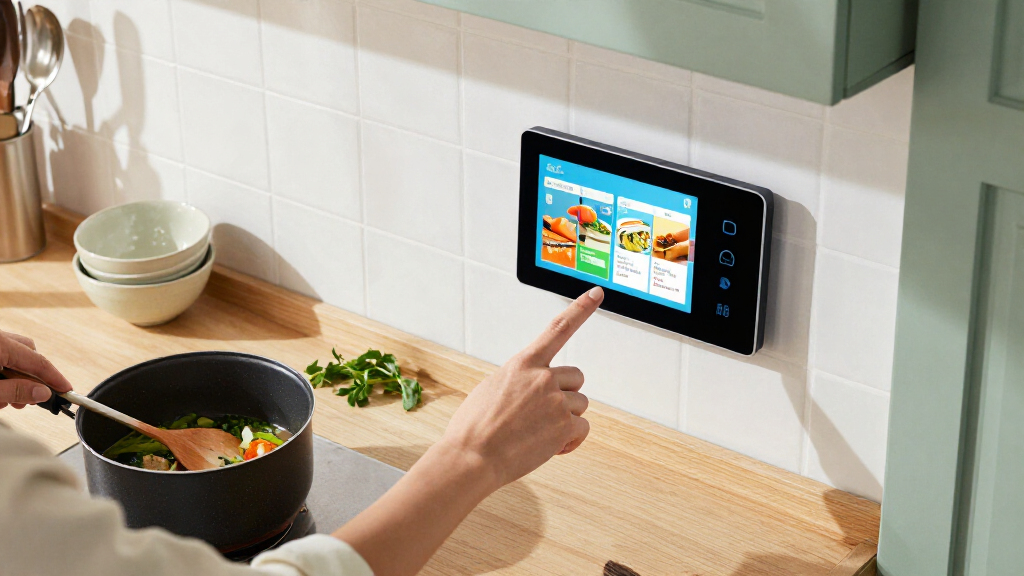
A smart display offers hands-free convenience that a smartphone cannot match. You can glance at recipes, weather, or calendar alerts without unlocking your phone, which reduces friction in daily routines. In the kitchen, a smart display allows you to follow cooking steps with dirty hands, whereas a phone would require constant wiping. Additionally, smart displays serve as a central hub for smart home controls, allowing you to manage lights, locks, and thermostats from a fixed location. For most households, the dedicated screen and voice interface justify the additional hardware.
Which smart display is best for elderly family members?
The Echo Show 8 or Echo Show 11 are excellent choices for elderly users due to their balance of size and simplicity. They offer large, legible text for calendars and video calls with family, which is a common use case. The voice interface is intuitive, and the screen size is large enough to be seen from across a room without being overwhelming. The Echo Show 5 is often too small for comfortable reading, while the 21-inch model might be too complex or large for smaller living spaces. Mid-sized Amazon displays strike the right balance of usability and visibility.
Conclusion
Choosing the right smart display depends largely on your existing digital ecosystem and how you intend to use the device. For the majority of users seeking a balance of size, audio, and smart home control, the Amazon Echo Show 11 stands out as the Best Overall pick due to its spatial audio and versatile screen size. If you want a true entertainment center that can double as a secondary TV, the Amazon Echo Show 21 is the Best Premium choice, offering unmatched screen real estate. For those on a tight budget who need a simple alarm clock and weather station, the Echo Show 5 remains the Best Value option despite its audio limitations. Android users and those who prioritize voice assistant intelligence should consider the Google Nest Hub Max as the Best for Android Users. Finally, for beginners or those with limited counter space, the Echo Show 8 provides the most Best for Beginners friendly experience with its manageable size and reliable performance.