
The best tech gifts for home add convenience or personality without asking the recipient to overhaul their setup. My best overall pick is the Amazon Echo Show 11, which combines a large touchscreen with smart-home controls and entertainment; the Govee RGBIC Smart Table Lamp 2 stands out for colorful ambient lighting, while the HOTO 25-Piece Cordless Electric Screwdriver Kit is a useful choice for practical household tasks. The main tradeoff is between connected features and simplicity: a display or smart speaker can do more, but may depend on Wi-Fi, an account, and compatible devices. Decorative clocks and compact accessories are easier to place, though they serve narrower needs. Read on for the full breakdown and a guide to choosing a gift that fits the person’s home.

Get home appliances delivered free with Prime
- Fast, free delivery on millions of items
- Prime Video, Amazon Music and more included
- Member-only deals all year
Complete the kit


Key Takeaways
- The Echo Show 11 is the most versatile centerpiece: its larger screen suits recipes, video calls, and smart-home controls, while the Echo Show 5 takes less space and asks for less room commitment.
- Ambient lighting offers personality without a screen: the Govee lamp adds adjustable color, but it depends more on app-based customization than a simple decorative clock.
- Practical tools can be more useful than connected gadgets: HOTO’s screwdriver kit and laser measure address household projects, though they are gifts for people who will actually use tools.
- The Echo Dot is the simpler smart-home entry point: it provides voice control and audio in a compact format, while Echo Show models add visual interaction and take up more counter or desk space.
- Decorative gifts and functional gifts solve different problems: the Maclock and Sharper Image Word Clock emphasize display and room style; phone stands, speakers, and HOTO tools focus on everyday tasks.
| Govee RGBIC Smart Table Lamp 2 | 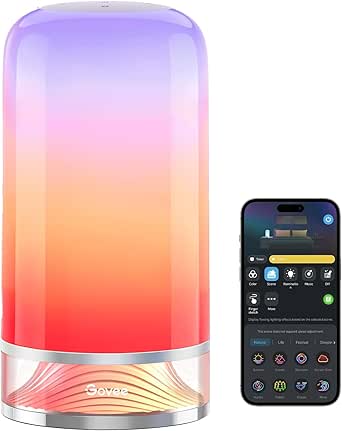 | Best Smart Accent Light | Brightness: 500 lumens | Color temperature: 2700K–6500K | Power: 24 watts; corded electric | VIEW LATEST PRICE | See Our Full Breakdown |
| Adjustable Phone Stand with Bluetooth Speaker |  | Best for Hands-Free Calls and Viewing | Brand and model: FRONTSUN L37 | Compatible devices: 4–13-inch smartphones and most tablets with cases | Adjustability: Telescopic height and multiple viewing angles | VIEW LATEST PRICE | See Our Full Breakdown |
| Maclock Retro Computer-Inspired Desk Clock with Pixel Display |  | Best Whimsical Bedside Clock | Display: Digital pixel display | Display information: Time, date, calendar, and room temperature | Alarm schedules: 5; daily, weekday, weekend, or one-time | VIEW LATEST PRICE | See Our Full Breakdown |
| Sharper Image LED Word Clock, 7.75-Inch, Copper |  | Best Decor-Forward Clock | Display: LED letter grid that spells out the time | Time increments: 5 minutes | Dimensions: 7.75 × 7.75 × 1 inches | VIEW LATEST PRICE | See Our Full Breakdown |
| Amazon Echo Show 11 Smart Display with Full HD Touchscreen and Spatial Audio |  | Best Premium Smart-Home Hub Display | Display: 10.95-inch Full HD touchscreen, 1920 × 1200 resolution | Dimensions: 10 × 5 × 7.2 in | Weight: 45.92 oz (1302 g) | VIEW LATEST PRICE | See Our Full Breakdown |
| HOTO 25-Piece Cordless Electric Screwdriver Kit | 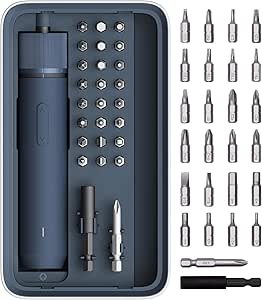 | Best for Home Repairs | Model: QWLSD011 | Power source: Battery powered | Voltage: 3.6 volts | VIEW LATEST PRICE | See Our Full Breakdown |
| Amazon Echo Dot (5th Gen) Smart Speaker with Alexa, Charcoal |  | Best Smart Speaker Gift | Generation: 5th Gen | Dimensions: 3.9 × 3.9 × 3.5 in | Weight: 10.7 oz (304 g) | VIEW LATEST PRICE | See Our Full Breakdown |
| Amazon Echo Show 5 Smart Display with Alexa, Charcoal |  | Best for Video Calls and Visual Controls | Display: 5.5-inch touchscreen | Camera: 2 MP with built-in shutter | Speaker: 1.75-inch full-range built-in speaker | VIEW LATEST PRICE | See Our Full Breakdown |
| HOTO Pocket-Size Laser Measuring Tool |  | Best Compact Tool for Decorating Projects | Model: QWCJY001 | Measurement range: 0.16–98 ft (0.05–30 m) | Accuracy: ±1/16 in (±2 mm) | VIEW LATEST PRICE | See Our Full Breakdown |
| tech gifts for home | Dimensions | Weight | Display |
|---|---|---|---|
| Govee RGBIC Smart Table Lamp 2 | — | — | — |
| Adjustable Phone Stand with Bl | 5.5 × 2.1 × 3.4 inches | 0.36 kg | — |
| Maclock Retro Computer-Inspire | 3.1 in W × 4.2 in H | — | Digital pixel display |
| Sharper Image LED Word Clock | 7.75 × 7.75 × 1 inches | — | LED letter grid that spells out the time |
| Amazon Echo Show 11 Smart Disp | 10 × 5 × 7.2 in | 45.92 oz (1302 g) | 10.95-inch Full HD touchscreen, 1920 × 1200 resolution |
| HOTO 25-Piece Cordless Electri | — | 700 g | — |
| Amazon Echo Dot | 3.9 × 3.9 × 3.5 in | 10.7 oz (304 g) | — |
| Amazon Echo Show 5 Smart Displ | 5.8 × 3.6 × 3.2 in | 16.1 oz (456 g) | 5.5-inch touchscreen |
| HOTO Pocket-Size Laser Measuri | — | 0.09 lb | OLED |
More Details on Our Top Picks
Govee RGBIC Smart Table Lamp 2
For a home gift that can shift from useful task lighting to colorful room ambience, I’d pick the Govee RGBIC Smart Table Lamp 2. It combines adjustable 2700K–6500K white light with multicolor effects, so it can suit a bedside table or desk without being limited to decorative colors. App and touch controls make quick changes easy, while Matter support lets it fit into a broader smart-home setup alongside the Amazon Echo Show 11. Its scenes, music syncing, timers, and schedules give it more lighting flexibility than a screen-focused gift like the Echo Show 11. The tradeoff is that this is a corded, indoor-only lamp, not a portable light, and its 500-lumen output is better for a bedside or accent role than illuminating an entire room. Pat-to-wake also needs app setup and only turns the lamp on.
Pros:- Combines multicolor RGBIC effects with adjustable warm-to-cool white light.
- Works with Matter, Alexa, Google Home, and SmartThings.
- App and touch controls support scenes, music syncing, timers, and schedules.
- Memory function can retain a preferred setting.
Cons:- Requires a corded power connection, limiting where it can be placed.
- Not water resistant and suited to indoor use only.
- Pat-to-wake requires app setup and only switches the lamp on.
Best for: Smart-home owners who want a colorful bedside or desk lamp with both warm-to-cool white lighting and app-based routines.
Not ideal for: People who need a portable lamp, outdoor lighting, or a bright single source for lighting a large room.
- Brightness:500 lumens
- Color temperature:2700K–6500K
- Power:24 watts; corded electric
- Controls:App and touch
- Connectivity:Bluetooth and Wi-Fi
- Smart home compatibility:Matter, Alexa, Google Home, and SmartThings
- Preset scenes:64+
- Music sync modes:8
Our verdict“Choose this for a connected bedside or desk lamp with more lighting variety than the Echo Show 11, but skip it if portability or room-wide brightness matters.”
Adjustable Phone Stand with Bluetooth Speaker
This FRONTSUN stand is a practical pick for someone who watches recipes in the kitchen, joins video calls at a desk, or wants a steadier phone position for everyday viewing. Its adjustable height and viewing angles are the key advantage over a basic stand, and the built-in Bluetooth speaker and microphone add audio and call functions without requiring separate accessories. Six non-slip pads help keep the stand in place, while compatibility with 4–13-inch phones and most tablets with cases gives it broader use than a phone-only holder. Compared with the Amazon Echo Show 5, it relies on a user’s own phone or tablet rather than offering a dedicated smart display and Alexa interface. That also keeps it more flexible, but it does not charge other devices and is not a substitute for a smart-home hub or a standalone screen.
Pros:- Telescopic height and adjustable viewing angles support different seating and counter positions.
- Bluetooth speaker and built-in microphone combine media playback with hands-free calls.
- Fits smartphones and most tablets from 4 to 13 inches, including many with cases.
- Six non-slip pads help stabilize the stand during use.
Cons:- Does not charge a phone or other connected device.
- Depends on a separate phone or tablet for its screen and apps.
- Its compatibility range may exclude devices larger than 13 inches.
Best for: People who regularly use a phone or small tablet for hands-free calls, video, or recipes at a desk or counter.
Not ideal for: Buyers seeking a dedicated Alexa display, smart-home control screen, or stand that also charges their phone.
- Brand and model:FRONTSUN L37
- Compatible devices:4–13-inch smartphones and most tablets with cases
- Adjustability:Telescopic height and multiple viewing angles
- Audio and calls:Bluetooth speaker and built-in microphone
- Anti-slip pads:6
- Dimensions:5.5 × 2.1 × 3.4 inches
- Weight:0.36 kg
- Charging:USB-C; does not charge other devices
Our verdict“Pick this for adjustable hands-free phone or tablet use with basic audio and call support, not as a replacement for the Echo Show 5.”
Maclock Retro Computer-Inspired Desk Clock with Pixel Display
The Maclock turns a bedside clock into a small piece of retro-inspired decor, with a pixel display that shows time, date, calendar, and room temperature. Five alarm schedules make it more useful for households with different weekday and weekend routines than the Sharper Image LED Word Clock, which focuses on spelling out the time in five-minute increments. Its rechargeable battery and USB-C charging also avoid keeping it permanently plugged in, while adjustable warm backlighting and sleep mode suit a bedroom better than a clock designed mainly as a visual display piece. The main compromise is the temperature feature: readings pause while the backlight is on, and the description notes that turning the light off may be needed for accuracy. This is a compact, characterful gift, but buyers who want a simple, always-visible temperature reading may find that behavior inconvenient.
Pros:- Pixel display shows time, date, calendar, and room temperature.
- Five alarm schedules support daily, weekday, weekend, and one-time alarms.
- Rechargeable battery and USB-C charging avoid a fixed power-cord placement.
- Adjustable warm backlighting includes a sleep mode.
Cons:- Temperature updates pause while the backlight is on.
- Temperature accuracy may require switching off the light.
- Its decorative pixel styling may not suit buyers seeking a traditional clock.
Best for: People who want a playful bedroom clock with multiple alarm schedules, useful calendar details, and rechargeable power.
Not ideal for: Buyers who need uninterrupted temperature updates or prefer a simple clock with an always-on, easy-to-read display.
- Display:Digital pixel display
- Display information:Time, date, calendar, and room temperature
- Alarm schedules:5; daily, weekday, weekend, or one-time
- Backlight:Adjustable warm light with sleep mode
- Power:Rechargeable battery
- Charging:USB-C
- Dimensions:3.1 in W × 4.2 in H
- Included accessories:Decorative floppy disk, stickers, and USB-C cable
Our verdict“Choose this for a playful, rechargeable bedside clock with flexible alarms, but pick the Sharper Image Word Clock if decor-led time display matters more than alarm options.”
Sharper Image LED Word Clock, 7.75-Inch, Copper
I’d choose this clock for someone who wants timekeeping to double as a piece of modern wall or desk decor. Instead of numeric digits, its LED letter grid spells out the time, giving it a more design-led presence than the Maclock’s retro pixel display. The copper finish and slim 7.75-inch square shape make it easy to place on a desk or hang on a wall, and USB power means there is no battery replacement or app setup to manage. The simplicity is also the limitation: it updates in five-minute increments, so it is less precise at a glance than the Maclock’s digital readout. It also needs to stay connected to USB power. This suits a recipient who values a distinctive display over alarms, room information, or portability.
Pros:- LED letter grid presents the time in a distinctive word-based format.
- Compact square design can sit on a desk or mount on a wall.
- Copper finish adds a decorative accent to a room.
- USB cord and adapter are included, with no app or Wi-Fi setup.
Cons:- Displays time in five-minute increments rather than exact minutes.
- Requires continuous USB power and cannot be placed freely without a nearby outlet.
- Does not provide the alarm schedules or room details found on the Maclock clock.
Best for: Design-minded recipients who want a distinctive, easy-to-place clock for a desk or wall and do not need minute-by-minute precision.
Not ideal for: People who rely on exact minute readings, want alarms or room data, or need a clock that works away from a power outlet.
- Display:LED letter grid that spells out the time
- Time increments:5 minutes
- Dimensions:7.75 × 7.75 × 1 inches
- Finish:Copper
- Placement:Desk or wall
- Power:USB cord and adapter included
- Controls:Forward and reverse time-setting controls
Our verdict“Choose this as a decor-first clock for someone who values a word-based display, but choose the Maclock for alarms and more detailed time information.”
Amazon Echo Show 11 Smart Display with Full HD Touchscreen and Spatial Audio
Among these five gifts, the Echo Show 11 has the broadest role: it combines a large 10.95-inch Full HD touchscreen, video calling, spatial audio, and a built-in hub for Zigbee, Matter, and Thread devices. That makes it a better fit for a connected household than the Govee lamp, which adds smart lighting but is still just one light, or the Echo Show 5, which is the more compact display option in this roundup. Its 13 MP camera with auto framing supports calls, while presence and ambient sensors can support personalized routines. The added capability brings a larger footprint and a more involved connected-device role than a simple home gift. Privacy controls include a button to disable the camera and microphone, but buyers who do not want a camera-equipped display should choose a simpler device.
Pros:- Large Full HD touchscreen pairs with spatial audio for a more substantial shared display.
- Built-in hub supports Zigbee, Matter, and Thread devices.
- 13 MP camera includes auto framing and 3.3× zoom for video calls.
- Microphone and camera disable button plus dedicated camera controls provide privacy options.
Cons:- Larger and heavier than the Echo Show 5, so it takes more space.
- Does not support Bluetooth speakers that require PIN codes.
- Hands-free voice control of connected mobile devices is not supported for Mac OS X.
Best for: Alexa households that want a large shared screen for video calls and a central hub for Matter, Thread, and Zigbee smart-home devices.
Not ideal for: People who want a compact bedside screen, avoid camera-equipped devices, or have Bluetooth speakers that require PIN codes.
- Display:10.95-inch Full HD touchscreen, 1920 × 1200 resolution
- Dimensions:10 × 5 × 7.2 in
- Weight:45.92 oz (1302 g)
- Camera:13 MP with auto framing and 3.3× zoom
- Audio:1 × 2.8-inch woofer and 2 full-range drivers
- Wi-Fi:Wi-Fi 6E (IEEE 802.11ax)
- Bluetooth:Version 5.4
- Smart home hub:Zigbee, Matter, and Thread Border Router
- Sensors:Ambient temperature, ambient light, presence detection, and camera
Our verdict“Choose this for an Alexa home that benefits from a larger screen and built-in smart-home hub, but pick the Echo Show 5 for a smaller display footprint.”
HOTO 25-Piece Cordless Electric Screwdriver Kit
For a home gift that earns its place in a drawer, I’d choose this cordless screwdriver kit for people who regularly assemble furniture, tighten hardware, or tackle small fixes. Its 25 S2 steel bits, extension rod, and magnetic case make it more useful for hands-on jobs than the Echo Dot or Echo Show 5, which bring convenience through smart-home control rather than repair capability. Three torque settings help adapt the tool to different tasks, while the circular LED light is useful in cabinets and other dim spots. The tradeoff is limited power: electric torque tops out at 4 N·m, so tougher fastening calls for manual effort or a heavier tool. Also, the USB-C charging cable isn’t included.
Pros:- Three torque settings help match the tool to different household tasks
- Includes 25 S2 steel bits and a 60 mm extension rod for varied and hard-to-reach fasteners
- Circular LED light helps illuminate confined work areas
- Magnetic case keeps the screwdriver and bits organized
Cons:- Electric torque is limited to 4 N·m, which can be insufficient for stubborn or heavy-duty fasteners
- Charging cable is not included
- At 700 g, it is less convenient to carry than the pocket-size HOTO laser measure
Best for: New homeowners, renters, or DIY-minded gift recipients who often assemble furniture and handle small household repairs
Not ideal for: People doing frequent heavy-duty construction or fastening jobs who need more electric torque, or buyers who expect a charging cable in the box
- Model:QWLSD011
- Power source:Battery powered
- Voltage:3.6 volts
- Electric torque:Up to 4 N·m
- Manual torque:Up to 8 N·m
- Battery capacity:1500 mAh
- Charging:Type-C; under 150 minutes
- Bits:25 S2 steel bits; 60 HRC
- Weight:700 g
Our verdict“Choose this kit for someone who wants a compact, organized helper for routine home repairs rather than a high-torque power tool.”
Amazon Echo Dot (5th Gen) Smart Speaker with Alexa, Charcoal
I’d pick the Echo Dot (5th Gen) for a household that wants voice control and audio without giving up counter space to a screen. It plays music, audiobooks, and podcasts, and Alexa can handle everyday requests and control compatible devices; the motion and temperature sensors also support smart-home routines. Compared with the Echo Show 5, this Dot is a better fit when video calls and visual information aren’t priorities. It can also extend a compatible eero network, a bonus the HOTO screwdriver and laser measure can’t provide. Its compact mono speaker is less suited to listeners seeking room-filling stereo sound, and eero extension requires a compatible setup. Some services may involve extra fees, while Bluetooth voice-control support has limitations.
Pros:- Streams music, audiobooks, and podcasts over Wi-Fi or Bluetooth
- Alexa supports timers, questions, and control of compatible smart-home devices
- Motion and temperature sensors can support household routines
- Microphone-off button and compatible eero network extension add useful controls and flexibility
Cons:- Mono audio from a 1.6-inch driver is less suited to buyers seeking a broad stereo listening experience
- eero extension needs a compatible router, linked accounts, and setup in the eero app
- Some Alexa skills and services may require subscriptions or other fees
Best for: People setting up a first Alexa-enabled home, or households that want a small speaker for timers, audio, and compatible smart-home routines
Not ideal for: Buyers who want a touchscreen for video calls, visual information, or a larger speaker experience
- Generation:5th Gen
- Dimensions:3.9 × 3.9 × 3.5 in
- Weight:10.7 oz (304 g)
- Speaker:1.6-inch full-range driver; mono
- Wi-Fi:Dual-band 802.11a/b/g/n/ac; 2.4 and 5 GHz
- Smart-home compatibility:Wi-Fi, Bluetooth Low Energy Mesh, and Matter
- Sensors:Motion and temperature
- eero Built-in coverage:Up to 1,000 sq. ft. with a compatible eero network
- Color:Charcoal
Our verdict“Choose the Echo Dot for a compact, voice-first home gift, but pick the Echo Show 5 if a screen and video calls matter more.”
Amazon Echo Show 5 Smart Display with Alexa, Charcoal
The Echo Show 5 makes more sense than the Echo Dot for a kitchen counter or bedside table where glances and video calls are part of the routine. Its 5.5-inch touchscreen presents information visually, while the 2 MP camera and built-in speaker support calls without needing a separate device. Like the Dot, it can control compatible smart-home devices, but its display gives it a more direct role in a connected home. It is also far smaller than the Echo Show 11, making it easier to place where space is limited. That compactness brings limits: the screen and speaker are modest, and it doesn’t support ad-hoc or peer-to-peer Wi-Fi. A camera shutter and camera/microphone-off button provide physical privacy controls.
Pros:- 5.5-inch touchscreen shows information at a glance
- Built-in 2 MP camera and speaker support video calls
- Camera shutter and microphone/camera-off button provide physical privacy controls
- Compact size suits counters and bedside tables where the Echo Show 11 may be too large
Cons:- The small display is less suitable for shared viewing than the Echo Show 11
- Does not support ad-hoc or peer-to-peer Wi-Fi networks
- Bluetooth speakers requiring PIN codes are not supported
Best for: Households that want a small smart display for video calls, glanceable information, and compatible device controls in a kitchen or bedroom
Not ideal for: People seeking a large screen for shared viewing, stronger audio, or setup on ad-hoc or peer-to-peer Wi-Fi networks
- Display:5.5-inch touchscreen
- Camera:2 MP with built-in shutter
- Speaker:1.75-inch full-range built-in speaker
- Dimensions:5.8 × 3.6 × 3.2 in
- Weight:16.1 oz (456 g)
- Wi-Fi:Dual-band 802.11a/b/g/n/ac
- Bluetooth:A2DP and AVRCP support
- Processor:MediaTek MT 8169
- Color:Charcoal
Our verdict“Choose this display for a compact spot where video calls and visual smart-home controls matter more than a large screen.”
HOTO Pocket-Size Laser Measuring Tool
For someone who is always measuring windows, furniture, or wall space, I’d give the HOTO Pocket-Size Laser Measuring Tool the edge over a conventional tape for quick indoor checks. One-button operation and a response time of about 0.2 seconds make repeat measurements simple, while the OLED display keeps readings visible without deciphering a tape in a tight space. It complements the HOTO screwdriver kit: the laser measure helps plan a project, while the screwdriver handles assembly and fastening. Its pocket-sized, keychain-friendly form is also easier to carry than the 700 g screwdriver. The tradeoff is its use case: it’s designed for indoor or shaded areas, not bright outdoor measurement, and the Class 2 laser must not be aimed at eyes.
Pros:- Measures distances from 0.16 to 98 feet with stated accuracy of ±2 mm
- One-button operation and roughly 0.2-second response make quick checks straightforward
- Compact, lightweight design is keychain-friendly
- USB-C rechargeable battery supports up to 1,000 measurements per charge
Cons:- Designed for indoor or shaded-area use
- Class 2 laser requires care to avoid direct eye exposure
- A laser reading may be less useful than a tape for measuring curved or irregular objects
Best for: Home decorators, renters, and DIY planners who frequently measure indoor rooms, furniture, or window spaces
Not ideal for: People who need outdoor measurements in bright conditions or prefer the physical feel and versatility of a traditional tape measure
- Model:QWCJY001
- Measurement range:0.16–98 ft (0.05–30 m)
- Accuracy:±1/16 in (±2 mm)
- Measurement response:About 0.2 seconds
- Laser class:Class 2
- Display:OLED
- Charging:USB-C rechargeable
- Measurements per charge:Up to 1,000
- Weight:0.09 lb
Our verdict“Choose this compact measure for frequent indoor decorating and layout tasks, not as a replacement for every kind of tape-measure job.”
How We Picked
I ranked these gifts by how clearly they solve a home need, how easy they are to fit into an existing room or routine, and whether their main benefit is apparent without a long setup. I also weighed flexibility, likely maintenance, and the recipient’s dependence on compatible devices, Wi-Fi, apps, or household tools. A smart display can do more than a clock, but it also asks for more space and setup; a compact speaker is less demanding but offers fewer visual features.
The order favors gifts with a useful balance of everyday function and broad appeal, followed by options that excel for a more specific recipient or room. The Echo Show 11 ranks first for its combination of screen-based household tasks and smart-home functions. The remaining picks are not interchangeable: I distinguish beginner-friendly voice control from decorative lighting, desk accessories, and project tools, and account for the narrower audience each one suits.
Factors to Consider When Choosing Best Tech Gifts For Home
Choosing a home tech gift is less about collecting features and more about matching the device to someone’s routines, space, and tolerance for setup. These factors can help you avoid buying an impressive gadget that becomes one more thing to manage.
Match the Gift to a Routine, Not Just a Room
Start with what the recipient already does at home: listen to music, manage lights, take video calls, or fix small items. A device that supports an existing habit is more likely to get used than one that introduces a whole new routine. Smart displays make sense for people who use screens for recipes, calls, or household controls, while a cordless screwdriver suits someone who regularly assembles or repairs things. A decorative clock can be a better fit for someone who values room style more than another connected device. Avoid buying a tool for a recipient who has little interest in DIY, even if it seems broadly practical. The most thoughtful gift often solves a small, recurring annoyance rather than promising to do everything.
Check Space, Placement, and Visibility
Measure the intended surface before choosing a display, lamp, or desk accessory. A larger smart screen can be easier to read and useful from across a kitchen, but it needs a suitable counter or shelf and may dominate a compact room. Smaller devices fit more places, though their display or sound may be less suited to shared spaces. Think about power outlets, cable routing, glare, and whether the device will be visible from where it is used. For decorative lighting and clocks, the recipient’s existing colors and materials matter as much as the feature list. A gift that fits the room naturally is less likely to be stored away.
Account for Setup and Privacy Preferences
Connected products can depend on a stable Wi-Fi connection, a smartphone app, an account, or links to other smart-home devices. That setup may be welcome for a technology enthusiast but frustrating for someone who wants a plug-in-and-use gift. Voice-enabled devices also introduce microphones into shared spaces, so consider whether the recipient is comfortable with voice controls and account-linked features. A traditional display clock or a standalone measuring tool may ask less of the household’s network and personal data. Before gifting a connected device, check whether the recipient already uses the same ecosystem. Matching an established setup is usually easier than asking someone to adopt a new one.
Choose Features the Recipient Will Actually Use
Long feature lists can make a device seem like a safer gift, but unused options add complexity rather than value. Think about the one or two functions that would matter most: a screen for visual information, voice control for hands-free tasks, adjustable lighting for atmosphere, or a measuring tool for home projects. A speaker with a phone stand may suit someone who watches videos at a desk, but it is not a substitute for a dedicated smart display. Similarly, color effects are a plus only if the recipient enjoys changing lighting settings. Favor clear everyday benefits over novelty functions that might wear off quickly. If you are unsure, a simpler device with a distinct use can be a safer choice.
Think About Maintenance and Long-Term Fit
Consider what ownership looks like after the gift is opened: app updates, charging, cleaning, storing accessories, or replacing batteries. A powered smart display needs a permanent spot and dependable connectivity, while a portable tool needs a place to live between projects. Small desktop gadgets can be easy to keep but may become clutter if the recipient already has several accessories. For tools, check whether the kit’s purpose matches the jobs the recipient handles rather than assuming every household needs another tool. For connected products, confirm that the main features do not rely on an add-on the recipient lacks. A good gift should stay useful without creating a new chore.
Decide When a Bigger Feature Set Is Worth It
Paying for a larger screen or broader capabilities makes sense when the recipient will use those features often and has a clear place for the device. If the gift is meant to add basic voice control or music to a room, a compact speaker may be a better fit than a screen-based hub. Premium-feeling functionality can also bring more setup, more space needs, and more dependence on connected services. By contrast, a focused accessory or tool may deliver a more direct benefit for someone with a specific use case. Do not equate more features with a better gift; weigh how often the recipient will use them against the extra complexity. When uncertain, choose the option whose main purpose is easiest to explain in one sentence.
Frequently Asked Questions
Which gift is the safest choice if I do not know the recipient’s smart-home setup?
A gift that does not depend on linking to an existing smart-home ecosystem is usually the lower-risk choice. The HOTO measuring tool, screwdriver kit, and decorative clocks have focused uses that do not center on smart-home integration. If you prefer a connected gift, check whether the recipient uses Alexa-compatible devices and has reliable Wi-Fi before choosing an Echo model. A smart display can be useful, but its extra features matter less if the recipient does not want to set up accounts or voice controls. Let the person’s habits guide the choice rather than assuming every home needs a hub.
Should I choose the Echo Show 11 or the Echo Show 5 as a gift?
Choose based on where the recipient will put it and how they will view it. The Echo Show 11 is better suited to a shared counter or larger surface where a bigger screen can support recipes, calls, and household controls. The Echo Show 5 is a more natural fit for a bedside table, desk, or room with limited space. A larger display does not automatically make the better gift if it is awkward to place or rarely used for visual tasks. If you are uncertain about room layout, the smaller model is the less space-intensive option.
Are smart-home gifts a good idea for someone who is not very technical?
They can be, provided the recipient wants the main function and is comfortable with basic setup. A compact voice speaker is a more modest entry into voice-controlled features than a smart display with a wider set of uses and settings. Still, connected devices may require an app, Wi-Fi, and an account, so consider whether someone can help with setup if needed. A lamp with app controls may also be less straightforward than a simple plug-in light for someone who avoids phone-based controls. When ease matters most, pick a device with one clear job and offer to help configure it.
Which of these gifts is best for someone who already has plenty of smart speakers?
A non-speaker gift is more likely to add something new to a home that already has voice audio covered. The Govee lamp brings a lighting-focused option, while the clocks offer a visual accent rather than another audio endpoint. For a recipient who enjoys home projects, the HOTO screwdriver kit or laser measuring tool shifts the gift toward practical use. The right choice depends on whether they prefer decor, lighting, or hands-on tasks. Adding another smart speaker may still make sense for a room without one, but it is less distinctive if coverage is already good.
How do I choose between a decorative gadget and a practical tool?
Look at what the recipient tends to keep and use: objects that improve a room’s atmosphere or tools that solve household tasks. The Maclock and Word Clock are more suited to someone who enjoys distinctive desk or room decor, while the HOTO tools serve people who measure, assemble, or repair things. Practical tools may see little use if the recipient rarely takes on projects; decorative electronics may feel unnecessary to someone who values utility above appearance. Consider storage too, since tool kits need a place between jobs and display pieces need a visible spot. Choose the category that reflects the recipient’s habits, not simply the one that seems more broadly useful.
Conclusion
For the most versatile home-focused gift, I recommend the Amazon Echo Show 11 as the best overall pick, especially for someone who will use its larger screen for shared household tasks. The Amazon Echo Dot is my best value-style choice for a recipient who wants compact voice control without needing a display, while the Echo Show 5 is the best beginner option for someone curious about smart displays but short on space. For a premium-feeling centerpiece, choose the Echo Show 11; for a more decorative gift, the Govee lamp or a clock better suits someone who values room character. The HOTO screwdriver kit and laser measuring tool are the specific-need picks for household projects. Match the gift to the person’s space and habits, and the right choice becomes much clearer.