When selecting the best smart locks with digital keys, the Yale Assure Lock 2 Wi-Fi stands out for its seamless ecosystem integration and robust build quality. For those prioritizing biometric speed, the Veise VE017 offers rapid fingerprint recognition without sacrificing security. The primary tradeoff in this category lies between connectivity reliability and power consumption, as more feature-rich models often drain batteries faster. This guide breaks down these options to help you balance convenience with long-term maintenance. Continue reading for a detailed comparison of features, pros, and cons to make an informed decision.

Get home appliances delivered free with Prime
- Fast, free delivery on millions of items
- Prime Video, Amazon Music and more included
- Member-only deals all year
Complete the kit


Key Takeaways
- Biometric locks like the Veise VE017 offer faster entry than keypad models but may struggle with wet or dirty fingers.
- Wi-Fi enabled models eliminate the need for separate hubs but typically have shorter battery lives compared to Bluetooth-only versions.
- The Yale Assure Lock 2 provides superior third-party integration, making it ideal for users with existing smart home setups.
- Budget-friendly options like the TEEHO TE001 often lack advanced encryption standards found in premium Schlage or Yale models.
- Palm vein recognition, seen in the Wyze Palm Lock, offers high security but requires precise hand placement, which can be inconvenient.
| Veise VE017 Fingerprint Smart Door Lock with App Control, Matte Black |  | Best for Flexible Digital Access | Model: VE017 | Unlock methods: Fingerprint, app, authorized access, fob card, code, code sharing, voice assistant with G1 Gateway, mechanical key | Fingerprint verification: Under 0.2 seconds | VIEW LATEST PRICE | See Our Full Breakdown |
| Yale Assure Lock 2 Wi-Fi Smart Deadbolt with Keypad |  | Best for Hub-Free Remote Access | Model: YRD410-WF1-619 | Connectivity: 2.4 or 5 GHz Wi-Fi; no hub required | Entry methods: Keypad, smartphone, Apple Watch, backup key | VIEW LATEST PRICE | See Our Full Breakdown |
| TEEHO TE001 Keyless Entry Deadbolt with Keypad, Matte Black |  | Best Basic Keypad Value | Model: TE001 | Lock type: Keyless entry deadbolt with keypad | Access codes: Up to 20 | VIEW LATEST PRICE | See Our Full Breakdown |
| Schlage Encode WiFi Smart Deadbolt with Century Trim, Matte Black |  | Best for High-Capacity Code Sharing | Model: BE489WBCEN622 | Connectivity: Wi-Fi | Access codes: Up to 100 | VIEW LATEST PRICE | See Our Full Breakdown |
| Philips Wi-Fi Keypad Deadbolt with Lever Handle and Fingerprint Entry |  | Best Fingerprint-and-Handle Set | Model: DDL241X-1HW-L-M | Unlock methods: Fingerprint, PIN, app, voice, physical key | Fingerprint capacity: Up to 50 fingerprints | VIEW LATEST PRICE | See Our Full Breakdown |
| Wyze Palm Lock Smart Door Lock with Palm Vein Recognition |  | Best for Contactless Digital Keys | Model: WPLCK1 | Lock type: Deadbolt | Unlock methods: Palm vein recognition, keypad codes, app, voice control, mechanical key | VIEW LATEST PRICE | See Our Full Breakdown |
| Veise VE06-L Smart Deadbolt Lock and 2-Lever Handle Set, Matte Black |  | Best for High-Capacity Shared Access | Model and finish: VE06-L; matte black | Construction: Solid zinc alloy | Unlock methods: App, passcodes, web portal, IC cards, e-keys, authorized admin, Apple Watch, physical key | VIEW LATEST PRICE | See Our Full Breakdown |
| Sifely S Fingerprint Smart Lock with Reversible Handle |  | Best for Flexible Local Entry | Model: Sifely S | Unlock methods: Fingerprint, PIN, Bluetooth app, RFID key fob, mechanical key | Passcode types: Permanent, timed, one-time, recurring | VIEW LATEST PRICE | See Our Full Breakdown |
| Philips 4200 Series Wi-Fi Smart Deadbolt with Keypad, Fingerprint Access, and Handle Set |  | Best Direct Wi-Fi Handle Set | Model: DDL242X-1HW-L | Connectivity: 2.4 GHz Wi-Fi; no hub required | Access methods: Fingerprint, PIN code, app, Alexa, Google Assistant | VIEW LATEST PRICE | See Our Full Breakdown |
| Yale Code Keypad Deadbolt, Keyless Entry, Black Suede |  | Best App-Free Digital Codes | Model and finish: YED210-NR-BSP; Black Suede | Entry codes: Up to 20 | Keypad: Backlit | VIEW LATEST PRICE | See Our Full Breakdown |
| Philips Wi-Fi Smart Deadbolt Lock with Keyless Entry |  | Best for Hub-Free Remote Access | Connectivity: Built-in 2.4 GHz Wi-Fi | Unlock Methods: App, Passcode, Fingerprint, Key, Voice | Passcode Capacity: 100 Custom Codes | VIEW LATEST PRICE | See Our Full Breakdown |
| Veise VE027 Wi-Fi Smart Lock with Fingerprint Keyless Entry, Matte Black |  | Best for Weather Resistance | Weather Resistance: IP65 Rated | Unlock Methods: App, Fingerprint, PIN, Voice, Card, Key | Backup Power: Type-C Port | VIEW LATEST PRICE | See Our Full Breakdown |
| Yamiry Keyless Entry Smart Door Knob with Keypad | 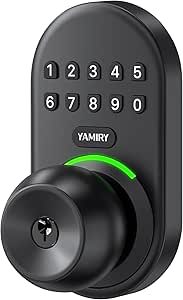 | Best for Interior Doors | Type: Door Knob | Unlock Methods: Keypad Code, Physical Key | User Codes: Up to 20 | VIEW LATEST PRICE | See Our Full Breakdown |
| Yamiry Smart Door Lock with Keypad and Fingerprint Reader |  | Best for DIY Installation | Unlock Methods: Fingerprint, App, Passcode, Fob, Key | Remote Access: Requires Separate Wi-Fi Gateway | Handle Type: Reversible (Left/Right) | VIEW LATEST PRICE | See Our Full Breakdown |
| Philips Wi-Fi Smart Front Door Lock Set with Handle |  | Best Complete Entry Set | Included Components: Smart Lock and Handle | Connectivity: Built-in 2.4 GHz Wi-Fi | Unlock Methods: App, Voice, Keypad, Key | VIEW LATEST PRICE | See Our Full Breakdown |
| smart locks with digital key | Model | Connectivity | Unlock methods |
|---|---|---|---|
| Veise VE017 Fingerprint Smart | VE017 | — | Fingerprint, app, authorized access, fob card, code, code sharing, voice assistant with G1 Gateway, mechanical key |
| Yale Assure Lock 2 Wi-Fi Smart | YRD410-WF1-619 | 2.4 or 5 GHz Wi-Fi; no hub required | — |
| TEEHO TE001 Keyless Entry Dead | TE001 | — | — |
| Schlage Encode WiFi Smart Dead | BE489WBCEN622 | Wi-Fi | — |
| Philips Wi-Fi Keypad Deadbolt | DDL241X-1HW-L-M | 2.4 GHz Wi-Fi and Bluetooth | Fingerprint, PIN, app, voice, physical key |
| Wyze Palm Lock Smart Door Lock | WPLCK1 | — | Palm vein recognition, keypad codes, app, voice control, mechanical key |
| Veise VE06-L Smart Deadbolt Lo | — | — | App, passcodes, web portal, IC cards, e-keys, authorized admin, Apple Watch, physical key |
| Sifely S Fingerprint Smart Loc | Sifely S | Local Bluetooth; remote access requires a separately sold Wi-Fi Gateway | Fingerprint, PIN, Bluetooth app, RFID key fob, mechanical key |
| Philips 4200 Series Wi-Fi Smar | DDL242X-1HW-L | 2.4 GHz Wi-Fi; no hub required | — |
| Yale Code Keypad Deadbolt | — | No app, Wi-Fi, or hub connectivity | — |
| Philips Wi-Fi Smart Deadbolt L | DDL242X-1HW | Built-in 2.4 GHz Wi-Fi | App, Passcode, Fingerprint, Key, Voice |
| Veise VE027 Wi-Fi Smart Lock w | VE027 | 2.4 GHz Wi-Fi and Bluetooth | App, Fingerprint, PIN, Voice, Card, Key |
| Yamiry Keyless Entry Smart Doo | YR04 | None (Offline) | Keypad Code, Physical Key |
| Yamiry Smart Door Lock with Ke | YR01 | Bluetooth | Fingerprint, App, Passcode, Fob, Key |
| Philips Wi-Fi Smart Front Door | DDL242X-15HW-H-MB | Built-in 2.4 GHz Wi-Fi | App, Voice, Keypad, Key |
More Details on Our Top Picks
Veise VE017 Fingerprint Smart Door Lock with App Control, Matte Black
The Veise VE017 is the most adaptable pick here for households that want digital keys in several forms: fingerprints, keypad codes, app access, and fob cards. Temporary, recurring, and permanent codes make it easier to give guests or service workers access without handing over a permanent key. Compared with the TEEHO TE001, it adds fingerprint and app-based entry, along with activity logs and alerts; unlike the Yale Assure Lock 2, remote control and voice-assistant support require a separately sold G1 Gateway. Its locally stored AES-128 encrypted data and IP55-rated zinc-alloy body are useful security and durability details, while the USB-C port offers a backup when the batteries run down. The tradeoff is more setup and an extra purchase for remote features, plus four AA batteries that are not included.
Pros:- Combines fingerprint, keypad, app, fob card, and mechanical-key access.
- Supports temporary, recurring, and permanent codes with user-permission management.
- Locally stores access data with AES-128 encryption and provides activity logs and alerts.
- IP55-rated metal body and USB-C emergency power port.
Cons:- Remote access and Alexa or Google voice control require a separately sold G1 Gateway.
- Four AA batteries are required and not included.
- The range of access methods may mean more setup than a simpler keypad-only lock.
Best for: Households that want fingerprint entry plus flexible guest codes, fob cards, and app permissions, and are willing to add a gateway for remote access.
Not ideal for: Buyers who want remote app control or voice commands straight out of the box, since those features require the separately sold G1 Gateway.
- Model:VE017
- Unlock methods:Fingerprint, app, authorized access, fob card, code, code sharing, voice assistant with G1 Gateway, mechanical key
- Fingerprint verification:Under 0.2 seconds
- Access data security:Locally stored AES-128 encryption
- Auto-lock delay:0–180 seconds
- Power:Four AA/LR6 alkaline batteries, not included
- Estimated battery life:About 12 months; varies with usage
- Weather protection and material:IP55; zinc-alloy, all-metal construction
- Smart home compatibility:Alexa and Google voice assistants with separately sold Veise G1 Gateway
Our verdict“Choose the VE017 if you want several kinds of digital keys and flexible guest permissions, and do not mind buying a gateway for remote control.”
Yale Assure Lock 2 Wi-Fi Smart Deadbolt with Keypad
The Yale Assure Lock 2 is a strong fit for buyers who want scheduled digital keys and remote control without adding a hub: it connects directly to 2.4 or 5 GHz Wi-Fi. Its unlimited scheduled codes can be set to expire, which suits rotating guests, household help, or frequent visitors better than the TEEHO TE001, which stores up to 20 codes and offers a single-use option. Keypad, smartphone, Apple Watch, and backup-key entry give household members alternatives if a phone is unavailable. DoorSense reports whether the door is closed, and auto-lock can help limit the chance of leaving it unsecured. Compared with the Schlage Encode, Yale offers unlimited codes rather than a stated cap of 100, but its remote app control is limited to the US and Canada. Check the required door measurements before buying.
Pros:- Connects directly to 2.4 or 5 GHz Wi-Fi without a hub.
- Allows unlimited access codes with schedules and expiration dates.
- Supports keypad, smartphone, Apple Watch, and backup-key entry.
- DoorSense and auto-lock help monitor and secure a closed door.
Cons:- Remote app control is limited to the US and Canada.
- Requires specific door thickness, bore-hole size, and lock spacing.
- Electronics warranty is one year, shorter than the lifetime limited coverage for finish and mechanical components.
Best for: Households in the US or Canada that want hub-free remote control and scheduled, expiring access codes for multiple visitors.
Not ideal for: Buyers outside the US and Canada, or anyone whose door does not meet the lock’s thickness, bore-hole, and spacing requirements.
- Model:YRD410-WF1-619
- Connectivity:2.4 or 5 GHz Wi-Fi; no hub required
- Entry methods:Keypad, smartphone, Apple Watch, backup key
- Access codes:Unlimited; can be scheduled or set to expire
- Door thickness:1-3/4 to 2-1/4 inches
- Door preparation:2-1/8-inch bore hole; 4-inch minimum center-to-center spacing
- Certification:BHMA Grade 2
- Operating temperature:-22°F to 140°F
- Warranty:Lifetime limited on finish and mechanical components; one year on electronics
Our verdict“Pick the Yale Assure Lock 2 if you need direct Wi-Fi access and flexible scheduled codes, provided your location and door fit its requirements.”
TEEHO TE001 Keyless Entry Deadbolt with Keypad, Matte Black
The TEEHO TE001 keeps digital access straightforward: enter a PIN at the keypad, assign up to 20 codes, or create a one-time guest code that deletes itself after use. That makes it a practical fit for buyers who mainly need keyless entry and do not need app-based digital keys. Compared with the Veise VE017, it gives up fingerprint, app, and fob-card access, but also avoids gateway-dependent remote features. One-touch locking and an adjustable 10–99-second auto-lock delay cover everyday convenience, while anti-peeping code protection lets users enter extra digits around their actual PIN. Its IP54 weather resistance adds some outdoor protection. The main catch is compatibility: it fits 54 mm (2-1/8-inch) door holes, not 38 mm holes, and its first-use door-direction setup requires a reset. Four AA batteries are not included.
Pros:- Stores up to 20 access codes and supports a one-time code that deletes after use.
- Offers adjustable auto-lock and one-touch locking.
- Anti-peeping code protection and IP54 weather resistance.
- Designed for screwdriver installation and left- or right-handed doors.
Cons:- Does not offer app-based or remote digital-key access.
- Fits 54 mm (2-1/8-inch) door holes and is not compatible with 38 mm holes.
- Four AA batteries are not included, and door-direction detection requires a reset before first use.
Best for: Homeowners who want keypad-based access and a self-deleting guest PIN without app connectivity or fingerprint features.
Not ideal for: Buyers who need smartphone-based digital keys, remote access, biometric entry, or a lock compatible with a 38 mm door hole.
- Model:TE001
- Lock type:Keyless entry deadbolt with keypad
- Access codes:Up to 20
- Temporary code:Single-use; deletes after use
- Auto-lock delay:10–99 seconds; off by default
- Power:Four AA batteries, not included
- Battery life:Up to 365 days
- Weather resistance:IP54
- Door-hole compatibility:54 mm (2-1/8 inches); not compatible with 38 mm holes
Our verdict“Choose the TE001 for simple keypad entry and temporary PIN sharing, but skip it if digital keys must work through an app or fingerprint reader.”
Schlage Encode WiFi Smart Deadbolt with Century Trim, Matte Black
The Schlage Encode suits busy households or rentals that need room for many keypad users: it supports up to 100 access codes and remote monitoring through built-in Wi-Fi. That high capacity sets it apart from the TEEHO TE001, which stores up to 20 codes and lacks app-based access, and gives it a more direct route to remote management than the Veise VE017, whose remote features require an additional gateway. A touchscreen keypad, physical backup key, customizable alarm, and auto-lock cover common entry and security needs without hardwiring. Alexa and Google Home voice control are optional. The tradeoff is battery upkeep: four included AA batteries may need replacement about every six months with typical use. Remote control also depends on a secure Wi-Fi connection and the Schlage Home app, so this is less appealing if you want an offline-first setup.
Pros:- Built-in Wi-Fi enables remote control and monitoring without an extra hub.
- Stores up to 100 access codes.
- Includes a touchscreen keypad, physical backup key, customizable alarm, and auto-lock.
- Supports optional Alexa and Google Home voice control.
Cons:- Four AA batteries may need replacement about every six months with typical use.
- Remote features require the Schlage Home app and a secure Wi-Fi connection.
- Listed door thickness is limited to 1-3/8 to 1-3/4 inches.
Best for: Landlords and larger households that need remote monitoring and capacity for many keypad codes without installing a hub.
Not ideal for: Buyers who want longer stated battery life, app-independent remote features, or a lock that fits doors outside its stated thickness range.
- Model:BE489WBCEN622
- Connectivity:Wi-Fi
- Access codes:Up to 100
- Voice assistants:Alexa and Google Home
- Door thickness:1-3/8 to 1-3/4 inches
- Backset:2-3/8 or 2-3/4 inches
- Power:Four AA batteries included
- Estimated battery life:Up to six months with typical use
- Backup entry:One physical key
Our verdict“Choose the Schlage Encode if a large number of keypad codes and built-in Wi-Fi matter more than minimizing battery changes.”
Philips Wi-Fi Keypad Deadbolt with Lever Handle and Fingerprint Entry
The Philips Wi-Fi Keypad Deadbolt with Lever Handle is the clearest choice in this group for buyers who want a fingerprint reader and matching lever hardware in one package. It supports up to 50 fingerprints alongside PIN, app, voice, and physical-key entry, so household members can choose between biometric and conventional digital keys. Compared with the Veise VE017, it lists Wi-Fi remote control directly rather than requiring a separately sold gateway, while the Schlage Encode offers a much higher code capacity but no fingerprint entry in the supplied product details. The Philips fits doors 1-3/8 to 2 inches thick and handles either door handing. Its main drawback is power demand: eight AA alkaline batteries are sold separately. Wi-Fi is limited to 2.4 GHz, which may rule it out for buyers who need another network band.
Pros:- Offers fingerprint, PIN, app, voice, and physical-key entry.
- Stores up to 50 fingerprints and provides an activity log.
- Connects over 2.4 GHz Wi-Fi for remote locking and unlocking without a hub.
- Includes lever handles and supports left- or right-handed doors.
Cons:- Requires eight AA alkaline batteries, sold separately.
- Remote connectivity requires a 2.4 GHz Wi-Fi network.
- The supplied specifications do not state fingerprint verification speed or battery life.
Best for: Homeowners replacing a deadbolt and lever together who want fingerprint entry, remote app access, and multiple backup methods.
Not ideal for: Buyers who want to avoid replacing eight batteries, rely on a network without 2.4 GHz Wi-Fi, or need more than 50 stored fingerprints.
- Model:DDL241X-1HW-L-M
- Unlock methods:Fingerprint, PIN, app, voice, physical key
- Fingerprint capacity:Up to 50 fingerprints
- Connectivity:2.4 GHz Wi-Fi and Bluetooth
- Voice assistants:Amazon Alexa and Google Assistant
- Door thickness:1-3/8 to 2 inches
- Door handing:Left- or right-handed
- Auto-lock delay:10–180 seconds
- Power:Eight AA alkaline batteries, sold separately
Our verdict“Pick the Philips set if you want fingerprint and app access with a lever handle included, and can accommodate its eight-battery power requirement.”
Wyze Palm Lock Smart Door Lock with Palm Vein Recognition
The Wyze stands apart from fingerprint locks such as the Philips 4200 Series by using palm vein recognition, so household members can unlock without touching a keypad or placing a finger on a sensor. That makes it a distinctive fit for busy entrances, while its app, voice control, mechanical key, and support for up to 50 guest codes cover visitors who need other ways in. Wi-Fi monitoring, an ajar-door alert, and tamper alarms add useful oversight; the dual-battery setup and USB-C emergency charging offer backup options when power runs low. The tradeoff is that its smart features depend on Wi-Fi and the Wyze app, and normal operation still requires batteries. I’d choose it for contactless convenience, not for a simple offline keypad setup like the Yale Code Keypad Deadbolt.
Pros:- Palm vein recognition provides contactless entry.
- Supports up to 50 unique or one-time guest codes.
- Includes auto-lock, tamper alerts, and an ajar-door alarm.
- Mechanical key backup and USB-C emergency charging provide alternative access options.
Cons:- Normal operation depends on batteries.
- Monitoring and other smart features rely on Wi-Fi and the Wyze app.
- Its Grade 3 certification and IP53 rating may not suit buyers seeking higher specified durability.
Best for: Households that want hands-free entry and need to issue temporary or individual codes to guests, cleaners, or office visitors.
Not ideal for: Buyers who want an app-free lock or dependable smart access without Wi-Fi and app reliance.
- Model:WPLCK1
- Lock type:Deadbolt
- Unlock methods:Palm vein recognition, keypad codes, app, voice control, mechanical key
- Guest codes:Up to 50 unique or one-time codes
- Battery system:Main battery lasts up to 6 months; secondary battery lasts up to 2 weeks
- Connectivity and voice assistants:Wi-Fi; Alexa and Google Assistant
- Emergency charging:USB-C
- Weather resistance and certification:IP53; BHMA Grade 3
Our verdict“Choose the Wyze if contactless palm recognition and flexible guest codes matter more than app-independent operation.”
Veise VE06-L Smart Deadbolt Lock and 2-Lever Handle Set, Matte Black
For a household, rental, or small office managing many people, the VE06-L offers more credential variety and capacity than the Sifely S: it supports more than 250 passcodes and over 1,000 IC cards, along with e-keys, app access, a web portal, Apple Watch, and a physical key. Its local encrypted data storage is a useful distinction for buyers who prefer access credentials to remain on the lock. The included two-lever handle set also makes this a fuller door-hardware replacement than a deadbolt-only pick. The catch is that remote management and Alexa or Google Assistant voice control require a separately sold G2 gateway. Its two-minute lockout after five incorrect passcodes may also frustrate users who mistype repeatedly. I’d favor it over the Sifely for credential volume, but not for out-of-box remote access.
Pros:- Supports more than 250 passcodes and over 1,000 IC cards.
- Offers app, web portal, e-key, Apple Watch, passcode, card, and physical-key access.
- Stores encrypted access data locally on the lock.
- Includes a two-lever handle set and adjustable auto-lock.
Cons:- Remote access and voice control require a separately sold G2 gateway.
- Five incorrect passcode attempts trigger a two-minute lockout.
- Grade 3 certification may be a limiting factor for buyers seeking a higher specified security grade.
Best for: Shared homes, rental operators, and small workplaces that need many individual codes or card credentials and value locally stored access data.
Not ideal for: Buyers who want remote access or voice control immediately without purchasing a separate gateway.
- Model and finish:VE06-L; matte black
- Construction:Solid zinc alloy
- Unlock methods:App, passcodes, web portal, IC cards, e-keys, authorized admin, Apple Watch, physical key
- Credential capacity:Over 250 passcodes; over 1,000 IC cards
- Auto-lock interval:5–900 seconds
- Gateway requirement:G2 gateway sold separately for remote access and Alexa or Google Assistant
- Door compatibility:Door thickness 1-3/8–2 in; hole diameter 1-1/2 or 2-1/8 in
- Weather resistance and security grade:IP54; BHMA/ANSI Grade 3
Our verdict“Pick the VE06-L for a busy shared door with many credentials, provided you’re comfortable adding a gateway for remote features.”
Sifely S Fingerprint Smart Lock with Reversible Handle
The Sifely S is a flexible choice when digital keys mean several ways to enter, rather than always-on internet control. It combines fingerprint, PIN, Bluetooth app, RFID fob, and mechanical key access, with permanent, timed, one-time, and recurring codes for different visitors. Compared with the Philips 4200 Series, which connects directly to Wi-Fi, the Sifely works over local Bluetooth by default; remote access and supported voice features need a separately sold gateway. That keeps the basic setup focused on nearby use, but it limits management when you’re away. Its reversible lever is helpful for compatible left- or right-handed doors, though buyers must check door thickness, bore, and backset before ordering. I’d choose it for varied entry methods, not for direct Wi-Fi management.
Pros:- Provides five entry methods, including fingerprint, PIN, Bluetooth app, RFID fob, and mechanical key.
- Supports permanent, timed, one-time, and recurring passcodes.
- Reversible lever accommodates compatible left- and right-handed doors.
- Includes auto-lock, passage, and privacy modes.
Cons:- Remote internet control and supported voice features require a separately sold Wi-Fi gateway.
- Four AA batteries are required and not included.
- Door thickness, bore, and backset must match the listed dimensions.
Best for: Homeowners who want fingerprint and multiple local entry options, plus flexible codes for recurring visitors.
Not ideal for: People who need remote access or voice control without buying a separate Wi-Fi gateway, or whose doors fall outside its stated measurements.
- Model:Sifely S
- Unlock methods:Fingerprint, PIN, Bluetooth app, RFID key fob, mechanical key
- Passcode types:Permanent, timed, one-time, recurring
- Connectivity:Local Bluetooth; remote access requires a separately sold Wi-Fi Gateway
- Material and handle:Zinc alloy; reversible lever
- Door thickness:1-3/8–2-1/4 in
- Bore and backset:2-1/8 in bore; 2-3/8 or 2-3/4 in backset
- Power and emergency power:Four AA batteries, not included; Micro-USB emergency port
Our verdict“Choose the Sifely S for varied fingerprint, code, and fob access at a door you manage mainly nearby over Bluetooth.”
Philips 4200 Series Wi-Fi Smart Deadbolt with Keypad, Fingerprint Access, and Handle Set
The Philips 4200 Series is the more straightforward pick for buyers who want remote app access without adding a bridge: it connects directly to 2.4 GHz Wi-Fi, unlike the Sifely S, whose remote functions require a separate gateway. Fingerprint entry, app control, voice commands, and permanent, one-time, periodic, or recurring PINs give household members and visitors several ways in. The included handle set makes it a coordinated hardware replacement, while the app’s lock status and access history help with remote oversight. Its fingerprint unlock is specified at 0.3 seconds, but auto-lock is off by default, so setup needs attention. Batteries are not included, and the lock is guided to stay within 33 feet of the router. I’d pick it over the Wyze for direct Wi-Fi convenience, but the Wyze offers contactless palm recognition and USB-C emergency charging.
Pros:- Connects directly to 2.4 GHz Wi-Fi without a separate hub.
- Combines fingerprint, app, voice assistant, and keypad entry.
- Supports permanent, one-time, periodic, and recurring PIN codes.
- Includes a matching handle set and installation hardware.
Cons:- Batteries are not included.
- Wi-Fi guidance calls for placement within 33 feet of the router.
- Auto-lock is off by default, and left-opening doors require a reset.
Best for: Households that want fingerprint and code entry, remote app management without a hub, and a matching handle set.
Not ideal for: Buyers who need a lock for doors outside its thickness range, lack nearby 2.4 GHz Wi-Fi, or expect auto-lock to be enabled out of the box.
- Model:DDL242X-1HW-L
- Connectivity:2.4 GHz Wi-Fi; no hub required
- Access methods:Fingerprint, PIN code, app, Alexa, Google Assistant
- PIN code types:Permanent, one-time, periodic, recurring
- Fingerprint unlock time:0.3 seconds
- Auto-lock:Adjustable from 0 to 180 seconds; off by default
- Battery life and batteries:Up to 6 months; standard 1.5V alkaline batteries recommended and not included
- Door compatibility:Thickness 1-3/8–1-3/4 in; right-opening by default, resettable for left-opening doors
Our verdict“Choose the Philips 4200 Series if direct Wi-Fi management and a bundled handle set matter more than palm recognition or hub-free offline use.”
Yale Code Keypad Deadbolt, Keyless Entry, Black Suede
The Yale Code is the simplest choice here for people who want digital entry codes without turning the door into a connected device. You create up to 20 codes directly on the lock, with a backlit keypad, auto-lock, low-battery alerts, and a backup key; there’s no app, Wi-Fi, or hub to set up. That makes it easier to keep independent of a network than the Philips 4200 Series, but it also means no remote code management, lock status, or access history. It is a keypad deadbolt rather than a multi-method smart lock, so it lacks fingerprint access and app-issued digital keys offered by the other picks. I’d recommend it for a straightforward household code system, not for owners who need to manage guest access while away.
Pros:- Creates up to 20 entry codes directly on the lock.
- Requires no app, Wi-Fi, or hub.
- Backlit keypad supports entry in low light.
- Includes auto-lock, low-battery alerts, and a backup key.
Cons:- Cannot manage codes remotely or check lock status through an app.
- Offers keypad and physical-key entry, but no fingerprint or app-based digital keys.
- Requires compatible door thickness, backset, and borehole dimensions.
Best for: Households that want to assign keypad codes locally and avoid apps, Wi-Fi, hubs, and connected-device setup.
Not ideal for: Buyers who need remote access management, fingerprint entry, access history, or app-issued digital keys.
- Model and finish:YED210-NR-BSP; Black Suede
- Entry codes:Up to 20
- Keypad:Backlit
- Connectivity:No app, Wi-Fi, or hub connectivity
- Auto-lock and alerts:Auto-lock; low-battery alerts
- Backup key:Included
- Certification and temperature range:BHMA Grade 3; -22°F to 140°F
- Door compatibility:Thickness 1-3/8–1-3/4 in; backset 2-3/8–2-3/4 in; borehole 1-1/2–2-1/8 in
Our verdict“Choose the Yale Code if locally managed keypad codes are enough and you do not need remote smart-lock features.”
Philips Wi-Fi Smart Deadbolt Lock with Keyless Entry
This lock stands out because it bypasses the need for a separate hub, connecting directly to your 2.4 GHz Wi-Fi for remote control. Unlike the Yamiry Smart Door Lock with Keypad and Fingerprint Reader (B0C66NCTXX), which requires a paid add-on for remote features, this Philips model works right out of the box. It supports five unlock methods, including fingerprint and voice commands, offering flexibility for households with mixed tech comfort levels. The ability to manage up to 100 custom passcodes makes it ideal for homes with frequent guests or service providers. However, it lacks a door sensor, meaning you won’t get alerts if the door is left ajar, a feature found in higher-end competitors. Additionally, it runs on four AA batteries rather than the eight required by some rivals, which may mean more frequent replacements depending on usage.Pros:- Built-in Wi-Fi eliminates the need for a separate bridge or hub
- Supports five distinct unlock methods including fingerprint and voice
- Manages up to 100 unique passcodes with scheduling options
Cons:- No built-in door sensor for open-door alerts
- Requires 2.4 GHz Wi-Fi network only
- Batteries are not included in the package
Best for: Homeowners who want remote access without buying extra hubs or gateways.
Not ideal for: Users who need door-open alerts or prefer a longer battery life with larger battery packs.
- Connectivity:Built-in 2.4 GHz Wi-Fi
- Unlock Methods:App, Passcode, Fingerprint, Key, Voice
- Passcode Capacity:100 Custom Codes
- Power Source:4 AA Alkaline Batteries (Not Included)
- Door Thickness:1-3/8 to 2 inches
- Auto-Lock Delay:10 to 180 Seconds
- Door Sensor:Not Included
- Model:DDL242X-1HW
Our verdict“This is the smart choice for buyers who prioritize seamless remote connectivity without additional hardware costs.”
Veise VE027 Wi-Fi Smart Lock with Fingerprint Keyless Entry, Matte Black
The Veise VE027 is engineered for durability, featuring an IP65 weather-resistant rating that sets it apart from indoor-focused models like the Yamiry Keyless Entry Smart Door Knob (B0D73J4DZ5). This makes it a superior option for exposed front doors or areas with harsh climates. It offers robust entry options, including fingerprint, PIN, and card access, alongside standard app and voice controls. The inclusion of a Type-C backup power port is a critical safety feature, allowing you to jump-start the lock if batteries die, a convenience missing in many budget competitors. While it supports extensive local data encryption for privacy, it requires eight batteries, which can be a hassle to replace compared to the four-battery Philips models. It also demands a 2.4 GHz network, limiting compatibility with some modern mesh systems.Pros:- IP65 rating provides strong protection against rain and dust
- Type-C port allows for emergency USB power backup
- Supports seven different entry methods including IC cards
Cons:- Requires eight batteries, increasing long-term maintenance
- Limited to 2.4 GHz Wi-Fi networks
- No built-in door sensor for status alerts
Best for: Homeowners with exposed exterior doors who need reliable weatherproofing and emergency power options.
Not ideal for: Users looking for a minimalist setup, as the eight-battery requirement adds maintenance overhead.
- Weather Resistance:IP65 Rated
- Unlock Methods:App, Fingerprint, PIN, Voice, Card, Key
- Backup Power:Type-C Port
- Connectivity:2.4 GHz Wi-Fi and Bluetooth
- Power Source:8 Batteries (Not Included)
- Security Grade:BHMA and ANSI Grade 3
- Model:VE027
Our verdict“Choose this lock if environmental durability and emergency power access are your top priorities.”
Yamiry Keyless Entry Smart Door Knob with Keypad
This model is distinct because it is a door knob, not a deadbolt, making it perfect for interior rooms like home offices or nurseries where heavy security isn’t the primary concern. Unlike the Philips Wi-Fi Smart Deadbolt (B0F5QKCD3S), it lacks app connectivity and remote features, focusing instead on simple, offline keypad access. It supports up to 20 user codes and one-time guest codes, which is sufficient for most household needs. The backlit keypad ensures usability in low-light conditions, a nice touch often missing in basic mechanical knobs. However, the tradeoff is significant: it offers no remote monitoring, no voice control, and relies on physical keys that can be duplicated easily. It is an excellent, low-maintenance solution for locking a bedroom door, but it should never be used as your primary exterior entry point.Pros:- Simple installation with no network setup required
- Backlit keypad for easy use in dark rooms
- Supports one-time codes for temporary access
Cons:- No app connectivity or remote control capabilities
- Physical backup keys are easily duplicable
- Limited to 20 user codes total
Best for: Renters or homeowners needing simple, offline keyless access for interior doors.
Not ideal for: Main entry points, as it lacks Wi-Fi, remote access, and deadbolt-level security.
- Type:Door Knob
- Unlock Methods:Keypad Code, Physical Key
- User Codes:Up to 20
- Connectivity:None (Offline)
- Weather Resistance:IP54
- Auto-Lock:Adjustable 5-99 Seconds
- Model:YR04
Our verdict“This is the ideal budget-friendly solution for securing interior spaces without smart home complexity.”
Yamiry Smart Door Lock with Keypad and Fingerprint Reader
This lock is designed for the DIY enthusiast, featuring a reversible handle that fits both left- and right-handed doors without complex adjustments. Compared to the Veise VE027 (B0F5961YT7), which offers built-in Wi-Fi, this Yamiry model relies on Bluetooth for direct app control, requiring a separately sold Wi-Fi gateway for remote access. This lowers the upfront cost but adds a hidden expense if you want to unlock the door from work. It supports fingerprint, passcode, and key fob entry, providing solid offline convenience. The installation process is streamlined for standard American wooden doors, avoiding the need for drilling new holes. However, the lack of native Wi-Fi means you must manage two separate devices (lock and gateway) if you want remote features, complicating the setup compared to all-in-one solutions.Pros:- Reversible handle simplifies installation on any door swing
- Includes key fobs for quick entry without phones
Cons:- Remote access requires purchasing a separate Wi-Fi gateway
- No native Wi-Fi connectivity out of the box
Best for: Tech-savvy users who prefer local Bluetooth control and want to save on upfront costs.
Not ideal for: Users who want immediate remote access, as the required gateway is sold separately.
- Unlock Methods:Fingerprint, App, Passcode, Fob, Key
- Remote Access:Requires Separate Wi-Fi Gateway
- Handle Type:Reversible (Left/Right)
- Connectivity:Bluetooth
- Included Accessories:2 Key Fobs, 2 Keys
- Installation:DIY, No Drilling Required
- Model:YR01
Our verdict“A solid choice for those who prioritize easy installation and local control over immediate remote capabilities.”
Philips Wi-Fi Smart Front Door Lock Set with Handle
Unlike the standalone deadbolts in this lineup, such as the Philips Wi-Fi Smart Deadbolt (B0F5QKCD3S), this product is a complete lock set that includes both the smart deadbolt and a matching handle. This ensures a cohesive aesthetic and simplifies the shopping process for front doors. It retains the hub-free Wi-Fi connectivity of its sibling, allowing for remote control and voice assistant integration without extra hardware. The system supports up to 100 passwords with flexible time-based expiration, which is excellent for managing cleaning staff or Airbnb guests. The tradeoff is power consumption; it requires eight AA batteries, significantly more than the four used by other Philips models, likely due to the additional handle mechanism. It also lacks a door sensor, so you must rely on the app’s activity logs to confirm if the door is closed.Pros:- Includes both smart deadbolt and matching handle
- Built-in Wi-Fi with no hub requirement
- Supports time-based and one-time password generation
Cons:- Requires eight AA batteries for operation
- No door sensor for open-door alerts
Best for: Homeowners replacing their entire front door lockset who want a unified smart solution.
Not ideal for: Those looking to upgrade just a deadbolt, as the handle integration may not fit existing hardware.
- Included Components:Smart Lock and Handle
- Connectivity:Built-in 2.4 GHz Wi-Fi
- Unlock Methods:App, Voice, Keypad, Key
- Password Capacity:Up to 100 Codes
- Power Source:8 AA Batteries (Not Included)
- Door Thickness:1-3/8 to 2 Inches
- Model:DDL242X-15HW-H-MB
Our verdict“This set is the most convenient upgrade for a front door, offering complete hardware and seamless smart features.”
How We Picked
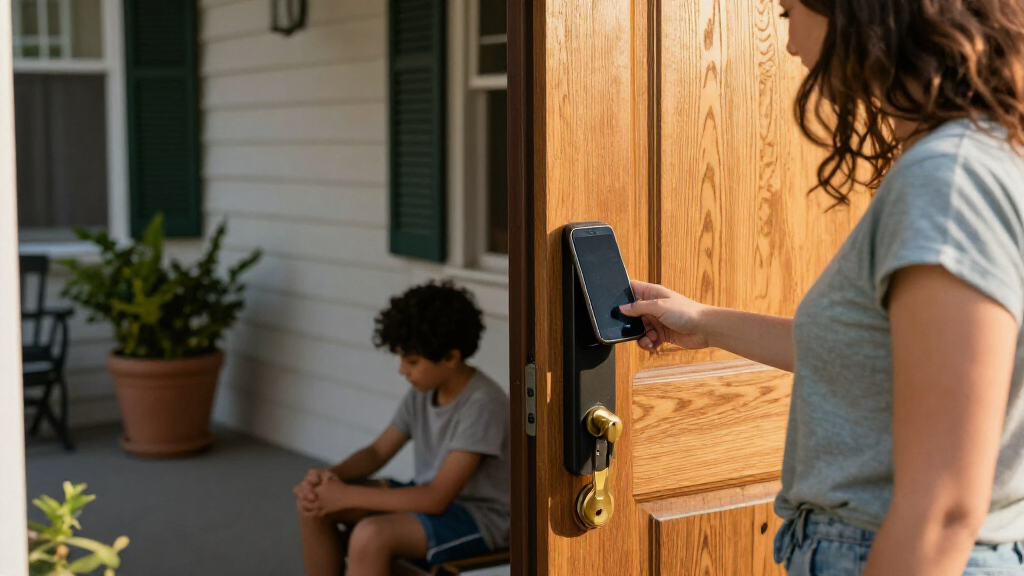
I evaluated these smart locks based on their digital key management capabilities, focusing on how easily users can grant temporary access to guests or service providers. Security protocols were scrutinized, prioritizing models that support ANSI Grade 1 or 2 ratings and encrypted communication between the app and the lock. I also considered the ease of installation, favoring locks that fit standard door preparations without requiring drilling or professional help.
Connectivity stability was another critical factor, distinguishing between models that require a separate bridge versus those with native Wi-Fi. I weighed the longevity of battery life against feature density, recognizing that frequent charging negates the convenience of keyless entry. Finally, I assessed the user interface design of companion apps, ensuring that managing multiple digital keys remains intuitive rather than cumbersome.
Factors to Consider When Choosing Best Smart Locks With Digital Keys
Choosing the right smart lock involves balancing security, convenience, and technical compatibility. This section explores the broader considerations that define a good digital key experience.Connectivity Standards And Hub Requirements
Many smart locks rely on Bluetooth or Zigbee protocols, which require a separate hub or bridge to connect to your home network. This adds another device to manage and can introduce connectivity delays when granting remote access. In contrast, native Wi-Fi models connect directly to your router, offering real-time notifications and remote control without extra hardware. However, Wi-Fi locks typically consume more power, leading to shorter battery intervals between charges. Buyers should weigh the inconvenience of a hub against the maintenance of frequent battery replacements.
Biometric Reliability And Environmental Factors
Fingerprint and palm recognition technologies vary widely in performance depending on environmental conditions. A sensor that works perfectly indoors may fail when fingers are wet, oily, or cold. High-end models use capacitive sensors with advanced algorithms to handle these variations, while budget options often rely on older optical tech. If you live in a region with harsh winters or high humidity, prioritize locks with backup access methods like physical keys or Bluetooth override. Reliability is more important than speed when you are locked out in bad weather.
Smart Home Ecosystem Integration
The value of a smart lock often depends on how well it communicates with other devices. If you use Apple HomeKit, Amazon Alexa, or Google Home, verify that the lock supports your preferred platform natively. Some locks offer limited integration, allowing only basic locking and unlocking via voice commands, while others support complex automations like locking the door when the garage opens. Checking for Matter support can also future-proof your purchase, ensuring compatibility with emerging standards. Without proper integration, the lock remains an isolated gadget rather than part of a cohesive system.
Physical Security And ANSI Ratings
Digital keys add convenience, but the lock itself must resist physical attacks. Look for locks rated ANSI Grade 1 or 2, which indicates resistance to drilling, picking, and prying. Many consumer-grade smart locks lack these rigorous certifications, prioritizing design over durability. If your front door is exposed to public view, consider models with reinforced deadbolts and secure mounting plates. A smart lock with a weak internal mechanism is merely an expensive inconvenience if a burglar can bypass it physically.
Battery Management And Fail-Safe Mechanisms
Running out of battery is the primary fear for smart lock owners. Premium models offer low-battery warnings weeks in advance and include emergency USB power ports for temporary activation. Cheaper alternatives may lack these safeguards, leaving you stranded if the battery dies unexpectedly. Additionally, consider the power consumption of connected features; constant Wi-Fi searching drains batteries faster than occasional Bluetooth checks. Choosing a lock with efficient power management reduces maintenance hassle and enhances peace of mind.
Frequently Asked Questions
Do smart locks with digital keys work during a power outage?
Most smart locks operate on batteries, so they continue functioning during a household power outage. However, Wi-Fi connectivity will be lost if your router is also without power, meaning remote access and notifications will stop working. Bluetooth and local keypad entry remain available since they do not rely on your home network. To maintain full functionality, consider connecting your router and smart hub to an uninterruptible power supply (UPS). This ensures you retain remote control and automation features even when the grid fails.
How secure are digital keys compared to traditional metal keys?
Digital keys are generally more secure against unauthorized duplication since they are encrypted and tied to specific user accounts. Unlike metal keys, which can be copied at any hardware store, digital access codes can be revoked instantly if a phone is lost or a guest leaves. However, smart locks introduce new vulnerabilities, such as potential hacking or software bugs, which require regular firmware updates. High-quality models use bank-grade encryption to mitigate these risks, but cheaper alternatives may have weaker security protocols. Regular maintenance and updates are required to keep the system secure.
Can I still use a physical key if my smart lock battery dies?
Many smart locks, such as the Schlage Encode, include a traditional keyway as a backup method for entry. This allows you to use a standard metal key if the batteries fail completely. However, some minimalist designs omit the keyway to maintain a sleek appearance or enhance security against bumping. If you prefer keyless operation but want a fallback, look for models with emergency USB-C ports that can power the lock temporarily. Always check the product specifications to confirm the presence of a physical backup before purchasing.
Are biometric smart locks suitable for households with children?
Biometric locks can be problematic for young children whose fingerprints are smaller and less defined, leading to frequent recognition failures. This may frustrate kids and lead to parents leaving the door unlocked for convenience, which compromises security. Some models allow parents to create temporary codes for children, which is often a more reliable method. If you choose a biometric lock, ensure it supports multiple authentication methods so kids can use a code if their fingerprint is not recognized. Testing the sensor with your children’s hands before installation is advisable.
What happens if I lose my smartphone that controls the digital keys?
Most reputable smart lock apps allow you to manage access from a web portal or a secondary device, so losing your phone does not permanently lock you out. You can typically revoke access from the lost device and grant permissions to a new phone or trusted family member. Some locks also offer voice assistant integration, allowing you to unlock the door via a smart speaker if configured correctly. It is wise to set up backup access methods, such as a keypad code or a physical key, to avoid being stranded. Always enable two-factor authentication on your lock account for added security.
Conclusion
For most homeowners, the Yale Assure Lock 2 Wi-Fi is the best overall choice due to its balance of security, connectivity, and ecosystem support. If you are looking for the best value, the TEEHO TE001 offers solid keyless entry features at a lower price point, though it lacks advanced integrations. The Philips 4200 Series is the best premium option for those who want a complete handle set with fingerprint and Wi-Fi capabilities. Beginners might find the Yamiry Keyless Entry Smart Door Knob easier to install and manage, making it the best for beginners. Finally, the Wyze Palm Lock is the best for specific needs if you prioritize high-security biometric entry over traditional keypad convenience.