Searching for a reliable color laser printer under 500 dollars can be challenging, as many models offer similar features but differ significantly in performance, connectivity, and print quality. The Brother HL-L3280CDW stands out as the best overall pick thanks to its balanced performance, wireless connectivity, and duplex printing. For those prioritizing multifunctionality, the Canon Color imageCLASS MF652Cw offers scanning and copying at a competitive price, while the Xerox C240 provides excellent print quality for print-only needs. However, tradeoffs such as slower speeds, limited paper capacity, or higher running costs can influence the right choice. Continue reading to explore the detailed breakdown of each model and find the best fit for your needs.

Get home appliances delivered free with Prime
- Fast, free delivery on millions of items
- Prime Video, Amazon Music and more included
- Member-only deals all year
Complete the kit


Key Takeaways
- The top picks balance print quality, connectivity, and cost of ownership, with the Brother HL-L3280CDW leading for overall value.
- Multifunction models like the Canon MF652Cw are ideal for small offices needing scanning and copying but may come with slightly higher costs or larger footprints.
- Print-only options like the Xerox C240 excel in quality and speed but lack multifunction features, suitable for dedicated printing tasks.
- Wireless connectivity and mobile printing are standard features in most models, but some offer Ethernet or fax, which may or may not be necessary.
- Tradeoffs often involve print speed, paper capacity, or cost per page; buyers should weigh these against their printing volume and budget.
| Brother HL-L3280CDW Wireless Color Laser Printer, Duplex, Mobile Printing, Ethernet, Includes 2-Month Refresh Trial | 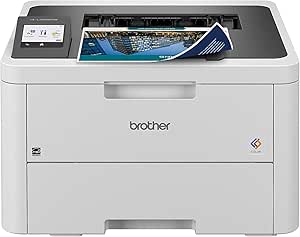 | Best Overall for Small Offices and Home Use | Print Speed: up to 27 ppm | Connectivity: Wireless, Ethernet, Mobile Printing | Duplex Printing: Automatic | VIEW ON AMAZON | See Our Full Breakdown |
| Brother HL-L3220CDW Color Laser Printer with Wireless Printing and Duplex |  | Best for High-Quality Color Output and Large Paper Capacity | Print Speed: 19 PPM | Paper Capacity: 250 sheets | Duplex Printing: Automatic | VIEW ON AMAZON | See Our Full Breakdown |
| Canon Color imageCLASS MF652Cw Wireless Laser Printer, Multifunction with Scanner and Copier |  | Best for Small Office Multi-Function Needs | Print Speed: 22 PPM color | First Print Time: 10.3 seconds | Paper Capacity: 250 sheets | VIEW ON AMAZON | See Our Full Breakdown |
| Xerox C240 Wireless Color Laser Printer – Print Only |  | Best Compact Print-Only Solution for Light Use | Printer Type: Laser | Color: Color | Print Speed: 26 ppm | VIEW ON AMAZON | See Our Full Breakdown |
| HP Color LaserJet Pro MFP 3301sdw Wireless All-in-One Color Laser Printer |  | Best for Small Office All-in-One Functionality | Print Speed: 26 ppm | Functions: Print, Scan, Copy | Automatic Document Feeder: Yes | VIEW ON AMAZON | See Our Full Breakdown |
| Xerox C235dni Wireless Color Laser All-in-One Printer |  | Best Overall for Small Offices and Home Use | Print Speed: 24 ppm | Monthly Duty Cycle: up to 1,500 pages | Connectivity: Wi-Fi, Wi-Fi Direct, USB | VIEW ON AMAZON | See Our Full Breakdown |
| Xerox C230dni Wireless Color Laser Printer |  | Best Compact Wireless Color Laser for Small Spaces | Print Speed: 24 ppm | Monthly Duty Cycle: up to 1,500 pages | Connectivity: Wi-Fi, Apple AirPrint, Mopria | VIEW ON AMAZON | See Our Full Breakdown |
| Brother MFC-L3720CDW Wireless Color Laser Printer, Scanner, Copier, Fax, Auto Duplex, 250-Sheet Capacity |  | Best Multifunction for Small Office Productivity | Print Speed: up to 19 ppm | Scan Speed: up to 29/22 ipm (black/color) | Paper Capacity: 250 sheets | VIEW ON AMAZON | See Our Full Breakdown |
| HP Color LaserJet Pro 3201dw Wireless Color Laser Printer |  | Best for Fast, Professional Color Printing in Small Offices | Print Speed: 26 ppm | Input Tray Capacity: 250 sheets | Connectivity: Wireless (dual-band Wi-Fi) | VIEW ON AMAZON | See Our Full Breakdown |
| Canon Color imageCLASS LBP646Cdw Wireless Laser Printer, Duplex, 26 PPM, Print Only, White |  | Best for Speed and Simplicity in Small or Home Offices | Printer Type: Laser | Color: Color | Print Speed: 26 PPM | VIEW ON AMAZON | See Our Full Breakdown |
| Lexmark CS331dw Color Laser Printer with Ethernet and Wireless Connectivity |  | Best Compact Design for Small Offices | Printer Type: Laser | Color: Color | Print Speed: 26 pages per minute | VIEW ON AMAZON | See Our Full Breakdown |
| Canon Color imageCLASS MF662Cdw Wireless Duplex Laser Printer with Copier and Scanner |  | Best Versatile Multi-Function Printer for Small Offices | Print Speed: 26 ppm | Color: Yes | Wireless: Yes | VIEW ON AMAZON | See Our Full Breakdown |
| color laser printer under 500 | Print Speed | Connectivity |
|---|---|---|
| Brother HL-L3280CDW Wireless C | up to 27 ppm | Wireless, Ethernet, Mobile Printing |
| Brother HL-L3220CDW Color Lase | 19 PPM | — |
| Canon Color imageCLASS MF652Cw | 22 PPM color | Wireless, Mobile Ready |
| Xerox C240 Wireless Color Lase | 26 ppm | Wi-Fi, Apple AirPrint, Mopria |
| HP Color LaserJet Pro MFP 3301 | 26 ppm | Wireless |
| Xerox C235dni Wireless Color L | 24 ppm | Wi-Fi, Wi-Fi Direct, USB |
| Xerox C230dni Wireless Color L | 24 ppm | Wi-Fi, Apple AirPrint, Mopria |
| Brother MFC-L3720CDW Wireless | up to 19 ppm | Wi-Fi, Wi-Fi Direct, USB |
| HP Color LaserJet Pro 3201dw W | 26 ppm | Wireless (dual-band Wi-Fi) |
| Canon Color imageCLASS LBP646C | 26 PPM | — |
| Lexmark CS331dw Color Laser Pr | 26 pages per minute | Wi-Fi, Ethernet, USB |
| Canon Color imageCLASS MF662Cd | 26 ppm | — |
More Details on Our Top Picks
Brother HL-L3280CDW Wireless Color Laser Printer, Duplex, Mobile Printing, Ethernet, Includes 2-Month Refresh Trial
The Brother HL-L3280CDW stands out for its combination of speed, connectivity, and eco-friendly features, making it ideal for small or home offices that prioritize quick turnaround and wireless flexibility. Compared with the Xerox C240, it offers slightly faster speeds and better security options, though it may involve a more complex setup process. Its automatic duplex printing and mobile compatibility support efficient workflows, but some users might find the initial configuration challenging, especially with the subscription requirements for certain features. The 27 ppm speed surpasses many competitors under $500, but the printer’s reliance on subscription services for full functionality could be a downside for budget-conscious users. This model makes the most sense for users who want a reliable, fast printer with wireless features without sacrificing security or eco-friendliness.
Pros:- Fast print speeds up to 27 ppm for efficient workflow
- Wireless and mobile device compatibility for flexible printing
- Automatic duplex printing reduces paper use
- Eco-friendly features like Eco Mode and Toner Save Mode
Cons:- Requires enrollment in a subscription service for some features
- Setup process may be complex for less tech-savvy users
- Limited to small or home office environments
Best for: Small offices or home users who need fast, reliable wireless printing with security features.
Not ideal for: Users seeking a simple, one-time purchase without ongoing subscriptions or complex setup.
- Print Speed:up to 27 ppm
- Connectivity:Wireless, Ethernet, Mobile Printing
- Duplex Printing:Automatic
- Touchscreen:2.7-inch
- Energy Star Certified:Yes
- Warranty:1-year limited
Our verdict“This pick is best suited for small office or home users who value speed and wireless features over simple setup.”
Brother HL-L3220CDW Color Laser Printer with Wireless Printing and Duplex
Compared to the Brother HL-L3280CDW, the HL-L3220CDW emphasizes a slightly slower print speed of 19 ppm but offers a larger 250-sheet paper tray, reducing refill interruptions during busy periods. It delivers professional-quality color with vivid graphics and crisp text, making it suitable for small businesses needing high-quality visuals. It lacks details on resolution and toner capacity, which could impact long-term operational costs, especially for frequent printers. Its wireless and mobile compatibility remains strong, but the slightly reduced speed and absence of advanced security features mean it’s better suited to less demanding environments. This model is perfect for users prioritizing large-volume printing and vibrant color output over speed.
Pros:- High-quality, vibrant color printing
- Large 250-sheet paper tray reduces refills
- Wireless and mobile device compatibility for convenience
Cons:- No specified print resolution or toner capacity details
- Slower speed of 19 ppm compared to faster models
- Potentially higher ongoing toner costs
Best for: Small business owners or creative professionals needing vibrant color printing with high capacity.
Not ideal for: High-volume print environments where faster speeds are necessary, or for users needing detailed security features.
- Print Speed:19 PPM
- Paper Capacity:250 sheets
- Duplex Printing:Automatic
- Wireless Connectivity:Yes
- Mobile Compatibility:Yes
- Toner Capacity:Not specified
Our verdict“This printer is best for users who need large-capacity, vibrant color printing over maximum speed.”
Canon Color imageCLASS MF652Cw Wireless Laser Printer, Multifunction with Scanner and Copier
The Canon MF652Cw offers multifunction capabilities, making it a versatile choice for small offices that need printing, scanning, and copying in one device. It features a respectable 22 ppm print speed, which is slightly slower than the Xerox C240, but compensates with a 3-year warranty and energy-efficient operation. Its ability to handle multiple functions adds value for users who want an all-in-one device, but it’s limited to 22 ppm, which could hinder productivity in high-volume environments. The requirement to use Canon-specific toner cartridges might increase ongoing costs and limit options for third-party supplies. This model is best suited for small office teams that need a multifunction device with solid security and reliability, rather than high-speed printing needs.
Pros:- Multifunctionality includes printing, scanning, and copying
- Fast first print time of 10.3 seconds
- 3-year limited warranty provides peace of mind
- Large 250-sheet paper capacity
Cons:- Limited to 22 pages per minute, slower than some competitors
- Requires use of Canon Genuine Toner cartridges, which may be costly
- No mention of mobile printing features
Best for: Small teams needing an all-in-one device with reliable multifunction features for daily document handling.
Not ideal for: High-volume print shops or users needing rapid printing, as it’s limited to 22 ppm and requires Canon toner cartridges.
- Print Speed:22 PPM color
- First Print Time:10.3 seconds
- Paper Capacity:250 sheets
- Connectivity:Wireless, Mobile Ready
- Warranty:3 years limited
- Energy Certification:ENERGY STAR
Our verdict“Ideal for small office teams needing a multifunction device with solid reliability rather than high-speed output.”
Xerox C240 Wireless Color Laser Printer – Print Only
The Xerox C240 offers a straightforward, space-saving design focused on reliable color printing at 26 ppm, making it suitable for light to moderate workloads. Its easy setup via the Xerox Easy Assist App and wireless connectivity are advantages for users who want a simple, quick-to-operate device. However, being print-only limits its functionality compared to multifunction models like the HP Color LaserJet Pro MFP 3301sdw. Its monthly duty cycle of 1,500 pages indicates it’s best for low to moderate use, and the need for high-yield toner for frequent printing can increase operational costs. This printer makes the most sense for freelancers or small offices that prioritize compactness and straightforward color printing without multifunction needs.
Pros:- Compact, space-saving design
- Fast color printing at 26 ppm
- Wireless setup with easy connectivity
Cons:- Print-only functionality limits versatility
- Designed for light to moderate use, up to 1,500 pages/month
- High-yield toner needed for frequent printing increases cost
Best for: Freelancers or small offices needing a dedicated, space-efficient color printer for light use.
Not ideal for: High-volume or multifunction print environments where scanning or copying is necessary.
- Printer Type:Laser
- Color:Color
- Print Speed:26 ppm
- Connectivity:Wi-Fi, Apple AirPrint, Mopria
- Monthly Duty Cycle:1,500 pages
- Features:Auto Power On, Auto-Duplex
Our verdict“This printer is best for light color printing needs in small spaces where simplicity is valued over multifunctionality.”
HP Color LaserJet Pro MFP 3301sdw Wireless All-in-One Color Laser Printer
The HP Color LaserJet Pro MFP 3301sdw combines speed, versatility, and reliability, targeting small office teams that need printing, scanning, and copying in one device. Its 26 ppm speed matches the Xerox C240, but with added multifunction capabilities such as a document feeder and duplex scanning. However, it requires HP-specific toner cartridges with chips, which could limit third-party options and potentially drive up long-term costs. The absence of explicit mobile printing features is a noticeable omission for users who prioritize flexibility. For offices seeking a comprehensive device that balances speed and multifunctionality, this model offers strong value, especially with auto document feeding and high-yield toner options.
Pros:- Fast color printing at 26 ppm
- All-in-one functionality including scan and copy
- Auto duplex and document feeder for efficiency
- Reliable performance for small office environments
Cons:- Requires original HP toner cartridges with embedded chips
- Limited to HP cartridges, restricting third-party options
- No explicit mobile printing features mentioned
Best for: Small teams needing a reliable, fast all-in-one device with scanning and copying capabilities.
Not ideal for: High-volume print shops or users who prefer third-party toner options to reduce costs.
- Print Speed:26 ppm
- Functions:Print, Scan, Copy
- Automatic Document Feeder:Yes
- Duplex Printing:Yes
- Input Tray Capacity:250 sheets
- Connectivity:Wireless
Our verdict“This device is ideal for small office teams seeking a dependable all-in-one with fast speeds and multifunction capabilities.”
Xerox C235dni Wireless Color Laser All-in-One Printer
The Xerox C235dni stands out as the best overall choice for small offices and home users seeking a reliable all-in-one with color. Its high-quality color printing and scanning, combined with a 2.8-inch color touchscreen and automatic duplex printing, make daily tasks more efficient. Compared to the Xerox C230dni, it offers similar print speeds but adds a 50-sheet auto document feeder, boosting productivity for multi-page jobs. The main tradeoff is its limited monthly duty cycle of 1,500 pages, which might not suit higher-volume environments, and the starter toner yields only 500 pages, requiring frequent replacements. Lack of an Ethernet port could also be a concern for wired network setups. Overall, this model is best for users prioritizing ease of setup, high-quality output, and compact design.
Pros:- Easy to set up with built-in Wi-Fi and mobile printing support
- High-quality color printing and scanning
- Automatic duplex printing saves paper
Cons:- Monthly duty cycle limited to 1,500 pages, unsuitable for high-volume use
- Starter toner yields only 500 pages, leading to frequent replacements
- No Ethernet port for wired network connection
Best for: Small offices or home users needing a reliable, all-in-one device with high-quality color output and wireless connectivity.
Not ideal for: High-volume offices or teams printing over 1,500 pages monthly, as the duty cycle is too limited for heavy workloads.
- Print Speed:24 ppm
- Monthly Duty Cycle:up to 1,500 pages
- Connectivity:Wi-Fi, Wi-Fi Direct, USB
- Display:2.8-inch color touchscreen
- Auto Document Feeder:50 sheets
- Supported Paper Sizes:Letter, Legal
Our verdict“This all-in-one is ideal for small-scale users prioritizing quality and convenience over high-volume capacity.”
Xerox C230dni Wireless Color Laser Printer
The Xerox C230dni is tailored for small offices needing a space-efficient color laser printer that still delivers sharp, vibrant output. Its compact design makes it ideal for tight spots, and it supports mobile printing via Apple AirPrint and Mopria, similar to the C235dni but in a smaller footprint. While its print speed of 24 ppm matches the C235, it’s slightly more limited in features, focusing solely on printing. Its monthly duty cycle of 1,500 pages aligns with light office use, but the inclusion of only starter toner (with a 500-page yield) means higher ongoing costs for frequent printing. Its lack of scanning and copying features makes it less suitable for multifunction needs, so it’s better suited for dedicated printing tasks in small spaces.
Pros:- Compact and space-saving design
- Easy mobile and smartphone printing setup
- Vibrant color and sharp text quality
Cons:- Limited to 1,500 pages per month, not suitable for high-volume printing
- Includes only starter toner, requiring additional cartridges for frequent use
- Print-only function, no scanning or copying
Best for: Small offices or home setups needing a space-saving printer with straightforward, high-quality color printing.
Not ideal for: Offices requiring multifunction capabilities like scanning or copying, or those with high monthly print volumes exceeding 1,500 pages.
- Print Speed:24 ppm
- Monthly Duty Cycle:up to 1,500 pages
- Connectivity:Wi-Fi, Apple AirPrint, Mopria
- Included Toner:Starter toner (500 yield)
- Size:Compact footprint
- Functionality:Print only
Our verdict“This printer is perfect for users who need a reliable, space-efficient color printer for light, infrequent jobs.”
Brother MFC-L3720CDW Wireless Color Laser Printer, Scanner, Copier, Fax, Auto Duplex, 250-Sheet Capacity
The Brother MFC-L3720CDW makes a strong case for small offices needing an all-in-one device that balances speed, versatility, and capacity. Its print speed of up to 19 ppm is decent for office workflows, and it adds scanning, copying, and faxing—features absent in most competitors like the Canon LBP646Cdw. The 250-sheet paper capacity and automatic duplex printing streamline repetitive tasks, while its 3.5-inch touchscreen offers intuitive control. However, the setup process can be complex due to its multiple functions, and the need to enroll in a subscription service for full features can add ongoing costs. Its higher initial price reflects its broader capabilities, making it better for offices with diverse document needs than for those solely focused on printing.
Pros:- Fast print and scan speeds suitable for office use
- Multiple connectivity options including wireless and cloud
- Intuitive touchscreen with customizable shortcuts
- Automatic duplex printing enhances efficiency
Cons:- Requires enrollment in subscription services for full functionality
- Setup can be complex due to multiple features
- Higher purchase price compared to basic printers
Best for: Small offices or workgroups that require an all-in-one device with decent speed and higher paper capacity.
Not ideal for: Solo users or small teams with minimal multifunction needs or those on a tight budget due to higher initial costs.
- Print Speed:up to 19 ppm
- Scan Speed:up to 29/22 ipm (black/color)
- Paper Capacity:250 sheets
- Auto Document Feeder:50 sheets
- Connectivity:Wi-Fi, Wi-Fi Direct, USB
- Display:3.5-inch color touchscreen
Our verdict“This versatile all-in-one is best for small offices needing speed, capacity, and multifunction capabilities in one device.”
HP Color LaserJet Pro 3201dw Wireless Color Laser Printer
The HP Color LaserJet Pro 3201dw delivers impressive speed with 26 pages per minute, making it a go-to for small teams needing quick, professional-quality color documents. Its 250-sheet input tray and auto duplex printing promote efficiency, much like the Canon LBP646Cdw, but with a focus on speed. Its dual-band Wi-Fi provides reliable wireless connectivity, and the self-reset feature minimizes downtime. However, it is compatible mainly with original HP cartridges with chips or circuitry, which can increase ongoing expenses. Firmware updates may be necessary to keep functionality smooth, and its print-only design limits versatility. This model suits offices prioritizing speed and quality over multifunction features or lower initial costs.
Pros:- Fast color print speeds of up to 26 ppm
- Auto duplex printing saves time and paper
- Reliable dual-band Wi-Fi connectivity
Cons:- Works mainly with original HP cartridges with chips, potentially increasing costs
- Firmware updates may be needed to maintain full functionality
- Print-only device, no scanning or copying
Best for: Small teams needing fast, reliable color printing with professional results and wireless ease.
Not ideal for: Users requiring scanning, copying, or multifunction features, or those seeking a more budget-friendly option for occasional use.
- Print Speed:26 ppm
- Input Tray Capacity:250 sheets
- Connectivity:Wireless (dual-band Wi-Fi)
- Duplex Printing:Auto 2-sided
- Additional Features:Reliable wireless, high speed
- Functionality:Print only
Our verdict“This printer is well-suited for small offices that need quick, high-quality color output regularly and value speed over multifunctionality.”
Canon Color imageCLASS LBP646Cdw Wireless Laser Printer, Duplex, 26 PPM, Print Only, White
The Canon imageCLASS LBP646Cdw offers a straightforward, fast printing solution for small or home offices that need reliable color output. Its 26 pages per minute speed rivals higher-priced models like the HP 3201dw but keeps things simple with a print-only design, which can reduce complexity and cost. Its 5-inch LCD makes setup and operation easier, and the automatic duplex feature minimizes paper waste. While lacking scanning or copying, this device’s high-capacity toner reduces the frequency of replacements, a plus for busy users. However, its limitation to printing only and absence of multifunction features may make it less appealing for users who want an all-in-one device, especially in larger or more diverse workflows.
Pros:- Fast print speeds of up to 26 pages per minute
- Wireless setup and mobile printing support
- Automatic duplex printing reduces paper use
- High-capacity toner lowers replacement frequency
Cons:- Print-only function limits versatility
- No scanning or copying features
- Limited to small or home office environments
Best for: Small or home offices that need fast, straightforward color printing with minimal fuss and high-capacity toner.
Not ideal for: Offices requiring multifunctionality like scanning or copying, or those with high-volume or diverse document needs.
- Printer Type:Laser
- Color:Color
- Print Speed:26 PPM
- Functionality:Print only
- Wireless:Yes
- Toner:Canon Genuine Toner 075 / 075 high-capacity
Our verdict“This model suits users seeking a fast, simple, and reliable printer for standard color printing tasks without extra features.”
Lexmark CS331dw Color Laser Printer with Ethernet and Wireless Connectivity
The Lexmark CS331dw stands out for its compact footprint, making it ideal for small to medium offices that need reliable color printing without taking up too much space. Its fast print speed of 26 pages per minute is competitive with models like the Canon MF662Cdw, but it’s limited to print-only functionality, which could be a drawback for users seeking multifunction features. The 600 x 600 dpi resolution is sufficient for most professional documents but may fall short for high-detail graphics or photos. Its wireless and Ethernet options provide flexible printing, and automatic duplexing helps save paper. However, at 35.5 pounds, it’s quite heavy, and its resolution may not satisfy those requiring sharp, high-resolution images. Compared to multifunction printers, this is best for users prioritizing speed and space efficiency over versatility.
Pros:- Fast printing speed of 26 pages per minute
- Wireless and Ethernet connectivity for flexible setup
- Automatic duplex printing saves paper
Cons:- Limited to print-only functionality, lacking scanning or copying
- Item weight of 35.5 pounds may be cumbersome to move
- Maximum resolution of 600 x 600 dpi may be insufficient for high-detail graphics
Best for: Small office teams needing fast, reliable color printing in a compact package.
Not ideal for: Creative professionals or high-volume users who require high-resolution image printing or multifunction capabilities.
- Printer Type:Laser
- Color:Color
- Print Speed:26 pages per minute
- Maximum Print Resolution:600 x 600 dpi
- Connectivity:Wi-Fi, Ethernet, USB
- Automatic Duplex Printing:Yes
- Tray Capacity:250 pages
- Item Weight:35.5 pounds
- Display Type:LCD
Our verdict“This model works best for small offices that need quick, space-saving color printing without multifunction features.”
Canon Color imageCLASS MF662Cdw Wireless Duplex Laser Printer with Copier and Scanner
The Canon MF662Cdw offers a compelling combination of printing, copying, and scanning, making it a better choice for users who need all-in-one functionality, unlike the Lexmark CS331dw which is limited to printing. Its 5-inch color touchscreen enhances usability, while a high-capacity toner ensures fewer replacements during busy periods. With a print speed matching the Lexmark at 26 ppm, it balances speed with multifunction capabilities, but setup may challenge users unfamiliar with network printing, and toner costs can add up over time. Its paper capacity of 250 sheets is suitable for moderate workloads but less ideal for high-volume environments. Compared to single-function printers, this model offers excellent versatility, though at a slightly higher complexity and maintenance cost.
Pros:- Fast print speeds with high-quality output
- Wireless and mobile device printing capabilities
- Automatic duplex printing reduces paper usage
- User-friendly 5-inch touchscreen
Cons:- Initial setup may require some technical knowledge
- High-capacity toner can be costly to replace
- Limited paper capacity for high-volume printing
Best for: Small businesses or home offices needing a multifunction device with reliable color output.
Not ideal for: Users who prioritize simple, single-function printing or are concerned about ongoing toner costs and complex setup.
- Print Speed:26 ppm
- Color:Yes
- Wireless:Yes
- Duplex Printing:Yes
- Scan:Yes
- Copy:Yes
- Paper Capacity:250 sheets
- Touchscreen:5-inch color
- Warranty:3 years
Our verdict“This printer is ideal for small offices needing multifunctionality, provided they are comfortable with setup and toner expenses.”

How We Picked
These printers were selected based on a combination of performance, value, and usability within a $500 budget. We prioritized models with consistent print quality, reliable connectivity options, and features that support small office or home use. Ease of setup and maintenance, as well as customer reviews, played a role in our rankings. Each product was evaluated for its overall balance of speed, print resolution, paper capacity, and additional features like scanning or duplexing. Our goal was to identify options that deliver dependable color printing without exceeding the budget, while also considering versatility and long-term costs.Factors to Consider When Choosing Color Laser Printer Under 500
Choosing the right color laser printer under 500 involves understanding your specific needs and how different features impact long-term value. Beyond initial price, factors like print speed, print quality, and connectivity options significantly influence your overall experience. Being aware of common pitfalls, such as underestimating toner costs or selecting models with insufficient paper capacity, can help you make smarter decisions. This guide highlights key considerations to ensure you pick a model that balances cost efficiency with performance and features suited to your environment.Print Quality and Resolution
Higher resolution printers produce sharper images and more vibrant colors, which matters if you print photos or marketing materials. While most models under 500 provide decent quality for text and basic graphics, some may struggle with detailed images or color accuracy. Check specifications for DPI ratings — 600×600 dpi is standard, but higher resolutions can improve image clarity. Understanding your printing needs will help you decide whether to prioritize resolution or other features like speed or connectivity.
Connectivity Options
Wireless printing is common in this price range, enabling easy printing from smartphones, tablets, and laptops without cables. Some models also include Ethernet ports or support for cloud-based printing services, offering more flexibility for small offices. Beware of printers that only support USB, as they limit convenience and remote printing capabilities. Consider your preferred workflow and the devices you’ll connect to ensure your chosen model’s connectivity features align with your setup.
Print Speed and Volume
Print speed, measured in pages per minute (PPM), affects how quickly you can complete larger jobs. Under 500-dollar models typically offer speeds between 18-30 PPM, suitable for light to moderate use. If you print frequently or in high volumes, prioritize higher speeds and larger paper capacities to avoid bottlenecks. Remember, faster printers may sometimes have higher toner costs or slightly larger footprints, so balance speed with overall value.
Multifunction Features
Many printers in this budget range include scanning, copying, and sometimes faxing, adding versatility for small offices or home use. Multifunction models are often larger and may consume more power, but they reduce the need for multiple devices. If you only need basic printing, a print-only model might save space and cost. Reflect on your workflow to decide whether multifunctionality is worth the extra investment or space requirement.
Running Costs and Toner Management
Tonor cartridges are the primary ongoing expense, and their yield directly impacts cost per page. Cheaper toner may lead to higher replacement frequency, increasing long-term costs. Some models offer high-yield cartridges, which save money over time but have a higher upfront cost. Understanding the toner yield and replacement cycle can prevent surprises and help you choose a model that balances initial price with ongoing expenses.
Frequently Asked Questions
Can I find a color laser printer under 500 with good photo quality?
While most printers in this price bracket are optimized for document printing and basic graphics, some can produce decent color photos for casual use. However, they usually lack the color accuracy and resolution of higher-end models or inkjet printers designed specifically for photo printing. If high-quality photo output is crucial, it may be worth considering a slightly higher budget or dedicated photo printer, as the color laser models under 500 tend to prioritize speed and text clarity over detailed photo reproduction.
Are wireless printers under 500 reliable for small business use?
Many wireless laser printers under 500 are suitable for small business environments, offering reliable connectivity and decent print speeds. However, their reliability depends heavily on the specific model and your network setup. Look for models with good customer reviews regarding connectivity stability and support for multiple devices. Also, consider whether they support features like mobile printing and cloud services, which are essential for smooth small business operations.
How often will I need to replace toner cartridges in these printers?
The frequency of toner replacement depends on your printing volume and cartridge yield. Most models under 500 feature standard-yield cartridges, which might need replacement after printing a few hundred pages. High-yield cartridges are available for some models, offering better cost efficiency for moderate to high-volume printing. Estimating your monthly print volume can help determine whether a model with higher-yield toner is a better long-term investment.
Is duplex printing available in all models under 500?
Duplex printing, which allows double-sided prints, is common in many models within this price range, especially in multifunction printers. However, some basic print-only models may lack this feature, so it’s important to verify before purchasing. Duplexing can save paper and reduce printing costs over time, making it a valuable feature for anyone printing large documents regularly.
What should I consider if I need a printer for photo printing?
For high-quality photo printing, laser printers under 500 generally aren’t the best choice because they focus on document clarity and speed. If you must print photos, look for models with high resolution (at least 600 dpi) and consider whether color accuracy and toner quality meet your standards. Alternatively, a dedicated inkjet photo printer might be a better investment, as laser models tend to produce less detailed images and less vibrant colors for photo printing.
Conclusion
For casual users or small offices, the Brother HL-L3280CDW offers an excellent balance of features, speed, and affordability, making it the best overall choice. Budget-conscious buyers who only need basic color documents might prefer the Xerox C240 for its quality and simplicity. Those seeking a multifunction device will find the Canon MF652Cw to be a smart pick, while users with limited space or minimal needs could opt for a compact, print-only model like the Xerox C240. Ultimately, your ideal choice depends on whether you prioritize multifunctionality, speed, or cost savings — but all options stay within the $500 limit, ensuring you get dependable color printing without overspending.
NFL season / tailgating Picks
team gear
As an affiliate, we earn on qualifying purchases.