For home entertainment, my best overall pick is the TCL 55-inch T7 Series 4K 120Hz QLED Google TV, which pairs a versatile screen size and vivid QLED picture with a faster refresh rate for sports and gaming. The Roku Select Series 50-inch 4K QLED is a strong fit for viewers who want a straightforward streaming experience, while Samsung’s 65-inch M70H Mini LED suits a larger room and a more premium setup. The main tradeoffs are screen size versus room fit, 4K and motion features versus simpler Full HD viewing, and smart platform preference versus picture upgrades. Smaller Roku, Insignia, and Amazon models can make more sense for bedrooms or secondary rooms than for a main viewing space. Read on for the full breakdown and help matching a TV to your room, viewing habits, and priorities.

Get home appliances delivered free with Prime
- Fast, free delivery on millions of items
- Prime Video, Amazon Music and more included
- Member-only deals all year
Complete the kit


Key Takeaways
- The TCL 55-inch T7 leads for all-around use: its 4K QLED panel and 120Hz refresh rate give it a broader role across streaming, sports, and gaming than the Full HD options.
- Screen size alone does not define the best living-room TV: the Roku 50-inch QLED offers a less oversized alternative, while Samsung’s 65-inch M70H is aimed at viewers with room for a larger premium display.
- Mini LED is the premium step in this lineup: Samsung’s 55- and 65-inch M80H and M70H models target viewers prioritizing picture performance over a basic streaming screen.
- Several similarly named models serve different rooms: Roku’s 32-, 40-, and 50-inch options span compact Full HD viewing through larger 4K QLED entertainment.
- Full HD remains a sensible fit for smaller screens: the 32- and 40-inch Samsung, Roku, Amazon, and Insignia models can suit bedrooms or secondary rooms, but they are less suited to a large main-room screen.
| Samsung 40-Inch F6000 Full HD Smart TV (2025) | 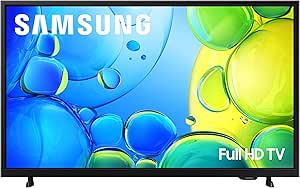 | Best Compact Samsung Smart TV | Screen size: 40 inches | Display technology: LED | Resolution: 1080p Full HD | VIEW LATEST PRICE | See Our Full Breakdown |
| Roku Select Series 50-Inch 4K QLED Smart TV |  | Best for Easy, Shared Viewing | Screen size: 50 inches | Display technology: 4K UHD QLED LED | Resolution: 4K (2160p) | VIEW LATEST PRICE | See Our Full Breakdown |
| Insignia 50-Inch F50 Series 4K UHD LED Smart Fire TV |  | Best for Alexa and Fire TV Fans | Screen size: 50 inches | Display technology: LED | Resolution: 4K UHD (2160p) | VIEW LATEST PRICE | See Our Full Breakdown |
| LG 55-Inch QNED73B Mini LED 4K Smart TV (2026) |  | Best for Big-Screen, Mixed Entertainment | Screen size: 55 inches | Display technology: Mini LED | Resolution: 4K | VIEW LATEST PRICE | See Our Full Breakdown |
| Amazon Ember 4-Series 43-Inch 4K UHD Smart TV with Fire TV |  | Best Mid-Size 4K Fire TV | Screen size: 43 inches | Resolution: 3840 x 2160 (4K UHD) | HDR formats: HDR10+, HDR10, HLG | VIEW LATEST PRICE | See Our Full Breakdown |
| Insignia 55-Inch F50 Series 4K UHD LED Smart Fire TV with Alexa Voice Remote | | Best for Big-Screen Fire TV Value | Screen size: 55 inches | Display and resolution: LED, 4K UHD (2160p) | Refresh rate: 60 Hz | VIEW LATEST PRICE | See Our Full Breakdown |
| Roku Select Series 40-Inch 1080p Full HD Smart TV (2026) |  | Best for Simple Streaming in a Small Room | Screen size: 40 inches | Display and resolution: LED, 1080p Full HD | Refresh rate: 60 Hz | VIEW LATEST PRICE | See Our Full Breakdown |
| Amazon Ember 2-Series 40-Inch Full HD Smart TV with Fire TV and Alexa Voice Remote Enhanced |  | Best Connected 40-Inch Fire TV | Screen size: 40 inches (39.5-inch viewable display) | Resolution: 1920 × 1080 Full HD | HDR formats: HDR10, HLG | VIEW LATEST PRICE | See Our Full Breakdown |
| Insignia 32-Inch FE Series Full HD Smart Fire TV |  | Best Compact Fire TV for Mixed Devices | Model and year: NS32-FEFL26, 2025 | Screen size: 32 inches | Display and resolution: LED-backlit LCD, 1080p | VIEW LATEST PRICE | See Our Full Breakdown |
| Roku Select Series 32-Inch Full HD Smart TV |  | Best for Private Listening in a Small Space | Screen size: 32 inches | Display and resolution: LED, 1080p Full HD | Refresh rate: 60 Hz | VIEW LATEST PRICE | See Our Full Breakdown |
| TCL 55″ T7 Series 4K 120Hz QLED Smart Google TV (55T7) |  | Best for Smooth, Colorful All-Round Viewing | Screen size: 55 inches | Resolution: 4K UHD (3840 × 2160) | Display: QLED, Direct LED | VIEW LATEST PRICE | See Our Full Breakdown |
| Amazon Ember 55-Inch 4-Series 4K Ultra HD Smart TV with Fire TV | | Best for Fire TV and Smart-Home Convenience | Screen size: 55 inches | Resolution: 4K Ultra HD | HDR: HDR10+ | VIEW LATEST PRICE | See Our Full Breakdown |
| Insignia 40-Inch F40 Series Full HD Smart Fire TV |  | Best Compact Pick for Everyday Streaming | Screen size: 40 inches | Resolution: 1080p Full HD | Backlight: Direct LED | VIEW LATEST PRICE | See Our Full Breakdown |
| Samsung 65-Inch M70H Series 4K Mini LED Smart TV (2026) |  | Best for a Bright, Large-Screen Living Room | Screen size: 65 inches | Resolution: 4K | Display technology: LED with Mini LED backlight | VIEW LATEST PRICE | See Our Full Breakdown |
| Samsung 55-Inch M80H Series 4K Mini LED Smart TV (2026) |  | Best for PC Gaming and Picture Processing | Screen size: 55 inches | Resolution: 4K | Display technology: Mini LED | VIEW LATEST PRICE | See Our Full Breakdown |
| smart TVs for home entertainment | Screen size | Refresh rate | Resolution |
|---|---|---|---|
| Samsung 40-Inch F6000 Full HD | 40 inches | 60 Hz | 1080p Full HD |
| Roku Select Series 50-Inch 4K | 50 inches | 60 Hz | 4K (2160p) |
| Insignia 50-Inch F50 Series 4K | 50 inches | 60 Hz | 4K UHD (2160p) |
| LG 55-Inch QNED73B Mini LED 4K | 55 inches | 60 Hz | 4K |
| Amazon Ember 4-Series 43-Inch | 43 inches | 60 Hz | 3840 x 2160 (4K UHD) |
| Insignia 55-Inch F50 Series 4K | 55 inches | 60 Hz | — |
| Roku Select Series 40-Inch 108 | 40 inches | 60 Hz | — |
| Amazon Ember 2-Series 40-Inch | 40 inches (39.5-inch viewable display) | 60 Hz | 1920 × 1080 Full HD |
| Insignia 32-Inch FE Series Ful | 32 inches | 60 Hz | — |
| Roku Select Series 32-Inch Ful | 32 inches | 60 Hz | — |
| TCL 55" T7 Series 4K 120Hz QLE | 55 inches | — | 4K UHD (3840 × 2160) |
| Amazon Ember 55-Inch 4-Series | 55 inches | — | 4K Ultra HD |
| Insignia 40-Inch F40 Series Fu | 40 inches | — | 1080p Full HD |
| Samsung 65-Inch M70H Series 4K | 65 inches | 60 Hz; DLG up to 120 Hz | 4K |
| Samsung 55-Inch M80H Series 4K | 55 inches | 120 Hz; up to 144 Hz for compatible PC games | 4K |
More Details on Our Top Picks
Samsung 40-Inch F6000 Full HD Smart TV (2025)
The 40-inch Full HD screen makes this Samsung a sensible fit for bedrooms, smaller living rooms, or a second screen where 4K is less important than easy access to entertainment. Its Tizen platform combines streaming apps with free channels, while mobile screen mirroring makes it easier to share compatible phone content. Compared with the 50-inch Roku Select Series 4K QLED, this model gives up both screen size and 4K detail, but it takes up less space and adds Object Tracking Sound Lite for virtual spatial audio. Picture tools such as HDR10+ and PurColor add flexibility, though the 60 Hz panel is not aimed at high-frame-rate gaming. Network-based smart services require a Samsung Account, and Q-Symphony only works with a separately sold compatible soundbar.
Pros:- Compact 40-inch size suits smaller rooms and secondary viewing spaces.
- Tizen brings streaming apps and free channels into one interface.
- HDR10+, PurColor, and contrast adjustment offer several picture enhancements.
- Mobile screen mirroring and Object Tracking Sound Lite add useful sharing and audio features.
Cons:- Full HD resolution offers less fine detail than the 4K Roku Select Series 50-Inch QLED and other 4K picks.
- Smart services that use the network require a Samsung Account.
- Q-Symphony requires a separately sold compatible soundbar.
Best for: Viewers furnishing a bedroom or compact living room who want Samsung’s smart platform and a manageable 40-inch screen.
Not ideal for: Buyers who sit far from the screen, want 4K detail, or expect a large-screen centerpiece for shared movie nights.
- Screen size:40 inches
- Display technology:LED
- Resolution:1080p Full HD
- Refresh rate:60 Hz
- HDR format:HDR10+
- Smart platform:Samsung Tizen
- Audio output:2-channel speakers, 20 W maximum
- Connectivity feature:Mobile screen mirroring
Our verdict“Choose this Samsung for a compact room and Tizen convenience, but pick a 4K model for a larger main-screen viewing setup.”
Roku Select Series 50-Inch 4K QLED Smart TV
For a shared living room, the 50-inch 4K QLED display and Roku’s straightforward streaming interface make this one of the most balanced choices in this group. Its voice remote has personal shortcuts and a lost-remote finder, while AirPlay 2, Bluetooth headphone listening, and clear-speech features address common household viewing needs. Compared with the Insignia 50-Inch F50 Series, this Roku adds QLED color, more HDMI ports, and headphone listening; the Insignia counters with a stated 300-nit brightness figure, while this Roku is rated at 250 nits. The Roku’s 60 Hz refresh rate and lack of motion enhancement make it less suitable for viewers focused on fast sports or gaming. Its glossy screen can also reflect room lighting, so placement matters.
Pros:- 4K QLED panel with HDR10, HDR10+, and HLG support.
- Four HDMI ports and two USB ports allow several devices to stay connected.
- AirPlay 2, Miracast, and multiple voice assistant options support flexible sharing and control.
- Bluetooth headphone mode, speech clarity features, and a remote finder are useful in shared homes.
Cons:- The 60 Hz refresh rate and lack of motion enhancement limit its appeal for fast-moving content.
- 250-nit maximum brightness is lower than the Insignia 50-Inch F50 Series’ stated 300 nits.
- Glossy screen finish can show reflections in bright rooms.
Best for: Households that want a 50-inch 4K screen, simple streaming access, AirPlay, and private Bluetooth listening options.
Not ideal for: Sports and gaming enthusiasts seeking higher refresh rates or motion enhancement, and viewers whose TV faces bright windows.
- Screen size:50 inches
- Display technology:4K UHD QLED LED
- Resolution:4K (2160p)
- Refresh rate:60 Hz
- HDR formats:HDR10, HDR10+, HLG
- Maximum brightness:250 nits
- HDMI ports:4
- Wireless connectivity:Wi-Fi, Bluetooth 5.2
- Screen mirroring:AirPlay 2, Miracast
Our verdict“Pick the Roku for an easy-to-share 50-inch entertainment hub, unless fast-motion viewing or bright-room performance is your priority.”
Insignia 50-Inch F50 Series 4K UHD LED Smart Fire TV
The Insignia F50 is a practical 50-inch 4K Fire TV for viewers who want Alexa voice control and a broad mix of wired connections without moving up to a more feature-rich screen. Fire TV puts streaming apps and free ad-supported content in the same interface, and 4K upscaling can give lower-resolution sources a cleaner presentation on the 4K panel. Its stated 300-nit brightness exceeds the Roku Select Series 50-Inch QLED’s 250 nits, though the Roku brings QLED technology, AirPlay 2, Bluetooth headphone listening, and one extra HDMI port. The Insignia instead offers DTS Virtual:X and useful legacy connections, including composite AV and a headphone jack. Its built-in speakers top out at 10 watts, so a separate audio setup may suit movie-focused households better.
Pros:- 4K UHD resolution, HDR10, and 4K upscaling support detailed viewing across mixed content.
- Fire TV combines streaming apps with free ad-supported content and Alexa control.
- 300-nit stated maximum brightness is higher than the Roku Select Series 50-Inch QLED’s listed 250 nits.
- Composite AV, headphone, optical, coaxial, Ethernet, and USB connections support a range of equipment.
Cons:- Built-in speakers have a maximum output of 10 watts, limiting sound headroom.
- HDR support is limited to HDR10, unlike the Roku’s HDR10, HDR10+, and HLG support.
- Some streaming content requires subscriptions, and availability varies.
Best for: Fire TV households that want a 50-inch 4K screen, Alexa control, and connections for older or varied devices.
Not ideal for: Viewers prioritizing QLED color, private Bluetooth headphone listening, or stronger built-in audio for films.
- Screen size:50 inches
- Display technology:LED
- Resolution:4K UHD (2160p)
- Refresh rate:60 Hz
- HDR format:HDR10
- Maximum brightness:300 nits
- Operating system:Fire OS
- Audio features:DTS Virtual:X, Dolby Digital
- HDMI ports:3
Our verdict“Choose the Insignia if Alexa, Fire TV, and varied device connections matter more than QLED features or stronger built-in audio.”
LG 55-Inch QNED73B Mini LED 4K Smart TV (2026)
This LG earns its place as the lineup’s large-screen Mini LED pick: its 55-inch 4K display, Dynamic QNED Color, and a7 AI Processor Gen9 target vivid, detailed viewing for films and everyday streaming. Filmmaker Mode gives movie fans a viewing option designed to preserve a more natural presentation, while webOS and LG Channels make it a broader entertainment hub than the compact Samsung F6000. The Roku Select Series 50-Inch QLED is smaller and has more listed connection detail, but the LG adds Mini LED backlighting, gaming tools such as Game Optimizer and ALLM, and cloud gaming support. Its 60 Hz refresh rate remains a limit for fast-motion gaming, and the listed HDR formats are HDR10 and HLG rather than HDR10+. Streaming and network features also depend on internet access, with some services requiring subscriptions.
Pros:- 55-inch 4K Mini LED display with Dynamic QNED Color is suited to a larger shared viewing space.
- a7 AI Processor Gen9 supports picture and sound processing features.
- Filmmaker Mode offers a movie-focused picture option.
- Game Optimizer, ALLM, cloud gaming, webOS, and LG Channels cover varied entertainment needs.
Cons:- 60 Hz refresh rate is less suited to high-frame-rate gaming and fast-motion preferences.
- Listed HDR formats are HDR10 and HLG, not HDR10+.
- Streaming and network-based features require internet access, and some services require subscriptions.
Best for: Movie watchers and casual gamers seeking a larger 55-inch 4K screen with Mini LED picture features and built-in gaming tools.
Not ideal for: Competitive gamers seeking a higher refresh rate, or buyers who want clearly specified HDR10+ support.
- Screen size:55 inches
- Display technology:Mini LED
- Resolution:4K
- Refresh rate:60 Hz
- HDR formats:HDR10, HLG
- Processor:a7 AI Processor 4K Gen9
- Smart platform:webOS
- Dimensions without stand:48.3 x 28.1 x 2.8 inches (W x H x D)
- Weight without stand:20.9 pounds
Our verdict“Choose the LG for a larger Mini LED movie-and-gaming screen, but look elsewhere if a higher refresh rate is a must.”
Amazon Ember 4-Series 43-Inch 4K UHD Smart TV with Fire TV
The Ember 4-Series offers a useful middle ground for buyers who want 4K resolution in a 43-inch format rather than a larger living-room screen. Fire TV and Alexa voice control make content search familiar for households already using Amazon services, while Wi-Fi 6 and a quad-core processor are designed to support responsive app use. Its four HDMI inputs, including one HDMI 2.1 port with eARC, give it a connection advantage over the Insignia 50-Inch F50’s three HDMI ports, even though the Insignia has a larger screen and a stated 300-nit brightness. The Ember also includes accessibility tools such as a screen reader, magnifier, captions, and audio description. Its 60 Hz refresh rate and 10 W + 10 W audio are less suited to high-frame-rate gaming or viewers seeking powerful built-in sound.
Pros:- 4K UHD resolution with HDR10+, HDR10, and HLG support.
- Wi-Fi 6 and a quad-core processor are designed for responsive smart TV use.
- Four HDMI inputs include HDMI 2.1 with eARC for compatible equipment.
- Accessibility features include a screen reader, magnifier, captions, and audio description.
Cons:- 60 Hz refresh rate does not suit viewers seeking higher-frame-rate gaming.
- 10 W + 10 W audio may not provide the impact some movie-focused rooms need.
- Some content requires subscriptions, and captions or audio descriptions are not available for every title.
Best for: Amazon and Alexa households that want a mid-size 4K screen, several device connections, and built-in accessibility options.
Not ideal for: Buyers seeking a larger screen, a higher refresh rate, or room-filling built-in audio for movies.
- Screen size:43 inches
- Resolution:3840 x 2160 (4K UHD)
- HDR formats:HDR10+, HDR10, HLG
- Refresh rate:60 Hz
- Backlight:Direct LED
- Operating system:Fire OS
- Wireless connectivity:Wi-Fi 6
- HDMI inputs:3 HDMI 2.0 and 1 HDMI 2.1 with eARC
- Audio:Dolby Digital Plus, 10 W + 10 W
Our verdict“Pick the Ember for a mid-size 4K Fire TV with strong connectivity and accessibility tools, rather than for high-refresh gaming or powerful onboard sound.”
Insignia 55-Inch F50 Series 4K UHD LED Smart Fire TV with Alexa Voice Remote
For a shared living room where screen size and easy access to streaming matter more than advanced motion handling, this 55-inch 4K Fire TV is the strongest fit in this group. Its 4K resolution and upscaling give lower-resolution shows a cleaner presentation on the larger screen, while Alexa voice search and smart-home controls keep common tasks simple. Compared with the Roku Select Series 40-Inch, it offers more screen area and 4K detail, but the Roku is easier to place in a smaller room and includes AirPlay 2. The tradeoff here is a 60 Hz panel and modest 300-nit brightness, which limit its appeal for fast action or bright rooms. Three HDMI ports, eARC, and legacy connections make it flexible for consoles, sound systems, and older devices.
Pros:- 55-inch 4K UHD screen with HDR10 and upscaling
- Fire TV apps, Alexa voice control, and smart-home access
- Three HDMI ports plus HDMI eARC and legacy connections
- VESA-compatible for wall mounting
Cons:- 60 Hz refresh rate is less suited to fast-moving sports and gaming
- 300-nit maximum brightness can limit visibility in bright rooms
Best for: Households setting up a main streaming TV who want a large 4K screen, Alexa controls, and several device connections.
Not ideal for: Viewers who watch in a sunlit room or prioritize high-refresh-rate gaming and smoother fast motion.
- Screen size:55 inches
- Display and resolution:LED, 4K UHD (2160p)
- Refresh rate:60 Hz
- HDR format:HDR10
- Maximum brightness:300 nits
- Smart platform:Fire OS
- Audio:Built-in stereo speakers, DTS Virtual:X, HDMI eARC
- Connections:3 HDMI, composite AV, digital optical, USB, headphone jack, coaxial, Ethernet
- Wall mount pattern:VESA 200 × 200
Our verdict“Choose this Insignia for a large, connected 4K Fire TV in a typical living room, but pick a brighter or faster panel for demanding viewing.”
Roku Select Series 40-Inch 1080p Full HD Smart TV (2026)
The 40-inch Roku Select is the clearest choice here for buyers who want a straightforward streaming screen without moving up to a large 4K set. Roku’s simple home screen brings apps and live TV together, while Smart Picture adjusts incoming content for an easier everyday setup. Compared with the Amazon Ember 2-Series 40-Inch, this Roku adds AirPlay 2, Miracast, and Bluetooth headphone mode, making it a flexible fit for mixed-device households or late-night viewing. The Ember counters with Wi-Fi 6 and Alexa-focused features. This Roku’s main compromise is its 1080p resolution; it cannot deliver the fine detail of the 55-inch Insignia F50’s 4K screen. Its 250-nit brightness and lack of motion enhancement also make it a better match for casual shows than bright-room viewing or fast-paced action.
Pros:- Simple Roku home screen for streaming apps and live TV
- AirPlay 2 and Miracast screen mirroring
- Bluetooth headphone mode supports quieter listening
- Voice remote works with Roku Voice and major voice assistants
Cons:- 1080p resolution has less detail than the 4K Insignia F50
- 250-nit maximum brightness is limited for bright rooms
- No motion enhancement technology
Best for: Apartment dwellers and bedroom viewers who want an uncomplicated streaming interface, wireless headphone listening, and phone-to-TV casting.
Not ideal for: Buyers seeking 4K detail, a large main-room screen, or enhanced motion for sports and fast games.
- Screen size:40 inches
- Display and resolution:LED, 1080p Full HD
- Refresh rate:60 Hz
- Maximum brightness:250 nits
- Contrast ratio:3000:1
- Wireless connectivity:Wi-Fi, Bluetooth 5.2
- Screen mirroring:AirPlay 2, Miracast
- Ports:3 HDMI, 1 USB
- VESA mount:200 × 300 mm
Our verdict“Pick this Roku for uncomplicated streaming and useful casting in a smaller room, not for 4K viewing or demanding motion performance.”
Amazon Ember 2-Series 40-Inch Full HD Smart TV with Fire TV and Alexa Voice Remote Enhanced
This Ember is a better match than the Roku Select 40-inch for viewers already centered on Alexa and Fire TV. Its quad-core processor and Wi-Fi 6 are aimed at responsive app access and wireless streaming, while Omnisense wake technology can make returning to the TV feel more hands-free. The Roku offers AirPlay 2 and Bluetooth headphone mode, so it has the edge for Apple-device households and private listening; the Ember instead adds Dolby Digital Plus, accessibility tools such as VoiceView, and an HDMI 2.1 port with eARC for a compatible audio system. Its 40-inch 1080p picture remains a modest home-entertainment format rather than a cinematic one, and two HDMI inputs leave less room for several wired devices than the 55-inch Insignia F50. Buyers should choose it for its connected features, not for screen resolution or refresh rate.
Pros:- Fire TV with Alexa voice control and Omnisense wake technology
- Wi-Fi 6 and a quad-core processor
- VoiceView, screen magnifier, and closed-caption features
- HDMI 2.1 with eARC and Dolby Digital Plus audio
Cons:- 1080p resolution is less detailed than the 4K Insignia F50
- Only two HDMI inputs and one USB port
- 60 Hz refresh rate does not target fast-motion viewing
Best for: Alexa users and accessibility-minded viewers who want a compact Fire TV with Wi-Fi 6 and a soundbar connection.
Not ideal for: Households with several HDMI devices, Apple users who rely on AirPlay 2, or viewers seeking a 4K main-room screen.
- Screen size:40 inches (39.5-inch viewable display)
- Resolution:1920 × 1080 Full HD
- HDR formats:HDR10, HLG
- Refresh rate:60 Hz
- Smart platform and processor:Fire OS, quad-core processor
- Wireless connectivity:Wi-Fi 6
- Ports:1 HDMI 2.0, 1 HDMI 2.1 with eARC, 1 USB 2.0, 1 Ethernet
- Audio:Dolby Digital Plus with passthrough of Dolby-encoded audio
- VESA mount:100 × 100 mm
Our verdict“Choose the Ember for Alexa-centered streaming, accessibility features, and eARC in a 40-inch set, but look elsewhere if you need more inputs or 4K.”
Insignia 32-Inch FE Series Full HD Smart Fire TV
For a bedroom, kitchen, or secondary viewing spot, this 32-inch Insignia pairs a compact footprint with a 1080p picture and Fire TV access. Its Alexa remote and AirPlay support make it useful in homes that mix streaming apps with Apple devices, while DTS TruSurround and optical audio give buyers options beyond the built-in speakers. Compared with the Roku Select Series 32-Inch, this model is the more natural fit for people who prefer Fire TV and want listed Ethernet connectivity; the Roku offers Bluetooth headphone mode and clearer-speech features. One practical caution is that the product information conflicts on HDMI count, listing two in the specifications and three in the description, so I would verify the actual connections before purchase. Its small screen and 60 Hz refresh rate suit everyday shows better than a main-room movie setup or fast-action gaming.
Pros:- 1080p resolution on a compact 32-inch screen
- Fire TV streaming and Alexa voice control
- AirPlay support and DTS TruSurround
- Includes listed Ethernet, optical audio, and USB connections
Cons:- Product information conflicts on whether it has two or three HDMI ports
- 32-inch screen is small for shared-room or cinematic viewing
- 60 Hz refresh rate limits suitability for fast-motion use
Best for: Fire TV households adding a compact 1080p set to a bedroom or kitchen, especially when AirPlay and wired network access are useful.
Not ideal for: Buyers who need a confirmed number of HDMI inputs, a large shared-room picture, or a TV with advanced motion handling.
- Model and year:NS32-FEFL26, 2025
- Screen size:32 inches
- Display and resolution:LED-backlit LCD, 1080p
- Refresh rate:60 Hz
- Smart platform:Fire TV
- Voice assistant:Alexa
- Connections:HDMI count is inconsistent in supplied data: 2 in specifications, 3 in description; 1 USB, optical audio, Ethernet
- Mounting:VESA 200 × 200 mm
- Weight:4.9 pounds
Our verdict“Choose this Insignia as a compact Fire TV with AirPlay and wired connectivity, but confirm its HDMI count before planning a multi-device setup.”
Roku Select Series 32-Inch Full HD Smart TV
This 32-inch Roku Select suits a bedroom or small den where easy streaming and quiet listening matter more than screen size. Roku’s simple home screen and voice remote make it easy to find shows, while Bluetooth headphone mode is a useful advantage for late-night viewing. Compared with the Insignia 32-Inch FE Series, this Roku has clearly specified three HDMI ports and adds AirPlay 2 and Miracast; the Insignia instead brings Fire TV and listed Ethernet. Both are 1080p sets with 60 Hz refresh rates, so neither is designed to deliver a cinematic large-screen experience or enhanced motion. Roku Smart Picture helps adjust incoming signals, but 250-nit brightness can be restrictive in a bright room. I’d choose it for a compact streaming setup, particularly where wireless headphones or phone casting will see regular use.
Pros:- Roku Smart Picture and an uncomplicated streaming home screen
- Bluetooth 5.2 headphone mode
- AirPlay 2 and Miracast screen mirroring
- Three HDMI ports for connecting external devices
Cons:- 32-inch 1080p screen is limited for a main living room
- 250-nit maximum brightness may struggle in bright spaces
- No motion enhancement technology
Best for: Bedroom viewers and small-space households who want a simple Roku interface, wireless headphone listening, and phone casting.
Not ideal for: Buyers seeking a larger 4K screen, a high-brightness picture, or enhanced motion for sports and fast games.
- Screen size:32 inches
- Display and resolution:LED, 1080p Full HD
- Refresh rate:60 Hz
- Maximum brightness:250 nits
- Contrast ratio:3000:1
- Wireless connectivity:Wi-Fi, Bluetooth 5.2
- Screen mirroring:AirPlay 2, Miracast
- Ports:3 HDMI, 1 USB
- VESA mount:200 × 200 mm
Our verdict“Pick this Roku for private listening and easy casting in a small room, but choose a larger or brighter TV for shared daytime viewing.”
TCL 55″ T7 Series 4K 120Hz QLED Smart Google TV (55T7)
The TCL T7 is my strongest pick here for households that split viewing between films, live sports, and console gaming. Its native 120 Hz refresh and QLED color give fast action more fluid movement and richer-looking scenes than the 60 Hz Samsung M70H, whose 120 Hz mode relies on DLG and can soften detail. Google TV, Chromecast, and AirPlay 2 also make it flexible for homes with different phones and streaming habits. It supports both Dolby Vision and HDR10+, a broader HDR mix than the HDR10+-only Ember 55-Inch 4-Series. The tradeoff is that the listing does not specify variable refresh rate or HDMI 2.1 gaming features, so I would not choose it solely for advanced PC or console gaming. Its 55-inch size and 24.3-pound weight also call for a suitable stand or careful mounting.
Pros:- Native 120 Hz refresh helps keep sports and fast games looking fluid.
- QLED color and support for Dolby Vision and HDR10+ suit varied film and streaming libraries.
- Google TV includes Chromecast, while AirPlay 2 supports Apple-device sharing.
- Four HDMI ports, including eARC, provide useful room for source devices and a soundbar.
Cons:- Variable refresh rate and HDMI 2.1 features are not specified.
- Two USB ports may limit connected storage or accessories.
- At 24.3 pounds, it is relatively demanding to lift or mount.
Best for: Households wanting one 55-inch TV for movies, sports, streaming, and smooth-motion gaming, especially those who use both Apple and Google devices.
Not ideal for: Competitive gamers seeking confirmed HDMI 2.1 or variable refresh rate support, and buyers who need a lighter TV for frequent repositioning.
- Screen size:55 inches
- Resolution:4K UHD (3840 × 2160)
- Display:QLED, Direct LED
- Native refresh rate:120 Hz
- HDR formats:Dolby Vision, HDR10+, HDR10, HLG
- Smart platform:Google TV
- HDMI ports:4, including one with eARC
- Wireless and casting:Wi-Fi 5, Bluetooth, AirPlay 2, Google Cast
- Audio formats:Dolby Atmos, DTS:X, DTS Virtual:X
Our verdict“Choose the TCL T7 if you want a versatile 55-inch entertainment TV with native 120 Hz motion and broad HDR support, but not if confirmed advanced gaming connections are your priority.”
Amazon Ember 55-Inch 4-Series 4K Ultra HD Smart TV with Fire TV
I’d pick the Ember 55-Inch 4-Series for a living room where Fire TV and Alexa+ are the main draw, rather than for the most ambitious picture or gaming specification. Its 4K resolution, HDR10+, and four HDMI inputs cover the everyday mix of streaming, a console, and a soundbar, while Wi-Fi 6 is a useful fit for a busy home network. Compared with the TCL T7, it has no stated native 120 Hz refresh or Dolby Vision support, so the TCL is the more clearly specified choice for fast action and a wider HDR format mix. The Ember instead adds an ambient-artwork feature that can wake the screen when its sensors detect someone nearby. That convenience comes with a Fire TV-centered experience, and some content or services may require subscriptions.
Pros:- 4K resolution and HDR10+ support suit current streaming and film content.
- Wi-Fi 6 and a quad-core processor support responsive streaming and app use.
- Four HDMI inputs accommodate multiple source devices.
- Alexa+ voice search, smart-home controls, and sensor-activated artwork add convenience.
Cons:- No native refresh-rate figure or Dolby Vision support is specified.
- Fire TV experience and some content access depend on services that may require subscriptions.
Best for: Fire TV households that want a 55-inch 4K screen, Alexa+ voice search, and straightforward connections for several entertainment devices.
Not ideal for: Viewers prioritizing native high-refresh gaming or Dolby Vision support, or households that do not want their smart-TV experience centered on Fire TV.
- Screen size:55 inches
- Resolution:4K Ultra HD
- HDR:HDR10+
- Audio:Dolby Audio
- Processor:Quad-core
- Wi-Fi:Wi-Fi 6
- HDMI inputs:4
- Voice assistant:Alexa+
Our verdict“Choose the Ember if Alexa+ and Fire TV convenience matter more to you than the TCL T7’s stated 120 Hz motion and broader HDR-format support.”
Insignia 40-Inch F40 Series Full HD Smart Fire TV
The Insignia F40 earns its place as the compact, simpler option for bedrooms, smaller living spaces, or a secondary TV. Its 40-inch Full HD screen is a more sensible match for close viewing than a 55- or 65-inch 4K model, while Fire TV and Alexa voice control make streaming easy to reach. AirPlay 2 and Bluetooth headphone pairing add practical sharing and late-night listening options. Against the Amazon Ember 55-Inch 4-Series, the Insignia gives up 4K resolution, HDR10+, and screen size; it is the better fit when space matters more than cinematic scale or fine detail. It also has just two HDMI inputs, including one with eARC, so a soundbar and multiple consoles can quickly use up its connections. I would keep it for casual viewing, not as a centerpiece for a large room.
Pros:- Compact 40-inch size suits bedrooms and smaller viewing spaces.
- Fire TV OS and Alexa voice control provide direct access to streaming and search.
- AirPlay 2 supports sharing from compatible Apple devices.
- Bluetooth headphone pairing can help with private or late-night viewing.
Cons:- 1080p resolution lacks the detail of the 4K Ember 55-Inch 4-Series.
- Two HDMI inputs limit room for multiple consoles and other devices.
Best for: Apartment dwellers, bedroom viewers, and families seeking a compact streaming TV with voice control and Apple-device casting.
Not ideal for: Buyers furnishing a large main room, seeking 4K detail, or connecting several HDMI devices at once.
- Screen size:40 inches
- Resolution:1080p Full HD
- Backlight:Direct LED
- Smart platform:Fire TV OS
- Voice assistant:Alexa
- HDMI inputs:2, including one with eARC
- Wireless connectivity:Dual-band Wi-Fi, Bluetooth
- Apple-device sharing:AirPlay 2
Our verdict“Choose the Insignia F40 for a smaller room and convenient streaming, but step up to a 4K model if this will be your main large-screen TV.”
Samsung 65-Inch M70H Series 4K Mini LED Smart TV (2026)
The Samsung M70H is the lineup’s large-screen choice for viewers who want a 65-inch 4K picture with high stated brightness for a bright living room. Its Mini LED backlight and HDR10+ support aim to add contrast and color, while Samsung TV Plus and Gaming Hub bring streaming and game access into the smart-TV setup. Compared with the 55-inch TCL T7, the M70H gives you a larger screen and a listed maximum brightness of 1000 nits, but its standard refresh rate is 60 Hz. DLG can raise the listed rate to 120 Hz for gaming, with a stated loss of image sharpness, so it is not the same proposition as the TCL’s native 120 Hz panel. The software-based dimming also differs from hardware full-array control. Network services require internet and a Samsung Account.
Pros:- 65-inch 4K screen makes shared viewing more immersive in a larger room.
- Listed maximum brightness of 1000 nits supports use in brighter spaces.
- Mini LED backlight and HDR10+ target higher contrast and vivid HDR viewing.
- Samsung TV Plus and Gaming Hub add built-in entertainment options.
Cons:- The standard refresh rate is 60 Hz; DLG’s up-to-120 Hz mode can reduce sharpness.
- Dimming is software-based rather than full-array hardware-based.
- Network-based smart services require internet access and a Samsung Account.
Best for: Viewers furnishing a bright, spacious living room who value a 65-inch screen, Samsung streaming features, and occasional fast-action gaming.
Not ideal for: Movie enthusiasts seeking specified Dolby Vision support or competitive gamers who want native 120 Hz without DLG sharpness compromises.
- Screen size:65 inches
- Resolution:4K
- Display technology:LED with Mini LED backlight
- Refresh rate:60 Hz; DLG up to 120 Hz
- Maximum display brightness:1000 nits
- HDR format:HDR10+
- Screen finish:Glossy
- Smart features:Samsung TV Plus, Gaming Hub
- Weight:31.7 pounds
Our verdict“Choose the M70H when screen size and bright-room viewing lead your priorities, but prefer the TCL T7 for its stated native 120 Hz motion.”
Samsung 55-Inch M80H Series 4K Mini LED Smart TV (2026)
The Samsung M80H is the more gaming-oriented Samsung in this group, especially for PC owners with hardware that can use its up-to-144 Hz mode. Its Mini LED display and NQ4 AI Gen2 processing are designed to sharpen and upscale lower-resolution material, while automatic SDR-to-HDR remastering can give older or standard-dynamic-range content a more vivid presentation. That processing emphasis distinguishes it from the TCL T7, which specifies native 120 Hz and Dolby Vision support but does not list comparable AI upscaling or a 144 Hz PC mode. The M80H’s highest refresh rate applies only to compatible PC games and equipment, so most viewers should not treat it as a guaranteed everyday advantage. Its two-channel, 20-watt audio is also modest for a 55-inch entertainment setup, and network services require a Samsung Account and internet access.
Pros:- Mini LED display pairs with AI processing for picture enhancement and 4K upscaling.
- Up to 144 Hz is available for compatible PC games.
- Automatic SDR-to-HDR remastering can give older content a more vivid look.
- Tizen provides access to streaming apps, games, and free channels.
Cons:- The 144 Hz mode depends on compatible PC games and a suitable graphics card.
- Built-in audio is limited to 20 watts across two channels.
- Network-based smart services require internet access and a Samsung Account.
Best for: PC gamers with compatible graphics hardware and streaming households that want AI-assisted upscaling and a 55-inch Mini LED screen.
Not ideal for: Buyers without a compatible gaming PC, viewers who prioritize Dolby Vision, or anyone expecting powerful built-in sound without an external audio system.
- Screen size:55 inches
- Resolution:4K
- Display technology:Mini LED
- Refresh rate:120 Hz; up to 144 Hz for compatible PC games
- HDR format:HDR10+
- Processor:NQ4 AI Gen2
- Operating system:Tizen
- Audio output:20 watts, 2 channels
- Weight:22.5 pounds
Our verdict“Choose the M80H if you have compatible PC gaming hardware and value picture processing, but the TCL T7 is the clearer choice for native 120 Hz and Dolby Vision support.”
How We Picked
I compared these TVs by how well their screen size, resolution, panel type, and motion features suit everyday home entertainment. A main-room TV needs to handle streaming and shared viewing well; sports and gaming can benefit from faster refresh capabilities, while bedrooms and secondary rooms may call for a compact screen and an easy-to-use smart platform. I also weighed practical differences such as the tradeoff between 4K and Full HD, and whether a model’s more advanced display technology matches the buyer’s needs.
The ranking gives more weight to versatility for a main viewing space than to screen size or feature count alone. That puts the TCL T7 first for its mix of 4K QLED and 120Hz capability, with Roku’s 50-inch QLED close behind for viewers who favor simple streaming access. Samsung’s Mini LED models take the premium positions, while the smaller Full HD TVs rank better for secondary-room use than as one-size-fits-all living-room picks. I distinguish between models with similar names by their size, resolution, and intended role, rather than treating them as interchangeable.
Factors to Consider When Choosing Smart TVs For Home Entertainment
Before choosing a TV, I would match the screen to the room and the people who will use it, then decide which picture upgrades will actually matter in daily viewing. These broader checks help prevent a common mismatch: paying for features that go unused or choosing a screen that feels limiting in the main entertainment space.
Match Screen Size to Viewing Distance
A larger screen can make films and sports more absorbing, but it only helps if the TV fits the room and viewing distance. Measure the space where the TV will sit and the usual distance from the sofa before settling on a size. In a compact bedroom, a 32- or 40-inch model may feel more natural than a 55-inch set. In a shared living room, a larger screen can make subtitles and details easier to see from farther back. Avoid choosing by diagonal measurement alone; the stand, cabinet width, and viewing angle matter too. If the TV is for a secondary room, a smaller Full HD model may be a better fit than paying for a large 4K display.
Choose Resolution for the Screen and Content
4K can show more fine detail than Full HD, but the benefit depends on screen size, viewing distance, and the content being watched. On a larger main-room screen, 4K is a sensible choice for modern streaming and other high-resolution sources. For a smaller TV viewed from across a bedroom, Full HD may be entirely adequate. Check which services and devices you actually use, since resolution cannot improve a source that is not available in higher quality. Buyers sometimes assume every show will look sharper after upgrading; picture processing, source quality, and screen size also affect what you see. Prioritize 4K when the TV will serve as the main screen or when you sit relatively close to a larger display.
Pay for Panel Upgrades That Fit Your Viewing
QLED and Mini LED are different routes to improving picture quality, but neither needs to be a requirement for every household. QLED models in this lineup offer a step up from basic LED options for viewers who value color and a more feature-rich screen. Mini LED is positioned as a premium choice for buyers seeking more advanced display performance. Those benefits matter most when the TV is a central part of movie, sports, or gaming sessions. If most viewing is casual and brief, a simpler model may leave more of your budget available for other parts of the setup. Compare the whole package rather than assuming a panel label alone makes a TV the right choice.
Think About Motion Before Buying for Sports or Gaming
Fast-moving sports and games can place different demands on a TV than ordinary streaming shows. A higher refresh rate, such as the 120Hz capability listed for the TCL T7, can be a meaningful differentiator for viewers who care about smooth motion. It is less central if the TV will mostly play films, news, and casual on-demand content. Gamers should also check that their console or connected device can make use of the TV’s motion features. Do not pay for a specification without considering the source equipment and the activities you do most. If sports or gaming are regular uses, treat motion support as a buying criterion rather than an afterthought.
Pick a Smart Platform You Will Actually Use
A built-in smart platform shapes how quickly you can reach streaming apps, search for shows, and use voice controls. Roku, Fire TV, and Google TV each provide a different interface, so think about which one feels familiar to the household. A simple menu can matter more than a long feature list if several people will use the TV. Check that the services you watch are available on the platform and that your preferred voice assistant fits your existing devices. Avoid assuming every model from a brand has the same remote or software features; product names in this group distinguish between different versions. Choosing for ease of everyday use can prevent frustration long after the picture specs have faded from memory.
Decide When a Premium Main-Room TV Is Worth It
Paying for an advanced display makes the most sense when the TV will be watched often, from a shared space, and for content where picture quality matters to you. A premium main-room model can be a better long-term fit than stretching a compact TV across a large room. The opposite is true for a spare room, where a basic Full HD screen may handle occasional viewing without unused upgrades. Think about how long you expect to keep the TV and whether its features match the rest of your entertainment setup. A sound system, console, or streaming device may also affect where an upgrade makes the biggest difference. Set priorities around your actual viewing habits before deciding which tier to choose.
Frequently Asked Questions
Is the TCL T7 a better main-room choice than the Roku 50-inch QLED?
I would choose the TCL T7 if sports or gaming matter alongside streaming, since its listed 120Hz refresh rate gives it a motion-focused distinction. The Roku 50-inch QLED makes more sense if a straightforward streaming experience is your main priority and you prefer its platform. Both offer 4K QLED, so the decision is not simply about resolution or panel type. Check the room size and the devices you plan to connect before choosing. If you rarely watch fast-moving content, the Roku may better match your routine.
Should I choose a 4K TV or Full HD for a bedroom?
For a smaller bedroom screen viewed from a typical bed or chair, Full HD may be sufficient, particularly if you mostly watch regular streaming or broadcast content. A 4K model becomes more appealing if you want a larger screen, sit closer, or regularly watch high-resolution sources. This roundup includes both compact Full HD options and larger 4K models, so room fit is a useful starting point. Do not assume that 4K automatically improves every show; the source and viewing distance affect the visible difference. Choose the resolution that fits your actual setup rather than the biggest specification.
Is Mini LED worth prioritizing over a QLED model?
Mini LED is worth a closer look if this will be your main TV and you place a high value on picture performance. The Samsung M70H and M80H models are the premium display choices here, while the TCL and Roku QLED sets offer a different balance of features and everyday usability. A panel upgrade may matter less in a secondary room or for casual viewing. Compare the TV’s size and intended use along with its display technology. If you will not notice or use the upgrade during your regular viewing, a QLED or standard LED model may be the more sensible match.
Which type of TV makes the most sense for sports and console gaming?
For buyers who regularly watch fast sports or play games, I would give extra attention to refresh rate and to whether connected devices can use the TV’s motion features. The TCL T7 stands out in this lineup because its listing specifies 120Hz, making it a clear option to compare for those activities. A larger screen can also help shared viewing, but it does not replace motion capability. Check the console or other source you plan to connect before making a decision. If your use is mostly films and series, the higher refresh rate may matter less than room fit or platform preference.
Is a 65-inch TV always the best choice for a living room?
No. A 65-inch screen can be a strong fit for a larger room or viewing from farther away, but it may overwhelm a small space or a narrow stand. This roundup pairs Samsung’s 65-inch M70H with smaller 55- and 50-inch options for buyers who need a more moderate footprint. Measure the wall or furniture and check how far viewers sit before committing to a size. Also account for the TV’s overall width, not just its diagonal measurement. The right living-room TV is the one that fits the space and viewing habits, not automatically the largest model.
Conclusion
For the strongest all-around mix of home entertainment uses, my best overall pick is the TCL 55-inch T7, especially for buyers who watch sports or play games as well as stream shows. The Roku Select Series 50-inch 4K QLED is my best value-oriented choice for viewers who want a larger 4K streaming TV without moving up to a premium Mini LED model. For a premium main-room setup, consider Samsung’s 65-inch M70H if your space suits the size, or the 55-inch M80H for a smaller premium screen. Beginners who want a familiar, simple streaming setup can start with a Roku Select model sized for their room. For a bedroom or secondary space, choose among the compact Full HD Roku, Amazon, Samsung, or Insignia models; for a larger screen on a simpler setup, the Insignia 50- or 55-inch F50 is another option. Match screen size and platform to your household before paying for upgrades.