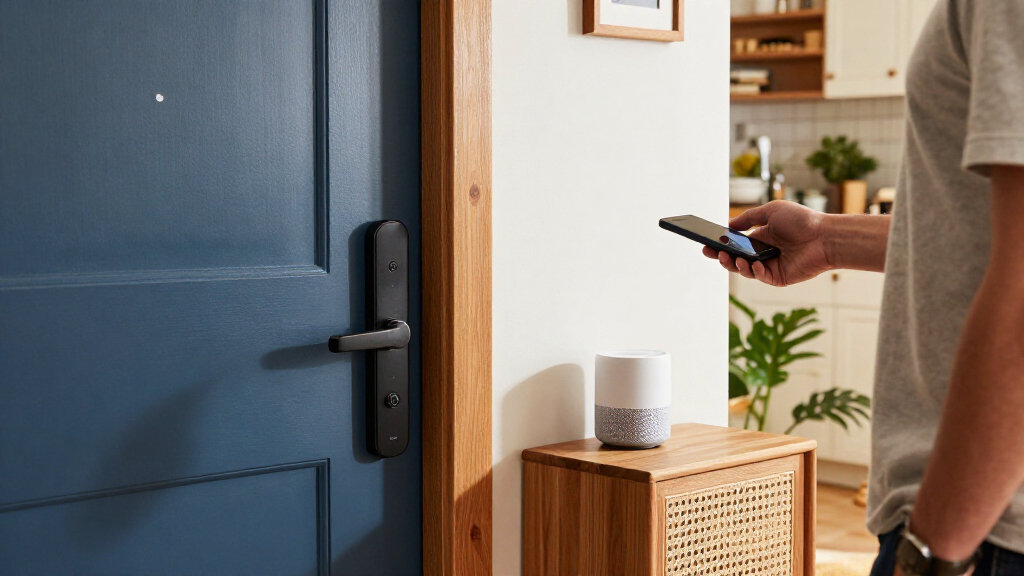

The best smart locks for Google Home pair useful access options with a dependable way to control the lock in your Google Home setup. My best overall pick is the Yale Smart Lock Deadbolt with Matter, which stands out for its Matter support and straightforward keyless entry. The Schlage Encode WiFi Smart Deadbolt is a strong alternative for buyers who want built-in Wi-Fi, while the ULTRALOQ Bolt SE suits homes prioritizing Matter connectivity. The main tradeoff is choosing between direct Wi-Fi convenience, Matter-based compatibility, and biometric features that may add complexity or depend on other parts of your setup. Read on for the full comparison, setup considerations, and recommendations by buyer type.

Get home appliances delivered free with Prime
- Fast, free delivery on millions of items
- Prime Video, Amazon Music and more included
- Member-only deals all year
Complete the kit


Key Takeaways
Matter support is a key differentiator: the Yale Matter deadbolt and ULTRALOQ Bolt SE offer a different smart-home integration path from locks that rely on built-in Wi-Fi or a brand-specific app.
Built-in Wi-Fi favors direct remote access: Schlage Encode models and several Philips and ULTRALOQ options are worth comparing if you want to manage a lock remotely without making a separate bridge the center of your setup.
Fingerprint access is common across the lineup: several Philips models, both eufy picks, the ULTRALOQ Bolt Fingerprint, and Aqara U400 add biometric entry, but buyers should weigh that convenience against their preferred smart-home connection.
Lock-and-handle bundles solve a fit problem: Philips sets with handles can suit doors needing coordinated hardware, while standalone deadbolts are a better match when existing handles stay in place.
Google Home compatibility is not one-size-fits-all: a lock’s Wi-Fi, Matter, or ecosystem-specific approach can affect setup and available controls, so confirm the exact features supported in your home before choosing.
| ULTRALOQ Bolt Fingerprint Wi-Fi Smart Lock with Door Sensor, Remote Access, Black |  | Best for Door-Status Monitoring | Connectivity: 2.4 GHz Wi-Fi | Unlock methods: Fingerprint, passcode, app, auto unlock, voice, web portal, backup keys | Fingerprint and code capacity: Up to 50 fingerprints and 50 passcodes | VIEW LATEST PRICE | See Our Full Breakdown |
| Philips 4200 Series Wi-Fi Keypad Deadbolt with Handle and Fingerprint Access |  | Best Complete Handle Set | Connectivity: 2.4 GHz Wi-Fi; no hub required | Access methods: App, keypad PIN, fingerprint, voice assistant | PIN types: Permanent, one-time, periodic, recurring | VIEW LATEST PRICE | See Our Full Breakdown |
| Philips 4000 Series Wi-Fi Smart Door Lock with Fingerprint and Lever Handles |  | Best for Large Households | Connectivity: Built-in 2.4 GHz Wi-Fi; no hub required for remote control | Unlock methods: Fingerprint, PIN code, key, app | Fingerprint capacity: Up to 50 fingerprints | VIEW LATEST PRICE | See Our Full Breakdown |
| Philips Wi-Fi Smart Deadbolt Lock with Fingerprint and Passcode Entry |  | Best for Adjustable Auto-Lock | Connectivity: Built-in 2.4 GHz Wi-Fi; no hub required | Unlock methods: App, passcode, fingerprint, physical key, Alexa, Google Assistant | Passcode capacity: Up to 100 custom passcodes | VIEW LATEST PRICE | See Our Full Breakdown |
| Yale Smart Lock Deadbolt with Matter, Keyless Entry, Matte Black |  | Best Matter Integration | Connectivity: Matter over Thread; 2.4 GHz Wi-Fi | Entry methods: Phone, keypad code, Google Assistant, backup key | Compatible hubs: Google TV (4K), Nest Hub (2nd Gen), Nest Hub Max, Nest Wi-Fi Pro, and other Matter-enabled hubs | VIEW LATEST PRICE | See Our Full Breakdown |
| Schlage Encode Smart WiFi Lock with Lever Handle, Century Trim, Matte Black |  | Best WiFi Lever Lock | Model: FE789WBCEN622LAT | Finish and trim: Matte Black; Century | Handle: Latitude lever | VIEW LATEST PRICE | See Our Full Breakdown |
| Philips Wi-Fi Smart Keypad Deadbolt Lock Set with Handles |  | Best for Flexible Entry Methods | Model: DDL240X-1HW-H2 | Unlock methods: App, fingerprint, PIN code, physical key, Google Assistant or Amazon Alexa voice commands | User codes: Up to 100 | VIEW LATEST PRICE | See Our Full Breakdown |
| Google Nest x Yale Smart Lock with Keypad, Satin Nickel |  | Best for Nest Households | Model: RB-YRD540-WV-619 | Lock type: Keypad deadbolt | Finish: Satin Nickel | VIEW LATEST PRICE | See Our Full Breakdown |
| ULTRALOQ Bolt SE Wi-Fi Smart Deadbolt with Matter | 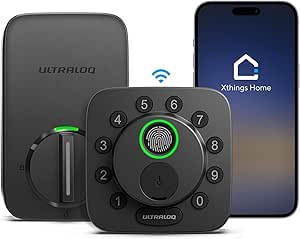 | Best for Multi-Method, Matter-Ready Access | Access methods: Fingerprint, passcode, smartphone app, web portal, shared eKey or code, voice control, 2 mechanical keys | Fingerprint capacity: Up to 50 | Passcode capacity: Up to 50 | VIEW LATEST PRICE | See Our Full Breakdown |
| Schlage Encode WiFi Smart Deadbolt with Century Trim, Matte Black |  | Best Overall for Google Home | Model: BE489WBCEN622 | Finish and trim: Matte Black; Century | Connectivity: Built-in WiFi | VIEW LATEST PRICE | See Our Full Breakdown |
| Philips Wi-Fi Smart Front Door Lock Set with Handle |  | Best for High-Capacity Guest Access | Connectivity: Built-in 2.4 GHz Wi-Fi; no hub required | Unlock methods: App, Google Assistant or Alexa voice commands, keypad password, physical key | Password capacity: Up to 100 | VIEW LATEST PRICE | See Our Full Breakdown |
| eufy Security Familock E32 Smart Lock with Fingerprint Keyless Entry |  | Best for Multi-Platform Fingerprint Access | Model: E32 (T85F2) | Lock type: Deadbolt | Unlock methods: Fingerprint, app, remote, touch, voice | VIEW LATEST PRICE | See Our Full Breakdown |
| Aqara U400 UWB Smart Lock with Fingerprint Keypad, Black |  | Best for Apple-First Homes Using Google Home | Connectivity: Matter over Thread | Unlock methods: UWB, Apple Home Key, fingerprint, touchscreen passcode, voice assistant, app, NFC card, physical key | Battery: Removable rechargeable lithium battery; up to six months per charge | VIEW LATEST PRICE | See Our Full Breakdown |
| eufy Security Smart Lock C220 Fingerprint Keyless Entry Deadbolt |  | Best for Straightforward Fingerprint Upgrades | Model: T8506 | Unlock methods: Fingerprint, app, keypad, physical key, Apple Watch, Alexa or Google Assistant | Connectivity: Built-in Wi-Fi | VIEW LATEST PRICE | See Our Full Breakdown |
| Schlage Arrive Smart WiFi Deadbolt with Camelot Trim, Satin Nickel |  | Best for Extensive Code Management | Connectivity: Built-in Wi-Fi; Bluetooth within range | Smart-home compatibility: Google Home, Alexa | Access-code capacity: Up to 250 | VIEW LATEST PRICE | See Our Full Breakdown |
| smart locks for Google Home | Connectivity | Unlock methods |
|---|---|---|
| ULTRALOQ Bolt Fingerprint Wi-F | 2.4 GHz Wi-Fi | Fingerprint, passcode, app, auto unlock, voice, web portal, backup keys |
| Philips 4200 Series Wi-Fi Keyp | 2.4 GHz Wi-Fi; no hub required | — |
| Philips 4000 Series Wi-Fi Smar | Built-in 2.4 GHz Wi-Fi; no hub required for remote control | Fingerprint, PIN code, key, app |
| Philips Wi-Fi Smart Deadbolt L | Built-in 2.4 GHz Wi-Fi; no hub required | App, passcode, fingerprint, physical key, Alexa, Google Assistant |
| Yale Smart Lock Deadbolt with | Matter over Thread; 2.4 GHz Wi-Fi | — |
| Schlage Encode Smart WiFi Lock | Built-in WiFi | — |
| Philips Wi-Fi Smart Keypad Dea | — | App, fingerprint, PIN code, physical key, Google Assistant or Amazon Alexa voice commands |
| Google Nest x Yale Smart Lock | — | — |
| ULTRALOQ Bolt SE Wi-Fi Smart D | 2.4 GHz WiFi; Matter over Thread | — |
| Schlage Encode WiFi Smart Dead | Built-in WiFi | — |
| Philips Wi-Fi Smart Front Door | Built-in 2.4 GHz Wi-Fi; no hub required | App, Google Assistant or Alexa voice commands, keypad password, physical key |
| eufy Security Familock E32 Sma | Built-in Wi-Fi | Fingerprint, app, remote, touch, voice |
| Aqara U400 UWB Smart Lock with | Matter over Thread | UWB, Apple Home Key, fingerprint, touchscreen passcode, voice assistant, app, NFC card, physical key |
| eufy Security Smart Lock C220 | Built-in Wi-Fi | Fingerprint, app, keypad, physical key, Apple Watch, Alexa or Google Assistant |
| Schlage Arrive Smart WiFi Dead | Built-in Wi-Fi; Bluetooth within range | — |
More Details on Our Top Picks
ULTRALOQ Bolt Fingerprint Wi-Fi Smart Lock with Door Sensor, Remote Access, Black
The ULTRALOQ Bolt Fingerprint Wi-Fi is my pick for Google Home users who want more than a remote-controlled deadbolt: its included door sensor can report whether the door is open, a useful distinction from the Philips 4000 Series, which has no door-closed sensor. Fingerprint, passcode, app, voice, and key entry give household members several ways in, while built-in 2.4 GHz Wi-Fi supports remote access without a separate lock hub. Its Grade 2 construction and IP65 rating also suit buyers who want weather resistance. The tradeoff is that Google Home is only one part of a broad platform mix, and the lock depends on 2.4 GHz Wi-Fi with a recommended router distance of 70 feet or less. Choose it for door-state awareness; skip it if you want a simpler setup or broader Wi-Fi-band support.
Pros:- Included door sensor reports open-door status, unlike the Philips 4000 Series.
- Fingerprint, passcode, app, voice, and backup-key access suit different household routines.
- Built-in 2.4 GHz Wi-Fi supports remote access without a separate lock hub.
- IP65 weather resistance and zinc alloy construction add durability.
Cons:- Connects only to 2.4 GHz Wi-Fi, with a recommended router distance of 70 feet or less.
- Eight AA batteries are required, adding more cells to replace than the four included with the Yale Matter lock.
Best for: Google Home households that want fingerprint entry, remote control, and alerts about whether the door is open.
Not ideal for: Buyers whose router relies on 5 GHz or sits more than about 70 feet from the lock, or who want a door lock with fewer setup variables.
- Connectivity:2.4 GHz Wi-Fi
- Unlock methods:Fingerprint, passcode, app, auto unlock, voice, web portal, backup keys
- Fingerprint and code capacity:Up to 50 fingerprints and 50 passcodes
- Security certification:ANSI/BHMA Grade 2
- Weather resistance:IP65
- Battery life and power:Up to one year under typical use; eight AA batteries included
- Installation:DIY; screwdriver required; no wiring
- Warranty:Lifetime mechanical; 18 months electronic
Our verdict“Choose the ULTRALOQ if door-open alerts and multiple entry methods matter more to you than broad Wi-Fi support.”
Philips 4200 Series Wi-Fi Keypad Deadbolt with Handle and Fingerprint Access
The Philips 4200 Series makes sense when replacing the deadbolt and handle together: it includes two matching door levers, so buyers do not have to source a separate handle set. For Google Home households, built-in Wi-Fi and Google Assistant support provide app-based remote control and voice commands without a hub. Its fingerprint reader and several PIN types, including one-time and recurring codes, make it more flexible for guests than a basic keypad lock. Compared with the Philips 4000 Series, this model is explicit about adjustable auto-lock timing, but its delay is off by default, so you must enable it in the app. The compromises are a shorter stated battery life than some alternatives, batteries that are not included, and a recommended router distance of just 33 feet.
Pros:- Includes two matching door levers and installation hardware.
- Built-in Wi-Fi enables remote app access without a separate hub.
- Permanent, one-time, periodic, and recurring PIN types accommodate different visitors.
- Fingerprint access and Google Assistant voice support offer alternatives to keypad entry.
Cons:- Batteries are not included, and the stated battery life is up to six months.
- Works on 2.4 GHz Wi-Fi and is recommended for use within 33 feet of the router.
- Auto-lock is off by default and must be enabled in the app.
Best for: Homeowners replacing a deadbolt and handles at once who want Google Assistant access, fingerprints, and varied guest PINs.
Not ideal for: Buyers who need the lock far from their router, want batteries included, or prefer auto-lock to work without changing app settings.
- Connectivity:2.4 GHz Wi-Fi; no hub required
- Access methods:App, keypad PIN, fingerprint, voice assistant
- PIN types:Permanent, one-time, periodic, recurring
- Fingerprint unlock time:0.3 seconds
- Auto-lock delay:Adjustable from 0 to 180 seconds; off by default
- Battery life:Up to six months; batteries not included
- Compatible door thickness:1⅜–1¾ inches
- Included hardware:Two door levers, latch assembly, mounting hardware, user manual
Our verdict“Pick the Philips 4200 Series if you are fitting a new handle set and want flexible codes alongside Google Assistant support.”
Philips 4000 Series Wi-Fi Smart Door Lock with Fingerprint and Lever Handles
For a busy household sharing access among family, cleaners, or regular visitors, the Philips 4000 Series stands out for capacity: it stores up to 100 user PINs and 50 fingerprints, with unlimited one-time PINs for occasional access. Built-in 2.4 GHz Wi-Fi enables remote control and notifications, and Google Assistant voice control fits the roundup’s Google Home focus. It also includes two lever handles and eight AA batteries, so the package is more ready to install than the Philips 4200 Series, which does not include batteries. The main limitation is the absence of a door-closed sensor: auto-lock only works after the door is fully shut, so it cannot tell you that the door was left ajar. Timed and recurring PIN sharing also calls for a separately sold Philips Wi-Fi Gateway.
Pros:- Stores up to 100 user PINs and 50 fingerprints.
- Unlimited one-time PINs can be deleted after each use.
- Built-in Wi-Fi supports remote access and notifications without a hub.
- Includes two lever handles and eight AA batteries.
Cons:- No door-closed sensor; the door must be fully shut for auto-locking to engage.
- Timed and recurring PIN sharing requires a separately sold Philips Wi-Fi Gateway.
Best for: Larger households that need many named PINs and fingerprints, plus occasional one-time codes and Google Assistant control.
Not ideal for: Buyers who want confirmation that the door is closed before auto-locking, or need timed and recurring codes without a separate gateway.
- Connectivity:Built-in 2.4 GHz Wi-Fi; no hub required for remote control
- Unlock methods:Fingerprint, PIN code, key, app
- Fingerprint capacity:Up to 50 fingerprints
- PIN capacity:Up to 100 user PINs; unlimited one-time PINs
- Voice assistants:Alexa and Google Assistant
- Door thickness compatibility:1⅜–1¾ inches
- Door-closed sensor:Not included
- Included components:Two lever handles, eight AA batteries, mounting hardware, lock, user manual
Our verdict“Choose this Philips if access-code capacity is your priority and you can live without door-closed sensing.”
Philips Wi-Fi Smart Deadbolt Lock with Fingerprint and Passcode Entry
The Philips Wi-Fi Smart Deadbolt is a straightforward choice for buyers who want Google Assistant voice control and several ways to unlock without adding a hub. Its adjustable auto-lock timer runs from 10 to 180 seconds, letting you choose a short delay for security or a longer one for busy household traffic. Up to 100 custom passcodes and scheduled or one-time codes make it more flexible for sharing access than the ULTRALOQ Bolt Fingerprint, whose listed code capacity is 50. Unlike that ULTRALOQ, however, this Philips has no door sensor, so it cannot report that the door is open. The built-in 2.4 GHz Wi-Fi supports remote access, but buyers must supply AA alkaline batteries. It suits a deadbolt-only replacement; choose the Philips 4200 Series instead if you also need a matching handle set.
Pros:- Built-in Wi-Fi supports remote access without a separate hub.
- Works with Google Assistant voice control.
- Stores up to 100 custom passcodes and supports scheduled and one-time codes.
- Auto-lock delay can be adjusted from 10 to 180 seconds.
Cons:- No door sensor to report whether the door is open.
- AA alkaline batteries are not included.
- Supports 2.4 GHz Wi-Fi only.
Best for: Google Home users replacing a deadbolt who want a tunable auto-lock delay and plenty of shareable passcodes.
Not ideal for: Buyers who need a door-open sensor, included batteries, or a bundled handle set.
- Connectivity:Built-in 2.4 GHz Wi-Fi; no hub required
- Unlock methods:App, passcode, fingerprint, physical key, Alexa, Google Assistant
- Passcode capacity:Up to 100 custom passcodes
- Auto-lock:Adjustable from 10 to 180 seconds
- Door thickness compatibility:1⅜–2 inches
- Batteries:AA alkaline (LR6); not included
- Door sensor:Not included
Our verdict“Choose this Philips deadbolt if adjustable relocking and code sharing matter more than door sensing or bundled handles.”
Yale Smart Lock Deadbolt with Matter, Keyless Entry, Matte Black
The Yale Smart Lock with Matter is the clearest fit here for buyers who want their Google Home setup to use a Matter-enabled hub rather than relying on a lock’s standalone Wi-Fi connection. It uses Matter over Thread and supports Google Assistant, keypad codes, phone access, and a backup key. The included Yale DoorSense, activity tracking, and scheduled or expiring codes give it a more connected access-control approach than the Philips Wi-Fi deadbolt, which lacks a door sensor. That integration comes with a dependency: remote access requires a compatible Matter hub, such as a supported Nest Hub or Nest Wi-Fi Pro, and availability is limited to the U.S. and Canada. Its specified door-thickness range also differs from the Philips models, so check your door before buying. Choose Yale for a hub-centered Google Home system, not for a hub-free setup.
Pros:- Matter over Thread supports integration with compatible Google Home hubs.
- Includes Yale DoorSense for door-status monitoring.
- Supports schedules, expiring access codes, entry alerts, and activity tracking.
- Includes four AA batteries and a backup key.
Cons:- Remote access requires a compatible Matter-enabled hub.
- Availability is limited to the U.S. and Canada.
- Its specified 1¾–2¼-inch door thickness range may not fit doors compatible with the Philips locks.
Best for: Google Home households with a compatible Matter hub that want Thread connectivity, door sensing, activity tracking, and keypad access.
Not ideal for: Buyers who do not own or plan to add a compatible Matter hub, live outside the U.S. or Canada, or have a door outside its stated thickness range.
- Connectivity:Matter over Thread; 2.4 GHz Wi-Fi
- Entry methods:Phone, keypad code, Google Assistant, backup key
- Compatible hubs:Google TV (4K), Nest Hub (2nd Gen), Nest Hub Max, Nest Wi-Fi Pro, and other Matter-enabled hubs
- Door thickness:1¾–2¼ inches
- Security certification:BHMA Grade 2
- Power:Four AA batteries included
- Operating temperature:-22°F to 140°F
- Warranty:Two years
Our verdict“Choose Yale if you already have a compatible Google Home Matter hub and want door sensing with Thread-based integration.”
Schlage Encode Smart WiFi Lock with Lever Handle, Century Trim, Matte Black
For a door that needs a lever rather than a deadbolt, this Schlage pairs built-in WiFi with keypad entry and app control, so remote management does not depend on adding a separate hub. Its capacity for up to 100 access codes, lock history, and alerts suits households that need to manage access for family, guests, or service providers. Google Assistant support gives it a place in a Google Home setup, while auto-lock and a built-in alarm add useful everyday safeguards. Compared with the Schlage Encode WiFi Smart Deadbolt, this model offers a lever format but does not provide the deadbolt’s listed physical backup key. Its main constraints are dependence on home WiFi for remote features and a three-year electronics warranty, shorter than its mechanical and finish coverage.
Pros:- Built-in WiFi enables remote app control without an additional accessory.
- Stores up to 100 access codes and offers lock history and push notifications.
- Auto-lock and a built-in alarm provide added access and door-movement monitoring.
- Fingerprint-resistant touchscreen helps keep keypad marks less visible.
Cons:- Remote app features depend on a working home WiFi connection.
- Electronics coverage is limited to three years.
- Unlike the Schlage Encode Smart Deadbolt, the supplied details do not list a physical backup key.
Best for: Google Home households replacing a compatible door lever that want remote access and many individual entry codes without a separate hub.
Not ideal for: Buyers who need a deadbolt, want remote access to work without home WiFi, or prefer a product with longer electronics coverage.
- Model:FE789WBCEN622LAT
- Finish and trim:Matte Black; Century
- Handle:Latitude lever
- Connectivity:Built-in WiFi
- Access methods:Touchscreen keypad and app
- Access codes:Up to 100
- Smart home compatibility:Google Assistant and Amazon Alexa
- Warranty:Limited lifetime mechanical and finish; limited three-year electronics
Our verdict“Choose this lever-format Schlage if you want Google Assistant access, remote WiFi control, and extensive code management, but do not need a deadbolt.”
Philips Wi-Fi Smart Keypad Deadbolt Lock Set with Handles
The Philips set is a strong fit for homes where different people prefer different ways to get inside: it supports fingerprint, PIN, app, physical key, and voice access, including Google Assistant. Remote control and door-status monitoring run through the Philips app over WiFi, so it offers more access variety than the Schlage Encode Smart WiFi Lever Lock, whose listed entry methods are touchscreen and app. Code flexibility is another distinction: Philips supports recurring, temporary, permanent, and unlimited one-time PINs, useful for rotating guest access without reusing a household code. The tradeoff is fit and setup: the door must be 35–50 mm thick, and remote features rely on WiFi and the Philips app. Buyers who want a simpler keypad-and-code setup may find the Google Nest x Yale easier to align with an existing Nest system.
Pros:- Offers five listed access methods, including fingerprint and Google Assistant voice commands.
- Supports up to 100 user codes and unlimited one-time PIN codes.
- Allows recurring, temporary, permanent, and one-time code schedules.
- Auto-lock timer can be set from 30 to 180 seconds.
Cons:- Door thickness must be between 35 and 50 mm for compatibility.
- Remote control and monitoring require WiFi and the Philips app.
- Its multiple access options may be unnecessary for buyers seeking a basic keypad lock like the Google Nest x Yale.
Best for: Households with frequent visitors or varied entry preferences that want fingerprint access, voice control, and one-time codes.
Not ideal for: Owners whose doors fall outside the 35–50 mm thickness range, or buyers who want remote features without WiFi and app setup.
- Model:DDL240X-1HW-H2
- Unlock methods:App, fingerprint, PIN code, physical key, Google Assistant or Amazon Alexa voice commands
- User codes:Up to 100
- One-time PIN codes:Unlimited
- Auto-lock timer:30–180 seconds
- Compatible door thickness:35–50 mm
- Included components:Door lock, handle set, 4 batteries
- Remote access:Philips app and WiFi
Our verdict“Pick this Philips set if your door fits and you want fingerprint entry plus flexible PIN options for household members and guests.”
Google Nest x Yale Smart Lock with Keypad, Satin Nickel
This is the most natural pick for a home already organized around Nest: the Nest x Yale combines keypad entry with scheduled passcodes, remote controls, and tamper alerts through the Nest app. Unlike the Schlage Encode Smart Deadbolt, it does not list built-in WiFi or a physical backup key; remote access instead depends on internet, WiFi, and compatible Nest equipment such as Nest Connect or Nest Guard. That makes it a more ecosystem-dependent choice, but a sensible one for buyers who already have the required Nest setup and want guest codes managed there. Automatic locking can reduce the chance of leaving the door unsecured, while the tamper alerts add notification for interference. Check door measurements before buying, since fit is a more significant concern than with the Schlage’s stated common door dimensions.
Pros:- Keypad entry supports scheduled passcodes for family and guests.
- Remote locking and unlocking are available through the Nest app when the required setup is present.
- Tamper alerts and optional automatic locking add monitoring and routine convenience.
- Replaces an existing deadbolt rather than requiring a lever-style lockset.
Cons:- Remote control, alerts, and schedules require internet, WiFi, and Nest Connect or Nest Guard.
- The supplied details do not list a physical key backup.
- Door measurements need checking to confirm compatibility.
Best for: Google Home users with compatible Nest equipment who want keypad entry, scheduled guest passcodes, and Nest app controls in one system.
Not ideal for: Buyers without compatible Nest equipment, or anyone who needs a lock with listed built-in WiFi or a physical key backup.
- Model:RB-YRD540-WV-619
- Lock type:Keypad deadbolt
- Finish:Satin Nickel
- Remote control:Nest app
- Remote feature requirements:Internet, WiFi, and compatible Nest Connect or Nest Guard
- Power source:4 AA batteries
- Included components:Nest x Yale Lock, Nest Connect, 4 AA batteries, installation guide, mounting hardware
Our verdict“Choose the Nest x Yale if you already have compatible Nest equipment and value scheduled codes managed through the Nest app.”
ULTRALOQ Bolt SE Wi-Fi Smart Deadbolt with Matter
The Bolt SE suits buyers who want several ways to enter and a path to broader smart-home integration: it supports fingerprint, passcode, app, web portal, shared eKey or code, voice control, and mechanical keys. Built-in WiFi enables remote management without a hub, while Matter over Thread can link it to a compatible ecosystem when a Thread Border Router is available. That is a different proposition from the Google Nest x Yale, which centers on Nest app controls and scheduled keypad codes rather than this broad access mix. The zinc alloy body and IP65 weather resistance also make it a better candidate for exposed exterior locations than locks without a stated weather rating. The tradeoffs are a 2.4 GHz-only WiFi connection, a separate hub requirement for Matter over Thread, and no included door sensor.
Pros:- Combines seven access methods, including fingerprint, voice control, shared eKeys, and mechanical keys.
- Built-in WiFi supports remote management without a hub.
- IP65 weather resistance and zinc alloy construction suit exterior-door use.
- Auto-lock and low-battery alerts support routine monitoring.
Cons:- Matter over Thread requires a compatible Thread Border Router.
- WiFi operates on 2.4 GHz only, with a recommended router range up to 70 feet.
- A door sensor is not included.
Best for: Google Home users who want fingerprint and key access alongside remote control, and who may add a compatible Matter-over-Thread hub.
Not ideal for: Buyers relying on 5 GHz WiFi, seeking a door sensor in the box, or wanting Matter over Thread without a compatible Thread Border Router.
- Access methods:Fingerprint, passcode, smartphone app, web portal, shared eKey or code, voice control, 2 mechanical keys
- Fingerprint capacity:Up to 50
- Passcode capacity:Up to 50
- Connectivity:2.4 GHz WiFi; Matter over Thread
- Matter hub requirement:Compatible Matter over Thread hub (Thread Border Router)
- Battery life:Up to 18 months
- Material and weather resistance:Zinc alloy; IP65
- Warranty:Lifetime mechanical; 18-month electronic
Our verdict“Choose the Bolt SE if you want varied entry methods and built-in WiFi, provided its 2.4 GHz connection and separate Matter hub requirement fit your setup.”
Schlage Encode WiFi Smart Deadbolt with Century Trim, Matte Black
Among these five, the Schlage Encode deadbolt is the clearest all-around match for Google Home: it pairs built-in WiFi with Google Home and Alexa support, remote app control, and no separate hub requirement. Its 100-code capacity, lock history, and customizable notifications make it practical for households managing recurring visitors, while the touchscreen and physical key provide two distinct entry options. Compared with the Schlage Encode Smart WiFi Lever Lock, this model is a deadbolt and explicitly includes a physical backup key; compared with the Nest x Yale, it does not require compatible Nest equipment for remote access. The tradeoffs are four AA batteries, with stated life up to six months under typical use, and reliance on the Schlage app and secure WiFi for remote and voice features. Its listed door dimensions help buyers check fit before installation.
Pros:- Built-in WiFi enables remote access without an additional hub.
- Works with Google Home and supports up to 100 access codes.
- Includes a touchscreen keypad, customizable alarm, auto-lock, and physical backup key.
- Installs with a screwdriver and lists compatibility with common door thicknesses and backsets.
Cons:- Four AA batteries may need replacement, with stated battery life up to six months under typical use.
- Remote and voice control require the Schlage Home app and a secure WiFi network.
- Electronics warranty is limited to three years.
Best for: Google Home households seeking a hub-free WiFi deadbolt with many access codes, app alerts, and a physical key backup.
Not ideal for: Buyers who need a lever lock, want remote control without WiFi, or prefer less frequent battery replacement than the stated typical schedule.
- Model:BE489WBCEN622
- Finish and trim:Matte Black; Century
- Connectivity:Built-in WiFi
- Access codes:Up to 100
- Voice assistants:Google Home and Amazon Alexa
- Door thickness:1-3/8 in to 1-3/4 in
- Backset:2-3/8 in or 2-3/4 in
- Power and battery life:Four AA batteries; up to six months with typical use
- Backup access:One physical key
Our verdict“Choose this Schlage if you want a straightforward Google Home deadbolt with built-in WiFi, broad code capacity, and a physical key backup.”
Philips Wi-Fi Smart Front Door Lock Set with Handle
The Philips Wi-Fi Smart Front Door Lock Set suits households that need more than a few recurring codes: it stores up to 100 permanent, one-time, or time-based passwords, with app alerts and access history to help track entry. Built-in 2.4 GHz Wi-Fi gives it remote app control without a hub, and Google Assistant voice control joins keypad and physical-key entry. Compared with the Schlage Arrive, its code capacity is lower, but the included matching handle makes it a complete door-set choice rather than a deadbolt alone. The tradeoffs are practical: it needs eight AA batteries, sold separately, and works on 2.4 GHz networks only. I’d choose it for flexible guest access, not for buyers seeking fingerprint entry or a rechargeable battery.
Pros:- Supports up to 100 permanent, one-time, and time-based passwords.
- Built-in Wi-Fi enables remote app access without a hub.
- Combines keypad, app, Google Assistant, and physical-key entry.
- Includes a matching handle and offers adjustable auto-lock timing.
Cons:- Requires eight AA alkaline batteries, which are not included.
- Connects to 2.4 GHz Wi-Fi only.
- Remote control works best with the router within 65 feet.
Best for: Hosts and households that regularly issue temporary or scheduled codes and want a matching handle included.
Not ideal for: Buyers who want fingerprint unlocking, 5 GHz Wi-Fi support, or a lock that arrives with its batteries.
- Connectivity:Built-in 2.4 GHz Wi-Fi; no hub required
- Unlock methods:App, Google Assistant or Alexa voice commands, keypad password, physical key
- Password capacity:Up to 100
- Password types:Permanent, one-time, and time-based
- Auto-lock delay:10–180 seconds
- Door thickness:1-3/8 to 2 in (35 to 50 mm)
- Battery requirement:Eight AA (LR6) alkaline batteries; not included
- Included components:Smart lock and handle
Our verdict“Choose this Philips set if you need plentiful flexible access codes and a matching handle, and can accommodate its battery and Wi-Fi requirements.”
eufy Security Familock E32 Smart Lock with Fingerprint Keyless Entry
The eufy Security Familock E32 makes sense for a home where fingerprint entry and several smart-home ecosystems matter more than a traditional keypad-first setup. Its built-in Wi-Fi allows remote app control without a bridge, while support for Google Home, Apple Home, Alexa, and SmartThings gives it broader platform flexibility than the Google-and-Alexa-focused Schlage Arrive. Matter is also listed among its compatibility features. Fingerprint access can make everyday entry quicker for household members, and voice control adds a hands-free option. The lock uses eight AA batteries, with stated life of up to eight months, but actual runtime varies with use. Its main fit limitation is the door: it is intended for standard single-cylinder deadbolts and does not suit mortise locks or nonstandard faceplates.
Pros:- Combines fingerprint entry with app, touch, remote, and voice unlocking.
- Built-in Wi-Fi enables remote app control without a bridge.
- Supports Google Home, Apple Home, Alexa, SmartThings, and Matter.
- Designed for DIY installation that typically requires no drilling.
Cons:- Compatibility excludes mortise locks and some nonstandard faceplates.
- Eight AA batteries are required, and battery life varies with use.
Best for: Households that want fingerprint entry, built-in remote access, and compatibility across several smart-home platforms.
Not ideal for: Owners of mortise locks, round or nonstandard faceplates, or doors outside standard US and Canadian single-cylinder deadbolt formats.
- Model:E32 (T85F2)
- Lock type:Deadbolt
- Unlock methods:Fingerprint, app, remote, touch, voice
- Connectivity:Built-in Wi-Fi
- Smart-home compatibility:Apple Home, Google Home, Alexa, SmartThings, Matter
- Battery:Eight AA batteries; up to eight months
- Weather resistance:IP53
- Door compatibility:Most standard US and Canadian single-cylinder deadbolts
Our verdict“Pick the E32 if fingerprint access and broad platform support are priorities and your door uses a compatible standard deadbolt.”
Aqara U400 UWB Smart Lock with Fingerprint Keypad, Black
The Aqara U400 has the most ambitious entry options in this group, including fingerprint, passcode, NFC card, physical key, and UWB hands-free unlocking. Its Matter over Thread connection can bridge the lock into supported smart-home platforms, including Google Home when the required controller is in place. That makes it a more involved ecosystem choice than the Wi-Fi-based eufy Security Familock E32, which has built-in Wi-Fi for remote app access. The U400’s standout UWB feature is specifically dependent on a compatible Thread-enabled Apple Home hub and supported Apple devices, so Google Home buyers should not treat hands-free UWB as a Google feature. A rechargeable, removable battery, IP65 exterior rating, BHMA certification, and rekeyable cylinder round out the appeal; the setup requirements and six-month charge interval ask more of the owner.
Pros:- Offers fingerprint, passcode, app, NFC card, physical-key, and UWB entry options.
- Matter over Thread supports integration with compatible smart-home platforms.
- Removable rechargeable battery can be charged by USB-C or separately.
- IP65 exterior rating, BHMA certification, and rekeyable cylinder.
Cons:- UWB unlocking requires a compatible Thread-enabled Apple Home hub and supported Apple devices.
- Matter smart-home features require a Thread-enabled controller for each ecosystem.
- NFC card is sold separately.
Best for: Smart-home enthusiasts with a Matter-over-Thread setup who want varied entry methods and are comfortable managing ecosystem requirements.
Not ideal for: Google Home buyers who expect UWB hands-free unlocking through Google alone, or anyone who wants a simple built-in-Wi-Fi setup without a Thread controller.
- Connectivity:Matter over Thread
- Unlock methods:UWB, Apple Home Key, fingerprint, touchscreen passcode, voice assistant, app, NFC card, physical key
- Battery:Removable rechargeable lithium battery; up to six months per charge
- Charging:USB-C
- Security certification:BHMA-certified
- Cylinder:Rekeyable
- Color:Black
Our verdict“Choose the U400 for flexible access and Matter-over-Thread integration, but only if you have the controllers and devices its advanced features require.”
eufy Security Smart Lock C220 Fingerprint Keyless Entry Deadbolt
The eufy Security Smart Lock C220 is a strong fit for buyers who want fingerprint access and Google Assistant control without adding a separate Wi-Fi bridge. It offers six entry methods, including keypad, physical key, Apple Watch, and voice assistant, so household members can use different routines. Compared with the newer eufy Familock E32, the C220’s listed integrations are less expansive, but its straightforward fit on many standard deadbolts and included batteries make the installation package easy to understand. Built-in Wi-Fi supports remote app control, while its IP53 rating and BHMA Grade 3 certification provide useful durability information. The tradeoff is that fit still depends on the existing deadbolt and bore size; its eight AA batteries may also need replacing sooner with frequent use.
Pros:- Six unlocking methods include fingerprint, keypad, physical key, Apple Watch, and voice assistant.
- Built-in Wi-Fi enables remote control without a bridge.
- Includes eight AA batteries and two physical keys.
- IP53-rated and BHMA Grade 3-certified, with stated testing beyond 100,000 lock and unlock cycles.
Cons:- Compatibility depends on the existing deadbolt and bore size.
- Battery life varies with usage and requires periodic replacement of eight AA batteries.
Best for: Homeowners replacing a compatible standard deadbolt who want fingerprint entry, remote Wi-Fi control, and several backup unlocking methods.
Not ideal for: Buyers whose doors have nonstandard deadbolts or bore sizes, or who want a rechargeable battery or broader listed platform support.
- Model:T8506
- Unlock methods:Fingerprint, app, keypad, physical key, Apple Watch, Alexa or Google Assistant
- Connectivity:Built-in Wi-Fi
- Battery:Eight AA batteries; around eight months, depending on use
- Door fit:Most standard deadbolts; bores under 54 mm with spacer removed
- Durability certification:BHMA Grade 3
- Water resistance:IP53
- Warranty:36 months for mechanical parts; 18 months for electronic parts
Our verdict“The C220 is a practical fingerprint-and-Wi-Fi upgrade for standard doors, especially if you value multiple backup entry methods over Matter support.”
Schlage Arrive Smart WiFi Deadbolt with Camelot Trim, Satin Nickel
The Schlage Arrive is the clearest pick here for homes that manage access primarily through codes: it supports up to 250 access codes, more than the Philips front-door set’s 100. Built-in Wi-Fi connects it to the Schlage Home app for remote locking, unlocking, code management, and notifications, while Google Home support adds voice control and routines. Its backlit, all-weather push-button keypad favors dependable code entry over biometric convenience; unlike the eufy Security Smart Lock C220, it does not list fingerprint or Apple Watch unlocking. The satin nickel Camelot trim gives it a traditional look, and installation uses a screwdriver without hardwiring. Check the door measurements before choosing it: the specified thickness range is narrower than the Philips set’s, and remote app features rely on Wi-Fi.
Pros:- Manages up to 250 access codes through the app.
- Built-in Wi-Fi supports remote locking, unlocking, notifications, and code management.
- Google Home support enables voice control and routines.
- Backlit, all-weather push-button keypad supports code entry in low light.
Cons:- Does not list fingerprint unlocking as an entry method.
- Door thickness and backset must fall within the stated fit ranges.
- Remote app features require a Wi-Fi connection.
Best for: Families, landlords, and frequent hosts who need to manage a large number of access codes through Google Home and an app.
Not ideal for: Buyers who want fingerprint unlocking, a matching handle set, or a lock that fits doors outside its specified thickness and backset ranges.
- Connectivity:Built-in Wi-Fi; Bluetooth within range
- Smart-home compatibility:Google Home, Alexa
- Access-code capacity:Up to 250
- Keypad:Backlit, all-weather silicone push buttons
- Door thickness:1-3/8 to 1-3/4 in
- Backset:2-3/8 or 2-3/4 in
- Installation:Screwdriver installation; no hardwiring required
- Finish and trim:Satin nickel; Camelot
Our verdict“Choose the Schlage Arrive if code capacity and remote management matter more than fingerprint entry or a wider range of door fit.”
How We Picked
I ranked these 15 locks around the needs behind the search: useful control through a Google Home setup, practical everyday entry, and a clear fit for common door and household needs. I weighed the stated connectivity approach—built-in Wi-Fi, Matter, or Google-branded ecosystem integration—alongside access methods such as keypad codes, fingerprints, and physical keys where applicable. I also considered whether each product is a deadbolt alone or a bundled lock-and-handle set, since that can change installation scope and compatibility with existing hardware.
The order favors options whose connection approach and feature set make a clear, practical case for Google Home households. Yale’s Matter model leads for its smart-home flexibility; Schlage Encode models rank highly for built-in Wi-Fi convenience, while the remaining picks earn their places through biometric access, bundled hardware, or specialized features. A feature label alone does not guarantee every Google Home function: buyers should verify current compatibility, required hubs or subscriptions, door measurements, and the exact capabilities available in their region before purchase.
Factors to Consider When Choosing Best Smart Locks For Google Home
Before choosing a lock, I would match the device to the way your household uses Google Home and to the door hardware already installed. These checks can prevent a common mismatch: buying a lock with appealing features that either needs extra equipment or does not fit the entry you want to upgrade.
Check What Google Home Can Actually Control
“Works with Google Home” can refer to different levels of integration, so confirm the functions you expect rather than relying on a compatibility label alone. You may want voice control, status checks, automations, remote locking, or notifications, and those capabilities can vary by lock, connection method, and software support. Check the manufacturer’s current compatibility information and Google Home’s supported device functions before buying. Matter can offer a standardized route for compatible smart-home devices, but it does not automatically mean every feature appears in every app. If a particular automation matters, verify that exact use case with the lock’s model number.
Choose Wi-Fi, Matter, or an Ecosystem-Specific Setup
Built-in Wi-Fi can make remote access feel direct, but a network-dependent lock may add demands on batteries and your home wireless setup. Matter can make a lock easier to fit into a broader smart-home system, though setup may call for a compatible controller or other Matter infrastructure. Ecosystem-specific products may be simple to manage within their intended setup but less flexible if you use devices from several brands. Do not buy based only on the word “smart”; identify which device connects the lock to your home and whether that connection is already available. The right choice is the one that supports your intended controls without adding gear you do not want.
Match the Lock to Your Existing Door Hardware
First decide whether you need a deadbolt replacement or a complete lock-and-handle set. Bundled Philips models can be useful when you are replacing coordinated entry hardware, but they may add cost and work if your current handle is staying. A standalone deadbolt usually makes more sense when the handle is separate and in good condition. Measure door thickness, backset, hole spacing, and clearance, then compare those measurements with the manufacturer’s installation requirements. Also check whether your door is left- or right-handed if the model calls for configuration; a feature-rich lock is a poor fit if the hardware does not line up.
Decide Whether Biometrics Solve a Real Need
Fingerprint entry can speed up daily arrivals and reduce dependence on codes, particularly for people who regularly come and go with full hands. It is less useful if household members prefer phones, keys, or PINs, and biometric readers may need occasional cleaning or enrollment updates. A keypad can be easier to share with guests or service providers because codes can be changed without collecting a physical key. Consider how many people need access, how often temporary access changes, and whether the lock offers a backup entry method you trust. Paying for fingerprint access makes sense when it replaces a recurring hassle, not just because the feature is available.
Plan for Power, Network, and Backup Access
Smart locks still need a dependable fallback plan when batteries run low, Wi-Fi drops, or a phone is unavailable. Check the lock’s stated battery type, low-battery alerts, emergency power options, and whether it includes a physical keyway. Think about signal strength at the front door; a lock at the edge of Wi-Fi coverage may behave differently from one near the router. If remote control matters, decide who will notice and respond to connection or battery alerts while you are away. A backup method that every household member understands is more useful than a long feature list no one has tested.
Spend on the Feature That Removes Your Biggest Friction
Higher-end features are worthwhile when they address a specific routine: Matter for a mixed-brand smart home, built-in Wi-Fi for remote management, or fingerprint access for fast daily entry. They are less compelling if you only need a keypad and basic locking. Compare the full setup, including any hub, app, subscription, and replacement-hardware needs, rather than judging by the lock alone. For a rental or shared household, simple code management may matter more than advanced biometrics. Set priorities before comparing models so you do not pay for overlapping ways to unlock a door.
Frequently Asked Questions
Will every lock on this list support the same Google Home controls?
No. Google Home support can differ by model, connection type, software version, and region, so the same voice command or automation may not be available across all 15 locks. A built-in Wi-Fi lock, a Matter lock, and a Google-branded product can each have a different setup path. Check the manufacturer’s current compatibility details and Google Home’s supported controls for the exact model before purchase. If you need a specific function, such as remote locking or a routine, verify that function rather than relying on general compatibility language.
Should I choose a Matter lock or one with built-in Wi-Fi?
Choose based on the equipment and control style you already have. Built-in Wi-Fi can provide direct network connectivity, while Matter may suit a home that already uses compatible smart-home infrastructure or combines products from several brands. Matter support does not remove the need to check for a compatible controller, and Wi-Fi models still depend on a reliable signal near the door. Compare the setup steps, supported Google Home features, and battery expectations for the specific models you are considering. The Yale Matter lock and ULTRALOQ Bolt SE make Matter a visible option in this lineup, while Schlage Encode models highlight the built-in Wi-Fi route.
Do I need to replace my handle when I install a smart deadbolt?
Usually, a deadbolt-only replacement does not require replacing a separate handle, provided your existing hardware and door layout remain compatible. The Philips models sold with handles are aimed at buyers who want a coordinated set or need to replace more than the deadbolt. Before ordering a bundle, check whether it includes hardware you can use and whether the handle style suits your door. Measure the existing holes and compare them with the installation requirements. Keeping a compatible handle can simplify the project and avoid replacing functional hardware unnecessarily.
Is fingerprint entry worth choosing over a keypad?
Fingerprint entry is useful when household members want quick access without remembering a code or taking out a phone. A keypad can be easier for guests, contractors, or family members who need temporary access, and codes can be shared or changed without enrolling a fingerprint. Some buyers may prefer having both methods, as seen on several models in this roundup, but each added access method can mean more setup and upkeep. Think about who uses the door and how often access changes. If guest access is the main concern, prioritize code management; if everyday convenience is the goal, biometric entry may be a better fit.
What should I verify before ordering a smart lock for my door?
Measure the door thickness, backset, and existing bore and edge-hole dimensions, then compare them with the lock’s installation specifications. Check whether the product replaces only the deadbolt or includes a handle set, since those require different hardware decisions. Confirm door handing and clearance if the manufacturer lists them as fit requirements. Also review the connection setup, required hub or controller, and backup entry method before buying. A few minutes spent checking fit and connectivity can prevent a lock from arriving that does not suit your door or Google Home setup.
Conclusion
For most Google Home households, I would start with the Yale Smart Lock Deadbolt with Matter as the best overall choice, particularly if smart-home flexibility is a priority. The ULTRALOQ Bolt SE is my best value-style pick for Matter-focused buyers, while the Schlage Encode Smart WiFi Deadbolt is the best premium fit for shoppers who want built-in Wi-Fi and a familiar deadbolt format. For a simpler keypad-and-deadbolt approach, I would compare the Schlage Arrive with the other Schlage options and confirm the controls you need in Google Home; no single product is automatically the easiest for every setup. Buyers who want fingerprint access should look closely at the ULTRALOQ Bolt Fingerprint, Philips fingerprint models, and eufy options, while those replacing both lock and handle should focus on Philips bundles. Before deciding, check door fit and exact Google Home functions so the lock’s standout feature matches your actual needs.