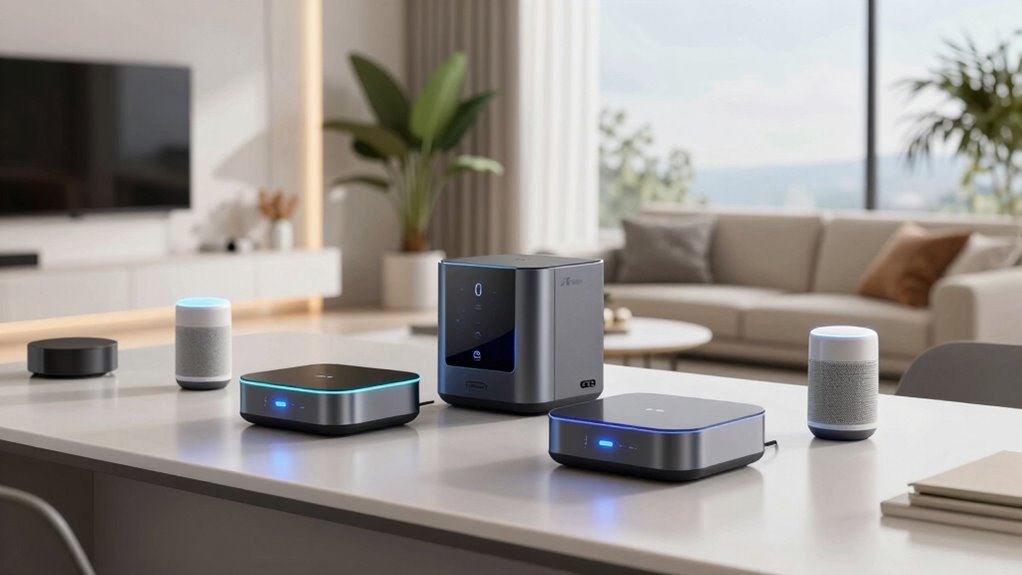

Hubitat Elevation C-8 Pro is my best overall pick for smart home control, with local automations and broad protocol support for people who want to build a capable system. The Aeotec Smart Home Hub is a more approachable hub for a mixed-device home, while the Amazon Echo Hub puts everyday controls on a dedicated screen. The main tradeoff is between flexible automation and a simpler visual interface, with compatibility and dependence on cloud services also shaping the choice. Some products here are full smart home controllers; others pair control features with a security display or entertainment screen. Read on for how each option fits different homes and priorities.

Get home appliances delivered free with Prime
- Fast, free delivery on millions of items
- Prime Video, Amazon Music and more included
- Member-only deals all year
Complete the kit


Key Takeaways
- Hubitat Elevation C-8 Pro leads for buyers who prioritize local automations and hands-on control, but its setup asks more of them than the Echo displays do.
- Aeotec Smart Home Hub offers a more balanced route into SmartThings, Zigbee, Z-Wave, and Matter support; the newer Hub 2 narrows the choice to Matter and Zigbee.
- Amazon Echo Hub gives smart home controls a dedicated touchscreen, while Echo Show models make more sense when video, Alexa, or Fire TV matter as much as device control.
- Lutron Caséta Smart Hub is the focused pick for Caséta lighting, and YoLink Smart Home Hub suits buyers building around amazon.com/dp/B0C5DPSW5Y?tag=whilehome-20&ascsubtag=dc-708179″ target=”_blank” rel=”nofollow sponsored noopener”>amazon.com/dp/B0DC91H3JK?tag=whilehome-20&ascsubtag=dc-708179″ target=”_blank” rel=”nofollow sponsored noopener”>amazon.com/dp/B0DC96PPZK?tag=whilehome-20&ascsubtag=dc-708179″ target=”_blank” rel=”nofollow sponsored noopener”>amazon.com/dp/B07TQLKQLJ?tag=whilehome-20&ascsubtag=dc-708179″ target=”_blank” rel=”nofollow sponsored noopener”>YoLink sensors and devices rather than a broad mixed ecosystem.
- Several entries are close variants or overlapping screen sizes, so the deciding factors are often ecosystem fit, intended room, and whether the device’s display adds value to the home.
| Hubitat Elevation C-8 Pro Smart Home Hub |  | Best for Local Automations | Protocols: Matter 1.5, Z-Wave 800 Series Long Range, Zigbee 3.0, Bluetooth | Voice assistants: Amazon Alexa, Google Home, Apple HomeKit | Device compatibility: 1,000+ devices across 100+ brands | VIEW ON AMAZON | See Our Full Breakdown |
| Amazon Echo Show 21 Smart Display with Fire TV |  | Best for a Shared Household Command Center | Display: 21-inch, 1920 × 1080 resolution | Dimensions: 21.4 × 13.2 × 1.5 inches | Weight: 10.7 lb | VIEW ON AMAZON | See Our Full Breakdown |
| eufy Security Smart Display E10, 8-Inch Smart Home Hub |  | Best for eufy Security Monitoring | Manufacturer: eufy | Model: T87A0 | Screen size: 8 inches | VIEW ON AMAZON | See Our Full Breakdown |
| Lutron Caséta Smart Hub for Alexa, Apple HomeKit, Google Assistant, and More |  | Best for Caséta Lighting | Compatibility: Amazon Alexa, Apple HomeKit, Google Assistant, Ring, Serena shades, Sonos | Capacity: Up to 75 Caséta devices | Connectivity: Connects to router; Clear Connect technology | VIEW ON AMAZON | See Our Full Breakdown |
| Amazon Echo Hub 8-Inch Smart Home Control Panel, Certified Refurbished |  | Best Wall-Mounted Control Panel | Display: 8-inch touchscreen | Connectivity: Wi-Fi, Bluetooth, Zigbee, Matter, Sidewalk, Thread | Smart home compatibility: Thousands of compatible devices | VIEW ON AMAZON | See Our Full Breakdown |
| YoLink Smart Home Hub (YS1603) |  | Best for Long-Range Sensors | Model: YS1603 | Protocol: YoLink LoRa | Maximum range: Up to 2,034 feet | VIEW ON AMAZON | See Our Full Breakdown |
| Amazon Echo Show 11 Smart Display, 11-Inch Full HD Touchscreen, Spatial Audio, Glacier White |  | Best Smart Display Hub | Display: 10.95-inch Full HD touchscreen, 1920 x 1200 | Smart home protocols: Zigbee, Matter, Thread Border Router | Camera: 13 MP with auto framing | VIEW ON AMAZON | See Our Full Breakdown |
| Aeotec Smart Home Hub with SmartThings, Z-Wave, Zigbee, and Matter |  | Best for Broad Protocol Coverage | Connectivity: Wi-Fi, Ethernet | Protocols: Matter, Zigbee, Z-Wave Plus (V3 model only) | Platform: SmartThings | VIEW ON AMAZON | See Our Full Breakdown |
| Amazon Echo Show 11 Smart Display with Full HD Screen and Spatial Audio |  | Best Alexa Display for Video Calls | Display: 11-inch Full HD touchscreen | Audio: Spatial audio | Smart home: Built-in smart home hub | VIEW ON AMAZON | See Our Full Breakdown |
| Aeotec Smart Home Hub 2 (V4) with Matter and Zigbee |  | Best for Local SmartThings Automations | Model: Hub 2 (V4) | Smart home platform: SmartThings | Supported protocols: Matter, Zigbee | VIEW ON AMAZON | See Our Full Breakdown |
| Amazon Echo Show 15 Full HD Smart Display with Fire TV |  | Best for Family Command Centers | Display size: 15.6 inches | Resolution: Full HD (1080p) | Entertainment: Built-in Fire TV | VIEW ON AMAZON | See Our Full Breakdown |
| Amazon Echo Hub 8-Inch Smart Home Control Panel |  | Best Dedicated Alexa Control Panel | Screen size: 8 inches | Connectivity: Wi-Fi, Bluetooth, Zigbee, Matter, Sidewalk, Thread | Mounting: Wall mount or compatible tabletop stand | VIEW ON AMAZON | See Our Full Breakdown |
| smart home hub | Connectivity |
|---|---|
| Hubitat Elevation C-8 Pro Smar | — |
| Amazon Echo Show 21 Smart Disp | — |
| eufy Security Smart Display E1 | — |
| Lutron Caséta Smart Hub for Al | Connects to router; Clear Connect technology |
| Amazon Echo Hub 8-Inch Smart H | Wi-Fi, Bluetooth, Zigbee, Matter, Sidewalk, Thread |
| YoLink Smart Home Hub | Wi-Fi or Ethernet |
| Amazon Echo Show 11 Smart Disp | — |
| Aeotec Smart Home Hub with Sma | Wi-Fi, Ethernet |
| Amazon Echo Show 11 Smart Disp | — |
| Aeotec Smart Home Hub 2 | Wi-Fi or Ethernet |
| Amazon Echo Show 15 Full HD Sm | — |
| Amazon Echo Hub 8-Inch Smart H | Wi-Fi, Bluetooth, Zigbee, Matter, Sidewalk, Thread |
More Details on Our Top Picks
Hubitat Elevation C-8 Pro Smart Home Hub
Local automation and broad device support make the Hubitat Elevation C-8 Pro the strongest fit here for households that want routines to keep running even when internet access drops. It brings Matter, Z-Wave, Zigbee, and Bluetooth devices into one hub, while the advanced rule engine allows more tailored routines than the Lutron Caséta Smart Hub, which centers on Caséta devices. It also supports Alexa, Google Home, and Apple HomeKit, and does not require a subscription.
The tradeoff is a steeper setup and learning curve: some integrations need configuration, and the rule tools may be more than a beginner wants. The Echo Hub offers a more visual, voice-led control panel, while Hubitat puts more emphasis on automation logic and local processing. Choose this model if control and resilience matter more than a quick, guided setup.
Pros:- Local processing lets automations continue without internet access
- Supports Matter, Z-Wave, Zigbee, and Bluetooth
- Works with Alexa, Google Home, and Apple HomeKit
- No subscription required and supports more than 1,000 devices across 100+ brands
Cons:- Advanced automation tools take time to learn
- Some integrations require manual setup and configuration
Best for: Smart home enthusiasts combining devices across protocols who want routines to run locally without a subscription
Not ideal for: Beginners who want a simple visual dashboard and minimal configuration
- Protocols:Matter 1.5, Z-Wave 800 Series Long Range, Zigbee 3.0, Bluetooth
- Voice assistants:Amazon Alexa, Google Home, Apple HomeKit
- Device compatibility:1,000+ devices across 100+ brands
- Antennas:2 dedicated external antennas
- Dimensions:3.23 × 2.95 × 0.67 inches
- Weight:0.16 lb
- Subscription:None required
Our verdict“Choose the C-8 Pro if you want broad protocol support and locally run automations and are comfortable configuring a more advanced hub.”
Amazon Echo Show 21 Smart Display with Fire TV
The Echo Show 21 combines smart home control with a large, glanceable screen for calendars, camera views, video calls, and Fire TV. Its Zigbee, Matter, and Thread support gives it hub functions alongside the display, making it a more entertainment-focused choice than the Amazon Echo Hub, which is designed around a smaller dedicated control panel. The camera’s privacy shutter and the option to mount the screen in portrait or landscape add flexibility for a shared kitchen or family room.
Its size is also the main compromise: at more than 21 inches wide and 10.7 pounds, it needs a deliberate mounting or counter location. Households seeking a compact controller or a hub focused on locally managed automations may prefer the Hubitat Elevation C-8 Pro. Some apps and services may also carry separate fees. Pick the Show 21 when a household display and smart home controls belong in the same place.
Pros:- 21-inch Full HD screen supports household information and smart home controls
- Built-in Fire TV and included remote add entertainment functions
- Zigbee, Matter, and Thread support compatible devices
- 13 MP camera includes auto-framing, zoom, and a privacy shutter
Cons:- Large, heavy display requires substantial counter or wall space
- Some apps, skills, and services may require separate subscriptions or fees
Best for: Families who want a large shared screen for schedules, video calls, entertainment, and compatible smart home controls
Not ideal for: Buyers with limited counter or wall space, or those who want a compact hub dedicated to automation
- Display:21-inch, 1920 × 1080 resolution
- Dimensions:21.4 × 13.2 × 1.5 inches
- Weight:10.7 lb
- Camera:13 MP with privacy shutter
- Audio:Two 2-inch woofers and two 0.6-inch tweeters
- Wi-Fi:Wi-Fi 6E, tri-band, dual-antenna MIMO
- Smart home connectivity:Zigbee, Matter, Thread Border Router
- Orientation:Landscape or portrait
- Included:Fire TV remote
Our verdict“Choose the Echo Show 21 if you want a large household display that also controls compatible smart home devices.”
eufy Security Smart Display E10, 8-Inch Smart Home Hub
The E10 is a security-first smart display: it can show up to four camera feeds at once, surface a live view with a voice alert for selected events, and keep historical events locally for playback. With HomeBase 3, its daily summaries can include facial and package recognition. That makes it more purpose-built for camera monitoring than the Amazon Echo Show 21, whose larger screen serves broader household and entertainment needs.
This focus narrows its appeal. Recognition and daily reports depend on HomeBase 3, so buyers without that system should not count on those functions. The provided data also does not establish broad smart home protocol support like the Hubitat Elevation C-8 Pro offers. Choose the E10 when eufy cameras are central to your setup; skip it if you want one hub to coordinate a wide mix of brands and device types.
Pros:- Shows up to four live security camera feeds at once
- Can surface live video and voice alerts for security events
- Local storage supports playback of historical events
- HomeBase 3 enables daily summaries with facial and package recognition
Cons:- Recognition and daily report features rely on HomeBase 3
- Its security focus is less suited to broad, multi-brand automation needs
Best for: Households with eufy cameras or a HomeBase 3 that want a dedicated screen for security events and playback
Not ideal for: Buyers seeking a general-purpose hub for coordinating devices across many smart home brands
- Manufacturer:eufy
- Model:T87A0
- Screen size:8 inches
- Storage:64 GB
- Weight:2.46 lb
- Color:Black and white
- Included components:5V/2A adapter, charging station, Smart Display E10, Type-C charging cable, wall mount
- Battery:1 included AAA battery; lithium-ion cell type
Our verdict“Choose the E10 if eufy security cameras are the main devices you want to monitor from a dedicated screen.”
Lutron Caséta Smart Hub for Alexa, Apple HomeKit, Google Assistant, and More
The Caséta Smart Hub makes the most sense when the goal is to connect Lutron Caséta controls with the voice assistants and services a household already uses. It supports up to 75 Caséta devices and connects to a router, while Lutron’s Clear Connect technology keeps those devices from competing with Wi-Fi traffic. Compared with the Hubitat Elevation C-8 Pro, which supports a wider mix of protocols and brands, this hub has a narrower job: linking Caséta devices with platforms such as Alexa, Apple HomeKit, Google Assistant, Ring, Serena shades, and Sonos.
That focus keeps the choice straightforward for a Caséta setup, but compatible dimmers, switches, and other accessories are sold separately. It is not a general-purpose hub for bringing many unrelated device types together. Choose it to connect and manage Caséta devices across supported platforms; buyers building a broader multi-protocol system should look at Hubitat or the Amazon Echo Hub.
Pros:- Connects Caséta devices with Alexa, Apple HomeKit, Google Assistant, Ring, Serena shades, and Sonos
- Supports up to 75 Caséta devices
- Clear Connect technology avoids competing with Wi-Fi devices
- Plugs into an outlet and connects to a router
Cons:- Compatible dimmers, switches, and accessories are sold separately
- Focused on Caséta devices rather than broad protocol support
Best for: Homeowners building around Caséta dimmers and switches who want them connected to voice assistants and supported platforms
Not ideal for: Buyers looking for a broad, multi-protocol hub to coordinate devices from many unrelated brands
- Compatibility:Amazon Alexa, Apple HomeKit, Google Assistant, Ring, Serena shades, Sonos
- Capacity:Up to 75 Caséta devices
- Connectivity:Connects to router; Clear Connect technology
- Installation:Plugs into an outlet
- Included:One Caséta Smart Hub
- Compatible accessories:Dimmers, switches, and other accessories sold separately
Our verdict“Choose the Caséta Smart Hub when your smart home centers on Lutron Caséta devices and supported integrations.”
Amazon Echo Hub 8-Inch Smart Home Control Panel, Certified Refurbished
The Echo Hub is a dedicated touchscreen for everyday device control, with dashboard widgets for devices, cameras, and routines plus voice control. Its built-in support for Wi-Fi, Bluetooth, Zigbee, Matter, Sidewalk, and Thread gives it broader smart home connectivity than the Lutron Caséta Smart Hub, which serves a Caséta-centered setup. The wall-mount option suits a shared spot where household members can reach controls without relying on a phone.
Power and placement require planning: in-wall cable pass-through and a power-over-Ethernet adapter are sold separately, and the tabletop stand is also an extra purchase. Some functions depend on compatible devices or services. Unlike the Echo Show 21, this model prioritizes a control panel over a large screen for entertainment and household organization. This listing is certified refurbished, so it suits buyers comfortable with that condition who want an Alexa-led wall interface.
Pros:- Touchscreen and voice controls provide two ways to manage compatible devices
- Built-in support for Wi-Fi, Bluetooth, Zigbee, Matter, Sidewalk, and Thread
- Customizable dashboard brings devices, cameras, and routines together
- Includes a microphone-off button and other privacy controls
Cons:- Wall-mounting accessories and tabletop stand are sold separately
- In-wall power pass-through or power-over-Ethernet adapter requires a separate purchase
- Some features depend on compatible devices or services
Best for: Alexa households seeking a shared wall-mounted panel for device controls, cameras, routines, and compatible security systems
Not ideal for: Buyers who want an included tabletop stand, a large entertainment display, or a hub centered on local automation rules
- Display:8-inch touchscreen
- Connectivity:Wi-Fi, Bluetooth, Zigbee, Matter, Sidewalk, Thread
- Smart home compatibility:Thousands of compatible devices
- Mounting:Wall mount; tabletop stand sold separately
- Power options:In-wall cable pass-through or power-over-Ethernet adapter, sold separately
- Condition:Certified refurbished
- Recycled materials:27%
Our verdict“Choose the certified refurbished Echo Hub if you want an Alexa-focused touchscreen mounted where the household can share access to smart home controls.”
YoLink Smart Home Hub (YS1603)
YoLink’s LoRa connection is the defining reason to choose this hub: its stated range reaches up to 2,034 feet, which suits sensors placed across a large property or in outbuildings where ordinary short-range links can struggle. It connects through Wi-Fi or Ethernet and supports Alexa, IFTTT, and Home Assistant, giving buyers several ways to fold compatible YoLink devices into a wider setup. Compared with the Aeotec Smart Home Hub, which brings Zigbee, Matter, and region-limited Z-Wave support, YoLink focuses on its own LoRa device ecosystem rather than broad protocol coverage. That focus limits what can connect directly. There is also no battery backup, so a power interruption takes the hub offline. I’d pick it for reach and compatible sensors, not as a universal hub.
Pros:- YoLink LoRa range is specified up to 2,034 feet
- Connects over Wi-Fi or Ethernet
- Works with Alexa, IFTTT, and Home Assistant
Cons:- No battery backup, so a power outage can interrupt hub operation
- LoRa focus makes it less suitable as a broad multi-protocol hub than the Aeotec Smart Home Hub
Best for: Homeowners with compatible YoLink sensors spread across a large property, detached buildings, or distant areas.
Not ideal for: Buyers who want one hub for Zigbee, Matter, and Z-Wave devices, or who need backup power during outages.
- Model:YS1603
- Protocol:YoLink LoRa
- Maximum range:Up to 2,034 feet
- Connectivity:Wi-Fi or Ethernet
- Voice control:Alexa
- Compatible platforms:IFTTT, Home Assistant
- Power:5 volts
- Battery backup:None
Our verdict“Choose YoLink when long-range coverage for compatible sensors matters more than broad protocol support or backup power.”
Amazon Echo Show 11 Smart Display, 11-Inch Full HD Touchscreen, Spatial Audio, Glacier White
The Echo Show 11 combines a smart home hub with a screen for video calls, photos, and entertainment, making it a stronger fit for a kitchen or shared room than a hub designed to sit out of sight. Its built-in support for Zigbee, Matter, and Thread covers several major device standards, while Alexa and the 10.95-inch Full HD display make controls easy to see and reach. The 13 MP auto-framing camera adds a useful calling feature; camera and microphone privacy controls give owners a way to disable them. Compared with the Echo Show 21, this smaller display takes up less wall or counter space. Its screen and media features, though, make it a less discreet choice than a dedicated hub such as the Aeotec Smart Home Hub. Bluetooth speakers that require PIN codes are not supported, and connected mobile devices have limited hands-free voice control.
Pros:- Built-in Zigbee, Matter, and Thread support
- 10.95-inch Full HD touchscreen makes controls and shared content easy to view
- 13 MP auto-framing camera supports video calls
- Camera and microphone privacy controls
Cons:- Larger and more media-focused than a dedicated hub such as the Aeotec Smart Home Hub
- Does not support Bluetooth speakers that require PIN codes
- Hands-free voice control of connected mobile devices is not supported for Mac OS X
Best for: Alexa households that want a visible control screen, video calling, and Zigbee, Matter, and Thread support in one device.
Not ideal for: Buyers seeking a discreet hub without a screen, or those who depend on PIN-protected Bluetooth speakers.
- Display:10.95-inch Full HD touchscreen, 1920 x 1200
- Smart home protocols:Zigbee, Matter, Thread Border Router
- Camera:13 MP with auto framing
- Audio:1 x 2.8-inch woofer and 2 full-range drivers
- Wi-Fi:Wi-Fi 6E
- Bluetooth:Version 5.4
- Processor:AZ3 Pro with AI Accelerator
- Weight:45.92 oz (1302 g)
Our verdict“Pick the Echo Show 11 if you want Alexa smart home control alongside a large touchscreen and video calling.”
Aeotec Smart Home Hub with SmartThings, Z-Wave, Zigbee, and Matter
For buyers combining devices from different generations and standards, the Aeotec Smart Home Hub offers a wide protocol mix: Matter, Zigbee, and Z-Wave Plus on the V3 model only. SmartThings automations can run locally, which can help keep compatible routines working during internet disruptions. It connects by Wi-Fi or Ethernet and also works with Alexa and Google Home. Compared with the Aeotec Smart Home Hub 2 (V4), this model’s V3 version adds Z-Wave support, a meaningful distinction for households with existing Z-Wave devices. The caveat is that support depends on the exact version; the listing specifies North American use, so it is a poor fit for shoppers elsewhere. Unlike the Echo Show 11, it has no display or built-in entertainment features. I’d favor it for protocol flexibility and automation, not room-by-room visual control.
Pros:- Supports Matter and Zigbee, with Z-Wave Plus on the V3 model
- Automations can run locally for compatible devices
- Offers Wi-Fi and Ethernet setup
- Works with Alexa and Google Home
Cons:- Z-Wave Plus support is limited to the V3 model
- Designed for use in North America
- No built-in display for visual controls
Best for: North American SmartThings users combining Zigbee and Matter devices, especially those with Z-Wave equipment and the V3 model.
Not ideal for: Buyers outside North America, or anyone who wants an integrated touchscreen control panel like the Echo Show 11.
- Connectivity:Wi-Fi, Ethernet
- Protocols:Matter, Zigbee, Z-Wave Plus (V3 model only)
- Platform:SmartThings
- App compatibility:SmartThings app for Android, iOS, and iPadOS
- Voice assistants:Amazon Alexa, Google Home
- Local automations:Many automations can run locally
- Region:North America
Our verdict“Choose this Aeotec hub for SmartThings automations and broad protocol coverage if your region and model version match your devices.”
Amazon Echo Show 11 Smart Display with Full HD Screen and Spatial Audio
This Echo Show 11 is a good match for households that want their smart home controls beside a large screen for streaming, photos, and video calls. Its centered auto-framing camera with 3.3x zoom helps keep callers in view, while spatial audio gives the display a role beyond controlling devices. The listing describes a built-in smart home hub, but unlike the other Echo Show 11 listing in this roundup, it does not specify Zigbee, Matter, or Thread support. Buyers who need those protocols spelled out may prefer that version or the Aeotec Smart Home Hub, whose supported standards are listed directly. Camera and microphone disable controls address privacy concerns, though some buyers may still prefer a screen-free hub. I’d choose this model for Alexa calls and shared-screen use, with the smart home role as an added convenience.
Pros:- 11-inch Full HD touchscreen for controls and shared media
- Spatial audio with improved bass
- Centered auto-framing camera with 3.3x zoom
- Camera and microphone disable controls
Cons:- The supplied product data does not identify specific smart home protocols
- Requires compatible Alexa-enabled devices for smart home control
- A camera and microphones may not suit buyers seeking a screen-free hub
Best for: Alexa households that want a shared touchscreen for video calls, streaming, and basic compatible-device controls.
Not ideal for: Buyers who need clearly specified Zigbee, Matter, or Thread support, or prefer a screen-free hub.
- Display:11-inch Full HD touchscreen
- Audio:Spatial audio
- Smart home:Built-in smart home hub
- Processor:AZ3 Pro chip
- Camera:Centered auto-framing camera with 3.3x zoom
- Privacy:Microphone and camera disable controls
Our verdict“Pick this Echo Show 11 for Alexa video calls and a large shared display when its unspecified hub protocols meet your needs.”
Aeotec Smart Home Hub 2 (V4) with Matter and Zigbee
The Aeotec Smart Home Hub 2 (V4) suits buyers who want SmartThings automations and support for Matter and Zigbee without an added screen or speaker. Local automation can keep many routines running through temporary internet outages, while Wi-Fi or Ethernet gives buyers a choice of connection. Compared with the older Aeotec Smart Home Hub, the V4 trades away Z-Wave support, so it makes more sense for a newer Matter and Zigbee setup than for a home with existing Z-Wave devices. It works with Alexa and Google Assistant, but device compatibility still depends on those supported protocols. If an always-visible interface matters, the Echo Show 11 offers one alongside hub functions. I’d choose the V4 for a quieter, locally oriented SmartThings setup, provided Z-Wave is not part of the plan.
Pros:- Supports Matter and Zigbee
- Many automations can run locally during temporary internet outages
- Offers Wi-Fi or Ethernet connectivity
- Compatible with Alexa and Google Assistant
Cons:- Does not support Z-Wave, unlike the V3 Aeotec Smart Home Hub
- No built-in display for visual device control
Best for: SmartThings users building around Matter and Zigbee who want local routines and a hub without a display.
Not ideal for: Households with Z-Wave devices or buyers who want a touchscreen control panel.
- Model:Hub 2 (V4)
- Smart home platform:SmartThings
- Supported protocols:Matter, Zigbee
- Connectivity:Wi-Fi or Ethernet
- Voice assistant compatibility:Alexa, Google Assistant
- Z-Wave:Not supported
- Local automation:Supported
Our verdict“Choose the V4 for local SmartThings routines and Matter or Zigbee devices if you do not need Z-Wave.”
Amazon Echo Show 15 Full HD Smart Display with Fire TV
The Echo Show 15 makes the most sense when a smart home hub also needs to keep a household organized. Its 15.6-inch Full HD screen gives calendars, lists, widgets, and compatible smart home controls room to stay visible, while Fire TV adds entertainment when the display is free. Compared with the 8-inch Echo Hub, it is better suited to a shared kitchen or living space than a dedicated wall control panel; the Echo Hub supports more connection standards for device management. The Show 15’s auto-framing camera and included remote add useful call and viewing options, but they take space that a focused control panel does not need. Streaming access can also depend on subscriptions, and its larger screen calls for a prominent place in the home.
Pros:- 15.6-inch Full HD screen gives family calendars and controls ample room
- Customizable widgets bring lists, weather, and compatible smart home controls together
- Built-in Fire TV and included remote support casual viewing
- Auto-framing camera supports video calls, with a shutter and mic/camera-off button
Cons:- Its large screen needs a prominent mounting or counter location
- Some streaming content may require a subscription
- The supplied connectivity details do not list the broader device standards built into the Echo Hub
Best for: Households that want a shared calendar, smart home dashboard, video calling, and streaming on one large display
Not ideal for: Buyers seeking a compact, dedicated control panel or broad built-in device connectivity; the 8-inch Echo Hub is more focused on smart home management
- Display size:15.6 inches
- Resolution:Full HD (1080p)
- Entertainment:Built-in Fire TV
- Camera:Auto-framing, 3.3x zoom, wide field of view
- Included accessory:Fire TV remote
- Privacy:Mic/camera-off button and built-in camera shutter
Our verdict“Choose the Echo Show 15 if your household wants a large shared organizer that also handles calls, entertainment, and compatible smart home controls.”
Amazon Echo Hub 8-Inch Smart Home Control Panel
For buyers who want a central place to manage compatible smart home devices, the Echo Hub puts control ahead of entertainment. Its 8-inch customizable dashboard can bring cameras, locks, alarms, sensors, routines, and media into one view. The built-in support for Zigbee, Matter, and Thread, alongside Wi-Fi and Bluetooth, makes it a more capable connection point than the Echo Show 15 based on the listed standards. That focus has a tradeoff: its smaller screen is less suited to family calendars or TV viewing, where the Show 15 offers more space and built-in Fire TV. The Echo Hub can be wall mounted or paired with a separately sold tabletop stand, and some power and installation accessories also cost extra. It fits homes with compatible devices better than buyers seeking an all-purpose display.
Pros:- Built-in support for Wi-Fi, Bluetooth, Zigbee, Matter, Sidewalk, and Thread
- Customizable dashboard organizes compatible devices and controls
- Manages compatible cameras, locks, alarms, sensors, routines, and media
- Wall-mount option and 27% recycled materials
Cons:- Power-over-Ethernet adapter, cable pass-throughs, and tabletop stand are sold separately
- Its 8-inch screen offers less room for household organization and viewing than the Echo Show 15
- Ring camera event summaries require Alexa+ and a compatible Ring subscription
Best for: Alexa households with compatible locks, cameras, sensors, alarms, and routines that want a central wall-mounted control point
Not ideal for: Families who want a large shared calendar and entertainment screen, or buyers who need tabletop and power accessories included
- Screen size:8 inches
- Connectivity:Wi-Fi, Bluetooth, Zigbee, Matter, Sidewalk, Thread
- Mounting:Wall mount or compatible tabletop stand
- Smart home control:Compatible cameras, locks, alarms, sensors, and other Alexa-compatible devices
- Privacy:Microphone-off button and multiple privacy controls
- Recycled materials:27%
Our verdict“Choose the Echo Hub if you want a dedicated Alexa control panel with several built-in smart home standards and already have a plan for mounting and power.”
How We Picked
I ranked these smart home hubs by how well each serves as a control point for a home, not by screen size or the number of features in its product name. I weighed supported protocols and ecosystems, the likely ease of setup and daily control, the role of local automation, and whether a device’s screen or specialized focus adds meaningful convenience. I also considered limitations that can affect long-term use, such as narrower device compatibility or reliance on a particular ecosystem.
The ranking favors useful breadth and control for the top positions, then gives dedicated and display-based options credit when they serve a clear buyer need. A purpose-built lighting or sensor hub ranks lower as an all-home controller, but may be the better fit for someone already committed to that system. Echo Show models are judged as smart displays with hub utility, while the Echo Hub is judged as a dedicated control panel. Similar models and refurbished listings are treated according to their distinct configuration and intended buyer.
| smart home hub | Connectivity |
|---|---|
| Hubitat Elevation C-8 Pro Smar | — |
| Amazon Echo Show 21 Smart Disp | — |
| eufy Security Smart Display E1 | — |
| Lutron Caséta Smart Hub for Al | Connects to router; Clear Connect technology |
| Amazon Echo Hub 8-Inch Smart H | Wi-Fi, Bluetooth, Zigbee, Matter, Sidewalk, Thread |
| YoLink Smart Home Hub | Wi-Fi or Ethernet |
| Amazon Echo Show 11 Smart Disp | — |
| Aeotec Smart Home Hub with Sma | Wi-Fi, Ethernet |
| Amazon Echo Show 11 Smart Disp | — |
| Aeotec Smart Home Hub 2 | Wi-Fi or Ethernet |
| Amazon Echo Show 15 Full HD Sm | — |
| Amazon Echo Hub 8-Inch Smart H | Wi-Fi, Bluetooth, Zigbee, Matter, Sidewalk, Thread |
Factors to Consider When Choosing Smart Home Hubs
Before choosing a hub, map the devices and routines you actually want it to connect. A short compatibility check can prevent buying a central controller that leaves key lights, locks, or sensors on separate apps. These broader decisions also help clarify whether a screen, local automation, or a focused device system deserves priority.
Check Compatibility Before Counting Protocols
A hub that lists several radio standards can still have gaps in device support, because compatibility depends on the specific product, software, and ecosystem. Make a short inventory of the devices you own and the ones you plan to add, including their exact model names. Check whether the hub supports the features you rely on, such as dimming, sensor states, or lock control, rather than only basic pairing. Matter can simplify some cross-platform connections, but it does not make every device feature interchangeable. If your home is mostly built around one brand, a focused hub can be easier to manage than a broad controller. For a mixed setup, prioritize confirmed device support over the longest protocol list.
Decide How Much Local Control You Need
Local control matters most when routines need to respond quickly or keep working through an internet outage. It also affects setup: systems with detailed local automation tools can reward careful configuration but may feel less approachable at first. Think through which actions must work without a cloud connection, such as a motion-triggered light or a contact sensor alert. Ask whether those behaviors run on the hub itself or depend on an account and remote service. Cloud features can make remote access and voice integration simpler, so local operation is not automatically the right priority for every household. Choose based on the routines you depend on, not an abstract preference for one architecture.
Treat a Screen as a Room-Level Convenience
A touchscreen can make lights, cameras, and routines easier for guests or household members who do not want to use an app. Its value depends on where it will live and whether people will actually walk up to it. A display in a kitchen or entryway may work as a shared control point, while a screen placed out of the way can become an unused extra. Separate a dedicated controller’s always-available controls from a smart display’s entertainment and voice features when comparing them. Larger screens can be useful for viewing video or camera feeds, but they take more wall or counter space. Pick the screen for the room’s routine, not just its dimensions.
Avoid Building Around a Single Feature by Accident
Many homes grow one purchase at a time, and the first hub can quietly determine which devices are easiest to add later. Before committing to a lighting or sensor-specific system, decide whether those devices will remain a small subsystem or become the center of your automation. A focused hub can be dependable and straightforward for its intended job, yet leave unrelated products needing another app or controller. Mixed ecosystems can work well, but each added bridge or account brings another place to configure routines and troubleshoot. If you expect to expand, favor a path that accommodates likely additions. If your needs are stable and narrow, focused support may be all you need.
Pay More for Capabilities You Will Use
Higher-end or broader hubs earn their place when they solve a real problem, such as coordinating mixed devices or running more involved automations. A large display is a poor reason to spend more if you only need a few room controls. Likewise, broad compatibility brings little value if all your devices already work in a simpler, narrower system. Consider the ongoing effort of maintaining automations, adding devices, and keeping accounts connected alongside the purchase itself. Refurbished equipment can be a sensible route to a dedicated control panel, but compare its condition, included accessories, and support terms with a new unit. Match the added capability to a specific household need before paying for it.
Frequently Asked Questions
Can I combine Zigbee, Z-Wave, and Matter devices under one smart home hub?
Sometimes, but a hub’s protocol list does not guarantee that every device will pair or expose all of its functions. Check compatibility for the exact models you own, especially for locks, sensors, and devices with advanced controls. Matter can link supported products across some ecosystems, while Zigbee and Z-Wave support depends on the hub’s radio and software. If a device requires its own bridge, plan for that extra hardware and app. For a home with several standards, confirmed device support matters more than the number of logos on the box.
Will my smart home routines still work if my internet goes down?
That depends on where the routines run and which devices or services they rely on. Local automations can continue on the hub during some internet interruptions, while cloud-based routines and remote access may stop until service returns. Voice assistants and streaming features commonly need internet access even when local device control remains available. Identify a few routines you consider essential and check whether they run locally on the specific hub. If outage resilience matters, favor a system whose documentation clearly describes offline behavior.
Should I choose a dedicated control panel or an Echo Show?
Choose a dedicated panel when a shared, always-ready interface for lights, routines, and other devices is your main goal. An Echo Show can be a better room device if you also want voice interaction, video, or entertainment features alongside smart home controls. Consider who will use it: a wall-mounted panel can help guests find common controls, while a display on a counter may suit a household already using Alexa. Screens do not automatically make device setup simpler, so check compatibility and control options first. The best fit is the one whose primary role matches how the room will be used.
Is a specialized hub a good choice if I already own devices from that brand?
It can be, particularly when you want reliable control of a specific group such as lighting or sensors. A focused hub may offer a simpler path for those devices than a general controller. The tradeoff is that other brands may need a separate hub, bridge, or app, which can split routines and daily control. Before buying, list the devices you expect to add over the next few years, not only those you own today. A narrow system makes sense when its limits match your plans.
What should I check before buying a refurbished smart home control panel?
Confirm the seller’s return window, warranty coverage, and whether the unit includes its power supply and mounting hardware. Ask whether it can receive current software updates and whether it can be reset and removed from a previous owner’s account. Check the screen and buttons for condition, since this device is meant for frequent household interaction. Refurbished status does not change ecosystem compatibility, so verify that it supports the devices you plan to control. Compare the full package and support terms with a new model before deciding.
Conclusion
For the broadest control and local automation, I recommend Hubitat Elevation C-8 Pro as the best overall pick, especially for buyers willing to spend time configuring a system. The Aeotec Smart Home Hub is my best value for a mixed-device home that wants SmartThings and multiple protocol support, while the Aeotec Smart Home Hub 2 fits a narrower Matter and Zigbee setup. Beginners who want a visible, approachable control point should look at the Amazon Echo Hub; choose an Echo Show instead when its display and entertainment features matter more. For premium screen-based use, the Echo Show 21 is the room-filling option, with the Show 15 as a smaller alternative. Pick Lutron Caséta for a Caséta-centered lighting system and YoLink for a YoLink-focused sensor setup. Your best choice is the one that supports the devices you own and the routines your household will use.
Halloween Picks
halloween
As an affiliate, we earn on qualifying purchases.