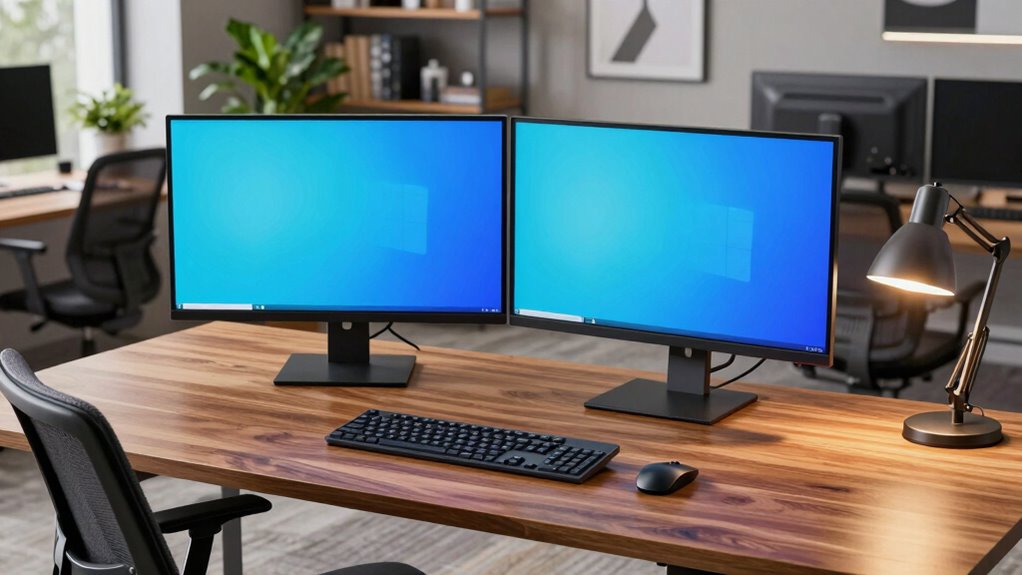
For most dual-monitor setups, I’d start with the Grandder 55 x 32-Inch Electric Standing Desk: its deeper work surface gives two screens more room without making the desk L-shaped. The Furologee 66-Inch L-Shaped Desk suits buyers who need a broad corner workspace, while the HUANUO 48 x 24-Inch Electric Standing Desk adds height adjustment and drawers in a smaller footprint. The main tradeoff is between desktop depth, room for accessories, and space-saving features such as storage or a standing mechanism. A desk can fit two monitors yet still leave too little room for a keyboard, mouse, and comfortable viewing distance. Read on for how all 13 options compare and which desk best matches your room and routine.

Get home appliances delivered free with Prime
- Fast, free delivery on millions of items
- Prime Video, Amazon Music and more included
- Member-only deals all year
Complete the kit

Key Takeaways
- Depth separates a comfortable dual-monitor surface from a merely wide one: the Grandder’s 32-inch depth gives screens and input devices more front-to-back room than the many 24-inch-deep options.
- L-shaped desks prioritize spreading out over simplicity: the Furologee and PRAISUN L-shaped models offer a second work zone, but need a corner or larger footprint.
- Electric height adjustment is a distinct advantage, not a requirement: HUANUO, Veken, Grandder, and ErGear suit sit-stand routines, while fixed desks avoid the added mechanism and setup complexity.
- Built-in extras can compete with usable desktop space: monitor stands, drawers, shelves, lights, and power features add convenience, but buyers should check whether they crowd the area needed for two screens and peripherals.
- Compact desks call for more careful layout planning: the Lufeiya 40-inch desk and PRAISUN 47 x 24-inch desk fit tighter rooms, but have less room to reposition monitors or add larger accessories.
| Huuger 54-Inch Computer Desk, Rustic Brown |  | Best Simple Fixed Desk | Dimensions: 19.7 × 54 × 29.5 inches | Shape: Rectangular | Top material: Engineered wood | VIEW ON AMAZON | See Our Full Breakdown |
| Furologee 66” L-Shaped Desk with Power Outlet and 2 Drawers, Rustic Brown |  | Best for a Corner Dual-Monitor Setup | Dimensions: 18.11 D × 65.35 W × 29.52 H inches | Shape: L-shaped | Weight: 54.3 pounds | VIEW ON AMAZON | See Our Full Breakdown |
| OffiGo 55-Inch U-Shaped Electric Standing Desk with Keyboard Tray, Monitor Stand, Power Outlets and LED Lighting, White |  | Best Adjustable Desk for a Full Dual-Monitor Station | Desk size: 55 inches | Shape: U-shaped | Height range: 28.3–46.5 inches | VIEW ON AMAZON | See Our Full Breakdown |
| Lufeiya 40-Inch White Computer Desk with LED Lights, Power Outlets, and Monitor Stand |  | Best Compact Desk for Two Screens | Dimensions: 19.7 × 39.4 × 33.4 inches | Color: White | Materials: Engineered wood and metal | VIEW ON AMAZON | See Our Full Breakdown |
| Korfile 59-Inch L-Shaped Computer Desk with Power Outlets, Black |  | Best Reconfigurable Desk with Storage | Dimensions: 18.8 × 59 × 33.9 inches | Configuration: Reversible L-shaped or straight | Weight: 45 pounds | VIEW ON AMAZON | See Our Full Breakdown |
| HUANUO 48 x 24-Inch Electric Height-Adjustable Standing Desk with Drawers, Black | 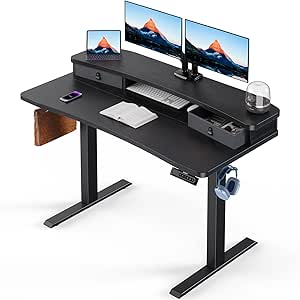 | Best for a Tidy Sit-Stand Setup | Desktop dimensions: 48 x 24 inches | Height range: 27.5–46.4 inches | Height presets: 4 | VIEW ON AMAZON | See Our Full Breakdown |
| Korfile 47.2-Inch Gaming Computer Desk with LED Lights, Power Outlets, Monitor Stand, and 5 Drawers |  | Best for a Feature-Packed Compact Setup | Dimensions: 18.5 x 47.2 x 35 inches | Frame: Powder-coated steel | Desktop: High-density desktop | VIEW ON AMAZON | See Our Full Breakdown |
| Pamray 58 Inch Computer Desk with Monitor Stand, LED Lights, and Storage Shelves – Black |  | Best for a Spacious, Organized Dual-Monitor Station | Width: 58 inches | Color: Black | Frame: Steel | VIEW ON AMAZON | See Our Full Breakdown |
| PRAISUN 47 x 24 Inch Computer Desk with Deeper Desktop |  | Best Value for a Simple Dual-Monitor Work Surface | Desktop dimensions: 47.2 x 23.6 inches | Desktop material: FSC-Certified wood | Frame material: Steel | VIEW ON AMAZON | See Our Full Breakdown |
| Veken 55-Inch Electric Height-Adjustable Standing Desk |  | Best for Dual-Monitor Sit-Stand Flexibility | Desktop dimensions: 55.12 x 23.64 inches | Height range: 28.3–46.5 inches | Desktop material: Engineered wood | VIEW ON AMAZON | See Our Full Breakdown |
| Grandder 55 x 32-Inch Electric Standing Desk, Oak |  | Best for Extra-Deep Standing Space | Desktop dimensions: 55.12 x 31.5 inches | Height range: 28.3–46.5 inches | Desktop material: Engineered wood | VIEW ON AMAZON | See Our Full Breakdown |
| PRAISUN 55 Inch L-Shaped Office Desk with Power Outlets and Type-C Port |  | Best for Storage and Built-In Charging | Overall dimensions: 39.4 D x 55.1 W x 30.3 H inches | Shape: L-shaped | Desktop depth: 19.7 inches | VIEW ON AMAZON | See Our Full Breakdown |
| ErGear 48 x 24-Inch Electric Height-Adjustable Standing Desk, Black |  | Best Compact Sit-Stand Pick | Dimensions: 47.2 W x 23.6 D inches | Height range: 28.35–46.46 inches | Top material: Laminated engineered wood | VIEW ON AMAZON | See Our Full Breakdown |
| desk for dual monitor | Storage |
|---|---|
| Huuger 54-Inch Computer Desk | — |
| Furologee 66” L-Shaped Desk w | 2 drawers and 2 shelves |
| OffiGo 55-Inch U-Shaped Electr | — |
| Lufeiya 40-Inch White Computer | 1 drawer, storage bag, and 2 headphone hooks |
| Korfile 59-Inch L-Shaped Compu | 4 repositionable non-woven fabric drawers |
| HUANUO 48 x 24-Inch Electric H | 2 drawers and 1 open storage cubicle |
| Korfile 47.2-Inch Gaming Compu | — |
| Pamray 58 Inch Computer Desk w | 2 drawers and 2 open side shelves |
| PRAISUN 47 x 24 Inch Computer | No specific storage options included |
| Veken 55-Inch Electric Height- | — |
| Grandder 55 x 32-Inch Electric | — |
| PRAISUN 55 Inch L-Shaped Offic | 3 fabric drawers and 3-tier metal mesh shelf |
| ErGear 48 x 24-Inch Electric H | — |
More Details on Our Top Picks
Huuger 54-Inch Computer Desk, Rustic Brown
The Huuger 54-Inch Computer Desk is a straightforward choice for a dual-monitor setup when you want a broad, uncluttered work surface without built-in storage or electronics. Its 54-inch width gives two monitors room to sit side by side, while the steel frame and reinforcement struts add support for everyday office or study use. Compared with the feature-packed Furologee 66” L-Shaped Desk, the Huuger has less total workspace and no charging ports, but its simpler rectangular layout may suit a room where an L-shaped footprint would be awkward. The main compromise is depth: at 19.7 inches, it leaves less room for monitor stands, a keyboard, and a comfortable viewing distance than deeper desks in the roundup. Its engineered wood top also lacks the character of solid wood.
Pros:- 54-inch width offers room for two monitors and basic work essentials.
- Steel frame and reinforcement struts support a stable everyday workstation.
- Simple rectangular shape fits more easily than a large L-shaped or U-shaped desk.
- Assembly tools and visual instructions are included.
Cons:- The 19.7-inch depth can feel cramped with two monitor stands and a keyboard.
- Engineered wood tabletop is not solid wood.
- No built-in drawers, shelves, or charging ports.
Best for: Home-office users who want a simple 54-inch surface for two monitors and have limited need for built-in storage or charging.
Not ideal for: Buyers using deep monitor bases, large peripherals, or a keyboard tray who need more front-to-back room.
- Dimensions:19.7 × 54 × 29.5 inches
- Shape:Rectangular
- Top material:Engineered wood
- Frame:Particleboard and steel
- Tabletop thickness:0.75 inches
- Weight:21 pounds
- Color:Rustic brown top, black base
- Assembly:Tools and visual instructions included
Our verdict“Choose the Huuger if you want a no-frills, 54-inch desk for two monitors and can work within its shallow depth.”
Furologee 66” L-Shaped Desk with Power Outlet and 2 Drawers, Rustic Brown
The Furologee 66” L-Shaped Desk suits buyers who want two monitors plus a separate zone for paperwork, a laptop, or other gear. Its corner layout spreads work across more usable areas than the single-plane Huuger 54-Inch Computer Desk, and the adjustable monitor stands can help keep screens elevated while freeing some desktop space. Built-in outlets and USB ports reduce the need to reach for a wall charger, while two shelves and fabric drawers provide places to store accessories. That extra organization comes with a tradeoff: the L shape needs more floor space and takes longer to assemble, potentially with a second person. The 0.6-inch tabletop and fabric drawers are also less substantial than a desk built around rigid storage, so this is a better fit for organized everyday work than heavy-duty storage needs.
Pros:- L-shaped layout gives dual monitors and other work gear separate areas.
- Built-in outlets and USB ports make device charging convenient.
- Adjustable monitor stands and shelves help organize the work surface.
- Reversible drawer placement allows some setup flexibility.
Cons:- The corner footprint requires more floor space than a standard rectangular desk.
- Assembly may take time and can be easier with two people.
- Fabric drawers offer less rigid protection than solid drawers.
Best for: Remote workers who need two monitors, a distinct secondary work zone, and accessible device charging in a corner of the room.
Not ideal for: People with a narrow room, those who want rigid drawers, or anyone seeking a simple desk that is quick to assemble.
- Dimensions:18.11 D × 65.35 W × 29.52 H inches
- Shape:L-shaped
- Weight:54.3 pounds
- Storage:2 drawers and 2 shelves
- Tabletop thickness:0.6 inches
- Load capacity:180 pounds
- Materials:Particleboard and metal
- Features:Built-in USB outlet, monitor stand, reversible drawer
Our verdict“Pick the Furologee if you have room for a corner workstation and want dual-monitor space paired with charging and storage.”
OffiGo 55-Inch U-Shaped Electric Standing Desk with Keyboard Tray, Monitor Stand, Power Outlets and LED Lighting, White
For buyers who want their dual-monitor desk to serve as a larger command center, the OffiGo 55-Inch U-Shaped Electric Standing Desk brings together an elevated monitor stand, keyboard tray, and electric height adjustment. The 28.3-to-46.5-inch range and three presets make it more adaptable through the day than the fixed-height Huuger or Furologee desks. Its U-shaped surface also creates distinct areas for screens, keyboard work, and accessories, while integrated outlets and USB ports keep charging close at hand. That capacity is the reason to choose it—and the main limitation. Compared with the more compact Lufeiya 40-Inch White Computer Desk, this model takes substantially more floor space and has a more involved setup. Its 154-pound capacity is a defined limit for a workstation loaded with multiple devices and accessories.
Pros:- Electric height adjustment spans 28.3 to 46.5 inches with three presets.
- U-shaped layout separates monitor, keyboard, and accessory zones.
- Includes a monitor stand, keyboard tray, outlets, and USB ports.
- Steel frame supports a workspace load of up to 154 pounds.
Cons:- U-shaped footprint needs substantial floor space.
- Assembly is required for a desk with multiple included components.
- 154-pound weight capacity may limit heavily equipped workstation builds.
Best for: Users who want two monitors, a dedicated keyboard area, and seated-to-standing adjustment in a spacious home office.
Not ideal for: Apartment dwellers or anyone with a tight floor plan who needs a compact, simple desk rather than a large U-shaped station.
- Desk size:55 inches
- Shape:U-shaped
- Height range:28.3–46.5 inches
- Height presets:3
- Weight capacity:154 pounds
- Monitor capacity:2 monitors
- Power:3 outlets and 2 USB ports
- Included features:Keyboard tray, monitor stand, LED light strip, and 2 storage hooks
Our verdict“Choose the OffiGo if you want an adjustable, feature-rich dual-monitor workstation and have enough room for its U-shaped footprint.”
Lufeiya 40-Inch White Computer Desk with LED Lights, Power Outlets, and Monitor Stand
The Lufeiya 40-Inch White Computer Desk is the compact pick for buyers fitting two screens into a bedroom, small office, or other limited workspace. Its monitor stand is designed to hold two monitors or laptops, so screens can sit above the main surface rather than taking up all of it. The built-in two-outlet, two-USB power strip is a useful extra when nearby sockets are scarce, and the removable bag and headphone hooks give small accessories a place to go. Compared with the Huuger 54-Inch Computer Desk, the Lufeiya saves width and adds more convenience features, but it gives up room for wider monitors, larger peripherals, or a comfortable spread of work materials. Its 39.4-inch tabletop is a deliberate space-saving choice, not a flexible surface for a heavily equipped station.
Pros:- Monitor stand accommodates two monitors or laptops while freeing tabletop space.
- Built-in power strip includes two outlets and two USB charging ports.
- Compact width suits rooms where a 54- or 66-inch desk will not fit.
- Includes a storage bag and two removable headphone hooks.
Cons:- At 39.4 inches wide, the desktop offers limited room beyond the two-screen setup.
- Engineered wood tabletop is not solid wood.
- Assembly is recommended for two people.
Best for: Students or apartment residents who need a compact desk with a two-screen stand and built-in charging.
Not ideal for: Users with wide monitors, large monitor bases, or several peripherals who need a broad desktop for daily work.
- Dimensions:19.7 × 39.4 × 33.4 inches
- Color:White
- Materials:Engineered wood and metal
- Tabletop thickness:0.75 inches
- Power strip:2 outlets and 2 USB charging ports
- Lighting:7 colors, 4 dynamic modes, and 16 static types
- Storage:1 drawer, storage bag, and 2 headphone hooks
- Assembly:Instruction manual and tool included; 2-person assembly recommended
Our verdict“Choose the Lufeiya when room is tight and you want a small desk that still provides a dedicated stand for two screens.”
Korfile 59-Inch L-Shaped Computer Desk with Power Outlets, Black
The Korfile 59-Inch L-Shaped Computer Desk stands out for buyers who may change their room layout or want the option of a corner or straight workstation. Its reversible configuration, two movable monitor stands, and four repositionable fabric drawers make it easier to tailor the arrangement to a dual-monitor setup than a fixed-shape desk such as the Furologee 66” L-Shaped Desk. The charging station also includes three outlets, USB, and Type-C, and a PC stand keeps a tower off the main surface. The compromise is depth: at 18.8 inches, it may feel constrained once two screens, a keyboard, and accessories are in place. Fabric drawers help with light organization but are less protective than rigid storage, so this desk favors flexible layout and convenience over a deep, heavy-duty workstation.
Pros:- Reversible design can be arranged as an L-shaped or straight workstation.
- Two movable monitor stands can be positioned to suit a dual-screen layout.
- Four repositionable fabric drawers provide flexible accessory storage.
- Charging station includes three outlets, USB, and Type-C.
Cons:- The 18.8-inch depth limits front-to-back space for monitors and keyboard use.
- Fabric drawers offer less structure and protection than rigid drawers.
- Particleboard top is less substantial than a solid-wood desktop.
Best for: Buyers who need a dual-monitor desk that can switch between corner and straight layouts, with flexible storage and charging.
Not ideal for: People who need a deep desktop for large monitor bases or want durable, rigid drawers for heavier items.
- Dimensions:18.8 × 59 × 33.9 inches
- Configuration:Reversible L-shaped or straight
- Weight:45 pounds
- Weight capacity:180 pounds
- Storage:4 repositionable non-woven fabric drawers
- Monitor stands:2 movable stands
- Charging ports:3 power outlets, 1 USB port, and 1 Type-C port
- Materials:Particleboard top and steel frame
Our verdict“Pick the Korfile if reconfigurable layout and built-in organization matter more to you than a deep, rigidly built desktop.”
HUANUO 48 x 24-Inch Electric Height-Adjustable Standing Desk with Drawers, Black
The HUANUO combines electric height changes with storage, making it a strong fit if your dual-monitor workspace needs to switch between sitting and standing without leaving accessories scattered across the desktop. Its 48 x 24-inch surface gives two monitors room to sit side by side, while the extended rear edge supports compatible C-clamp mounts. Compared with the simpler PRAISUN 47 x 24 Inch Computer Desk, this adds four height presets and drawers, but gives up the PRAISUN’s straightforward fixed-desk simplicity.
The tradeoff is desk space: 48 inches of width can feel tight if you use large monitor stands, speakers, and a laptop together. The two drawers and open cubicle help reclaim surface area, though assembly is required and two people are recommended. I’d choose it for a compact sit-stand setup, not a sprawling multi-device station.
Pros:- Four presets make common sitting and standing heights quick to select.
- The 48 x 24-inch desktop provides useful depth for a two-monitor arrangement.
- Two drawers and an open cubicle keep small office items off the work surface.
- Extended rear edge supports compatible C-clamp monitor mounts.
Cons:- The 48-inch width can limit spacing for two large monitors and extra peripherals.
- Assembly is required, with two people recommended.
- Storage and monitor equipment share a limited desktop footprint.
Best for: Home-office users who want dual monitors, sit-stand flexibility, and enclosed storage on a compact desk.
Not ideal for: Users with large monitor bases or several peripherals who need more than 48 inches of working width.
- Desktop dimensions:48 x 24 inches
- Height range:27.5–46.4 inches
- Height presets:4
- Storage:2 drawers and 1 open storage cubicle
- Desktop material:Engineered wood
- Frame material:Carbon steel and automotive-grade cold-rolled steel
- Maximum weight recommendation:176 pounds
- Assembly:Required; 2 people recommended
Our verdict“Choose the HUANUO if you want a compact dual-monitor desk that adds electric sit-stand adjustment and built-in storage.”
Korfile 47.2-Inch Gaming Computer Desk with LED Lights, Power Outlets, Monitor Stand, and 5 Drawers
The Korfile 47.2-inch desk packs more organization and connectivity into a compact footprint than the PRAISUN 47 x 24 Inch Computer Desk. A raised monitor stand can lift screens above the main work surface, while five repositionable fabric drawers and built-in outlets help keep accessories and charging gear close at hand. For a dual-monitor setup, that raised shelf may free desk space, but its 18.5-inch depth is a clear constraint: check the footprint of your monitors and keyboard before choosing it.
The RGB strip offers 22 effects, a bonus for gaming rooms but not a practical advantage for everyone. Its powder-coated steel frame and crossbar support add stability, though the fabric drawers are less rigid than the HUANUO’s built-in drawers. I’d pick this when lighting, ports, and storage matter more than a deep work surface; skip it if your monitors need substantial stand depth.
Pros:- Raised monitor stand can free up space on the main desktop.
- Three AC outlets and two USB ports keep charging connections within reach.
- Five drawers offer multiple installation positions for adapting the layout.
- Steel frame and crossbar support are designed to steady the desk.
Cons:- The 18.5-inch depth may be restrictive for dual monitors and keyboard clearance.
- Fabric drawers provide less structure than rigid drawers.
- RGB lighting adds controls and visual features that may be unnecessary for an office setup.
Best for: Gamers or students who want a compact dual-monitor station with a raised monitor shelf, charging ports, and flexible storage.
Not ideal for: People using deep monitor stands, a full-size keyboard with a large mouse area, or monitors that need a deeper desktop.
- Dimensions:18.5 x 47.2 x 35 inches
- Frame:Powder-coated steel
- Desktop:High-density desktop
- Drawers:5 non-woven fabric drawers
- Lighting:RGB LED strip with 22 effects
- Power:3 AC outlets and 2 USB charging ports
- Monitor stand:Raised, full-coverage stand
- Drawer configuration:Reversible; 4 mounting options
Our verdict“Pick the Korfile for a compact, gaming-oriented dual-monitor setup with built-in power and flexible storage, provided its shallow depth suits your equipment.”
Pamray 58 Inch Computer Desk with Monitor Stand, LED Lights, and Storage Shelves – Black
At 58 inches wide, the Pamray gives dual monitors more breathing room than the 47.2-inch Korfile, with space left over for a laptop or desktop accessories. Its monitor stand and two side shelves plus two drawers make organization part of the design, while built-in outlets with USB ports reduce the need to reach for a separate power hub. The steel frame is rated to support up to 200 pounds, a useful margin for a monitor-heavy setup and other desk equipment.
This is a fixed-height desk, unlike the electric HUANUO and Veken, so it does not offer a sit-stand routine. Its LED system has many modes and colors, which may appeal to gaming or vanity setups but can add control complexity for buyers seeking a plain work surface. Assembly also takes effort. I’d favor it for width and storage, not for height flexibility or minimal setup.
Pros:- The 58-inch width offers more room for side-by-side monitors than the compact Korfile.
- A monitor stand, two drawers, and two open shelves provide several ways to organize gear.
- Built-in power outlets and USB ports simplify access to charging connections.
- Steel frame has a stated 200-pound weight capacity.
Cons:- Fixed height does not offer the sit-stand flexibility of the HUANUO or Veken.
- Assembly may take time and effort.
- The extensive LED modes may be more complicated than needed for a work-focused setup.
Best for: Users who want room for two monitors, extra devices, and organized storage in a fixed-height desk.
Not ideal for: Buyers who need electric height adjustment or prefer a simple desk without extensive lighting controls.
- Width:58 inches
- Color:Black
- Frame:Steel
- Weight capacity:200 pounds
- Lighting:LED lights with 213 modes and 10,000+ colors
- Storage:2 drawers and 2 open side shelves
- Power:Built-in power outlets with USB ports
- Cable management:Included
Our verdict“Choose the Pamray if you want a wide, storage-rich fixed desk for dual monitors and do not need electric height adjustment.”
PRAISUN 47 x 24 Inch Computer Desk with Deeper Desktop
The PRAISUN is the straightforward choice in this group: its 47.2 x 23.6-inch surface offers nearly the same footprint as the HUANUO, but without drawers, lights, or height-adjustment hardware. That leaves the desk focused on the basics—space for two monitors, a keyboard, and daily work. Its depth is also more accommodating than the 18.5-inch Korfile, which may matter when monitor stands and keyboard placement compete for room.
The tradeoff is that there is no built-in storage or cable management listed, so accessories and chargers need another home. It also cannot raise or lower like the Veken. The FSC-Certified wood surface and steel frame suit a home office, dorm, or gaming room, and assembly is listed at under 40 minutes. I’d choose it when a usable, deeper worktop matters more than integrated extras.
Pros:- 23.6 inches of depth gives monitor stands and keyboard placement more room than the Korfile’s 18.5-inch depth.
- The 47.2-inch width accommodates a compact side-by-side monitor setup.
- Steel frame is designed to provide a stable base.
- Assembly is listed at under 40 minutes.
Cons:- No dedicated storage options are included.
- Fixed height cannot support alternating between sitting and standing.
- No built-in power or cable-management features are specified.
Best for: Students and home-office users who need a practical, deeper desktop for two monitors without paying for storage or electric features they will not use.
Not ideal for: People who want sit-stand adjustment, built-in drawers, or integrated power and cable organization.
- Desktop dimensions:47.2 x 23.6 inches
- Desktop material:FSC-Certified wood
- Frame material:Steel
- Assembly time:Under 40 minutes
- Storage:No specific storage options included
- Height adjustment:Not specified
Our verdict“Pick the PRAISUN if you want a simple, deeper dual-monitor work surface and can provide your own storage and cable organization.”
Veken 55-Inch Electric Height-Adjustable Standing Desk
The Veken stands out for buyers who want a wider electric sit-stand desk without adding drawers and shelves that crowd the work area. Its 55.12 x 23.64-inch desktop gives two monitors more side-to-side room than the HUANUO’s 48-inch surface, and memory presets make it easier to return to familiar sitting and standing heights. Cable management, a clip, and two headphone hooks help keep cords and accessories from taking over the available space.
It is not as deep as the 24-inch HUANUO or PRAISUN, so large monitor bases may leave less room for a keyboard. The desktop is made from two boards, and the supplied information notes that stability may vary with floor type and load. Its 154-pound capacity is also lower than the HUANUO’s 176-pound recommendation. I’d favor the Veken for wider monitor spacing and height changes, not maximum depth or storage.
Pros:- 55.12-inch width gives dual monitors more spacing than the HUANUO’s 48-inch desktop.
- Electric height adjustment and memory presets make repeatable position changes convenient.
- Cable management, a cable clip, and headphone hooks help organize desk accessories.
- Motor noise is specified as under 52 dB.
Cons:- The 23.64-inch depth is slightly less than the 24-inch HUANUO and PRAISUN surfaces.
- The desktop is made of two boards rather than one continuous piece.
- Stability may vary with floor type and load, and its 154-pound capacity is below the HUANUO’s recommendation.
Best for: Remote workers who want side-by-side monitors, electric sitting-to-standing changes, and memory presets on a wider desk.
Not ideal for: Users with deep monitor stands, heavy equipment near the 154-pound capacity, or a preference for a single-piece desktop.
- Desktop dimensions:55.12 x 23.64 inches
- Height range:28.3–46.5 inches
- Desktop material:Engineered wood
- Desktop thickness:0.6 inches
- Frame material:Steel
- Maximum weight capacity:154 pounds
- Motor noise:Under 52 dB
- Features:Electric height adjustment, memory presets, and cable management
- Warranty:2 years
Our verdict“Choose the Veken if you want a wide electric desk for dual monitors and memory-based sit-stand changes, and its two-piece top and stated capacity suit your setup.”
Grandder 55 x 32-Inch Electric Standing Desk, Oak
The 55.12 x 31.5-inch desktop gives a dual-monitor setup more front-to-back room than a typical 24-inch-deep desk, leaving space for a keyboard and peripherals without crowding the screens. That extra depth is the Grandder’s main advantage over the ErGear 48 x 24-inch desk, which takes up less room but offers a tighter work surface. Electric adjustment spans 28.3 to 46.5 inches, and two memory presets make it easier to return to sitting and standing positions. The frame’s 176-pound capacity accommodates monitors and other desk equipment, while anti-collision protection adds a safeguard during height changes. The tradeoff is a larger footprint and a desktop made from engineered wood, not solid wood. I’d choose it for spacious monitor work, not for a compact room or buyers seeking a premium tabletop.
Pros:- 31.5-inch desktop depth gives monitors and peripherals more room than a 24-inch-deep surface.
- Electric height adjustment supports both seated and standing work.
- Two memory presets simplify returning to preferred desk heights.
- Anti-collision protection and a 176-pound capacity suit a monitor-heavy setup.
Cons:- The deeper, 55-inch-wide top takes more room than the ErGear 48 x 24-inch desk.
- The desktop is engineered wood rather than solid wood.
- Assembly is required.
Best for: Dual-monitor users who want extra front-to-back workspace and a sit-stand desk for a dedicated home office.
Not ideal for: People with limited floor space or those who want a solid-wood desktop rather than engineered wood.
- Desktop dimensions:55.12 x 31.5 inches
- Height range:28.3–46.5 inches
- Desktop material:Engineered wood
- Frame material:Metal
- Weight capacity:176 pounds
- Memory presets:2
- Height adjustment:Electric
- Safety feature:Anti-collision protection
Our verdict“Choose the Grandder if your dual-monitor setup needs generous depth and you have room for a larger electric standing desk.”
PRAISUN 55 Inch L-Shaped Office Desk with Power Outlets and Type-C Port
The PRAISUN takes a different route from the height-adjustable Grandder and ErGear: it is a fixed-height L-shaped workstation built around storage and device access. Its 19.7-inch-deep desktop can accommodate a dual-monitor arrangement, while the return adds a separate area for peripherals, paperwork, or a laptop. A built-in charging station with four AC outlets, USB, and Type-C can reduce the need to reach for a wall socket, and the reversible layout helps it fit more room arrangements. Three fabric drawers and a mesh shelf provide useful places to stow accessories, though they are less rigid than conventional drawers. Compared with the simpler, adjustable ErGear, this desk offers more organization and surface zones but cannot switch between sitting and standing. Its particleboard construction also makes it a less suitable pick for buyers prioritizing a durable, solid-wood feel.
Pros:- L-shaped layout separates monitor work from a secondary task or equipment area.
- Built-in AC, USB, and Type-C ports keep device connections close at hand.
- Reversible design supports left- or right-hand room layouts.
- Three fabric drawers and a three-tier mesh shelf provide storage for accessories.
Cons:- Fixed 30.3-inch height does not support sit-stand work like the Grandder or ErGear.
- Particleboard and fabric drawers are less substantial than solid wood and rigid drawer construction.
- Assembly is required.
Best for: Dual-monitor users who want an L-shaped work area, accessible charging, and storage for office accessories.
Not ideal for: People who need an adjustable-height desk or prefer solid wood and rigid drawers.
- Overall dimensions:39.4 D x 55.1 W x 30.3 H inches
- Shape:L-shaped
- Desktop depth:19.7 inches
- Material:Particleboard and metal frame
- Power:4 AC outlets, 1 USB port, 1 Type-C port
- Storage:3 fabric drawers and 3-tier metal mesh shelf
- Layout:Reversible left- or right-hand orientation
- Assembly:Required; tools included
Our verdict“Pick the PRAISUN if you want a stationary dual-monitor corner workstation with integrated charging and storage rather than sit-stand adjustment.”
ErGear 48 x 24-Inch Electric Height-Adjustable Standing Desk, Black
For a dual-monitor setup in a smaller room, the ErGear keeps the footprint to about 47.2 x 23.6 inches while still offering electric height adjustment. Its four memory presets give it an advantage over the Grandder’s two, making it easier to save several preferred positions or share the desk between users. The stated 176-pound capacity and carbon-steel frame are suited to a monitor setup, and the lifting columns are designed for stability. The compromise is the 24-inch-class depth: compared with the Grandder’s deeper top, there is less room between screens and the front edge for a keyboard, accessories, or other work materials. Its height range also starts at 28.35 inches, which may be too high for some seated users. This is a practical fit for compact spaces, but not for anyone needing an expansive desktop.
Pros:- Compact footprint is easier to fit than the deeper Grandder.
- Four memory presets offer more saved positions than the Grandder’s two.
- Electric adjustment supports switching between seated and standing work.
- Carbon-steel frame and stated 176-pound capacity are suited to monitor equipment.
Cons:- The 23.6-inch depth leaves less workspace than the Grandder’s 31.5-inch-deep top.
- The 28.35-inch minimum height may not suit every seated posture.
- Assembly is required, even though tools are included.
Best for: People fitting two monitors into a smaller home office who want electric sit-stand adjustment and several saved height positions.
Not ideal for: Users who need a deep work surface for large peripherals or whose seated desk height needs fall below 28.35 inches.
- Dimensions:47.2 W x 23.6 D inches
- Height range:28.35–46.46 inches
- Top material:Laminated engineered wood
- Frame material:Carbon steel
- Weight capacity:176 pounds
- Memory presets:4
- Top thickness:0.67 inches
- Assembly:Required; tools included
Our verdict“Choose the ErGear when floor space and four saved height settings matter more than a deep surface for a dual-monitor workspace.”

How We Picked
I ranked these desks for the specific demands of a two-monitor setup: enough width to place screens side by side, useful depth for viewing distance and peripherals, and a layout that leaves room for daily work rather than screens alone. I also weighed height adjustment, storage, cable and power convenience, and footprint, since those features can change how practical a desk feels in a home office or gaming space.
The ranking favors desks that balance screen space with everyday usability, rather than treating a long desktop or a long feature list as sufficient on its own. The Grandder ranks highest for its unusually deep surface and electric adjustment; the Furologee stands out for corner layouts, while compact and accessory-heavy desks rank lower when their smaller or more segmented work areas call for stricter setup compromises. Product details alone cannot confirm how a particular monitor stand, clamp, or accessory will fit, so I recommend checking dimensions and mounting needs before buying.
Factors to Consider When Choosing Desk For Dual Monitors
Choosing a desk for two monitors is less about finding the biggest number in a product name and more about matching the work surface to your screens, room, and habits. I’d plan the setup before weighing convenience features: a desk that fits the room but forces awkward screen placement may be a poor fit for daily use.
Measure the Full Setup, Not Just the Monitors
Measure the combined width of both monitors, including their stands, then leave space for speakers or other items you use every day. A desk’s listed width does not tell you how much remains after a monitor riser, drawers, or built-in shelves take up room. Also check depth: screens placed close to the back edge can leave little space for a keyboard and mouse. A deeper surface can improve layout flexibility, but it also projects farther into the room. Before ordering, mark the desk’s footprint on the floor and compare it with doors, walkways, and nearby furniture.
Choose Monitor Stands or Arms Around Your Screen Setup
A built-in monitor shelf can raise screens and free space underneath, but its width and height may limit how you position two displays. Monitor arms allow more adjustment and can clear the desktop, yet they require compatible mounting edges and enough clearance behind the desk. Buyers often focus on screen weight and forget to check clamp depth, frame obstructions, or whether a raised back panel blocks the mount. If you want different screen heights or angles, flexible positioning may matter more than a shelf included with the desk. Confirm the mounting arrangement before treating any surface as arm-compatible.
Decide Whether You Need a Standing Mechanism
An electric sit-stand desk makes it easier to change working positions during the day, but the desk still needs to fit your seated posture and monitor height. Check the adjustment range against your own height and chair rather than assuming every standing desk will suit every user. The motorized frame also adds weight and mechanical parts, which can make assembly and moving more involved than with a fixed desk. If you rarely plan to change height, a stable fixed desk may be a simpler use of your space. For a standing setup, account for cable slack so monitors and accessories can move with the desktop.
Treat L-Shaped Layouts as a Space Tradeoff
An L-shaped desk can give two monitors a dedicated zone while leaving another surface for writing, a laptop, or equipment. That extra work area comes with a larger footprint and a stronger dependence on room layout. Check which side the return sits on and whether the desk can be assembled to match your corner; the wrong orientation can obstruct a path or put the screens in an awkward position. Measure both wall runs and the space needed to sit and move the chair. If your second monitor is the only reason you want an L shape, compare its footprint with a straight desk that has more depth.
Balance Storage and Accessories Against Clear Surface
Drawers, shelves, lighting, and built-in power can reduce clutter and simplify access to devices, but they do not add usable monitor space by themselves. Storage placed under or beside the desktop can also affect legroom, chair position, and where a computer tower can sit. Built-in power features are convenient when outlets are poorly placed, though you should still plan cable routes and access to the wall outlet. A common mistake is choosing a desk for its accessory count before checking how two monitors, a keyboard, and a mouse will fit together. Prioritize the features that solve a real setup problem, then protect the clear surface area your work requires.
Check Stability, Assembly, and Room Access
Two monitors add weight and can make small movements more noticeable, especially if screens sit on tall stands or extended arms. Look for clear information about the desk’s load capacity and frame design, and remember that the total includes monitors, mounts, a computer, and other equipment. Stability also depends on proper assembly and a level floor, so allow time and space to put the desk together. Large desktops and L-shaped frames may be difficult to carry through narrow hallways or turn through doorways. Measure the delivery path as well as the final desk location to avoid a setup that cannot reach its intended room.
Frequently Asked Questions
Is a 47-inch-wide desk enough for two monitors?
It can work if the monitors are compact, their stands do not take up much room, and you keep other equipment to a minimum. Width alone does not show whether the screens will fit comfortably with speakers, a laptop, or a desk lamp. Check the actual monitor widths and add space for the gap and any accessories you need. A compact model such as the 47.2-inch Korfile or 47-inch PRAISUN makes more sense when room size is the priority than when you want room to spread out. If you plan to add larger displays later, a wider desk gives you more flexibility.
Should I choose a deeper desk or an L-shaped desk for two monitors?
Choose more depth if your main goal is to place two screens, keyboard, and mouse comfortably on one continuous work surface. An L shape is better when you also need a separate zone for paperwork, a laptop, or other equipment and have space for the return. The deeper Grandder offers a straight-desk alternative for buyers who want more front-to-back room without committing to a corner layout. L-shaped desks can be less forgiving if the return orientation does not match the room. Measure your intended screen positions and the desk footprint before deciding.
Do I need an electric standing desk for a dual-monitor setup?
No; dual monitors do not require a motorized frame. An electric desk is useful if you want to alternate between sitting and standing, but its adjustment range should suit your chair, height, and monitor position. A fixed desk may be a better match if you work seated and prefer a simpler setup. If you choose a standing model, plan for cables with enough slack to move safely as the desktop rises. The monitor arrangement should remain comfortable at both working heights, not just when seated.
Are built-in monitor stands a good choice for two screens?
They can be helpful when the shelf is wide and tall enough for both monitors and leaves usable space below. Their fixed dimensions may restrict screen spacing or make it harder to align displays of different sizes. If you want independent height and angle adjustments, monitor arms can offer more flexibility, provided the desk supports the clamp. Check whether a back panel or shelf lip would interfere with mounting hardware. Think through the complete layout before choosing a desk for its included stand alone.
What should I check before ordering a desk with built-in power?
Check what kinds of outlets or ports are included and where they sit relative to your monitors, computer, and wall outlet. Built-in power can make everyday connections easier, but it does not replace planning cable paths or confirming access to a suitable wall socket. For a height-adjustable desk, verify that cords can move with the desktop without snagging. Consider whether the outlet area will be blocked by a monitor stand or desk accessories. If you already use a powered hub or surge protector, compare its connections with the desk’s built-in options before choosing.
Conclusion
For most buyers, I’d choose the Grandder 55 x 32-Inch Electric Standing Desk as the best overall: its deep work surface gives a dual-monitor setup more room, and electric height adjustment adds flexibility. The PRAISUN 47 x 24-Inch Computer Desk is my best value-style pick for shoppers who want a straightforward, deeper-than-compact surface without a standing mechanism. For a best premium direction, the OffiGo 55-Inch U-Shaped Electric Standing Desk suits buyers who want a large, feature-rich workstation and have the room for its broader layout. Beginners setting up two monitors in a smaller space should compare the HUANUO 48 x 24-Inch Electric Standing Desk with the ErGear 48 x 24-Inch Electric Standing Desk and prioritize the footprint and adjustment features they will actually use. For a corner office, pick the Furologee 66-Inch L-Shaped Desk; for a compact gaming setup with storage and lighting, consider the Korfile 47.2-Inch Gaming Desk. My final check would be to measure both monitors, the desk footprint, and any mounting hardware before ordering.