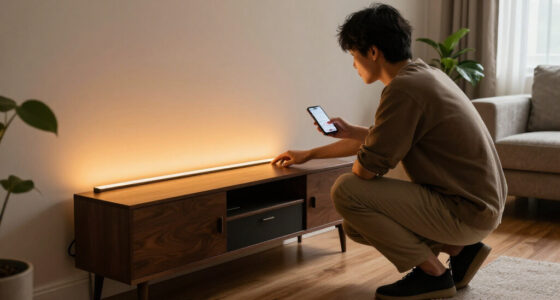
The best HomeKit smart home devices make everyday controls easier without locking you into a complicated setup. My best overall pick is the ecobee Smart Thermostat Premium for combining climate control with a SmartSensor, while the TP-Link Tapo P125M is a straightforward choice for adding Matter-compatible plug control and the Aqara G410 stands out for a HomeKit Secure Video doorbell option. The main tradeoffs are whether to choose native HomeKit support or Matter, how much setup a device needs, and whether you need a single-purpose control or a more flexible hub-based system. Switches, cameras, and outdoor devices also bring different installation and compatibility requirements. Read on for my full comparison and advice on choosing the right fit for your home.

Get home appliances delivered free with Prime
- Fast, free delivery on millions of items
- Prime Video, Amazon Music and more included
- Member-only deals all year
Complete the kit



Key Takeaways
- The ecobee Smart Thermostat Premium is the most capable all-around pick because it combines a high-impact home function, Siri support, and a SmartSensor rather than adding only one more remote-controlled outlet.
- The Tapo P125M is the clearest low-friction way to expand outlet automation, while the Kasa EP25P4 adds energy monitoring for buyers who want device-use data as well as control.
- Matter expands flexibility, but it does not erase setup differences. The Tapo P125M, Linkind plugs and bulbs, and Tapo power strip still need a compatible ecosystem and a careful check of the features exposed in Apple Home.
- Wired switches solve a different problem than smart plugs. Kasa and Tapo wall switches can preserve familiar wall control, but buyers need to check wiring, single-pole compatibility, and installation needs before ordering.
- Special-purpose devices involve more tradeoffs than basic controls: cameras raise privacy and placement questions, the garage opener depends on compatible hardware, and outdoor plugs need an appropriate location and weather protection.
| Aqara Smart Doorbell Camera G410 with Chime, HomeKit Secure Video, Black |  | Best HomeKit Doorbell | Resolution: 2K; 1600×1200 when connected to HomeKit | Viewing angle: 175° | Chime volume: 95 dB | VIEW LATEST PRICE | See Our Full Breakdown |
| Airversa QliQ AC1 HomeKit Button Controller, White, 1 Pack |  | Best Physical HomeKit Controller | Buttons and actions: 3 buttons; up to 9 actions using single, double, or long presses | Connectivity: Thread; Apple Home exclusive | Hub requirement: Thread-enabled Apple Home hub within 30 feet | VIEW LATEST PRICE | See Our Full Breakdown |
| TP-Link Tapo P125M Matter Smart Plug Mini, 3-Pack |  | Best Value Matter Plug Pack | Pack size: 3 smart plugs | Maximum current: 15 A | Maximum power: 1800 W | VIEW LATEST PRICE | See Our Full Breakdown |
| Kasa KS200P3 Apple HomeKit Smart Light Switch, Single Pole |  | Best for Hardwired Lighting | Model and quantity: KS200P3; 3 switches | Operation: On/off; one-way, single-pole | Operating voltage: 100–120 VAC | VIEW LATEST PRICE | See Our Full Breakdown |
| Kasa Smart Plug Mini 15A with Energy Monitoring and Apple HomeKit Support (EP25P4) |  | Best HomeKit Plug for Energy Monitoring | Model: EP25P4 | Maximum load: 15 A, 1800 W | Operating voltage: 120 V AC | VIEW LATEST PRICE | See Our Full Breakdown |
| Aqara Camera E1 2K Indoor Security Camera |  | Best HomeKit Indoor Camera | Resolution: 2304 × 1296 pixels (2K) | Viewing movement: 360° pan and tilt | Lens: f/2.0 wide-angle | VIEW LATEST PRICE | See Our Full Breakdown |
| TP-Link Tapo Matter Smart Light Switch, 2-Pack | 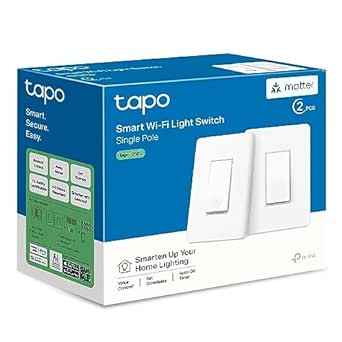 | Best Two-Switch Matter Starter | Model: Tapo S505 | Pack size: 2 switches | Switch type: Single-pole, one-way | VIEW LATEST PRICE | See Our Full Breakdown |
| Kasa Matter Smart Light Switch, Single Pole, 3-Pack |  | Best for Updating Multiple Circuits | Model: KS205P3 | Pack size: 3 switches | Switch type: Single-pole, on/off | VIEW LATEST PRICE | See Our Full Breakdown |
| ecobee Smart Thermostat Premium with Wi-Fi, Siri, Alexa, and SmartSensor |  | Best Premium HomeKit Climate Upgrade | Connectivity: Wi-Fi | Built-in voice assistants: Siri and Alexa | Included sensor: SmartSensor | VIEW LATEST PRICE | See Our Full Breakdown |
| meross MSG100HK Smart Garage Door Opener Remote |  | Best for HomeKit Garage Access | Model: MSG100HK | Connectivity: Wi-Fi, 2.4 GHz only | Compatible platforms: Apple HomeKit, Siri, CarPlay, Amazon Alexa, Google Assistant, and SmartThings | VIEW LATEST PRICE | See Our Full Breakdown |
| Linkind Matter Smart Color-Changing LED Bulbs, A19 E26, 6-Pack |  | Best Color Bulb Pack | Bulb shape and base: A19; E26 | Pack size: 6 bulbs | Power: 9 watts per bulb | VIEW LATEST PRICE | See Our Full Breakdown |
| Tapo P316M Matter Smart Wi-Fi Power Strip with Energy Monitoring |  | Best Matter Power Strip | AC outlets: 6 individually controlled | USB ports: 3 always-on ports; 5 V, 2.4 A | Connectivity: Matter; 2.4 GHz Wi-Fi | VIEW LATEST PRICE | See Our Full Breakdown |
| Kasa EP40A Outdoor Smart Plug with Apple HomeKit, 2 Outlets |  | Best for Outdoor HomeKit Control | Outlets: 2 independently controlled AC outlets | Maximum load: 15 A / 1875 W per outlet | Voltage: 125 V AC | VIEW LATEST PRICE | See Our Full Breakdown |
| Onvis 5-Key Smart Button Scene Controller for Apple HomeKit |  | Best Physical HomeKit Scene Controller | Keys: 5 | Press types: Single, double, and long press | Maximum actions: 15 | VIEW LATEST PRICE | See Our Full Breakdown |
| Linkind Matter Smart Plug, 4-Pack |  | Best Value for Distributed Smart Plug Control | Pack size: 4 plugs | Connectivity: Matter; 2.4 GHz Wi-Fi | Network requirement: IPv6 | VIEW LATEST PRICE | See Our Full Breakdown |
| HomeKit smart home device | Connectivity |
|---|---|
| Aqara Smart Doorbell Camera G4 | — |
| Airversa QliQ AC1 HomeKit Butt | Thread; Apple Home exclusive |
| TP-Link Tapo P125M Matter Smar | 2.4 GHz Wi-Fi, Bluetooth, and Matter |
| Kasa KS200P3 Apple HomeKit Sma | 2.4 GHz Wi-Fi |
| Kasa Smart Plug Mini 15A with | 2.4 GHz Wi-Fi |
| Aqara Camera E1 2K Indoor Secu | Wi-Fi 6, 2.4 GHz only; WPA3 |
| TP-Link Tapo Matter Smart Ligh | Matter and Wi-Fi; 2.4 GHz required |
| Kasa Matter Smart Light Switch | Matter and 2.4 GHz Wi-Fi |
| ecobee Smart Thermostat Premiu | Wi-Fi |
| meross MSG100HK Smart Garage D | Wi-Fi, 2.4 GHz only |
| Linkind Matter Smart Color-Cha | Matter; 2.4 GHz Wi-Fi |
| Tapo P316M Matter Smart Wi-Fi | Matter; 2.4 GHz Wi-Fi |
| Kasa EP40A Outdoor Smart Plug | — |
| Onvis 5-Key Smart Button Scene | Thread; Bluetooth |
| Linkind Matter Smart Plug | Matter; 2.4 GHz Wi-Fi |
More Details on Our Top Picks
Aqara Smart Doorbell Camera G410 with Chime, HomeKit Secure Video, Black
The Aqara Smart Doorbell Camera G410 is the most feature-packed security pick here: it combines HomeKit Secure Video with local microSD storage, local face recognition, and an included Zigbee and Matter hub. Its 175° view and mmWave motion detection give Apple Home users more ways to monitor the entrance than a simple accessory like the Airversa QliQ AC1 button controller. The hub can also help connect other smart-home devices, adding value beyond doorbell alerts.
There are meaningful limits. HomeKit caps the video resolution at 1600×1200, below the advertised 2K, and the product data says it is not water resistant, a serious concern for an exposed outdoor mounting spot. Local storage also requires buying a microSD card separately. I’d choose it for its broad ecosystem support and detection options, but not for an installation where weather exposure or full-resolution HomeKit footage is a priority.
Pros:- Supports HomeKit Secure Video as well as Matter and several other platforms
- Built-in Zigbee and Matter hub can support additional smart-home devices
- Offers local face recognition and microSD storage
- mmWave motion detection and a 175° viewing angle support flexible monitoring
Cons:- Not water resistant, limiting suitability for exposed outdoor installation
- HomeKit connection limits video resolution to 1600×1200
- microSD card is sold separately
Best for: Apple Home households seeking a doorbell with local storage, advanced motion detection, and a built-in hub for other smart-home devices.
Not ideal for: Buyers mounting a doorbell in an exposed location, or those who require 2K resolution when viewing through HomeKit Secure Video.
- Resolution:2K; 1600×1200 when connected to HomeKit
- Viewing angle:175°
- Chime volume:95 dB
- Wi-Fi:2.4 GHz and 5 GHz; WPA3
- Storage:microSD up to 512 GB (card not included) and cloud storage
- Smart home compatibility:Apple HomeKit, Matter, Alexa, Google Assistant, SmartThings, and Home Assistant
- Hub and detection:Built-in Zigbee and Matter hub; mmWave radar; local face recognition
- Water resistance:Not water resistant
Our verdict“Choose the G410 if you want an advanced, multi-platform HomeKit doorbell and can protect it from weather; skip it if exposed mounting or full 2K HomeKit footage is non-negotiable.”
Airversa QliQ AC1 HomeKit Button Controller, White, 1 Pack
The Airversa QliQ AC1 gives Apple Home users a physical alternative to opening an app or asking Siri. Its three buttons support single, double, and long presses, allowing up to nine actions from one small controller. That makes it more flexible for scene control than the Kasa KS200P3, which is designed to switch a hardwired fixture on and off rather than trigger a range of Home actions. A wall plate and built-in magnet make placement adaptable, while Thread connects it to Apple Home without relying on Wi-Fi.
This is a focused accessory, not a broad smart-home controller: it works exclusively with Apple Home and needs a compatible Thread-enabled Apple Home hub within 30 feet. Its rechargeable battery lasts up to two months per charge, so it still needs periodic attention. I’d pick it for convenient scene access in a HomeKit household, but the cross-platform Tapo P125M plugs make more sense for someone building across ecosystems.
Pros:- Three buttons and three press types can trigger up to nine actions
- Thread connectivity supports responsive Apple Home control
- Includes a wall plate and built-in magnet for flexible placement
- Rechargeable battery lasts up to two months per charge
Cons:- Works exclusively with Apple Home
- Requires a compatible Thread-enabled Apple Home hub within 30 feet
- Battery needs recharging periodically
Best for: Apple Home users who want a wall-mounted or movable physical controller for scenes, lights, and other HomeKit automations.
Not ideal for: Households without a nearby Thread-enabled Apple Home hub, or buyers who need a controller that works across smart-home platforms.
- Buttons and actions:3 buttons; up to 9 actions using single, double, or long presses
- Connectivity:Thread; Apple Home exclusive
- Hub requirement:Thread-enabled Apple Home hub within 30 feet
- Battery:Rechargeable lithium-ion; up to 2 months per charge
- Mounting:Surface mount; included wall plate and built-in magnet
- Dimensions:2.99 × 1.26 × 0.57 inches
- Weight:1.76 ounces
- Included components:Smart button, charging cable, wall plate, quick start guide, and scene stickers
Our verdict“Pick the QliQ AC1 for flexible physical scene control in a Thread-equipped Apple Home, but choose a cross-platform accessory if your household uses multiple ecosystems.”
TP-Link Tapo P125M Matter Smart Plug Mini, 3-Pack
The TP-Link Tapo P125M is the most straightforward way in this group to add several remotely controlled outlets while keeping platform options open. Its three-plug pack supports Matter with Apple Home, Alexa, Google Home, and SmartThings, so changing or sharing control across ecosystems is easier than with the Apple-only Airversa QliQ AC1. Local network control also means connected devices can remain controllable when the internet is down, while schedules and timers cover everyday routines without voice commands.
The compact design helps preserve access to neighboring outlets, but these plugs rely on 2.4 GHz Wi-Fi and Bluetooth setup rather than Thread. The single-outlet Kasa EP25P4 adds energy monitoring, which the P125M does not list; the Tapo pack is the better fit when outlet count and Matter compatibility matter more. Its 15 A, 1800 W rating supports many typical plug-in devices, though buyers should check the load requirements of anything they plan to connect.
Pros:- Three plugs provide a practical way to add control in multiple locations
- Matter support works with Apple Home and several other major platforms
- Local network control can work when the internet is offline
- Compact body helps avoid blocking nearby outlets
Cons:- Connects over 2.4 GHz Wi-Fi only
- Does not list energy monitoring, unlike the Kasa EP25P4
- Bluetooth is used for setup, while ongoing connectivity relies on Wi-Fi
Best for: Households adding several lamps or other compatible plug-in devices that want Matter support across Apple Home and other major platforms.
Not ideal for: Buyers who need energy-use tracking, 5 GHz Wi-Fi support, or a plug for a device that exceeds its electrical rating.
- Pack size:3 smart plugs
- Maximum current:15 A
- Maximum power:1800 W
- Operating voltage:120 V AC
- Connectivity:2.4 GHz Wi-Fi, Bluetooth, and Matter
- Compatible platforms:Apple Home, Amazon Alexa, Google Home, and Samsung SmartThings
- Control options:App, voice, schedules, and timers
- Warranty:2-year limited warranty
Our verdict“Choose the Tapo P125M pack for multi-platform Matter control across several outlets, but pick the Kasa EP25P4 if monitoring energy use is a priority.”
Kasa KS200P3 Apple HomeKit Smart Light Switch, Single Pole
The Kasa KS200P3 suits buyers who want ordinary wall-switch control to work with Apple Home, rather than adding a smart plug to each lamp. This three-pack controls single-pole fixtures such as lights and ceiling fans, with remote access, schedules, timers, and Away Mode. It needs no hub and also supports Alexa and Google Assistant, making it more adaptable across assistants than the Apple-exclusive Airversa QliQ AC1. For permanently wired room lighting, that difference can make daily control feel more natural.
Installation is the main hurdle: each switch requires a neutral wire and 2.4 GHz Wi-Fi, so older wiring or multi-way circuits may rule it out. The Kasa EP25P4 is a simpler choice for a lamp because it plugs in, though it cannot replace a wall switch for a hardwired fixture. HomeKit remote control also requires a networked Apple device at home. I’d choose this pack when the wiring matches and several fixtures need dependable app and voice control.
Pros:- Three switches can control hardwired fixtures through Apple Home
- Also supports Alexa and Google Assistant
- Schedules, timers, remote control, and Away Mode are included
- No smart-home hub is required
Cons:- Requires a neutral wire at each installation point
- Supports 2.4 GHz Wi-Fi only
- HomeKit remote control requires a networked Apple device at home
Best for: Homeowners with neutral-wire, single-pole circuits who want app and voice control for several hardwired lights or compatible fixtures.
Not ideal for: Renters, homes without neutral wires, or buyers trying to control multi-way circuits or a plug-in lamp without electrical work.
- Model and quantity:KS200P3; 3 switches
- Operation:On/off; one-way, single-pole
- Operating voltage:100–120 VAC
- Connectivity:2.4 GHz Wi-Fi
- Neutral wire:Required
- Compatible assistants:Apple Siri, Amazon Alexa, and Google Assistant
- Hub requirement:No hub required
- Certification and warranty:UL certified; 2-year warranty
Our verdict“Choose the KS200P3 when you have compatible single-pole wiring and want HomeKit control at the wall; use the Kasa EP25P4 for lamps or other plug-in devices.”
Kasa Smart Plug Mini 15A with Energy Monitoring and Apple HomeKit Support (EP25P4)
The Kasa EP25P4 adds a useful layer beyond remote switching: energy monitoring lets owners track the usage of a connected appliance, while schedules and timers handle routine control. It supports Apple HomeKit and several other assistants without a hub, making it a more informative single-device option than the three-pack TP-Link Tapo P125M, which offers Matter and local network control but does not list energy tracking. Its 15 A, 1800 W rating covers many everyday plug-in devices, and the compact format helps keep adjacent outlets accessible.
The tradeoff is connectivity: this plug uses 2.4 GHz Wi-Fi, not Matter, so it is less flexible for buyers who want a standard shared across platforms. HomeKit remote access also depends on a networked Apple device at home. Compared with the Kasa KS200P3, the EP25P4 avoids wiring work and suits lamps or appliances, but it cannot control a hardwired ceiling fixture. I’d pick it when tracking plug-in energy use matters more than Matter support or multi-outlet coverage.
Pros:- Energy monitoring adds visibility into connected-device usage
- Works with Apple HomeKit, Alexa, Google Assistant, and SmartThings
- Schedules, timers, and remote app control support everyday automation
- No hub is required, and the compact design helps preserve nearby outlet access
Cons:- Uses 2.4 GHz Wi-Fi and does not list Matter support
- HomeKit remote control requires a networked Apple device at home
- Controls plug-in devices, not hardwired fixtures like the Kasa KS200P3
Best for: Apple Home users who want to automate a lamp or appliance and monitor its energy use without installing a hub or replacing a wall switch.
Not ideal for: Buyers seeking Matter compatibility, control for hardwired fixtures, or remote HomeKit access without a networked Apple device at home.
- Model:EP25P4
- Maximum load:15 A, 1800 W
- Operating voltage:120 V AC
- Connectivity:2.4 GHz Wi-Fi
- Compatible platforms:Apple HomeKit, Siri, Amazon Alexa, Google Assistant, and SmartThings
- Features:Energy monitoring, scheduling, timers, and remote app control
- System requirements:Android 5.0 or higher; iOS 10 or higher
- Warranty:2-year limited warranty
Our verdict“Choose the EP25P4 for energy tracking and HomeKit control of a plug-in device, but choose the Tapo P125M if Matter compatibility or a multi-plug pack matters more.”
Aqara Camera E1 2K Indoor Security Camera
The Aqara Camera E1 is the strongest fit here for buyers who want a movable indoor view inside Apple Home. Its 2K video, 360° pan and tilt, and person tracking can cover more of a room than a fixed-view camera, while HomeKit Secure Video and local detection suit privacy-minded households. Compared with the Aqara Smart Doorbell Camera G410, the E1 is designed for interior monitoring rather than watching an entryway. Storage flexibility is another advantage: it supports microSD and compatible NAS storage as well as Aqara cloud. The tradeoffs are its need for a separate 5V 2A USB-A power supply and 2.4 GHz-only Wi-Fi; some cloud AI features also require a subscription. I’d choose it for room coverage, not for a completely cable-free setup.
Pros:- 2K video with 360° pan and tilt helps cover a room from one camera position.
- Person tracking and local detection add useful monitoring features.
- HomeKit Secure Video support integrates it with Apple Home.
- microSD, Aqara cloud, and SMB3-compatible NAS storage provide flexibility.
Cons:- USB-A power supply is required but not included.
- Connects only to 2.4 GHz Wi-Fi.
- Some cloud AI features require a subscription.
Best for: Apple Home households wanting pan-and-tilt indoor monitoring, person tracking, and local or NAS storage options.
Not ideal for: Buyers who need a battery-powered camera, 5 GHz Wi-Fi, or cloud AI features without a subscription.
- Resolution:2304 × 1296 pixels (2K)
- Viewing movement:360° pan and tilt
- Lens:f/2.0 wide-angle
- Night vision:940 nm infrared
- Connectivity:Wi-Fi 6, 2.4 GHz only; WPA3
- Storage:microSD up to 512 GB, Aqara cloud, or SMB3-compatible NAS
- Power:USB-C; requires 5V 2A USB-A power supply, not included
- Compatibility:HomeKit Secure Video, Alexa, and IFTTT
Our verdict“Choose the Camera E1 for flexible, wide-area indoor monitoring in Apple Home if a wired camera and 2.4 GHz Wi-Fi fit your setup.”
TP-Link Tapo Matter Smart Light Switch, 2-Pack
The Tapo S505 two-pack is a practical way to add Matter-enabled wall control to two single-pole circuits without committing to a larger bundle. It works with Apple Home and several other major platforms, so it suits homes where devices may be shared across ecosystems. Local network control, schedules, and timers keep everyday lighting useful even when voice control is inconvenient. Compared with the Kasa KS205P3, this package contains fewer switches, which can make sense when you only have a couple of target rooms; the Kasa bundle is better suited to outfitting three circuits at once. Both require neutral wiring and 2.4 GHz Wi-Fi, so neither is a fit for every older electrical setup. I’d pick the Tapo when guided setup and Matter compatibility matter more than covering the most switches in one purchase.
Pros:- Matter support works with Apple Home and other major smart home platforms.
- Two switches suit buyers updating a small number of circuits.
- App, touch, and voice control support different household preferences.
- Scheduling, timers, and local network control add useful automation options.
Cons:- Requires a neutral wire, which some switch boxes do not have.
- Limited to single-pole, one-way installations.
- Requires 2.4 GHz Wi-Fi.
Best for: HomeKit users replacing one or two single-pole switches who want Matter support across multiple smart home platforms.
Not ideal for: Households without neutral wires, users needing multi-way switch support, or anyone whose Wi-Fi setup lacks 2.4 GHz.
- Model:Tapo S505
- Pack size:2 switches
- Switch type:Single-pole, one-way
- Connectivity:Matter and Wi-Fi; 2.4 GHz required
- Wiring:Neutral wire required
- Compatible platforms:Apple Home, Amazon Alexa, Google Home, and Samsung SmartThings
- Certification and warranty:UL certified; 2-year warranty
Our verdict“Choose the Tapo two-pack for Matter-based control of two compatible single-pole circuits, but check your wiring before buying.”
Kasa Matter Smart Light Switch, Single Pole, 3-Pack
For a HomeKit household replacing several standard switches, the Kasa KS205P3 three-pack makes the most sense when all the target circuits are single-pole and have neutral wires. Matter support brings the switches into Apple Home while leaving room to use Alexa, Google Home, or SmartThings. Schedules, timers, Away Mode, and remote control can make routine lighting less dependent on someone remembering to switch it off. Compared with the Tapo S505 two-pack, Kasa gives you a third switch for a broader update; the Tapo is the more restrained choice if you only need two. The tradeoffs are similar: these are on/off switches, not dimmers, and they depend on 2.4 GHz Wi-Fi and neutral wiring. I’d favor this bundle for multi-room replacement, not for specialized lighting or incompatible wiring.
Pros:- Three switches support updates across multiple rooms or circuits.
- Matter enables compatibility with Apple Home and other major platforms.
- Schedules, timers, Away Mode, and remote access support everyday automation.
- App-guided installation helps with setup.
Cons:- Requires a neutral wire at each installation point.
- Single-pole on/off design does not provide dimming or multi-way control.
- Requires 2.4 GHz Wi-Fi.
Best for: Homeowners upgrading three standard single-pole lighting circuits who want Matter-based Apple Home control and scheduling.
Not ideal for: Buyers with no neutral wire, multi-way circuits, dimmable-lighting needs, or a 5 GHz-only network.
- Model:KS205P3
- Pack size:3 switches
- Switch type:Single-pole, on/off
- Connectivity:Matter and 2.4 GHz Wi-Fi
- Wiring:Neutral wire required
- Compatible platforms:Apple Home, Alexa, Google Home, and SmartThings
- Certification and warranty:UL certified; 2-year warranty
Our verdict“Pick the Kasa three-pack over the Tapo two-pack when you have three compatible circuits to update and do not need dimming.”
ecobee Smart Thermostat Premium with Wi-Fi, Siri, Alexa, and SmartSensor
The ecobee Smart Thermostat Premium is the most feature-rich climate choice in this group, pairing occupancy-aware temperature adjustments with an included SmartSensor for rooms that a central thermostat may not represent well. Its built-in air quality monitor adds another layer of household feedback, while Siri and Alexa are built in for voice control. Compared with the Aqara Camera E1, this is a larger commitment: it interacts with HVAC equipment and needs system compatibility checked before installation. The included Power Extender Kit and trim kit can help with DIY setup, but they do not remove the need to confirm your wiring and HVAC configuration. Siri also requires an Apple home hub, and some security features sit behind a subscription. I’d choose ecobee for whole-home comfort features, not simply for a HomeKit voice-control device.
Pros:- Occupancy-aware adjustments can adapt heating and cooling to household routines.
- Included SmartSensor helps account for room-to-room comfort differences.
- Built-in air quality monitoring provides alerts and filter reminders.
- Power Extender Kit and trim kit are included for installation.
Cons:- HVAC compatibility should be checked before purchase.
- Siri features require an Apple home hub.
- Some security features require an ecobee Smart Security subscription.
Best for: Homeowners with a compatible HVAC system who want occupancy-aware heating and cooling, room sensing, and air-quality alerts.
Not ideal for: Renters, buyers seeking a simple HomeKit accessory, or households without a compatible HVAC system or Apple home hub for Siri features.
- Connectivity:Wi-Fi
- Built-in voice assistants:Siri and Alexa
- Included sensor:SmartSensor
- Air quality monitoring:Built-in monitor with alerts and filter reminders
- HVAC compatibility:Compatible with 95% of HVAC systems
- Installation accessories:Power Extender Kit and trim kit included
- Energy certification:ENERGY STAR certified
- Warranty:3 years
Our verdict“Choose ecobee for a substantial climate-control upgrade with room sensing and air monitoring, provided your HVAC system and Home setup are compatible.”
meross MSG100HK Smart Garage Door Opener Remote
The meross MSG100HK adds app and voice control to a compatible existing garage opener, making it the most focused convenience upgrade in this group. Its wired sensor reports whether the door is open or closed, while activity history, scheduled closing, and auto-close can help households keep track of garage access. Unlike the ecobee Smart Thermostat Premium, it is not a broad home upgrade; its value is concentrated on one door and one existing opener. It also preserves existing wall buttons and remotes, so household routines do not have to change. Compatibility is the main hurdle: some opener models need an adapter, and Security+ 3.0 is not supported. It also uses 2.4 GHz Wi-Fi only. I’d verify the opener model before choosing it over more general-purpose HomeKit devices.
Pros:- Adds app and voice control to a compatible existing opener.
- Wired sensor reports door status and supports activity history.
- Scheduled closing and auto-close add practical garage routines.
- Existing wall buttons and remotes continue to work.
Cons:- Some opener models require a separate adapter.
- Not compatible with Security+ 3.0.
- Supports one opener and requires 2.4 GHz Wi-Fi.
Best for: Homeowners with one compatible garage door opener who want Apple Home, app, and voice control plus door-status tracking.
Not ideal for: Buyers with Security+ 3.0 openers, unsupported garage models, multiple doors to control, or no 2.4 GHz Wi-Fi.
- Model:MSG100HK
- Connectivity:Wi-Fi, 2.4 GHz only
- Compatible platforms:Apple HomeKit, Siri, CarPlay, Amazon Alexa, Google Assistant, and SmartThings
- Opener compatibility:200+ brands and 1,600+ models; adapter may be required
- Supported protocols:Security+ 1.0 and 2.0; not Security+ 3.0
- Sensor and control:Wired sensor; app and voice control
- Maximum supported devices:1
- Subscription fees:None
Our verdict“Choose the MSG100HK to add HomeKit garage control to one compatible opener after checking its model and protocol.”
Linkind Matter Smart Color-Changing LED Bulbs, A19 E26, 6-Pack
For a HomeKit setup that needs colorful lighting across several fixtures, this six-bulb pack offers a broader canvas than a smart plug or switch can: it supports 16 million colors, 104 preset scenes, and Apple Home control through Matter. Each bulb reaches 800 lumens, so it can serve as everyday room lighting as well as accent lighting, while using 9 watts. Compared with the Linkind Matter Smart Plug, these bulbs can change color and brightness rather than simply switching a device on or off; the plug is a better fit for lamps whose bulbs you want to keep. The tradeoffs are the need for 2.4 GHz Wi-Fi and general incompatibility with traditional dimmer switches. This pick makes most sense when the whole room’s lighting is part of the smart-home plan.
Pros:- Matter support enables integration with Apple Home and other major platforms.
- Six bulbs provide color control across several fixtures from one pack.
- Up to 800 lumens per bulb supports everyday lighting as well as accent use.
- Offers 16 million colors, 104 scenes, and app-based music sync.
Cons:- Requires a 2.4 GHz Wi-Fi network.
- Generally incompatible with traditional dimmer switches.
Best for: HomeKit households outfitting multiple indoor fixtures with app- or voice-controlled color and scene lighting.
Not ideal for: Buyers with traditional wall dimmers or anyone who only needs basic on/off control for lamps.
- Bulb shape and base:A19; E26
- Pack size:6 bulbs
- Power:9 watts per bulb
- Maximum light output:800 lumens per bulb
- Connectivity:Matter; 2.4 GHz Wi-Fi
- Smart home compatibility:Apple Home, Alexa, Google Home
- Color and scenes:16 million colors; 104 preset scenes
- Operating life:25,000 hours
Our verdict“Choose this pack if you want Matter-enabled color and scene control across multiple HomeKit lighting fixtures, and skip it if your existing dimmers must remain in use.”
Tapo P316M Matter Smart Wi-Fi Power Strip with Energy Monitoring
The P316M is the most useful choice here when several devices need separate schedules or energy tracking at one location. Its six individually controlled AC outlets let you manage connected equipment independently, and per-outlet energy monitoring can help identify which devices draw power. Three USB ports add charging capacity, but they are always on, unlike the switched AC outlets. Compared with the Linkind Matter Smart Plug 4-Pack, this strip gathers multiple connections in one unit and adds energy monitoring; individual plugs offer more flexibility for devices spread around a home. Matter and local network control make it a strong HomeKit fit, including when the internet is unavailable. Its 16.2-inch body and 37-inch cord, however, call for a planned placement, and it still needs 2.4 GHz Wi-Fi.
Pros:- Six AC outlets can be controlled separately.
- Tracks energy use for each AC outlet.
- Matter support and local network control suit multi-platform and internet-outage use.
- Adds surge protection and three always-on USB ports.
Cons:- USB ports cannot be controlled individually and remain on.
- Requires a 2.4 GHz Wi-Fi network.
- The 16.2-inch body and 37-inch cord may limit placement.
Best for: HomeKit users who want to automate and monitor several nearby appliances, chargers, or desk devices from one strip.
Not ideal for: Buyers who need USB ports to switch independently, or who need a compact strip with a longer cord.
- AC outlets:6 individually controlled
- USB ports:3 always-on ports; 5 V, 2.4 A
- Connectivity:Matter; 2.4 GHz Wi-Fi
- Maximum current:15 A
- Voltage:120 V
- Cord length:37 inches
- Dimensions:16.2 x 4.8 x 1.9 inches
- Features:Per-outlet energy monitoring, surge protection, scheduling, local control, overcharge prevention
Our verdict“Pick the P316M for a centralized HomeKit setup that benefits from per-outlet control and energy data, but choose separate smart plugs if your devices are spread out.”
Kasa EP40A Outdoor Smart Plug with Apple HomeKit, 2 Outlets
For patios, seasonal lights, and other outdoor gear, the EP40A brings two independently controlled outlets into Apple Home without asking you to use an indoor plug outside. Its IP64 rating offers protection from dust and water splashes, while scheduling and remote control make it practical for routines such as switching landscape lighting on at dusk. Compared with the indoor Linkind Matter Smart Plug 4-Pack, this Kasa model is built for outdoor placement and explicitly supports HomeKit, but it has only two outlets and does not list Matter support. Each outlet is rated for up to 15 A / 1875 W, giving buyers a clear per-outlet load limit. It still depends on 2.4 GHz Wi-Fi, and HomeKit remote access requires a networked Apple device at home; IP64 protection is not a substitute for a location sheltered from harsh exposure.
Pros:- Two outlets operate independently.
- Works with Apple HomeKit, Siri, Alexa, and Google Assistant.
- IP64 protection suits outdoor use where dust and water splashes are concerns.
- Supports scheduling, grouping, and remote control.
Cons:- Requires 2.4 GHz Wi-Fi.
- HomeKit remote access requires a networked Apple device at home.
- IP64 protection does not mean the plug is suited to every exposed outdoor location.
Best for: HomeKit users automating two outdoor loads, such as patio lights and seasonal decorations, who can keep the plug within Wi-Fi coverage.
Not ideal for: Buyers needing a Matter-based outdoor plug, more than two switched outlets, or reliable HomeKit remote access without an Apple device at home.
- Outlets:2 independently controlled AC outlets
- Maximum load:15 A / 1875 W per outlet
- Voltage:125 V AC
- Weather resistance:IP64
- Wi-Fi:2.4 GHz; 802.11 b/g/n
- Voice assistants:Siri, Alexa, Google Assistant
- Wi-Fi range:Up to 300 ft
- Warranty:2 years
Our verdict“Choose the EP40A when you want two separately automated outdoor loads in HomeKit and can meet its Wi-Fi and remote-access requirements.”
Onvis 5-Key Smart Button Scene Controller for Apple HomeKit
The Onvis controller suits HomeKit homes where a physical button is more convenient than asking Siri or opening an app. Its five programmable keys each support single, double, and long presses, giving you up to 15 actions for scenes or compatible devices. That makes it more configurable than the Airversa QliQ AC1 HomeKit Button Controller in this lineup, while its compact surface-mount format and included magnetic strips offer flexible placement. Thread or Bluetooth connectivity gives it a wireless connection path, but Thread requires a compatible Apple Home hub set as the connected hub. Buyers also need iOS 17.4 or later, so it is not the simplest pick for older Apple setups. It is best for households ready to map multiple controls, rather than anyone seeking a general-purpose button with broad platform support.
Pros:- Five keys with three press types support up to 15 actions.
- Connects through Thread or Bluetooth.
- Includes adhesive tape and magnetic mounting strips.
- Activity records are stored in the Onvis app on iOS devices, with no cloud storage or tracking.
Cons:- Requires iOS 17.4 or later.
- Thread use requires a compatible Apple Home hub set as the connected hub.
- Designed for Apple HomeKit rather than broad smart-home platform compatibility.
Best for: HomeKit households that want a wall- or surface-mounted control point for several lighting, plug, or scene actions.
Not ideal for: People using older iOS versions, those without a compatible Apple Home hub for Thread, or buyers who want cross-platform control.
- Keys:5
- Press types:Single, double, and long press
- Maximum actions:15
- Connectivity:Thread; Bluetooth
- Compatibility:Apple HomeKit; iOS 17.4 or later
- Power:3 V
- Dimensions:2.17 x 0.79 x 2.17 inches
- Mounting:Surface mount; adhesive tape and magnetic strips included
Our verdict“Choose the Onvis if you want a highly configurable physical control for HomeKit scenes and have the required iOS version and, for Thread, an appropriate Apple hub.”
Linkind Matter Smart Plug, 4-Pack
This four-pack is a practical way to add individual on/off control to lamps and other compatible devices across a HomeKit home. Matter lets the plugs work with Apple Home and several other platforms, while local network control can keep working when internet service is unavailable. Compared with the Tapo P316M Matter Smart Wi-Fi Power Strip, these plugs are easier to place in separate rooms, but they do not offer energy monitoring or consolidate outlets in one location. Scheduling, timers, voice commands, and remote control cover the everyday automation basics. The setup has two notable requirements: a 2.4 GHz Wi-Fi network and IPv6, plus a compatible Matter hub for most platform integrations. The AiDot app can work without a hub, but buyers who want these plugs directly in Apple Home should plan around the hub requirement.
Pros:- Four plugs support control across multiple locations.
- Matter compatibility supports Apple Home and several other platforms.
- Schedules, timers, remote control, and voice commands cover common routines.
- Local network control can continue when internet access is unavailable; overload and short-circuit protection are included.
Cons:- Supports 2.4 GHz Wi-Fi only and requires IPv6.
- Most platform integrations require a compatible Matter hub.
- Does not provide the per-outlet energy monitoring found on the Tapo P316M.
Best for: HomeKit users who want to automate several separate lamps or appliances with Matter-enabled plugs and already have a compatible hub.
Not ideal for: Buyers who need energy tracking, use only 5 GHz Wi-Fi, or want Apple Home integration without a compatible Matter hub.
- Pack size:4 plugs
- Connectivity:Matter; 2.4 GHz Wi-Fi
- Network requirement:IPv6
- Amperage:15 A
- Power capacity:1800 W
- Plug type:Type A
- Platform requirement:Compatible Matter hub required for most platform integrations
- Certifications:FCC; ETL
Our verdict“Choose this four-pack for distributed Matter-based HomeKit on/off control if your network and hub meet its requirements; choose the Tapo strip if energy monitoring matters more.”
How We Picked
I ranked these devices by how directly they improve a HomeKit household, how clear their setup and everyday control are, and how well their features justify the extra installation, maintenance, or compatibility checks they require. I also weighed versatility, build and placement needs, and whether a product supports useful Home features such as energy monitoring, scene control, or HomeKit Secure Video. A device that adds a meaningful home function ranks ahead of a narrow accessory when its added complexity is reasonable.
The order reflects practical fit, not a claim that one device suits every home. Plug-in options rank well for simple setup and easy reversibility; switches can be a better long-term fit but require wiring checks. Matter support is a plus for ecosystem flexibility, while direct HomeKit compatibility remains relevant for shoppers focused on Apple Home. Specialized products such as cameras, thermostats, and garage controls are judged by the value of their specific job and the extra compatibility or privacy decisions involved.
Factors to Consider When Choosing Best HomeKit Smart Home Devices
HomeKit devices can share an app while differing substantially in installation, ecosystem requirements, and what they let you automate. I would choose by starting with the home task you want to improve, then checking the less visible constraints before buying. These factors help prevent a device that technically connects but does not fit your wiring, network, routines, or privacy preferences.
Choose HomeKit, Matter, or Both With Your Existing Setup in Mind
Matter is a compatibility standard, not a guarantee that every feature appears identically in every app. Before buying, check which functions the manufacturer exposes to Apple Home and whether the device needs a compatible controller or other ecosystem hardware. If you already rely on Apple Home, direct HomeKit support can make the setup path more familiar. Matter can be useful if you expect to add another compatible platform later, but it is not a reason to ignore setup requirements. Avoid buying several devices on the assumption that the label alone makes them interchangeable. Start with one device category, confirm the controls you need, and then expand.
Match the Device to the Control You Want to Keep
A smart plug, wall switch, and scene button solve different control problems. A plug is easy to add or remove but only works with devices that resume their state safely after power is restored. A wall switch keeps familiar room-level control, though installation and wiring make it a more involved change. A button can trigger a scene without asking someone to open an app, but it depends on you creating useful automations in advance. Think about guests, children, and household members who may not use Siri or a phone. The common mistake is automating a device while making its everyday manual control less convenient.
Check Wiring, Load, and Placement Before Choosing Hardware
Installation constraints often matter more than a feature list. For a wall switch, check the switch type, circuit arrangement, and wiring requirements against the product instructions; consult an electrician if anything is unclear. For smart plugs and power strips, confirm that the appliance’s load is supported and that the device is intended for that use. Outdoor models need a suitable protected location and should not be treated as a substitute for safe electrical installation. Cameras need a usable view, power access, and a placement that respects household privacy. Measuring and checking these details first can prevent buying a device that cannot serve its intended spot.
Decide How Much Monitoring and Automation You Actually Need
Energy monitoring and sensors are useful only when they answer a real question. Plug-level monitoring can help identify the consumption of an individual connected appliance, while a thermostat sensor can support more informed room comfort decisions. Neither feature automatically reduces energy use; you still need to interpret the information and adjust schedules or habits. If you only want a lamp to turn on by voice or schedule, a simpler plug may be a better fit. If you want to build routines, plan what should trigger them and what happens when a device goes offline. Avoid paying for data or sensors you have no intention of checking.
Set Privacy Expectations for Cameras and Connected Controls
Home security devices deserve a separate privacy check. Review where video is stored, which services or subscriptions may be involved, who can view recordings, and how notifications work before placing a camera or doorbell. HomeKit Secure Video support is a specific benefit, but buyers should still check Apple Home requirements and recording settings. A camera pointed at a shared or sensitive area can create household concerns even when the setup is technically sound. Garage controls also deserve care: consider who has access and what safeguards apply if the network or device is unavailable. Choose monitoring that matches your comfort level, rather than treating every connected feature as a default improvement.
Plan for Reliability and Manual Fallbacks
Smart-home convenience should not make essential controls fragile. Think about what happens during a Wi-Fi or internet outage, a power cut, or an app sign-in problem. Keep physical access available for lights, heating, and garage doors wherever possible, and avoid making a safety-critical routine depend on one cloud connection. A dedicated button or familiar wall control can make a smart setup easier for people who do not want to use voice commands. For devices used every day, consider whether a brief delay or reconnect process would cause real disruption. A slightly less feature-rich device can be the better household choice if its manual fallback is clearer.
Frequently Asked Questions
Should I choose a Matter device or one made specifically for Apple Home?
Choose based on the controls you need in Apple Home, not the label alone. Matter can make a device usable across compatible smart-home platforms, which is helpful if your household uses more than Apple devices. A HomeKit-specific model may offer a more direct Apple-oriented setup, while a Matter product may require a compatible controller or additional configuration. Check the manufacturer’s feature list for the exact functions you plan to use, such as energy readings, camera features, or automations. If you are uncertain, adding one device first is a safer way to confirm how it behaves in your setup.
Are smart plugs a good substitute for replacing wall switches?
They are a good fit for lamps and suitable plug-in appliances, but they do not replace every wall switch. A smart plug controls power at the outlet, so it will not help with a hardwired ceiling light or a device that needs its own switch left on. A wall switch can preserve the familiar way to control fixed lighting, but it involves checking circuit and wiring compatibility. Consider who uses the room and whether physical control needs to remain simple. For a rented home or a temporary setup, a plug is often easier to reverse; for fixed lighting, a compatible switch may be more natural.
Do I need an Apple home hub to use these devices?
Basic setup and remote or automated features are not always the same thing. Requirements depend on the product, its connection method, and the Apple Home features you want to use. Some devices may work for local control after setup, while remote access, automations, or particular Matter configurations can call for a compatible home hub or controller. Check current Apple and manufacturer requirements for the exact device before buying. If you plan to build automations across multiple rooms, confirm hub needs early rather than discovering them after installation.
What should I check before buying a HomeKit-compatible light switch?
Confirm the circuit and wiring before choosing a switch model. Check whether the device supports your switch configuration, whether it requires a neutral wire, and whether it is designed for the lighting load you have. A single-pole switch is not automatically suitable for a multi-way circuit. Also consider who will install it and whether you need an electrician. If the wiring is unclear, pause the purchase and get qualified advice; a smart switch should not be selected by appearance or app compatibility alone.
Which device type is the best place to start if I am new to Apple Home?
A plug is often the simplest first step if you have a suitable lamp or appliance. It avoids wall wiring and lets you learn how Apple Home handles scheduling, voice commands, and basic automations. Choose an item that has a safe, predictable response when power is switched, and check whether you need Matter setup hardware. If your main goal is a room scene rather than controlling one outlet, a button controller may fit better but requires more planning. A thermostat, camera, or garage opener can deliver more specialized value, yet each brings extra setup, privacy, or compatibility decisions.
Conclusion
For most households, I would start with the ecobee Smart Thermostat Premium as the best overall if climate control and room sensing are priorities. For straightforward outlet automation, the TP-Link Tapo P125M is my best-value fit, while the Aqara G410 is the best specialized choice for a HomeKit Secure Video doorbell. Beginners who want a reversible first step should look at a compatible smart plug before taking on wiring or camera setup. For premium, function-rich control, the ecobee makes the most sense when its thermostat and sensor features match your home; for lighting, select a wall switch only after verifying the circuit. Pick the garage opener, outdoor plug, power strip, or scene controller only when that specific use case is your priority.
Fall yard work Picks

Halloween Inflatable Haunted House Maze – 20×20 ft with Removable Roof and Blower
As an affiliate, we earn on qualifying purchases.