Keeping your Roborock S8 Pro Ultra clean ensures it performs at its best and prolongs its lifespan. Proper maintenance involves cleaning the main components, filters, and mop pads regularly. This guide provides clear, practical steps to safely clean your robot vacuum and mop system, helping you avoid common issues and keep your floors spotless.

Get home appliances delivered free with Prime
- Fast, free delivery on millions of items
- Prime Video, Amazon Music and more included
- Member-only deals all year
Follow these detailed instructions to maintain your device efficiently and safely, whether you’re a new user or a seasoned owner looking to optimize performance.
Key Takeaways
| Regular Cleaning | Clean filters and mop pads monthly for best performance. |
| Component Care | Avoid water contact with electronic parts; use appropriate cleaning tools. |
| Filter Maintenance | Wash washable filters regularly to maintain suction power. |
| Mop Pad Upkeep | Replace mop pads every 1-3 months for effective cleaning. |
| Safe Disassembly | Turn off and unplug before cleaning or opening the device. |
Power Down and Prepare the Robot
- Ensure the Roborock S8 Pro Ultra is turned off and unplugged from the charging dock.
- Remove the main body from the dock to access internal components safely.
Clean the Dustbin and Filters
- Open the dustbin compartment and remove the dustbin.
- Empty the dustbin into a trash bag and wipe it with a damp cloth if needed.
- Remove the washable filter and rinse it under water. Let it air dry completely before reinserting.
Check and Clean the Mop System
- Detach the mop assembly from the robot.
- Remove the mop pad and wash it with warm water and mild detergent. For best results, replace every 1-3 months.
- Use a soft brush or cloth to clean the mop attachment and spinning mop mechanism.
Clean the Main Body and Sensors
- Use a dry microfiber cloth to wipe the exterior of the robot and remove dust and debris.
- Carefully clean sensors and obstacle avoidance cameras with a soft, dry cloth to maintain navigation accuracy.
Reassemble and Test
- Ensure all parts are completely dry before reassembling.
- Reattach the mop pad and dustbin, then power on the device.
- Run a short cleaning cycle to verify proper operation.
The Products in This Guide
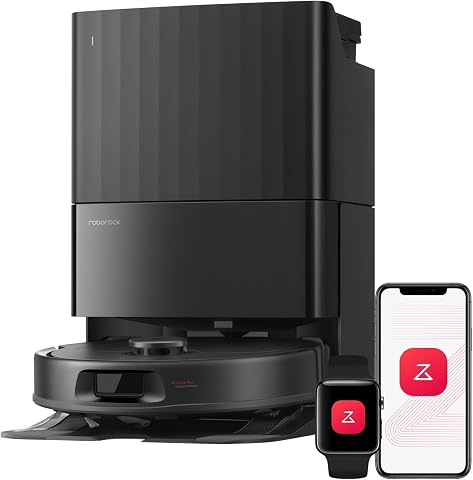
roborock Qrevo S Pro Robot Vacuum and Mop
- ✔ Weight: 10.5 lbs
- ✔ Dimensions: 13 x 13 x 4.3 inches
- ✔ Charging Time: Approx. 6 hours

4 Pack Washable Filter
- ✔ Filter Material: HEPA and foam
- ✔ Weight: 0.2 lbs per filter
- ✔ Dimensions: Approx. 3 x 3 inches
roborock Qrevo S Pro Robot Vacuum and Mop
The Roborock Qrevo S Pro Robot Vacuum and Mop offers powerful 18,500Pa suction, a self-cleaning dock, and smart obstacle avoidance, making it a top choice for pet owners and busy households. Regular cleaning of its components ensures it functions flawlessly.
Pros:
- Powerful suction for deep cleaning
- Self-cleaning dock reduces maintenance
- Smart obstacle avoidance prevents collisions
- Anti-tangle brush ideal for pet hair
Cons:
- Requires regular filter and mop pad maintenance
- Can be complex to disassemble for deep cleaning
- Dock size may be large for smaller spaces
Best for: Pet households and busy families seeking automated cleaning
Not ideal for: Users seeking a simple, manual vacuum without smart features
Bottom line: A powerful, smart cleaning solution with minimal daily effort.
4 Pack Washable Filter
The 4 Pack Washable Filter set is compatible with multiple Roborock models, including the Q7 and Q8 Max series. These filters help maintain optimal suction and filtration, essential for thorough cleaning.
Pros:
- Cost-effective 4-pack
- Washable and reusable
- Maintains high filtration efficiency
- Easy to install
Cons:
- Must dry completely before reinstallation
- Not OEM, but compatible
Best for: Users who want reliable, cost-effective filter replacements
Not ideal for: Owners of older or incompatible models
Bottom line: A practical set to keep your vacuum at peak filtration performance.
Frequently Asked Questions
Can I clean the robot’s sensors safely?
Yes, use a dry microfiber cloth to gently wipe the sensors and cameras. Avoid using liquids to prevent damage.
How often should I wash the filters?
It is recommended to wash washable filters every 1-2 months, depending on usage, to maintain suction power.
Is it necessary to replace the mop pads regularly?
Yes, replace or wash mop pads every 1-3 months to ensure effective cleaning and prevent dirt buildup.
What should I do if the robot isn’t cleaning properly after cleaning?
Check and clean the filters, dustbin, and sensors. Ensure all parts are dry and reassembled correctly before testing.
Keeping Your Roborock S8 Pro Ultra in Top Shape
Regular cleaning and maintenance are key to ensuring your Roborock S8 Pro Ultra continues to perform at its best. Follow these simple steps to clean filters, mop pads, and sensors safely and effectively. Proper upkeep not only extends the device’s lifespan but also guarantees consistently thorough cleaning for your home.
By staying on top of maintenance, you can enjoy hassle-free, automated cleaning and a healthier, cleaner living environment.
Affiliate disclosure: As an Amazon Associate we earn from qualifying purchases. Prices and availability are accurate as of the time of publishing.
Cold & flu season Picks
humidifiers
As an affiliate, we earn on qualifying purchases.