
The best smart home hubs connect devices across protocols and brands while keeping everyday controls manageable. My best overall pick is the Homey Pro 2026 for households seeking broad automation options, while the Amazon Echo Hub suits Alexa-centered homes that want a dedicated control panel and the Hubitat Elevation C-8 Pro appeals to people who prioritize detailed automation and local control. The main tradeoff is between broad compatibility and easier setup: a flexible hub may take more planning, while a simpler or brand-focused hub can leave some devices out. Screen-based hubs also serve a different purpose from compact gateways that run quietly in the background. Read on for the full breakdown, buyer guidance, and answers to common setup questions.

Get home appliances delivered free with Prime
- Fast, free delivery on millions of items
- Prime Video, Amazon Music and more included
- Member-only deals all year
Complete the kit


Key Takeaways
- Homey Pro 2026 stands out as the broad-automation pick, while Hubitat Elevation C-8 Pro is aimed at buyers willing to work through more detailed automation setup.
- Amazon Echo Hub and Echo Show 15 fill different roles: the Echo Hub is a dedicated smart-home control panel, while the larger Echo Show adds a display-first experience with Fire TV.
- Aqara, SONOFF, YoLink, and SwitchBot focus on particular device ecosystems or functions; check whether their supported devices match your existing gear before buying.
- Home Assistant Green and Homey Pro mini offer different paths to compact automation: one suits hands-on system builders, while the other targets a smaller dedicated hub setup.
- Lutron Caséta, Aeotec, and the Aqara M100, M200, and M3 each solve narrower needs, so protocol support and the devices you plan to connect matter more than a long feature list.
| Amazon Echo Hub 8-Inch Smart Home Control Panel |  | Best Overall Smart Home Control Panel | Display: 8-inch touchscreen, 1280 x 800 | Smart home connectivity: Wi-Fi, Bluetooth, Zigbee, Matter, Thread, Amazon Sidewalk | Wi-Fi standard: Dual-band 802.11a/b/g/n/ac | VIEW LATEST PRICE | See Our Full Breakdown |
| YoLink Smart Home Hub (YS1603) |  | Best for Long-Range YoLink Devices | Model: YS1603 | Protocol: YoLink LoRa | Maximum range: Up to 2,034 feet | VIEW LATEST PRICE | See Our Full Breakdown |
| SONOFF Bridge-M Smart Home Hub |  | Best for Bridging Zigbee Devices to Matter | Device type: Smart home hub and Zigbee gateway | Supported protocols: Zigbee, BTHome, eWeLink, Matter Bridge | Compatible platforms: Alexa, Google Home, Apple Home | VIEW LATEST PRICE | See Our Full Breakdown |
| Amazon Echo Show 15 (2nd Gen) 15.6-Inch Full HD Smart Display with Fire TV |  | Best Large-Screen Smart Home Hub | Display: 15.6-inch Full HD, 1920 x 1080 | Dimensions: 16.1 x 10.1 x 1.4 inches | Weight: 4.96 lb | VIEW LATEST PRICE | See Our Full Breakdown |
| SwitchBot Hub 2 Smart Home Hub with Thermometer, Hygrometer, IR Remote, and Light Sensor |  | Best for IR Appliances and Room Monitoring | Connectivity: 2.4 GHz Wi-Fi and Bluetooth | Temperature accuracy: ±0.36°F | Humidity accuracy: ±1.8% RH | VIEW LATEST PRICE | See Our Full Breakdown |
| Hubitat Elevation C-8 Pro Smart Home Hub |  | Best for Advanced Local Automation | Model: C-8 Pro | Protocols: Matter 1.5, Z-Wave 800 Series, Zigbee 3.0, Bluetooth | Voice assistant compatibility: Amazon Alexa, Google Home, Apple HomeKit | VIEW LATEST PRICE | See Our Full Breakdown |
| Aqara Smart Hub M200 Matter Controller and Thread Border Router |  | Best for Aqara Homes and Flexible Installation | Model: HM-G03E | Supported Zigbee devices: Up to 40 Aqara devices | Supported Thread devices: Up to 40 devices | VIEW LATEST PRICE | See Our Full Breakdown |
| Homey Pro 2026 Smart Hub for Home Automation |  | Best for Broad Device Compatibility | Connectivity protocols: Bluetooth, infrared, Matter, Wi-Fi, Z-Wave, Zigbee, Thread | Compatible devices: Over 50,000 devices from over 1,000 brands | Automation: App and web-based flows; local processing | VIEW LATEST PRICE | See Our Full Breakdown |
| Aqara Smart Home Hub M3 Matter Controller with IR Blaster |  | Best for Larger Aqara Device Networks | Model: HM-G01E | Device capacity: Up to 127 Aqara Zigbee devices and 127 Thread devices | Connectivity: Zigbee, Thread, Bluetooth, dual-band Wi-Fi, Ethernet with PoE, USB-C | VIEW LATEST PRICE | See Our Full Breakdown |
| Aeotec Smart Home Hub 2 (V4) – Matter and Zigbee Gateway |  | Best for Straightforward SmartThings Setups | Model: V4 – Smart Home Hub 2 (2025) | Model number: GP-AEOHUBV4US | Connectivity: Wi-Fi, Ethernet | VIEW LATEST PRICE | See Our Full Breakdown |
| Lutron Caséta Smart Hub, Compatible with Alexa, Apple HomeKit, Google Assistant, Ring, and More | 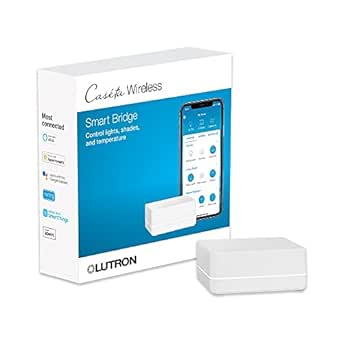 | Best for Caséta Lighting | Model: L-BDG2-WH | Compatible platforms and devices: Amazon Alexa, Apple HomeKit, Google Assistant, Ring, Serena shades, Sonos | Maximum supported devices: Up to 75 Caséta devices | VIEW LATEST PRICE | See Our Full Breakdown |
| Home Assistant Green Smart Home Hub |  | Best for Local Control and Custom Automation | Operating system: Home Assistant OS | Processor memory: 4 GB LPDDR4X RAM | Storage: 32 GB | VIEW LATEST PRICE | See Our Full Breakdown |
| Homey Pro mini Smart Home Hub with Zigbee, Ethernet, Matter, and Thread |  | Best Compact Multi-Protocol Hub | Model: HOMEY-PRO-MINI-US-01 | Built-in protocols: Zigbee, Matter, Thread, Ethernet | Additional protocols with Homey Bridge: Z-Wave, Bluetooth, infrared | VIEW LATEST PRICE | See Our Full Breakdown |
| Aqara Smart Hub M100 Matter Controller with Thread and Wi-Fi 6 |  | Best Entry Point for Aqara and Matter | Device capacity: Up to 20 Aqara Zigbee devices and 20 Thread devices | Protocols: Zigbee, Thread, Wi-Fi | Matter support: Bridges compatible Aqara Zigbee products to supported Matter ecosystems | VIEW LATEST PRICE | See Our Full Breakdown |
| smart home hub | Model |
|---|---|
| Amazon Echo Hub 8-Inch Smart H | — |
| YoLink Smart Home Hub | YS1603 |
| SONOFF Bridge-M Smart Home Hub | — |
| Amazon Echo Show 15 | — |
| SwitchBot Hub 2 Smart Home Hub | — |
| Hubitat Elevation C-8 Pro Smar | C-8 Pro |
| Aqara Smart Hub M200 Matter Co | HM-G03E |
| Homey Pro 2026 Smart Hub for H | — |
| Aqara Smart Home Hub M3 Matter | HM-G01E |
| Aeotec Smart Home Hub 2 | V4 – Smart Home Hub 2 (2025) |
| Lutron Caséta Smart Hub | L-BDG2-WH |
| Home Assistant Green Smart Hom | — |
| Homey Pro mini Smart Home Hub | HOMEY-PRO-MINI-US-01 |
| Aqara Smart Hub M100 Matter Co | — |
More Details on Our Top Picks
Amazon Echo Hub 8-Inch Smart Home Control Panel
The Echo Hub is the strongest fit here for buyers who want a dedicated screen that also handles a broad mix of smart-home connections. Its support for Zigbee, Matter, and Thread, alongside Wi-Fi and Bluetooth, reduces the need for separate bridges for many compatible devices. The customizable dashboard, camera feeds, and routines make it more purpose-built for daily control than the larger Echo Show 15, which adds entertainment and family widgets but takes up more wall space. The tradeoff is that the Echo Hub is primarily a control panel, not a general-purpose display: its 8-inch screen is modest, and a tabletop stand is sold separately. Setup also requires internet access, while some Alexa and Ring features depend on compatible services.
Pros:- Built-in support for Wi-Fi, Bluetooth, Zigbee, Matter, Thread, and Sidewalk
- Customizable touchscreen dashboard for controls, routines, and camera feeds
- Wall mount, mounting hardware, and power adapter are included
- Supports Power over Ethernet with a compatible USB-C converter
Cons:- Internet access is required for setup
- Tabletop stand, cable pass-through, and compatible PoE converter are sold separately
- Some Alexa+ and Ring features require compatible services or subscriptions
Best for: Households seeking a dedicated, wall-mounted touchscreen to manage compatible devices, routines, and camera feeds from one place
Not ideal for: Buyers who want a large screen for TV, video calls, or shared family calendars, or who need a tabletop stand included
- Display:8-inch touchscreen, 1280 x 800
- Smart home connectivity:Wi-Fi, Bluetooth, Zigbee, Matter, Thread, Amazon Sidewalk
- Wi-Fi standard:Dual-band 802.11a/b/g/n/ac
- Audio:Stereo playback with two full-range speakers
- Sensors:Passive infrared proximity and ambient light sensors
- Power:12.5W adapter included; compatible with USB-C PD accessories
- Mounting:Wall mount included; tabletop stand sold separately
- Power over Ethernet:Supported with a compatible USB-C converter
Our verdict“Choose the Echo Hub if you want a dedicated control panel with broad protocol support; pick the Echo Show 15 instead if screen size and entertainment matter more.”
YoLink Smart Home Hub (YS1603)
The YoLink YS1603 is a focused gateway for people building around YoLink’s LoRa-connected devices, rather than a universal hub for every smart-home protocol. Its stated range of up to 2,034 feet can suit sensors placed far from the router or in outbuildings, where the Echo Hub’s broader protocol list does not provide the same YoLink LoRa connection. Wi-Fi or Ethernet gives you a choice of network connection, and compatibility with IFTTT and Home Assistant adds room for custom automations. The limitation is its narrow ecosystem: it does not list support for Zigbee, Matter, or Thread, and the listed device compatibility is centered on smartphones. There is also no battery backup, so a power outage can interrupt hub operation.
Pros:- YoLink LoRa protocol has a stated maximum range of up to 2,034 feet
- Connects to the network by Wi-Fi or Ethernet
- Works with IFTTT and Home Assistant
- Compact plug-in hub measures 4.33 x 4.33 x 1.06 inches
Cons:- Focused on the YoLink LoRa ecosystem rather than broad protocols such as Zigbee, Matter, or Thread
- No battery backup
- Product data lists smartphone compatibility but does not specify a built-in display or broad device support
Best for: YoLink users connecting distant sensors or devices who want app control and links to IFTTT or Home Assistant
Not ideal for: Buyers seeking a multiprotocol hub for mixed Zigbee, Matter, or Thread devices, or continued operation during power loss
- Model:YS1603
- Protocol:YoLink LoRa
- Maximum range:Up to 2,034 feet
- Network connection:Wi-Fi or Ethernet
- Integration:IFTTT and Home Assistant
- Dimensions:4.33 x 4.33 x 1.06 inches
- Power:5 volts; plug-in; no battery backup
Our verdict“Pick the YoLink YS1603 if long-range YoLink coverage is your priority, but choose the Echo Hub for a more varied set of supported smart-home protocols.”
SONOFF Bridge-M Smart Home Hub
The SONOFF Bridge-M has a specific job: bring compatible Zigbee, BTHome, and eWeLink devices into Matter-compatible platforms such as Alexa, Google Home, and Apple Home. That makes it a more targeted choice than the Echo Hub, which supports several protocols directly and adds a touchscreen, but does not serve the same stated role as this bridge for compatible devices. A local web console and MQTT support give technically confident owners useful paths for managing devices and connecting with Home Assistant. The important boundary is that Bridge-M is a Matter Bridge, not a Matter Controller; it cannot add Matter devices directly. Its 90 dB alarm and mobile alerts also depend on compatible Zigbee sensors, so they are not standalone security features.
Pros:- Bridges compatible Zigbee, BTHome, and eWeLink devices to Matter platforms
- Works with Alexa, Google Home, and Apple Home
- Local web console and Home Assistant MQTT integration
- Built-in 90 dB alarm with mobile notifications when paired with compatible Zigbee sensors
Cons:- Cannot act as a Matter Controller or add Matter devices directly
- Alarm and security functions rely on compatible Zigbee sensors
- Its bridge-focused role is narrower than the Echo Hub’s touchscreen control and wider protocol support
Best for: Smart-home owners with compatible Zigbee, BTHome, or eWeLink devices who want to expose them to Matter platforms or Home Assistant
Not ideal for: Buyers who need a hub to commission Matter devices directly, or who want a standalone alarm without compatible Zigbee sensors
- Device type:Smart home hub and Zigbee gateway
- Supported protocols:Zigbee, BTHome, eWeLink, Matter Bridge
- Compatible platforms:Alexa, Google Home, Apple Home
- Home Assistant integration:MQTT
- Local management:Web console
- Alarm volume:90 dB
- Matter Controller support:No
Our verdict“Choose Bridge-M to connect supported non-Matter devices to Matter platforms; choose the Echo Hub if you need a direct-control panel and broader built-in hub functions.”
Amazon Echo Show 15 (2nd Gen) 15.6-Inch Full HD Smart Display with Fire TV
The Echo Show 15 makes sense when smart-home control is one part of a larger shared display. Its 15.6-inch Full HD screen can show family widgets and Fire TV alongside controls, while Zigbee, Matter, and Thread provide built-in connections for compatible devices. Compared with the more control-focused Echo Hub, the Show 15 gives up compactness in exchange for more room for calendars, video, and calls. Its 13 MP camera includes auto-framing and a privacy shutter, and the display can sit in landscape or portrait orientation. That scale calls for dedicated installation space, though, and the 4.96-pound unit is much larger than a basic hub. Some apps, skills, and services may also carry separate requirements or fees.
Pros:- Large 15.6-inch Full HD display with built-in Fire TV
- Customizable widgets support family organization and smart-home controls
- Supports Zigbee, Matter, and Thread Border Router
- 13 MP camera has auto-framing and a privacy shutter
Cons:- Large footprint and 4.96-pound weight call for dedicated installation space
- Some apps, skills, and services may require subscriptions or other fees
- Less compact and control-focused than the 8-inch Echo Hub
Best for: Families who want a wall-mounted shared screen for smart-home controls, schedules, entertainment, and video calls
Not ideal for: Buyers who need a compact, dedicated control panel or lack space for a large wall-mounted display
- Display:15.6-inch Full HD, 1920 x 1080
- Dimensions:16.1 x 10.1 x 1.4 inches
- Weight:4.96 lb
- Camera:13 MP with privacy shutter
- Audio:Two 2-inch woofers and two 0.6-inch tweeters
- Wi-Fi:Wi-Fi 6E; supports 802.11a/b/g/n/ac networks
- Smart home connectivity:Zigbee, Matter, Thread Border Router
- Orientation:Landscape or portrait
Our verdict“Choose the Echo Show 15 if your hub should also serve as a large family display and entertainment screen; choose the Echo Hub for a smaller dedicated controller.”
SwitchBot Hub 2 Smart Home Hub with Thermometer, Hygrometer, IR Remote, and Light Sensor
The SwitchBot Hub 2 stands apart by combining a small network hub with temperature, humidity, and light sensing and an infrared remote for appliances such as compatible air conditioners or TVs. Those readings can feed automation scenes, giving the hub a practical role beyond connecting devices. Compared with the SONOFF Bridge-M, which focuses on bridging compatible devices to Matter platforms, SwitchBot is more useful for households that want room monitoring and IR control in the same unit. Its Matter support is limited to supported SwitchBot devices, however, so it should not be mistaken for a universal Matter hub. Wi-Fi is also restricted to 2.4 GHz, and the listed maximum range is 10 meters; buyers planning a larger or more varied setup should check device compatibility and placement carefully.
Pros:- Tracks temperature, humidity, and light remotely
- Learns infrared remote controls for compatible appliances
- Supports automation scenes and several voice-assistant options
- Matter enables HomeKit compatibility for supported SwitchBot devices
Cons:- Matter and HomeKit support applies to supported SwitchBot devices, not all accessories
- Wi-Fi support is limited to 2.4 GHz
- Listed maximum supported device count is six, with a maximum range of 10 meters
Best for: People who want to automate IR-controlled appliances and use room temperature, humidity, or light readings in scenes
Not ideal for: Buyers who need a broad, long-range hub for mixed devices or expect Matter support for every brand of accessory
- Connectivity:2.4 GHz Wi-Fi and Bluetooth
- Temperature accuracy:±0.36°F
- Humidity accuracy:±1.8% RH
- Maximum supported devices:6
- Maximum range:10 meters
- Compatible assistants:Alexa, Google Assistant, Siri Shortcuts, SmartThings, IFTTT
- Matter support:Yes; HomeKit support for supported SwitchBot devices
- Power:No batteries required
Our verdict“Choose the SwitchBot Hub 2 for IR appliance control and room-sensor automations, but select a broader hub if you need wider Matter device support.”
Hubitat Elevation C-8 Pro Smart Home Hub
The Hubitat Elevation C-8 Pro is the strongest fit here for people who want detailed automations to run locally, without a required subscription. Its support for Matter, Z-Wave, Zigbee, and Bluetooth gives it broader protocol coverage than the Aeotec Smart Home Hub 2, which lacks Z-Wave. Two external antennas may also help when the hub needs to reach devices across a larger home. Rule Machine and an AI-assisted routine builder offer room to build complex setups, but that flexibility comes with a learning curve. Unlike the more focused Aqara M3, Hubitat is not limited to Aqara Zigbee devices; still, broad compatibility does not guarantee every device or feature will work. Choose it for control and customization, not the simplest setup.
Pros:- Local processing can keep automations running during internet outages
- Supports Matter, Z-Wave, Zigbee, and Bluetooth
- Advanced tools include Rule Machine and an AI-assisted routine builder
- No subscription is required for full platform functionality
Cons:- Advanced automation tools can take time to learn
- Compatibility and available features vary by device
Best for: Experienced smart-home owners who want local automations, multiple protocols, and detailed control without a recurring subscription
Not ideal for: Beginners who want a guided, low-effort setup or buyers relying on a specific device whose Hubitat compatibility has not been confirmed
- Model:C-8 Pro
- Protocols:Matter 1.5, Z-Wave 800 Series, Zigbee 3.0, Bluetooth
- Voice assistant compatibility:Amazon Alexa, Google Home, Apple HomeKit
- Other integration:Ring cameras
- Antennas:2 dedicated external antennas
- Device compatibility:1,000+ devices across 100+ brands
- Dimensions:2.95 x 3.23 x 0.67 inches
- Subscription:Not required
Our verdict“Choose the C-8 Pro if you value flexible, subscription-free local automation more than a beginner-friendly setup.”
Aqara Smart Hub M200 Matter Controller and Thread Border Router
The Aqara Smart Hub M200 suits households building around Aqara devices that also want a path to Matter and Thread. Its Ethernet with PoE offers a tidy wired installation where power and network can share one cable, while Wi-Fi and USB-C provide alternatives. The built-in 360° infrared blaster can control compatible appliances, and the speaker adds alerts and custom messages—features the Hubitat C-8 Pro does not emphasize. The catch is its ecosystem boundary: Zigbee support is limited to Aqara devices, so it is less flexible than Hubitat for mixed-brand setups. Capacity is also lower than the Aqara M3, with support for up to 40 Aqara Zigbee and 40 Thread devices. Choose it for a focused Aqara setup, not as a universal Zigbee bridge.
Pros:- Supports Matter bridging, Thread, and Aqara Zigbee devices
- PoE, Ethernet, dual-band Wi-Fi, and USB-C provide installation flexibility
- 360° IR blaster includes status feedback and learning
- Local automations and built-in speaker add practical control and alert options
Cons:- Zigbee support is limited to Aqara devices
- Supports up to 40 Aqara Zigbee and 40 Thread devices, below the Aqara M3’s listed capacity
- USB power adapter is not included
Best for: Aqara-device owners who want Matter bridging, Thread support, infrared appliance control, and the option of PoE installation
Not ideal for: Households with a broad mix of third-party Zigbee devices or those needing the higher device capacity of the Aqara M3
- Model:HM-G03E
- Supported Zigbee devices:Up to 40 Aqara devices
- Supported Thread devices:Up to 40 devices
- Connectivity:Zigbee, Thread, Bluetooth, dual-band Wi-Fi, Ethernet with PoE, USB-C, infrared
- IR control:360° blaster with status feedback and learning
- Power:PoE or USB-C; 2A USB power adapter not included
- Dimensions:3.93 x 3.93 x 1.21 inches
- Weight:4.6 ounces
Our verdict“Pick the M200 for an Aqara-centered home that benefits from PoE and IR control, but choose the Aqara M3 for a larger device network.”
Homey Pro 2026 Smart Hub for Home Automation
The Homey Pro 2026 is the broad-coverage choice for a home assembled from devices across many brands and wireless standards. Its seven listed technologies—Wi-Fi, Zigbee, Z-Wave Plus, Bluetooth, infrared, Matter, and Thread—cover more connection types than the Aeotec Smart Home Hub 2, which omits Z-Wave and Bluetooth from its listed protocols. Homey also pairs local processing with app and web-based flows, giving buyers room to automate lighting, music, security, and energy use without relying on cloud execution for every routine. That reach can reduce the need for separate bridges, but the flow tools may feel demanding if you only want basic schedules. Compared with Hubitat’s more rules-focused approach, Homey presents a broad, multi-brand platform; confirm support for specific products before building around it.
Pros:- Supports seven wireless technologies, including Z-Wave Plus, Matter, and Thread
- Local automation reduces reliance on cloud processing
- Flow tools are available through the app and web interface
- Designed to work with products across more than 1,000 brands
Cons:- Advanced flow creation can be challenging for new users
- The product data gives differing compatibility counts, so confirm support for specific devices
- Listed item dimensions are incomplete
Best for: Multi-brand smart-home owners who want one local hub for devices using several wireless protocols and are willing to learn flow-based automation
Not ideal for: Buyers who want a very simple setup, or anyone choosing it based on a device count without verifying compatibility for their exact products
- Connectivity protocols:Bluetooth, infrared, Matter, Wi-Fi, Z-Wave, Zigbee, Thread
- Compatible devices:Over 50,000 devices from over 1,000 brands
- Automation:App and web-based flows; local processing
- Control method:App, voice
- Control type:Full
- Color:Black/Grey
- Switch type:Hub
- Item dimensions:4.9 x 4.9 x; third dimension incomplete
Our verdict“Choose Homey Pro 2026 if your priority is bringing varied brands and protocols into one locally processed automation system.”
Aqara Smart Home Hub M3 Matter Controller with IR Blaster
For a larger Aqara installation, the Aqara Hub M3 has a clear advantage over the M200: it supports up to 127 Aqara Zigbee devices and 127 Thread devices, rather than 40 of each. It also bridges compatible Aqara devices to Matter ecosystems and combines local automations with Ethernet, PoE, USB-C, and dual-band Wi-Fi. Its 360° IR blaster adds control for compatible appliances, with status feedback and learning; the M200 offers similar IR functionality in a lower-capacity package. The limitation is ecosystem-specific Zigbee support, so owners of third-party Zigbee products should look at the Hubitat C-8 Pro instead. Some cloud-based notifications still need an internet connection, despite local automation support. This is a strong Aqara-centered controller, not a universal hub for every Zigbee brand.
Pros:- Supports up to 127 Aqara Zigbee devices and 127 Thread devices
- Bridges supported devices to Matter and works with several major ecosystems
- Local automations and multiple connection and power options, including PoE
- 360° IR blaster includes feedback and learning
Cons:- Does not support third-party Zigbee devices
- Some cloud-based notifications require an internet connection
- USB power adapter is not included
Best for: Aqara households with a growing mix of Zigbee and Thread devices that want Matter bridging, local automations, and PoE
Not ideal for: Buyers with third-party Zigbee devices, or those who need every notification to work without internet access
- Model:HM-G01E
- Device capacity:Up to 127 Aqara Zigbee devices and 127 Thread devices
- Connectivity:Zigbee, Thread, Bluetooth, dual-band Wi-Fi, Ethernet with PoE, USB-C
- IR blaster:360° with status feedback and learning
- Local storage:8GB end-to-end encrypted
- Compatibility:Matter, Apple HomeKit, Alexa, SmartThings, Home Assistant
- Warranty:12 months
- Brand:Aqara
Our verdict“Choose the M3 over the M200 when you need greater Aqara device capacity, but skip it if your Zigbee setup spans multiple brands.”
Aeotec Smart Home Hub 2 (V4) – Matter and Zigbee Gateway
The Aeotec Smart Home Hub 2 makes the most sense for buyers who want a Matter and Zigbee gateway managed through SmartThings, with Alexa and Google Assistant compatibility. Wi-Fi or Ethernet gives placement flexibility, and supported local automations can continue during temporary internet outages. Its narrower protocol mix is the defining tradeoff: unlike the Hubitat C-8 Pro, the Aeotec does not support Z-Wave, so it is a poor fit for homes built around Z-Wave sensors, locks, or switches. It also lacks the Aqara M3’s Thread and infrared features. In return, its focus on SmartThings, Matter, and Zigbee avoids the broader automation toolkit—and added learning burden—of Homey Pro 2026. Check each device’s integration needs before choosing it.
Pros:- Connects compatible Matter and Zigbee devices through SmartThings
- Supports Amazon Alexa and Google Assistant
- Offers Wi-Fi and Ethernet connectivity
- Supported local automations can continue during temporary internet outages
Cons:- Does not support Z-Wave
- Device integration depends on compatibility with the hub and SmartThings
- Does not list Thread or infrared support
Best for: SmartThings users building around compatible Matter and Zigbee devices who want Wi-Fi or Ethernet and some local automation
Not ideal for: Homes with Z-Wave devices, or buyers seeking Thread support, infrared control, or a broader set of built-in protocols
- Model:V4 – Smart Home Hub 2 (2025)
- Model number:GP-AEOHUBV4US
- Connectivity:Wi-Fi, Ethernet
- Supported protocols:Matter, Zigbee, SmartThings
- Voice assistant compatibility:Amazon Alexa, Google Assistant
- Local automations:Supported
- Z-Wave:Not supported
- Color:White
Our verdict“Pick the Aeotec Hub 2 for a focused SmartThings setup with Matter and Zigbee, but choose Hubitat if Z-Wave is part of your home.”
Lutron Caséta Smart Hub, Compatible with Alexa, Apple HomeKit, Google Assistant, Ring, and More
The Lutron Caséta Smart Hub is a focused pick for households building around Caséta switches, dimmers, and Serena shades rather than a general-purpose hub for every smart device. It links those products with Alexa, Apple HomeKit, Google Assistant, Ring, and Sonos, while the Lutron app provides schedules and scenes. Its capacity of up to 75 Caséta devices gives a lighting system room to grow, and Clear Connect keeps supported devices off the home’s Wi-Fi network. Compared with the Aqara Hub M100, this is less about bridging different device protocols and more about reliably coordinating Caséta gear. The tradeoff is a narrower ecosystem: Caséta accessories are purchased separately, and the hub needs a router connection and app setup. Choose it for a Caséta-centered home, not as a catch-all hub.
Pros:- Works with Alexa, Apple HomeKit, Google Assistant, Ring, Sonos, and Serena shades.
- Supports schedules and scenes through the Lutron app.
- Can manage up to 75 Caséta devices.
- Clear Connect avoids competing with household Wi-Fi devices.
Cons:- Caséta switches, dimmers, and other coordinating accessories are sold separately.
- Requires a router connection and setup through the Lutron app.
Best for: Homeowners building a multi-room Caséta lighting system who want app schedules and voice-assistant integrations.
Not ideal for: Shoppers seeking one hub for a broad mix of Zigbee, Thread, and other third-party devices, or anyone who does not plan to buy Caséta products.
- Model:L-BDG2-WH
- Compatible platforms and devices:Amazon Alexa, Apple HomeKit, Google Assistant, Ring, Serena shades, Sonos
- Maximum supported devices:Up to 75 Caséta devices
- Connectivity technology:Clear Connect
- Network setup:Plugs into an outlet and connects to a router
- Operating voltage:120 volts
- Dimensions:1.44 × 2.94 × 4.69 inches
- Color and material:White plastic
Our verdict“Choose this hub to coordinate a growing Caséta lighting system; pick a more protocol-focused option such as the Aqara Hub M100 for broader device mixing.”
Home Assistant Green Smart Home Hub
Home Assistant Green is a strong starting point for buyers who want Home Assistant without assembling a small computer or installing its operating system themselves. Home Assistant OS comes preinstalled, and its local data storage and low power use suit an always-on automation system. Ethernet provides a wired network connection, while two USB ports let you add adapters for Zigbee, Z-Wave, or Thread as your setup calls for them. That flexibility is different from the Homey Pro mini, which includes Zigbee, Matter, and Thread support in the hub itself. Green keeps its base setup simple, but its wireless protocol reach depends on extra hardware. It also needs Ethernet rather than a Wi-Fi connection. I’d choose it for a hands-on household that values local control and room to expand, not for someone seeking a wireless, all-protocol hub straight out of the box.
Pros:- Home Assistant OS is preinstalled, reducing initial setup work.
- Stores home data locally and uses only a few watts of power.
- Two USB ports allow optional Z-Wave, Zigbee, or Thread adapters.
- Compact, fanless design operates silently.
Cons:- Requires a wired Ethernet connection.
- Z-Wave, Zigbee, and Thread require separately obtained USB adapters.
Best for: Home Assistant newcomers and DIY-minded households who want local automations, preinstalled software, and the option to add radio protocols later.
Not ideal for: Buyers who need built-in Zigbee, Z-Wave, or Thread radios, or who cannot place a hub near a wired Ethernet connection.
- Operating system:Home Assistant OS
- Processor memory:4 GB LPDDR4X RAM
- Storage:32 GB
- Connectivity:Ethernet and USB
- USB ports:2
- Wireless compatibility:Bluetooth
- Dimensions:4.41 × 4.41 × 1.26 inches
- Included items:Gigabit Ethernet cable, universal power supply, quick start guide, sticker, warranty and safety information
Our verdict“Pick Home Assistant Green if local control and customizable automations matter more than built-in wireless protocol support.”
Homey Pro mini Smart Home Hub with Zigbee, Ethernet, Matter, and Thread
The Homey Pro mini fits buyers who want several modern protocols and automation tools in a compact hub, without committing to a subscription. Its built-in Zigbee, Matter, Thread, and Ethernet support covers a varied mix of devices, while local processing is designed to keep automations running without an internet connection. Homey Flow, dashboards, energy monitoring, sensor alerts, backups, and voice-assistant compatibility add useful control beyond simple device linking. Compared with Home Assistant Green, the Pro mini has Zigbee and Thread built in, whereas Green requires optional adapters for those protocols. The limitation is its missing radios: Z-Wave, Bluetooth, and infrared need a separately sold Homey Bridge. Buyers should also check that their particular devices work with Homey; support across more than 1,000 brands does not mean every device feature is identical.
Pros:- Built-in Zigbee, Matter, Thread, and Ethernet support.
- Local processing supports automations when internet access is unavailable.
- Includes Homey Flow, dashboards, energy monitoring, alerts, and backups without a subscription.
- Supports devices from over 1,000 brands and works with major voice assistants.
Cons:- Z-Wave, Bluetooth, and infrared require a separately sold Homey Bridge.
- Device and feature compatibility can vary across its broad supported-brand range.
Best for: Households mixing Zigbee, Matter, and Thread devices who want local automation features and no required subscription.
Not ideal for: Homes that depend on Z-Wave, Bluetooth, or infrared devices and do not want to add a Homey Bridge.
- Model:HOMEY-PRO-MINI-US-01
- Built-in protocols:Zigbee, Matter, Thread, Ethernet
- Additional protocols with Homey Bridge:Z-Wave, Bluetooth, infrared
- Voice assistant compatibility:Siri, Amazon Alexa, Google Assistant
- Supported brands:Over 1,000
- Processing:Local processing
- Subscription required:No
- Color and material:Black plastic
Our verdict“Choose the Pro mini for a compact, subscription-free hub with built-in Zigbee and Thread, but add another option if your setup relies on Z-Wave or infrared.”
Aqara Smart Hub M100 Matter Controller with Thread and Wi-Fi 6
The Aqara Hub M100 is a compact bridge for buyers who want to connect Aqara Zigbee products with Matter-compatible platforms such as Apple Home, Amazon Alexa, and Home Assistant. It supports up to 20 Aqara Zigbee devices and 20 Thread devices, and local execution lets Zigbee and Matter automations keep running without Wi-Fi or cloud access. Its USB-A power connection also gives more placement flexibility than the router-connected Lutron Caséta Smart Hub. The key boundary is ecosystem compatibility: the M100 does not support third-party Zigbee devices, so it is not a universal Zigbee coordinator. It also needs a 5V/0.5A adapter that is not included, and cloud push notifications need internet access. This makes the most sense for an Aqara-focused setup that wants a straightforward path into Matter, rather than a mixed-brand Zigbee network.
Pros:- Supports up to 20 Aqara Zigbee devices and 20 Thread devices.
- Bridges compatible Aqara Zigbee products to Matter ecosystems.
- Local Zigbee and Matter automations can run without Wi-Fi or cloud access.
- USB-A power allows flexible placement when paired with a suitable adapter.
Cons:- Does not support third-party Zigbee devices.
- Requires a 5V/0.5A power adapter, which is not included.
- Some features, including cloud push notifications, require internet access.
Best for: Aqara device owners who want local automations and a bridge to Matter-compatible smart home platforms.
Not ideal for: Buyers with third-party Zigbee devices they want to connect directly, or anyone who expects a power adapter in the box.
- Device capacity:Up to 20 Aqara Zigbee devices and 20 Thread devices
- Protocols:Zigbee, Thread, Wi-Fi
- Matter support:Bridges compatible Aqara Zigbee products to supported Matter ecosystems
- Wi-Fi:2.4 GHz Wi-Fi 6 (802.11ax)
- Security protocol:WPA3
- Power:USB-A; requires a 5V/0.5A adapter, not included
- Automation:Local execution for Zigbee and Matter devices
- Coverage:1,500–2,000 square feet
Our verdict“Pick the M100 for a compact Aqara-to-Matter bridge with local automation, but skip it if your Zigbee devices come from multiple brands.”
How We Picked
I ranked these hubs around the jobs buyers actually need them to do: connect the smart devices they own, run useful automations, and remain manageable after setup. I compared their stated protocol and ecosystem support, whether they offer a screen or work as a gateway, and how their controls and automation features fit different levels of technical comfort. I also looked at the practical costs of choosing a focused hub, such as dependence on one ecosystem or the need to check device compatibility before purchase.
The order favors products with a strong balance of flexibility, usability, and clear purpose, rather than simply counting supported features. That puts Homey Pro 2026 ahead for buyers who want a capable central hub, while the Echo Hub ranks highly for straightforward visual control in an Alexa home. More specialized products rank lower as all-purpose choices, but can be the better match for a specific system, protocol, or automation style. Where a product’s appeal depends on a particular setup, I treat compatibility checks as part of its value rather than assuming every hub works with every device.
Factors to Consider When Choosing Best Smart Home Hubs
A smart home hub is only useful if it fits the devices, habits, and level of control you want. Before choosing a model, map your current setup and decide whether you need a visible control point, a protocol bridge, or an automation system that can coordinate devices across rooms.
Match Protocol Support to Your Actual Devices
Start with the model numbers of the devices you already own, then check the hub maker’s compatibility information rather than relying on a protocol logo alone. A hub may support a standard such as Matter, Thread, or Zigbee without supporting every device feature or setup path. Also check whether a device connects directly or needs its own bridge, since that can add equipment and another app to manage. For future purchases, favor a hub that covers the protocols you are likely to add, but avoid paying for support you have no use for. A short compatibility list built around your lights, sensors, locks, and switches is more useful than a broad claim of universal support.
Decide Whether You Need a Screen or a Background Gateway
A display hub puts controls, routines, and sometimes household information where people can see them; a compact gateway usually focuses on connecting devices and running automations. Those roles are not interchangeable, even when both products are called hubs. Think about who will use the system: shared touch controls can help visitors or family members who do not want to open an app, while a screen may add little value if you already use voice commands and phone controls. Place a control panel where it is convenient without exposing sensitive controls to everyone who passes by. If you choose a gateway, check how you will handle setup and everyday changes through its app or web interface.
Choose the Right Balance of Local and Cloud Control
Some buyers want routines to keep working when an internet connection is interrupted; others value remote access and connected services more. Ask which functions run locally, which rely on the maker’s cloud, and what happens to automations during an outage. Local processing can improve resilience and responsiveness, but it may come with a more involved setup or fewer cloud-based conveniences. Do not assume that a device described as a smart hub runs every feature locally. If reliability matters for a particular task, such as a light schedule or sensor-triggered action, verify that specific behavior before choosing.
Estimate Setup and Ongoing Management Effort
Setup effort is more than plugging in the hub: it can include pairing devices, naming rooms, building routines, and keeping integrations working after changes. A simple, focused hub may be easier to maintain if your devices fit its ecosystem, while a flexible system can reward a buyer willing to configure rules and troubleshoot connections. Ask who in the household will manage the system months after installation, not just on day one. Check whether you can edit automations from the phone or computer you prefer and whether another household member can use them without special knowledge. A system that is easy for the main installer but opaque to everyone else can make everyday use harder.
Plan for Growth Without Buying Features You Will Not Use
Make a realistic list of what you may add over the next year, such as sensors, lighting, or climate controls, and select a hub that can support that path. Extra protocol support is useful only if it reduces the need for separate bridges or opens up devices you actually want. A narrow hub can be a sensible choice for one well-defined job, while a general-purpose hub makes more sense when you expect a mixed-brand home. Avoid building a system around a feature name alone; confirm that the devices you plan to buy are supported together. Leave room for a second hub if a specialized system later proves useful, rather than forcing one device to handle every role.
Separate Hub Features From Device Features
A hub’s built-in sensors, infrared control, screen, or voice assistant can make a setup feel simpler, but those extras do not automatically improve device compatibility. Check whether a bundled feature replaces equipment you already own or merely adds another control method. An infrared blaster, for example, may help with compatible remote-controlled appliances, but it does not turn every appliance into a fully integrated smart device. Likewise, a display is convenient only if its location and controls suit your household. Compare the hub’s central job—connecting devices and coordinating actions—with its extras, and let the central job guide your choice.
Frequently Asked Questions
Can I use one smart home hub with devices from several brands?
Often, but brand diversity alone does not guarantee that everything will connect. Check each device’s exact protocol, model, and supported features against the hub’s compatibility information. Matter can help connect products across platforms, yet some features may still depend on the manufacturer’s app or a separate bridge. If you already own several brands, list the devices you need the hub to control before buying. That check can prevent a hub from becoming an extra box that does not replace your existing gateways.
Do I need Matter support if my current devices already work?
No; Matter support is not a reason by itself to replace a working setup. It can broaden your choices when buying compatible devices or make cross-platform setups easier, but the benefit depends on which products you plan to add. Check whether your current devices can connect to the new hub and whether their important functions carry over. If you do not expect to add Matter products, a hub that better fits your existing ecosystem may serve you better. Treat Matter as a useful compatibility factor, not a guarantee that every device will work together.
Will my automations keep working if my internet goes down?
That depends on the hub, the automation, and the devices involved. Some routines can run locally, while remote access, voice services, or cloud integrations may stop during an outage. Before relying on a routine for daily convenience or household security, check where its rules are processed and what the manufacturer says happens offline. Test the specific devices and actions you plan to use rather than assuming all functions share the same connection path. If internet-independent operation is a priority, make local control a deciding factor in your shortlist.
Should I choose a smart display hub or a hub without a screen?
Choose a display if people in your home will benefit from visible, shared controls or if you want the hub to serve as a household screen as well. A screenless hub is a better fit when you mainly need device connections and background automations, or when you prefer using a phone or voice assistant. Consider placement and privacy as well as screen size: a panel is only helpful if it is easy to reach and its controls suit the room. These are different product roles, not simply premium and basic versions of the same thing. Pick based on how your household will control the home day to day.
Is it better to replace my current hub or add a second one?
Replacing a hub can simplify management, but only if the new model supports the devices and routines you rely on. Adding a second hub may be more practical when one system has a clear specialty, such as controlling a focused device ecosystem, and your main hub handles broader automations. The tradeoff is extra setup and potentially more than one app or bridge to maintain. Before changing anything, record your existing routines and confirm that the new arrangement can reproduce them. If the current hub still serves an important purpose, a planned combination may be safer than a full replacement.
Conclusion
For the widest all-around automation role in this lineup, my best overall recommendation is Homey Pro 2026; choose Hubitat Elevation C-8 Pro instead if detailed automation and hands-on control matter more than a gentler setup. The best value depends on the devices you already own: a focused option such as the SONOFF Bridge-M or Aqara M100 can make sense when its compatibility matches your needs, without paying for a screen or broader system you will not use. For beginners in an Alexa-centered home, the Amazon Echo Hub offers a clear control-panel approach, while the Echo Show 15 suits households that also want a larger display. Buyers seeking a premium, flexible system should compare Homey Pro 2026 with Hubitat based on their appetite for configuration; those building around local customization should also look closely at Home Assistant Green. For specific needs, consider Lutron Caséta for a lighting-focused setup, YoLink for its device ecosystem, SwitchBot Hub 2 for its bundled sensors and infrared control, or the Aqara and Aeotec options when their protocol support fits your equipment. Choose by compatibility and control style first, then select the hub whose tradeoffs you are comfortable managing.